
 CasePulse
Your intake team already knows the pattern. A client calls to ask when their consultation is. Another wants the office address again. A third says they never wrote down the time for tomorrow's meeting. Meanwhile, a paralegal is toggling between the phone, email, and the case management system just to keep the calendar from falling apart.
That work feels small in the moment, but it adds up fast. Manual reminder calls eat time that should go to case progress, client follow up, and getting demand packages out the door. Then the worst version of the problem hits. The client doesn't show.
For plaintiff firms, that isn't just an inconvenience. It creates dead time on the calendar, disrupts staff workflow, and often triggers another round of chasing, rescheduling, and documenting the missed appointment. Automated appointment reminders fix that problem most effectively when they live inside the same system your staff already uses to manage the case.
End the Constant Calls and Client No Shows
A busy PI front desk doesn't need more software tabs. It needs fewer preventable calls.
In a lot of firms, appointment reminders still happen the old way. A legal assistant prints tomorrow's schedule, starts dialing, leaves voicemails, updates notes, and hopes the client got the message. If the client picks up, great. If not, the office still has to spend time documenting the attempt and dealing with the fallout if the appointment gets missed.
That's why automated appointment reminders matter. They take a repetitive task that staff perform manually and move it into a repeatable workflow. The reminder goes out on time, the client gets the information in a format they're likely to see, and staff stay in the case system instead of working from sticky notes and call lists.
The cost of missed appointments is real even outside legal. Dialog Health's appointment reminder statistics note that no-shows cost the U.S. healthcare system an estimated $150 billion annually, and automated appointment reminders have been proven to reduce no-show rates by approximately 34% from baseline, with 97% of studies showing improved attendance after implementation. Law firms deal with a different service model, but the operational lesson is the same. If reminders reduce missed appointments, they protect revenue and free staff time.
Where firms usually get stuck
The problem usually isn't that firms don't know reminders help. It's that their current process is held together by human memory.
- Calendar reminders are too limited: A calendar alert helps the staff member remember to call. It doesn't contact the client.
- Standalone texting tools create extra work: Someone still has to copy appointment details from Needles, Neos, LawBase, or Litify into another system.
- Manual outreach breaks under volume: Once the caseload climbs, consistency disappears.
Practical rule: If your reminder process depends on one staff member remembering to send it, you don't have a system. You have a task list.
A lot of firms start looking for ways to reduce no-show appointments only after support staff start complaining about phone volume. That's usually the right instinct, just late in the process. The better move is to build reminders into the existing case workflow before missed appointments become normal.
What changes when reminders are automated
Clients stop needing to call for basic scheduling details. Staff stop spending part of every afternoon doing reminder outreach. The calendar gets more stable.
The firm transitions into a modern service operation, moving beyond a call center built around appointment confirmation. This development offers the chief advantage.
What Are Reminders in a Legal Context
In a law firm, automated appointment reminders aren't just calendar nudges. They're scheduled client communications tied directly to case activity and appointment data already inside the firm's case management system.
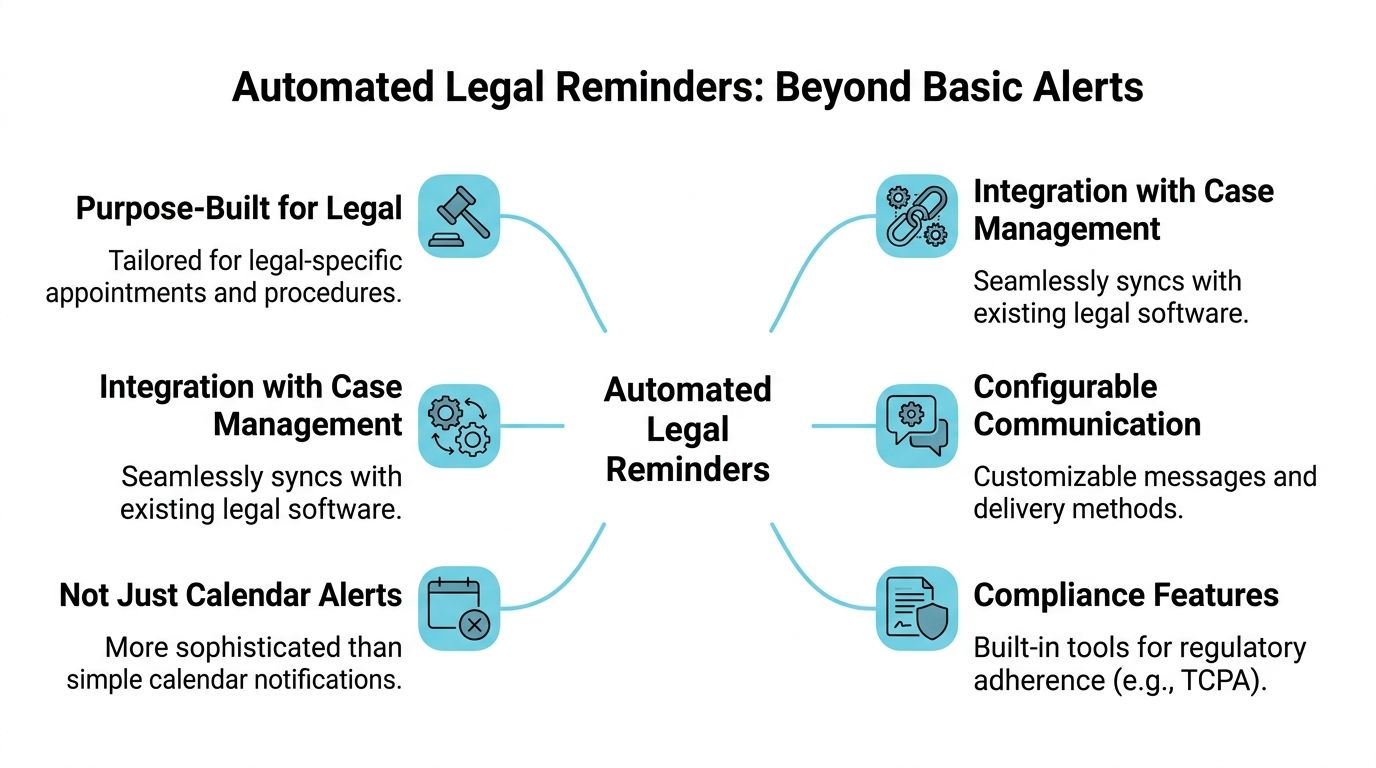
A generic reminder app can send a text. That part is easy. The harder part is making sure the right message goes to the right client, at the right time, with the right appointment details, without forcing your staff to enter everything twice.
That's why integration matters more than the reminder itself.
What a legal reminder system should pull from
When automated appointment reminders are connected to systems like Needles, Neos, LawBase, or Litify, the firm can trigger reminders from the same record where the appointment lives. Staff don't need to recreate the event in a separate tool. They don't need to update two systems when a meeting time changes. And they don't need to wonder whether the text that went out matched the latest calendar entry.
A legal workflow usually needs reminders to reflect details such as:
- Appointment type: Intake consult, recorded statement prep, deposition prep, medical coordination call, settlement meeting
- Assigned team: The attorney, case manager, or paralegal responsible for the matter
- Client-specific timing: The exact date and time tied to the active case record
- Status updates: Whether the client confirmed, asked to reschedule, or didn't respond
Why standalone apps create friction
Standalone tools can work for very small teams, but they usually create an extra administrative layer.
Here's the difference:
| Approach | Staff workflow | Common issue |
|---|---|---|
| Standalone reminder app | Copy appointment data into separate software | Double entry and missed updates |
| Calendar-only alerts | Staff get prompted to call or email manually | Reminders still depend on staff follow through |
| Integrated case-management reminder workflow | Reminder activity follows the case record | Less switching, fewer manual steps |
A reminder system is only useful if the people doing the work will actually use it inside their normal day.
That's why integrated portals are more practical than bolt-on apps. The reminder becomes one piece of a broader communication workflow. Clients can receive appointment notices, check case status, send messages, share files, and complete forms without forcing staff to leave their main workspace.
Why this matters to client experience
Clients don't think in terms of your software stack. They judge the firm by whether communication feels clear and organized.
If a client gets a reminder, confirms the appointment, and can message the office from the same communication flow, the firm looks coordinated. If they get a text from one system, an email from another, and a call from someone who didn't know the text already went out, the experience feels fragmented.
That's the legal context. Automated appointment reminders aren't just about sending messages. They're about fitting reminder activity into the same case-centered workflow your team already relies on.
Key Benefits for Your Firm and Clients
The value of automated appointment reminders shows up in two places at once. The firm gets back time and protects scheduled work. The client gets a simpler, less frustrating experience.
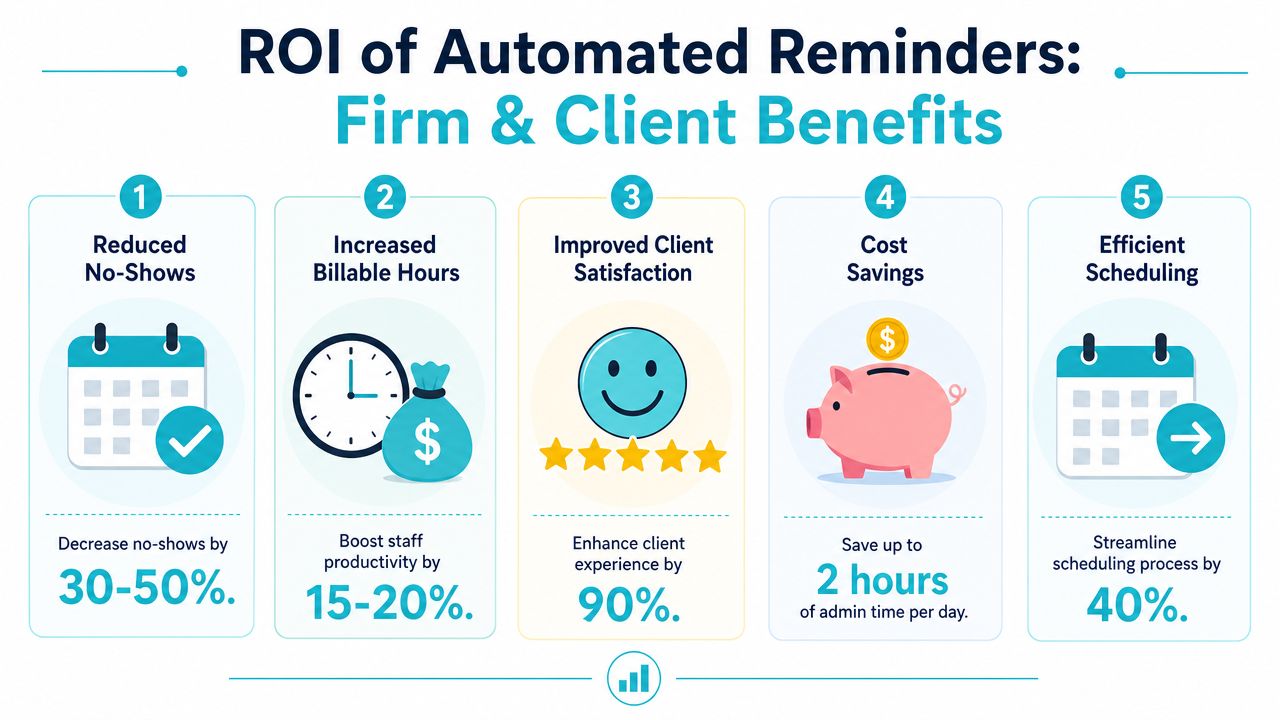
The biggest operational win is attendance. According to MedLaunch's reminder best practices, automated appointment reminders can reduce no-show rates by 40 to 60 percent. For a practice with a 15 percent no-show rate seeing 100 clients daily, this can prevent an annual revenue loss of approximately $390,000. Legal matters aren't identical to medical visits, but the same business logic applies. A missed consultation, prep call, or client meeting costs the firm time it can't easily recover.
Firm side gains
Once reminders are integrated into the case workflow, staff stop spending chunks of the day on avoidable appointment administration.
The biggest advantages usually look like this:
- Less manual calling: Staff don't have to work tomorrow's schedule line by line.
- Lower inbound call volume: Fewer clients call to ask for the date, time, or location.
- Cleaner records: Confirmation and reschedule activity can be attached to the matter rather than buried in someone's email.
- More stable calendars: Teams can act earlier when a client indicates they can't attend.
That last point matters a lot in PI firms. If a client can't make a meeting and tells you early enough, the team can reschedule instead of losing the slot completely.
Client side gains
Clients respond well to communication that's simple, timely, and easy to act on.
A reminder helps because it reduces uncertainty. The client knows when the appointment is, what it relates to, and what to do next if plans changed. That lowers the odds of silence and confusion.
A good reminder process also signals competence. Clients want to feel that the firm has a system. They don't want to wonder whether they missed a handwritten voicemail or whether the office forgot to send details.
The reminder itself is useful. The real benefit is that clients stop having to work hard to stay on schedule with your firm.
Why the payoff compounds
These gains reinforce each other.
When fewer appointments are missed, staff have more time for client work. When communication feels smoother, clients are less likely to call with basic scheduling questions. When the team spends less time chasing confirmations, they can put more attention into case progress and service.
That's the part many firms miss. Automated appointment reminders aren't just an admin tool. They improve capacity without asking the firm to hire more people or pile another process onto the front desk.
Crafting Messages and Timing Them for Success
Most reminder failures aren't technology failures. They're messaging and workflow failures.
A vague text sent at the wrong time won't do much. A clear message with a direct way to confirm or reschedule performs better because it asks the client to take one simple action.
Research summarized by Assort Health on automated appointment reminders makes that distinction clear. While basic one-way reminders can reduce no-shows by 30 to 40%, conversational two-way systems that allow clients to instantly confirm or reschedule can achieve reductions of up to 90% by eliminating response friction.
What works better than generic reminders
A legal reminder should do three things well:
- Identify the appointment clearly
- Tell the client what action to take
- Make response easy
If the message only says “Reminder: you have an appointment tomorrow,” clients still have to hunt for details or call the office back. That defeats the point.
A better reminder keeps the language short and direct. It also gives the client a simple way to reply.
If a client has to stop, search their email, and call your office to reschedule, the reminder created friction instead of removing it.
Practical message examples
Below are templates that fit common PI workflows. Keep them neutral and factual.
Initial consultation
“Hi [Client First Name], this is [Firm Name]. You're scheduled for your consultation on [Day] at [Time]. Please reply CONFIRM if you'll attend or RESCHEDULE if you need a different time.”
Case update meeting
“Hi [Client First Name], this is a reminder of your case meeting with [Firm Name] on [Day] at [Time]. Reply CONFIRM to keep this appointment or RESCHEDULE if needed.”
Deposition prep
“Hi [Client First Name], this is [Firm Name] reminding you about your deposition preparation meeting on [Day] at [Time]. Please reply CONFIRM or RESCHEDULE.”
Document signing or form completion appointment
“Hi [Client First Name], you have an appointment with [Firm Name] on [Day] at [Time] to review and complete case paperwork. Reply CONFIRM if that still works.”
Cadence that fits legal practice
A simple cadence usually works better than over-messaging. The main goal is to give enough notice for planning, then a shorter reminder close to the appointment.
A practical pattern is:
- Booking confirmation: Send right after the appointment is created
- Advance reminder: Send a few days before
- Short reminder: Send the day before or same day, depending on the meeting type
- Escalation for no response: Route unconfirmed high-value appointments to a staff call
For firms reviewing voice and text workflows more broadly, this guide on how to transform your business communications is useful context because it shows how messaging works better when it's part of a connected communication process rather than a side tool.
If you're tightening your client messaging standards overall, these client communication best practices are a good framework for keeping reminder language consistent across the firm.
Staying Compliant with Communication Rules
Law firms don't get to treat reminder automation casually. If you're sending texts or automated calls, consent and cadence need to be managed deliberately.
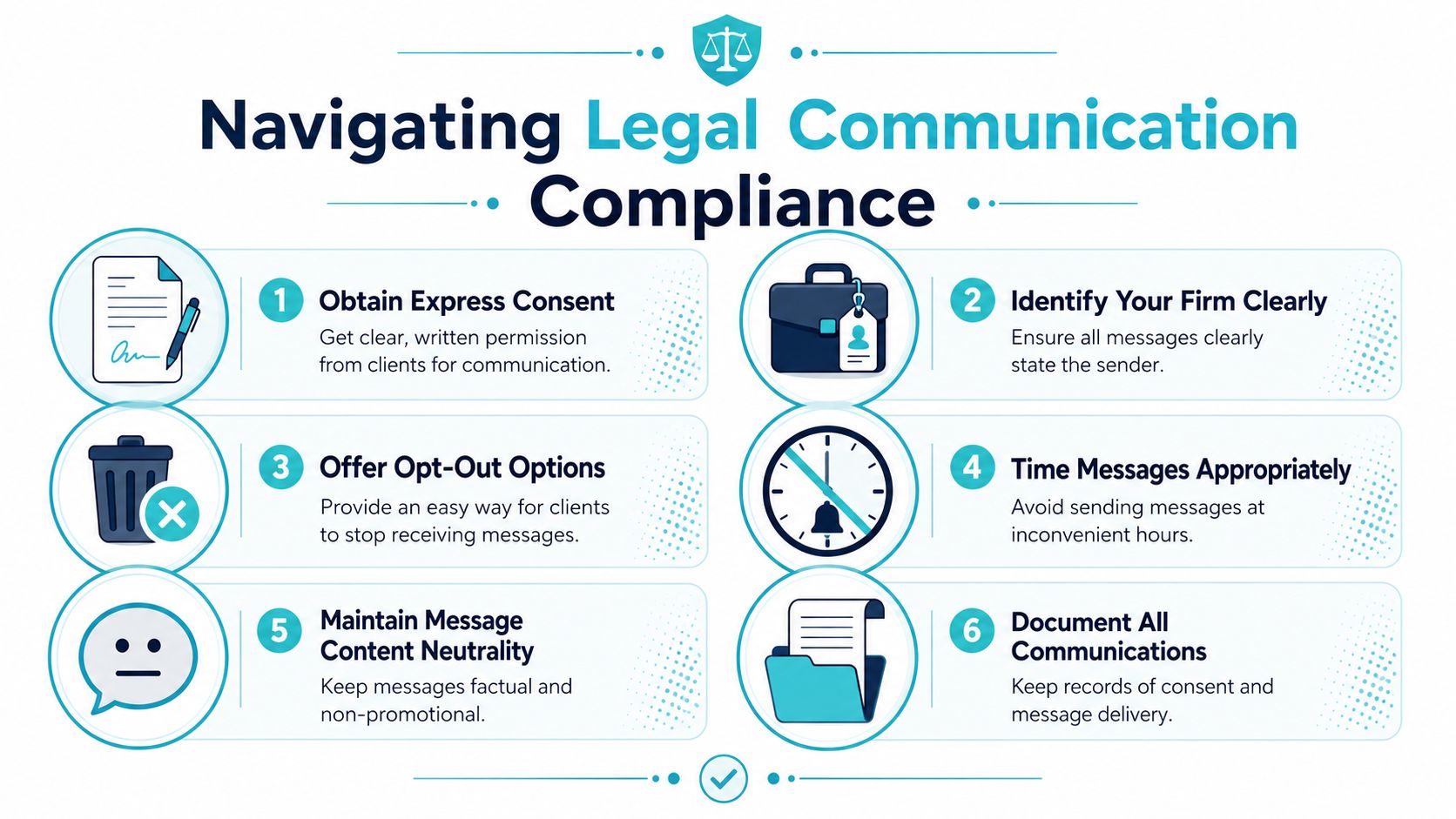
The baseline rule is straightforward. Valant's discussion of reminder cadence and TCPA rules states that TCPA regulations establish a clear compliance threshold for reminder cadence, limiting automated communications to once per day and no more than three times per week unless the client provides express written consent for a greater number of messages.
What your firm should document
The safest reminder process starts at intake, not after the first missed appointment.
Make sure your workflow covers:
- Written consent: Capture clear permission for text or automated communication.
- Channel preference: Ask whether the client wants text, email, or phone.
- Opt-out handling: Give clients a simple way to stop automated reminders.
- Message records: Keep a record of what was sent and when.
- Neutral content: Keep reminders factual. Don't put sensitive case details into routine messages.
What compliant reminders look like in practice
A compliant reminder is usually simple and restrained. It identifies the firm, references the appointment, and avoids unnecessary detail.
Good example:
“[Firm Name]: Reminder of your appointment on [Day] at [Time]. Reply CONFIRM or call the office if you need to reschedule.”
Poor example:
A long promotional message, repeated too often, with case-specific facts the client may not want displayed on a lock screen.
Compliance habit: Build consent collection into intake and onboarding so staff aren't guessing later about who agreed to what.
This is one area where an integrated portal helps operationally. If client consent, communication preferences, and reminder history live inside the same workflow as the matter record, the firm has a much cleaner process than it would with disconnected texting tools and handwritten intake notes.
Your Firm's Implementation Checklist
Most firms overcomplicate rollout. They assume reminder automation is a major software project, when the essential work is usually deciding how the workflow should behave inside the systems the team already uses.
A clean implementation starts with operations, not messaging templates.
Start with the system you already have
Before you compare tools, confirm where appointment data currently lives. In most PI firms, that means Needles, Neos, LawBase, or Litify. If appointments are being tracked partly in the case management system and partly in Outlook calendars, fix that first. Automation only works well when the source of truth is clear.
Then define what should trigger a reminder. Don't just say “all appointments.” Break it down by appointment type, who owns the matter, and what response should happen if a client doesn't confirm.
Roll out in this order
This sequence works well because it keeps the project manageable.
Map your appointment types
List the meetings that require reminders. Initial consults, case signups, deposition prep, paperwork reviews, and attorney calls may need different timing and language.Check integration compatibility
Confirm that your reminder tool or client portal connects to your current case management system and can use matter data without duplicate entry.Set response rules
Decide what happens when a client confirms, asks to reschedule, or doesn't respond. Someone on the team should own each path.Write a small template library
Start with a handful of appointment-specific messages. Keep them short and consistent.Pilot with one team
Use one practice group, one location, or one appointment category before firm-wide rollout.Review staff workflow
Make sure the system supports the way your team already works. If staff have to manage another inbox, adoption will drag.
For firms evaluating workflow design more broadly, this explanation of workflow automation for law firms is useful because it frames automation as a process decision, not just a software feature.
What to look for in a reminder platform
Many law firms frequently make the wrong purchase. Their selection is based solely on message-sending.
A stronger evaluation looks at:
| Decision area | What to ask |
|---|---|
| Integration | Does it work from the matter record inside your existing system? |
| Client interaction | Can clients confirm or respond without creating extra staff work? |
| Branding | Can the communication reflect your firm identity clearly? |
| Adoption | Can staff use it without changing their whole day? |
One option in this category is CasePulse, which provides a client portal for law firms that integrates with systems such as Needles, Neos, LawBase, and Litify, allowing clients to check case status, message the team, share files, complete forms, and receive routine reminders while staff stay in their existing workflow.
Keep the first launch narrow
Don't try to automate every reminder and every client touchpoint on day one.
Start with one high-friction appointment category. Get the workflow right. Watch how clients respond. Then expand. Firms that take that approach usually get better staff buy-in because people can see the workload drop quickly without feeling like the office just added another software project.
Measuring Success and Solving Common Issues
A reminder workflow earns its place in the case management system only if it changes office behavior. The test is straightforward. Fewer missed appointments, fewer reminder calls, and fewer staff workarounds.
Start by measuring results that affect scheduling and staff time. Open rates matter less than whether the intake team is spending less of the day chasing confirmations. If reminders are sent from the matter record in Needles, Neos, or a similar system, reporting should live there too. That keeps appointment activity tied to the client file instead of scattered across phone logs, inboxes, and separate messaging tools.
What to measure
Use a short scorecard:
- No-show rate by appointment type: Intake consults, medical update calls, and attorney meetings often produce different response patterns.
- Inbound calls about scheduling: A drop here usually means the reminder answered the question before the client picked up the phone.
- Confirmation and reschedule rates: These show whether the message is prompting action, not just being delivered.
- Staff time spent on reminder follow-up: Ask the team for a baseline before launch, then check again after 30 days.
One metric in isolation can mislead. A high confirmation rate sounds good until staff are still making manual calls because clients reply in ways the system cannot route cleanly. In firms that get the best results, the reminder process is connected to the same workflow staff already use to update matters, review notes, and track next steps.
Common issues after launch
The first complaint is usually familiar. The client says no reminder came through.
Check the communication channel before changing the script. Proactive Chart's reminder guidance says 97 percent of patients prefer appointment reminders by SMS, and 86 percent ignore calls from unknown numbers. A firm that relies on outbound calls from an unfamiliar office line should expect lower response rates than a firm sending text reminders tied to the client record.
Other problems usually come from setup choices:
- Too many clients are not responding: Cut extra wording and make the next step obvious. “Reply C to confirm” works better than a paragraph.
- Reschedule requests come in too late: Send the first reminder earlier for appointments that require transportation, childcare, or document gathering.
- Staff still place manual reminder calls: Define the exceptions. For example, call only if the appointment is high value, the client has missed before, or the text failed.
- Replies create more work than they save: Route confirmations, cancellations, and reschedule requests back into the case management workflow so staff are not copying information from a standalone app into the matter.
A good reminder process reduces exceptions. If staff are intervening on most appointments, the workflow is not finished.
For firms that want cleaner post-launch reporting, this guide to tracking client communication activity inside a law firm system lays out what to monitor after rollout.
CasePulse gives law firms a secure client portal that connects directly to systems like Needles, Neos, LawBase, and Litify, so reminders, messages, forms, and case updates stay inside the workflow your staff already uses. If your firm wants fewer appointment calls, fewer missed meetings, and a cleaner client communication process, learn more at CasePulse.