
 CasePulse
 The best client portal software for a law firm is not just another app. It is a secure bridge to your existing case management system, whether you are running Needles, Neos, LawBase, or Litify. Top options like CasePulse are built to automate client communication and slash administrative work, all without forcing your team to juggle a separate inbox. It is a strategic move that directly boosts both efficiency and client happiness.
Why Client Portals Are Now a Necessity for Law Firms
Let's be honest. Clients today expect instant access to their case information. The old model of waiting for a paralegal to call back with a simple status update just does not cut it anymore. This shift in expectations has turned client portals from a nice-to-have feature into a core operational tool for any competitive law firm.
A well built portal does so much more than just share documents. Think of it as a central, secure command center for each client's case. It offers a single, trusted place for secure messaging, document exchange, and real time progress updates that clients can access 24/7 from any device. This constant availability answers their most common questions before they even think to ask.
Reducing Administrative Burdens
One of the biggest wins you will see after implementing the right portal is the immediate drop in administrative busywork. When clients can find answers themselves, the constant stream of "just checking in" phone calls and emails slows to a trickle. This hands precious time back to your paralegals and case managers.
Instead of spending half their day fielding routine inquiries, your team can finally focus on the high value legal work that actually moves cases toward resolution. The portal takes care of the predictable questions, freeing up your staff to handle the complex ones.
By automating routine updates and document collection, a client portal gives your team back its most valuable resource: time. This shift allows skilled staff to focus on substantive legal tasks, directly improving firm productivity and case outcomes.
The numbers back this up. The global client portal software market was valued at about USD 7.4 billion in 2024 and is on track to hit USD 21.9 billion by 2033, growing at an annual rate of roughly 11.5%. This explosive growth is fueled by client demand for instant updates and the critical need for secure document sharing. Both are major pain points that a purpose built legal portal solves.
Enhancing Security and Client Trust
Email was never designed to handle the sensitive documents common in legal cases. A dedicated client portal provides a far more secure alternative, using encryption and controlled access to protect confidential information. Getting this right is a cornerstone of modern practice. You can learn more about the bigger picture by mastering law firm document management.
This focus on security does more than just protect data; it builds trust. Giving clients a professional, branded space for all their case interactions shows them your firm takes their privacy and security seriously. It reinforces their confidence in your ability to manage their case from start to finish, setting a positive tone for the entire relationship. Choosing the right client portal software is truly an investment in both your firm's efficiency and your clients' peace of mind.
The Six Essential Criteria for Evaluating Law Firm Portals
Choosing the right client portal is not like picking out any other piece of software. For a law practice, the stakes are just too high. Generic platforms that work for other businesses often create more problems than they solve in a legal setting. So, before you even start looking at demos, you need a solid framework for evaluation.
This is not about chasing the longest feature list. It is about focusing on what actually moves the needle in your firm's day to day operations. I have broken it down into six make or break criteria that will help you tell a true legal solution from a general purpose tool that just adds to your team's workload.
1. Security and Confidentiality
Let’s start with the absolute baseline: security. For a law firm, this is not just a best practice. It is a core ethical duty. Client confidentiality is everything, so any portal you consider must offer serious, multi layered protection for your case files and communications. Basic password protection does not even begin to cover it.
Here’s what you should be looking for as a bare minimum:
- Data Encryption: All information, whether it is being uploaded or just sitting on a server, has to be encrypted. No exceptions.
- Access Controls: You need precise, granular control over who sees what. A client should only have access to their own case documents and updates, period.
- Compliance: The platform must meet relevant data protection regulations. This is not just about protecting clients. It is about protecting your firm from liability.
Without these security fundamentals in place, a client portal goes from being an asset to a massive risk.
2. Deep Case Management Integration
A client portal that doesn’t talk to your case management system is just another island of information for your team to manage. That’s a non starter. The whole point is to extend the power of what you already use, not to create another inbox to check. The best portals integrate deeply with the systems your firm runs on, like Needles, Neos, LawBase, and Litify.
The real value of a portal lies in its ability to sync seamlessly with your firm's central source of truth. When your staff can manage all client communications and file sharing from within the case management system they already use, adoption is frictionless and efficiency soars.
This kind of deep integration means that when you update a case note, upload a document, or send a message, it all flows automatically between the two systems. Your team stays in their familiar environment, and clients get the 24/7 access they want. Frankly, this is the single most important factor for cutting down on administrative busywork.
3. Powerful Automation Capabilities
Automation is what separates a simple file sharing tool from a real productivity engine. A portal built for law firms should take on the repetitive, low value tasks that burn up your staff's time. Think about all the time spent chasing clients for documents or information.
For instance, the portal should be smart enough to automatically send reminders if a client has not filled out their intake forms or provided a key piece of evidence. This simple function can save your paralegals from making dozens of phone calls and sending manual emails, freeing them up for actual legal work. You can explore the automation features that CasePulse offers to get a better sense of how this works in the real world.
4. An Effortless Client Experience
Here is a hard truth: if the portal is confusing or clunky for your clients, they will not use it. They will go right back to calling and emailing your front desk, and the entire investment is wasted. The client facing side has to be dead simple, intuitive, and work perfectly on any device they grab, whether it is a phone, tablet, or desktop.
Custom branding is also a bigger deal than you might think. The portal needs to look and feel like it belongs to your firm, complete with your logo and brand colors. It is a small detail that goes a long way in building trust and reinforcing your professionalism.
5. Onboarding and Expert Support
Bringing new software into the firm can be a heavy lift. The vendor you partner with absolutely must have a clear, structured onboarding process and provide hands on help to get you live. Look for US based support teams that actually understand the legal industry. It makes a world of difference.
A smooth implementation, which should only take about a week, means you start seeing a return on your investment almost immediately. But do not forget about ongoing support. You need to know that you can get a knowledgeable person on the line quickly when questions pop up months or years down the road.
6. Transparent and Scalable Pricing
Finally, let us talk money. The pricing model should be simple and predictable. Steer clear of any vendor that tries to lock you into a long term contract or has a reputation for hidden fees. The ideal setup is a model that scales with your firm and gives you unlimited use for cases, messages, and document storage.
A month to month subscription keeps the vendor honest; they have to keep earning your business every single month. As you evaluate options, also make sure they support legally compliant document signing. It is crucial to understand the specific e-signature legal requirements for law firms to ensure every document is secure and enforceable.
A Head-to-Head Comparison of Top Client Portal Software
Now that we have a solid evaluation framework, let us put it to work and see how the leading client portal solutions really stack up. We are going to move past the glossy feature lists and dig into the practical, day to day differences that actually impact a law firm’s efficiency, security, and client happiness. We will be looking at CasePulse alongside both generic, all in one business portals and other legal specific options.
The goal here is to expose the subtle but crucial distinctions. For instance, a portal that plugs directly into your case management software makes client communication a natural part of your workflow. A disconnected tool, on the other hand, forces your team to manage yet another inbox, creating friction and leaving room for mistakes. This kind of balanced analysis will help you pinpoint the solution that genuinely fits how your firm operates.
To help visualize the decision making process, this flowchart maps out the key considerations, like security, integrations, and client experience, that lead to the right choice.
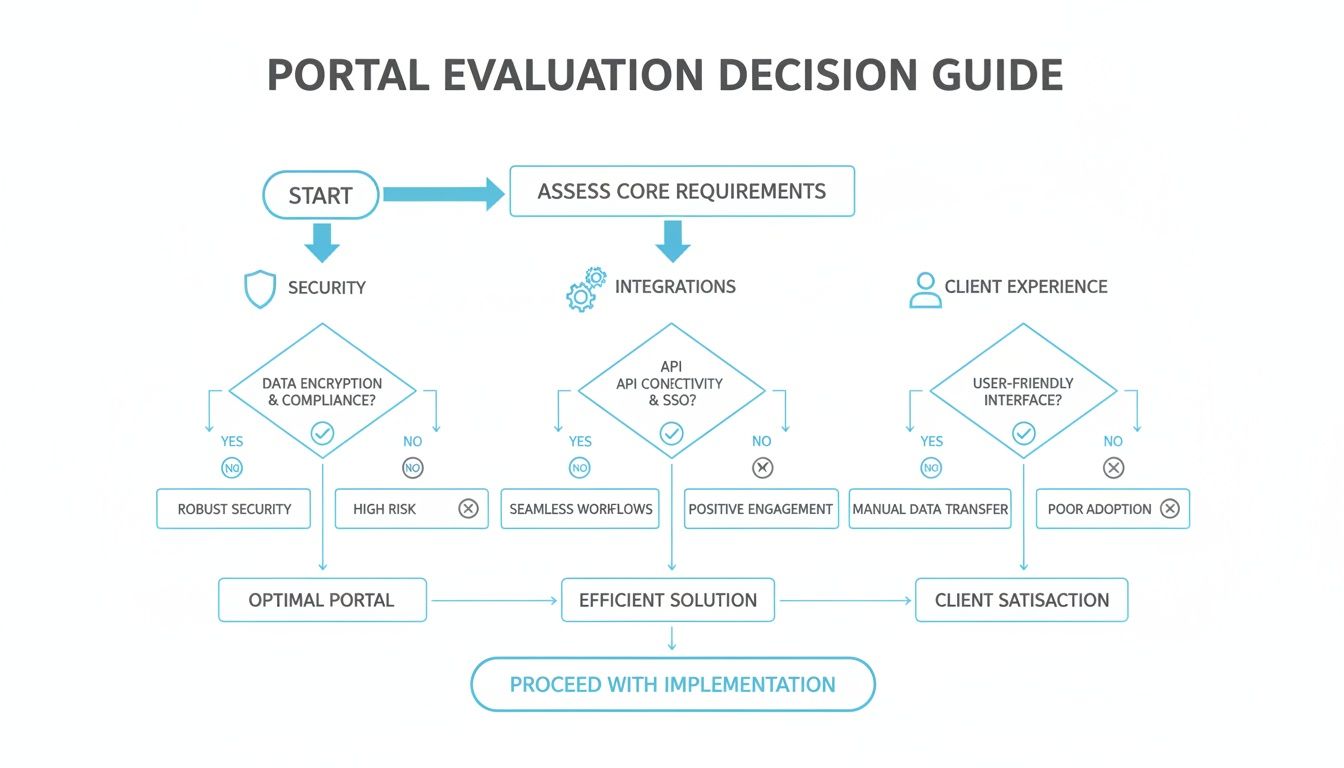
As the chart shows, a weakness in any one of these core areas can derail the entire effort. It underscores why you need a solution that truly delivers on all three fronts.
Feature Comparison of Leading Client Portal Software for Law Firms
To make this comparison concrete, let us look at how a purpose built legal portal like CasePulse measures up against generic and other legal specific alternatives based on our key criteria. The differences become clear when you see them side by side.
| Feature | CasePulse | Generic Portal A (e.g., SuiteDash) | Legal Portal B (Older, file-focused) |
|---|---|---|---|
| CMS Integration | Deep, direct sync with Needles, Neos, LawBase, Litify | None. Operates as a separate system. | Limited or API-based. Often requires custom development. |
| Security | Legal-grade with granular permissions | General business security, lacks case-specific controls. | Strong, but often at the expense of user-friendliness. |
| Client UX | Modern, mobile-first, intuitive design. Zero training needed. | Cluttered. Often tries to be an "all-in-one" for every business type. | Dated and clunky. Feels like a file server, not a communication hub. |
| Automation | Context-aware: Triggers based on case status, document type, etc. | Basic: General task reminders, no case-specific logic. | Minimal. Typically limited to basic notifications. |
| Onboarding & Support | Fast (approx. 1 week), with US-based legal tech experts | DIY or requires a paid consultant. Support lacks legal context. | Varies. Can be slow and complex, especially with older tech. |
| Pricing Model | Transparent & scalable. No long-term contracts. | Complex tiers with feature and user limitations. | Often requires long-term commitments with high setup fees. |
This table highlights a critical takeaway. While generic portals seem versatile, they lack the specialized integrations and workflows that law firms depend on. And while some older legal portals check the security box, they often fail on usability and automation, which is where the real ROI is found.
Security and Integration: The Legal Industry Dealbreakers
When you are comparing your options, security and integration are the first two hurdles any portal has to clear. If it cannot, it’s simply not a viable choice for a law firm. A generic business portal might offer basic file sharing, but it almost never has the granular access controls or deep CMS integration that legal work demands.
Take a tool like SuiteDash, which markets itself as an all in one solution for service businesses. It has a ton of features, from document sharing to invoicing. But its main selling point is consolidating tools, not connecting deeply with a firm's system of record. For a law firm, that means it just adds another layer of work, forcing paralegals to manually shuttle documents and updates between the portal and your case management software.
The most critical differentiator is whether a portal works with your case management system or around it. A purpose-built tool like CasePulse that integrates directly with Needles, Neos, LawBase, or Litify makes every client interaction a seamless part of the case file, eliminating double entry and ensuring a single source of truth.
This is not just a nice to have feature. It is fundamental. The legal world operates differently. While other industries might build their operations around a CRM, a law firm’s universe revolves around its case management platform. This is a key reason why the best client portal software for legal is almost always purpose built.
Research shows that legal tech buyers are increasingly prioritizing portals that plug directly into their existing workflows. This trend is especially strong in North America, where total spending on client portals is expected to hit USD 10.4 billion by 2033. This massive market growth, detailed in reports by firms like Verified Market Research, is driven by the demand for secure, integrated solutions. That is exactly why specialized legal portals are pulling ahead of the pack.
Client Experience and Automation: Where You Create Real Value
Once you have cleared the foundational hurdles of security and integration, the focus shifts to client experience and automation. This is where you can truly set your firm apart and unlock huge efficiency gains. After all, a clunky, hard to use portal will just be ignored by your clients, defeating the whole purpose.
Many legal specific portals that handle integration well still fall short on user experience. They can feel dated, or just be a pain for non technical clients to navigate. For example, some older legal portals were designed mainly as secure file vaults, so they lack modern messaging or a clean mobile interface. Clients are forced to download documents just to view them, which adds needless friction to the process.
A modern solution like CasePulse is built around a simple, intuitive client interface that works perfectly on any device. Clients can check their case status, send a quick message, or fill out a form with just a few taps. That ease of use is everything. When the portal is the easiest way for a client to get an answer, they will use it. That means fewer phone calls interrupting your team. For firms on platforms that do not have great client facing tools built in, it’s worth exploring how a dedicated portal complements systems like Litify.
Automation is what separates the good tools from the great ones.
- Generic Portals: They usually lack context specific automation. You might get general task reminders, but they cannot trigger actions based on case status or a specific document being uploaded.
- Legal-Specific Portals: A top tier legal portal automates routine follow ups. It can, for instance, send automatic reminders to a client who has not submitted their intake form or provided a critical piece of evidence.
This kind of smart automation translates directly into hours saved. Instead of your staff manually chasing clients for information, the system handles the routine communication, freeing them up to focus on the substantive legal work that actually moves cases forward.
Onboarding, Support, and Pricing: The Final Checkpoints
Finally, let us talk about the practical side of things: getting the software up and running and paying for it. The most powerful portal in the world is useless if it takes months to set up or if you cannot get an expert on the phone when you need help.
Many large, enterprise level platforms have notoriously complex and long onboarding processes. A tool like Zendesk, for example, is a powerful support ticketing system, but configuring it for a law firm's specific communication needs can be a major project. It often requires significant setup and a steep learning curve, which delays any return on your investment.
In contrast, a solution designed from the ground up for the legal industry should offer a fast, streamlined implementation. CasePulse, for instance, is typically live in about a week. That’s only possible because the platform is pre configured for legal workflows and is backed by a US based support team that understands the real world challenges of a law practice.
Pricing models also vary widely. Be wary of solutions that lock you into long term contracts or have confusing pricing tiers with hidden fees for essentials like document storage or extra users. A transparent, scalable model is always the better choice.
Look for a straightforward subscription that includes:
- Unlimited cases, messages, and files
- Unlimited support and training
- A month to month agreement with no long term commitment
This kind of pricing aligns the vendor’s success with your own. It ensures they are constantly motivated to provide excellent service and keeps your firm agile enough to adapt as your needs evolve. That is the foundation of a healthy partnership.
Calculating the Real ROI of a Purpose-Built Portal
One practical way to ground the ROI math: CasePulse prices as a flat monthly rate starting at $250, with unlimited cases, messages, files, and forms — so the calculation is a single subscription against the staff hours currently going to status calls. There are no per-seat or per-case fees, and month-to-month terms keep the downside of a trial small. Details are on the pricing page, and a demo is the fastest way to test the fit against your caseload.
When you are a managing partner, every investment decision boils down to one simple question: what’s the actual return? A client portal is not just another tech subscription. It is a strategic move. The real value is not just in the software itself, but in the tangible results. It gives back time, money, and sanity to your firm.
Let's look past the subscription fee and measure what really counts. The best client portal software is not an expense. It is an asset that generates measurable efficiency gains that directly boost your firm’s profitability. When you start to quantify those gains, the ROI picture becomes incredibly clear.
Quantifying a Reduction in Administrative Overhead
One of the first places you will see a return is in cutting down the mountain of non billable administrative work. Just think about a typical day for your paralegals and case managers. How many hours are burned just fielding those "just checking in" phone calls or manually chasing down clients for documents they were supposed to send last week?
This is where a purpose built portal that hooks directly into your case management system really shines. By automating these repetitive, low value tasks, it frees up your team. Clients can log in anytime, day or night, to get a status update, which dramatically cuts down on the constant stream of inbound calls. It is a simple shift, but its impact on your team's daily capacity is massive.
Here is a real world scenario we see all the time:
- Before the Portal: A paralegal easily spends 90 minutes a day answering routine calls and sending "gentle reminder" emails for missing documents.
- After the Portal: Clients check their case status online, and the portal sends automated reminders for outstanding forms. That paralegal instantly gets at least 60 minutes back in their day.
What does that reclaimed hour mean? It is an hour now spent on substantive legal work that actually moves cases forward. That could be drafting motions, preparing for depositions, or coordinating with experts. Over a year, that single hour per day adds up to over 250 hours of high value work for just one employee.
The Financial Impact of Faster Client Intake and Communication
These are not just theoretical gains. The data backs it up. Professional services firms that adopt secure client portals consistently see a 20% to 40% reduction in those time consuming status update calls. Industry benchmarks often show staff saving 30 to 60 minutes per day once routine follow ups are automated.
This reclaimed time translates directly into faster case cycles and healthier cash flow. When you streamline client intake with a portal that has fillable forms, you can sign new clients faster and with fewer errors. For high volume firms, that kind of efficiency is not just nice to have. It is critical.
A client portal isn't an expense; it's a productivity multiplier. By automating low-value communication, it unlocks your team's capacity to handle more cases effectively, directly contributing to the firm's bottom line.
This efficiency also has a major impact on client happiness. Giving clients a secure, convenient way to get information and communicate builds their trust in your firm. In fact, it is common for firms to report double digit jumps in client satisfaction scores after bringing in a self service portal.
Strengthening Client Relationships and Future Referrals
Finally, the ROI of a client portal goes well beyond your internal metrics. When you provide a modern, professional, and secure communication hub, you fundamentally change how clients see your firm. It shows you’re committed to transparency and great service, which is a powerful way to stand out in a very crowded legal market.
A great client experience is one of the most powerful engines for new business. Happy clients leave good reviews and, more importantly, they refer their friends and family to you. That kind of organic growth is priceless, and it’s a direct result of the superior service a portal helps you deliver.
The right portal ensures every client interaction is logged and connected back to your primary system, something you can learn more about in our guide to legal case management software. This creates a seamless, professional experience that builds the kind of trust and loyalty that keeps your firm growing for years to come.
Your Step-by-Step Checklist for Adopting a New Portal
Choosing the right software is a huge step, but making it work for your firm is where the real effort begins. A successful adoption is about more than just signing a contract. It requires a clear, methodical plan to turn that new tool into a firm wide asset. A structured approach is the only way to get your team and clients on board, ensuring you see a return on your investment from day one.
This practical checklist will walk you through the entire process. From initial planning and vetting vendors to a seamless launch, these steps will help you not only select the best client portal software but guarantee it becomes an indispensable part of how you operate.
Phase 1: Define Your Needs and Secure Buy-In
Before you even think about watching a demo, you need to look inward. A successful rollout starts with a crystal clear understanding of the specific problems you are trying to solve. This groundwork ensures you do not get distracted by shiny features and instead choose a solution that addresses your firm's real, everyday pain points.
The first move is to assemble a small internal committee. You will want a managing partner, a paralegal, and an administrator in the room. Their different viewpoints are absolutely crucial.
Together, your team should:
- Identify Core Pain Points: Are you drowning in phone calls from clients just wanting a status update? Is chasing down documents slowing cases to a crawl? List the top three to five administrative bottlenecks you expect the portal to eliminate.
- Define Must-Have Features: Based on those pain points, create a non negotiable feature list. For most firms, this means deep integration with your case management system (like Needles or Litify) and robust automated reminders are at the top of the list.
- Secure Partner Approval: With your needs defined, you can build a solid business case to present to the firm’s partners. Focus on the tangible ROI, like fewer non billable hours spent on admin and a measurable jump in client satisfaction, to get their enthusiastic support.
Phase 2: Vet Vendors and Conduct Targeted Demos
Once you have your requirements and budget locked down, it’s time to start evaluating vendors. This phase is all about asking the right questions to separate the true legal tech partners from the generic software companies. Do not let a slick sales presentation pull your focus from your core needs.
Every demo you see should be viewed through the lens of how it solves your specific problems. A canned, one size fits all presentation is a waste of your time.
During this stage, make sure you:
- Request a Custom Demo: Insist that vendors show you how their portal integrates directly with your firm’s specific case management system. If they cannot show a live connection to a system like Neos or LawBase, that’s a major red flag.
- Ask Integration-Specific Questions: Dig deeper than just "Do you integrate?" Ask pointed questions like, "Show me exactly how a client's message appears within a case file in our CMS," or "Can we trigger automated reminders from case status changes in our system?"
- Verify the Onboarding Process: A great portal should not take months to get up and running. Ask about the typical timeline from contract to go live. A vendor like CasePulse, for example, can often get a firm fully operational in about a week, which keeps disruption to an absolute minimum.
The most revealing moment in any demo is seeing how the portal handles the two-way flow of information with your case management system. If the portal forces your team to manage yet another separate inbox, it’s not a solution—it’s just another problem.
Phase 3: Plan the Rollout and Communicate the Launch
Once you’ve made your choice, the final phase is all about execution. A thoughtful rollout plan is what separates a tool that gets used from one that collects dust. Getting both your internal team and your clients to adopt the new system quickly requires a clear strategy.
Your implementation partner should provide plenty of hands on support, but your internal communication plan is just as critical. A smooth launch really does set the stage for long term success.
Your final checklist for a successful launch includes:
- Internal Training: Schedule a mandatory training session for all staff. Don’t just focus on the "how" of using the software; emphasize the "why," specifically how this tool will make their jobs easier.
- Client Communication Plan: Draft simple, clear email templates to announce the new portal to your clients. Be sure to highlight the benefits for them, like 24/7 access to their case status and a secure, easy way to upload documents.
- Phased Client Onboarding: Avoid inviting all your clients on day one. Start with a small group of tech savvy clients to gather feedback and iron out any wrinkles. Once you're confident, you can gradually roll it out to everyone else. This approach builds momentum and prevents you from getting overwhelmed.
Answering Your Top Questions About Client Portals
When you are looking at client portal software, a lot of questions come up. It is a big decision for any law firm, so you need straight answers. Let us tackle some of the most common questions we hear from legal professionals.
Will Clients Actually Use a New Portal?
This is probably the biggest concern we see, but it’s less about the technology and more about the experience you give your clients. If a portal is clunky or confusing, they will just go back to calling your office. It is that simple. The trick is to choose a platform built with simplicity in mind.
The best client portals offer a clean, intuitive interface that works flawlessly on any device, especially a smartphone. When a client realizes that logging in is the quickest way to get a case update or send you a document securely, adoption takes care of itself. Of course, a good rollout plan helps. A simple announcement email explaining how the portal makes their life easier can make all the difference.
How Long Does It Take to Get a Portal Up and Running?
The setup time can vary wildly. Some of the generic, all in one business platforms can take weeks, or even months, to wrestle into shape for a law firm's unique needs. You end up spending a ton of time just trying to configure the basic workflows and security settings your practice requires.
On the other hand, a portal designed specifically for law firms should be a much faster process. Because it’s already built for legal workflows and integrates directly with systems like Needles, Neos, LawBase, and Litify, the heavy lifting is already done. A focused implementation, led by people who get legal tech, can have your firm live in about a week.
A quick, painless onboarding process is a huge tell. If a vendor can get you running in a week, it shows they truly understand the legal world. It also means less disruption for your team and a much faster path to cutting down on all that administrative busywork.
Will This Thing Really Cut Down on Phone Calls?
Yes, without a doubt. But only if it gives clients the information they are calling for in the first place. Those "just checking in" calls are almost always driven by a lack of information. Clients just want to know what’s going on, and if they cannot find out easily, they will call.
A portal that syncs with your case management system in real time gives clients 24/7 access to their case status, timelines, and important documents. This lets them find answers on their own time, which drastically cuts down on routine calls. Your staff is then free to focus on the conversations that actually move cases forward.
Can We Make the Portal Look Like Our Firm's Website?
Absolutely. Brand consistency is key to building trust with your clients. A generic looking portal can feel disconnected from your firm, which might make clients hesitant to use it. That’s why the ability to apply your firm's branding is a must have feature.
The top tier portals let you customize the look and feel with your firm's logo, color scheme, and overall design. This creates a seamless experience, reinforcing that the portal is a secure extension of your firm. It is a small detail that makes a big impact on your professional image and your clients' confidence.
Ready to see how a purpose-built client portal can boost your firm’s efficiency and keep clients happy? Discover CasePulse and learn how our direct integration with your existing case management system can automate communication and give your team back its most valuable resource: time.