
 CasePulse
 Picking between Clio and MyCase is not just about software. It is a strategic decision that will shape your firm's day to day efficiency and capacity for growth. Both are titans in the legal practice management space, but they cater to very different types of firms and philosophies.
For firms on a growth trajectory that need a scalable, feature rich ecosystem with deep third party integrations, Clio is almost always the answer. It is built for mid sized to larger practices that want to customize their tech stack. On the other hand, MyCase shines for solo practitioners and small firms who need an intuitive, all in one solution with predictable pricing right out of the box.
Clio vs MyCase The Definitive Verdict for Your Firm
So, how do you make the right call? The best choice depends entirely on your firm's practice area, current size, and five year plan. This guide will break down the critical differences to help you align your needs with the right platform.
The core of the decision really boils down to your immediate priorities versus your long term vision.
- Clio is all about flexibility and scale. Its massive marketplace of integrations means you can connect it to specialized tools you already use and love, creating a truly custom setup. It grows with you.
- MyCase takes a different approach by offering a complete, self contained system. Its biggest strength is its simplicity. Essential features like a robust client portal and payment processing are included in every plan.
This decision tree gives you a quick visual to frame the choice based on your firm's profile.
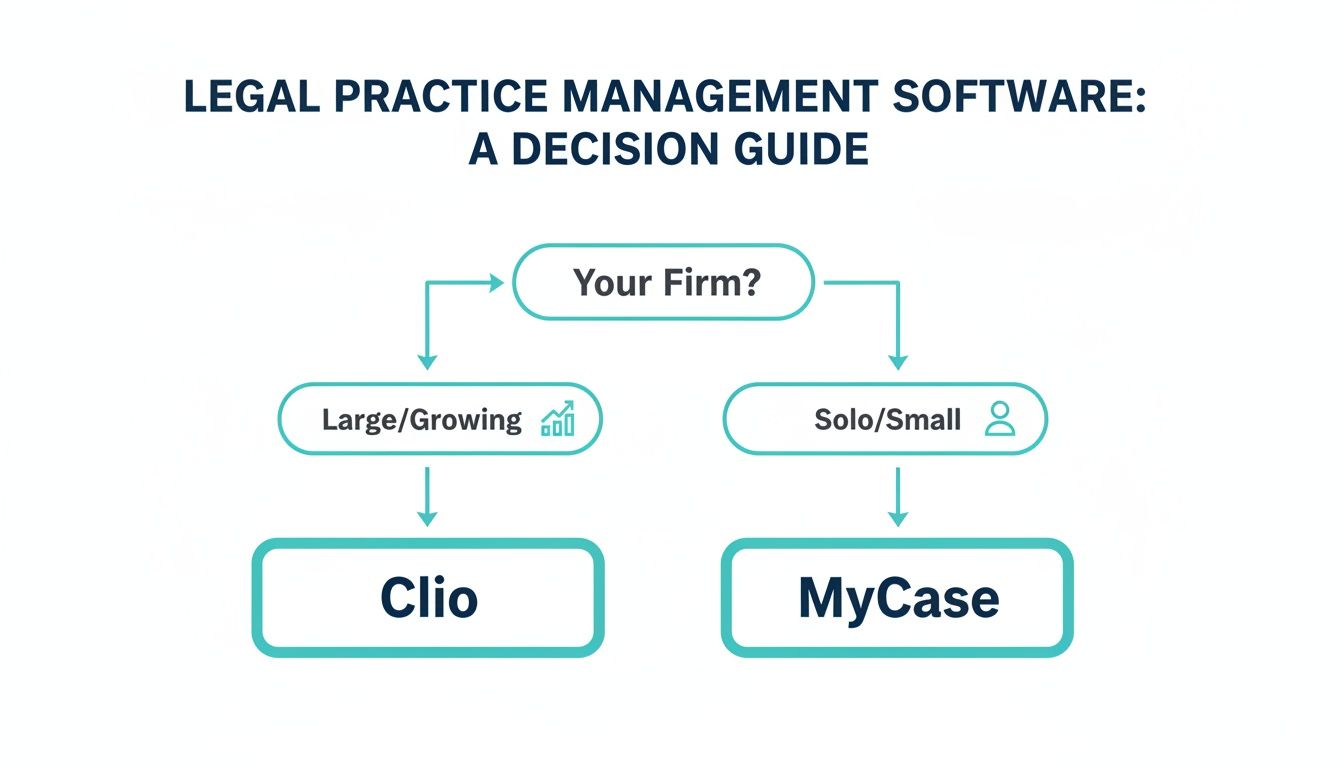
As the graphic shows, it is a classic fork in the road. Growing firms lean toward Clio's expansive ecosystem, while smaller practices often find more immediate value in MyCase's unified platform.
Clio vs MyCase Key Differentiators at a Glance
To really understand the landscape, it is helpful to look at Clio's market dominance. Its financial trajectory is a testament to its strong adoption, with projections showing it could hit $400 million in annual recurring revenue by October 2025. This kind of momentum, fueled by its appeal to firms with 1 to 50 attorneys, shows just how well its model resonates with the small to mid sized market. You can read more about Clio's market performance and its impact on legal tech.
For a quick side by side view, this table breaks down the most important distinctions between the two platforms.
| Factor | Clio | MyCase |
|---|---|---|
| Ideal Firm Size | Mid sized to large firms needing scalability. | Solo practitioners and small firms. |
| Integrations | Extensive marketplace with 200+ integrations. | Limited, focusing on built in features. |
| Client Portal | Available as an add on or in higher tier plans. | Included in all plans as a core feature. |
| Pricing Model | Tiered, allowing features to scale with growth. | Simpler, all inclusive pricing structure. |
Ultimately, this table highlights the fundamental difference in philosophy. Clio offers a customizable, a la carte experience perfect for scaling, while MyCase provides a straightforward, all inclusive package for immediate efficiency.
Comparing Core Case Management Features
When you get down to the brass tacks of picking between Clio and MyCase, it all comes down to how each platform handles the daily grind. Forget the marketing fluff. The real test is in the workflow, automation, and how they organize your documents. Your firm's established habits and operational style will be the biggest factor in deciding which one feels like a natural extension of your team.

Think of Clio as a powerful central hub for every shred of information tied to a case. Its real strength is in its depth and customizability. It excels at linking huge amounts of data, documents, and communications to a single matter, giving you a complete, 360 degree view. This is a massive plus for firms that need granular control and meticulous tracking for complex, long running cases.
MyCase, on the other hand, is built on a foundation of simplicity and a clean user experience. It is designed to get new users up and running fast by integrating the essential tools into one intuitive interface. The philosophy here is not about endless tweaking. It is about giving you a clear, direct path to managing your files, calendar, and to do lists without a lot of fuss.
Document Handling and Storage
How a platform handles documents is often a make or break feature, and this is a key differentiator between the two. Clio offers unlimited document storage on every single one of its plans. For firms drowning in paperwork, that is a huge selling point. It also has advanced version control and plays nicely with popular cloud storage services, so you can maintain a single source of truth for every file.
MyCase also provides built in document storage with version control, but its system is more of a self contained ecosystem. It is built for simple uploading, sharing, and organizing right within the platform or its client portal. While it does not boast the long list of third party storage integrations you will find with Clio, its all in one design streamlines the process for firms that do not want to juggle multiple tools.
For firms handling document heavy litigation, Clio's unlimited storage and integration flexibility offer a distinct advantage. However, smaller firms may find the simplicity of MyCase's built in system more than sufficient for their daily needs.
Calendaring and Task Automation
Great case management is all about staying on top of deadlines and knowing who is doing what. Both platforms have robust calendaring and task management, but they shine in different ways.
Clio's automation tools, especially in its more advanced plans, are where it really pulls ahead. You can build out sophisticated, rules based workflows that do the heavy lifting for you. Imagine opening a new case and having a template that automatically populates a sequence of tasks and court deadlines. For practices like personal injury or family law with predictable timelines, this is a game changer that reduces errors and ensures nothing falls through the cracks.
MyCase also handles tasks and calendars well, but its main focus is on ease of use. You can quickly create task lists, assign them out, and link them to matters. The automation is not as complex as Clio’s, but it absolutely covers the essentials for a smaller practice without requiring a steep learning curve. As you weigh these features, it is also smart to see how they compare to the broader market by checking out roundups like the 12 Best Case Management Software for Attorneys.
Real-World Workflow Comparison
Let's walk through a common scenario: opening a new client matter.
- In Clio: A paralegal could use a pre built case template. The moment they do, the system automatically creates a dozen initial tasks, schedules key deadlines based on the filing date, and sets up standard document folders. This level of automation is perfect for high volume firms.
- In MyCase: The process is more hands on but incredibly straightforward. The paralegal opens the new case, creates a few key tasks (perhaps from a saved list), and manually adds the important dates to the calendar. It is a clean, simple approach that works well for firms that prefer simplicity over complex automation.
Ultimately, the best choice really depends on your firm's DNA. If your team loves customized, automated workflows and needs a system that can handle growing complexity, Clio is likely the stronger contender. But if your top priority is an easy to use, all in one solution that helps you nail the fundamentals, MyCase is an excellent choice. For a deeper dive into improving your firm's processes, our guide on legal case management software offers some valuable insights.
A Deep Dive into Financial and Billing Management
A law firm's financial health is its lifeblood. Because of that, how a platform handles billing and trust accounting is not just a feature. It is a critical factor in your decision. Looking at Clio versus MyCase, you will see two very different philosophies at play. One acts as a powerful, integration first hub, while the other offers a streamlined, self contained system.
Clio is built to be the financial command center that connects to the tools your firm already relies on. Its real power comes from its deep, solid integrations with accounting software, especially QuickBooks Online and Xero. This connection keeps your practice management data and accounting records perfectly in sync, which is a huge deal for preventing the kind of manual entry errors that can cause major headaches.
MyCase takes a different tack, championing an all in one approach. The goal here is to keep your entire financial workflow inside its platform. The star of the show is MyCase Payments, its own native payment processing solution. Having this built right in makes it incredibly simple to accept online payments, a must have for improving cash flow and giving clients the convenience they expect.
Invoicing and Billing Flexibility
Getting accurate invoices out the door on time is non negotiable. Both platforms handle this well, but they approach it with different levels of detail. Clio’s billing tools are exceptionally granular, with features designed for more complicated billing arrangements.
For firms that juggle complex financial scenarios, Clio has a clear edge. Its system is engineered to manage:
- Split Billing: You can easily divide invoices between multiple parties, a common need in insurance defense or family law.
- Contingency Fee Structures: It lets you track expenses and calculate fees with real precision, which is essential for personal injury practices.
- LEDES Billing: The platform can generate invoices in the standardized format required by many corporate clients and insurance companies.
MyCase keeps the process much more direct. Its invoicing is straightforward and easy to navigate, making it perfect for firms that mostly stick to standard hourly or flat fee billing. It handles retainers and basic expense tracking just fine, but it does not have the fine tuned control needed for the really complex billing scenarios where Clio shines.
Your choice really comes down to your client base and billing needs. If you are constantly managing split invoices or have clients that demand LEDES formatting, Clio’s advanced toolset is built for you. If your billing is more straightforward, the simplicity of MyCase is a huge plus.
Trust Accounting and Compliance
Staying IOLTA compliant is one of the heaviest responsibilities a law firm carries. Both platforms offer dedicated tools for managing trust accounts, but they go about it differently.
Clio provides robust, three way reconciliation reporting to make sure your trust account records, internal ledger, and bank statements all line up. Its detailed audit trail gives you a crystal clear history of every transaction, which is invaluable for staying compliant and sailing through audits. That deep integration with accounting software also adds another layer of security, since all trust transactions are reconciled against a formal accounting system.
MyCase also delivers the essential trust accounting features you need. You can deposit funds, pay invoices from trust, and avoid common pitfalls like overdrafts. Because its financial system is self contained, the entire process from deposit to payment happens within one ecosystem. For smaller firms that do not want the hassle of managing a separate accounting program, this can simplify the workflow and reduce the risk of errors that pop up when syncing data between different tools.
The broader market really reflects this dynamic. The global case management sector, where North America holds a 41% share, is projected to grow from $8.26 billion in 2024 to $24.09 billion by 2034. Clio's expansive feature set is attracting a wider range of growing firms, aligning with its move into mid sized and larger segments. Meanwhile, MyCase continues to be an excellent, focused choice for solo and small practices. You can find more insights on the legal tech market's growth over at Precedence Research.
Evaluating the Client Communication Experience
In a world where clients expect instant updates, the way your firm communicates can genuinely make or break their experience. Both Clio and MyCase get this. They have built client portals right into their platforms for secure messaging, document sharing, and invoice payments. But their approaches could not be more different, and it is a key distinction when you are comparing Clio vs MyCase.
MyCase treats its client portal as a core, non negotiable part of its platform. It is included in every single plan, sending a clear message: direct, easy client communication is not a premium add on, it is fundamental. This is a huge win for solo practitioners and small firms who need a reliable, out of the box solution for giving clients secure case access without any extra cost.
Clio, on the other hand, offers a robust portal called Clio for Clients, but you will typically find it in their higher tier plans or as an add on. This frames it as a more advanced tool for firms ready to invest in a deeper level of client collaboration. The portal itself is polished and gives you the secure environment you need for sensitive discussions.

This really drives home the point that modern client service is about more than just email. It is about creating a single, professional hub for every interaction.
The Firm and Client Viewpoint
From your firm’s side of the desk, both portals are designed to slash administrative overhead. Giving clients a self service option to check case status, download documents, or pay a bill cuts down on the constant stream of phone calls and emails that bog down your team.
MyCase’s portal is widely praised for its simplicity. It is just plain intuitive for clients, which is absolutely critical for adoption. If a portal is confusing, clients will give up and go right back to calling your office, completely defeating the purpose.
Clio's portal delivers similar functions but lives within a larger, more complex ecosystem. The real value unlocks when you see how it integrates with Clio’s other advanced features, like its sophisticated document management and billing systems.
From the client's perspective, both are a massive upgrade over the back and forth of traditional email. The main benefits for them are clear:
- Security: Sharing sensitive documents through an encrypted portal is infinitely safer than email.
- Convenience: They can access their case information or pay an invoice 24/7, from any device.
- Transparency: Having one place to see case updates and documents builds a tremendous amount of trust and confidence.
For many firms I talk to, the biggest win from a client portal is how it completely changes the communication dynamic. You shift from reactive phone calls asking "what's new?" to proactive, organized updates that keep clients informed and genuinely happy.
Where Native Portals Can Fall Short
While both Clio and MyCase offer solid portals, they are, by design, general purpose tools. For high volume firms, especially in practices like personal injury, these built in solutions can sometimes create more work than they save. They often just do not have the deep automation required to manage client communication at a large scale.
Think about it: a paralegal might still have to manually post the same "case filed" update to dozens of individual client portals. This is where the limitations of a one size fits all approach start to show. These platforms are phenomenal case management systems, but their client portals are just one feature among many.
The Role of a Specialized Client Portal
This gap is exactly where a purpose built solution like CasePulse comes into play. A dedicated client portal is not just an add on; it is the entire focus. It is designed to integrate with your core case management system but takes the client journey to a whole new level with powerful automation.
Imagine a system that provides 24/7 case status updates automatically, without your staff having to lift a finger. That is the kind of power a specialized tool brings. It can also manage complex fillable forms and send automated reminders, which drastically cuts the administrative load on your team. You can learn more about elevating your firm's communication by reviewing these client communication best practices.
A solution like CasePulse is meant to complement your case management software, not replace it. By handling all the client facing communication with smart automation, it frees up your team to focus on high value legal work inside Clio or MyCase. It is about knowing when the native tools are good enough, and when a purpose built solution is what you really need to deliver a truly superior client experience.
Unpacking the True Cost and Value Proposition
When you are comparing law practice management software, the sticker price is just the beginning of the story. To really understand what you will be spending on Clio or MyCase, you need to look at the total cost of ownership. That means digging into the per user costs, potential data migration fees, and payment processing charges that often hide in the fine print.

Let's break down the pricing models for both platforms so you can budget with confidence and see which one really offers the best bang for your buck.
Comparing Pricing Models
Clio and MyCase take fundamentally different approaches to pricing.
Clio uses a tiered structure, designed to scale with your firm. You can start with a basic plan and then graduate to higher tiers as you need more sophisticated features like advanced reporting or workflow automation. It is a "pay for what you use" model.
MyCase, on the other hand, is built around a more all inclusive philosophy. Their plans tend to be simpler, bundling core features like the client portal and MyCase Payments right out of the gate. This is for firms that want predictable costs and a comprehensive toolset from day one.
The core difference is strategic. Clio’s a la carte model lets you pay for what you need when you need it, which is ideal for growth. MyCase’s bundled approach offers immediate, comprehensive value, which is perfect for firms prioritizing simplicity and cost certainty.
Per-User Costs and Hidden Fees
Both platforms charge on a per user, per month basis. This is standard, but the details matter.
Clio's entry level plans can look very affordable at first glance. However, the cost can escalate quickly as you add team members or realize an essential feature is locked behind a higher tier plan. It is critical to map out your firm's must have features and see exactly where they fall in Clio’s pricing ladder.
MyCase offers more transparent pricing, but you still need to know what you are getting into. While their native payment processing is a huge plus, the associated transaction fees are a separate cost. These fees are typically a percentage of each transaction. This is an industry standard, but something you absolutely have to factor into your budget.
Do not forget about data migration. Both companies can help you move your firm's data from your old system, but this service usually comes with a one time fee. The cost and complexity depend entirely on what system you are coming from, so getting a custom quote is a non negotiable step in your financial planning.
Assessing the Overall Value Proposition
The real winner in the Clio vs. MyCase debate is not about which one is cheaper. It is about which one delivers a better return on your investment.
For a mid sized firm with serious growth ambitions, the higher cost of Clio’s advanced plans might be a smart investment. The ability to automate complex workflows and get deep business insights could generate efficiency gains that dwarf the subscription fee.
Conversely, a solo practitioner or small firm will likely find immediate value in MyCase’s all in one package. Having a built in client portal and payment system can improve cash flow and client satisfaction from day one, offering a powerful return for a smaller practice. As you evaluate your options, it is also worth seeing how specialized tools are priced. For example, you can learn more about how CasePulse offers scalable pricing for its dedicated client portal.
Making the Right Choice for Your Firm's Future
Choosing between Clio and MyCase is not about picking a winner. The truth is, the best software is the one that feels like a natural extension of how your firm already operates. It should match your workflow, your client service style, and your ambitions for the future. The right technology can be a massive growth engine, while the wrong one just adds friction to every single day.
When you boil it all down, the decision gets a lot simpler. One platform is an ever expanding ecosystem, and the other is a powerful, self contained toolkit.
When to Choose Clio
Clio is really built for the ambitious, growing law firm that sees technology as a core part of its strategy. If your practice demands deep customization and you know your needs will change as you expand, Clio’s massive ecosystem is designed for that journey.
You should lean toward Clio if your firm:
- Is Built for Scale: You are a mid sized firm or have concrete plans to grow your team, add practice areas, or significantly increase your caseload.
- Depends on Other Software: Your daily operations rely on tools like QuickBooks, Microsoft 365, or other legal tech apps. Clio’s integration marketplace is, without a doubt, its greatest strength.
- Needs Advanced Reporting: You want to dig into the data, tracking key performance indicators and profitability with granular, customizable reports to make smarter business decisions.
When to Choose MyCase
MyCase is the perfect fit for solo attorneys and small firms who just want something that works simply, efficiently, and right away. Its all in one approach cuts through the complexity, letting your team get started fast with very little fuss.
MyCase is probably the right call if your firm:
- Wants an All-in-One Box: You need a system where essentials like client messaging and payment processing are built in and work together seamlessly from the start.
- Puts Simplicity First: Your team needs a platform that is intuitive and does not require a steep learning curve.
- Has Straightforward Billing: You stick to standard hourly or flat fee billing and do not need complicated features like LEDES or split billing.
As you weigh these points, it is also worth zooming out. Picking the right practice management software is just one piece of the puzzle when it comes to the tailored IT solutions that a modern law firm needs to thrive.
The question is not "Which software is better?" It is "Which software is better for us?" A solo personal injury attorney has completely different needs than a 20 person corporate law firm. Let your practice area, client base, and growth plans be your guide.
Knowing When to Supplement Your System
It is also important to be realistic: no single platform does everything perfectly. While Clio and MyCase are fantastic at case management, firms using other systems like Needles, Neos, or Litify often realize they need a specialized tool to really nail one specific part of their practice.
This is especially true when it comes to client communication. If your main goal is to slash the time spent on administrative phone calls and automate case status updates for a high volume practice, adding a purpose built client portal like CasePulse can be a game changer. This lets you stick with the core strengths of your case management software while delivering a truly automated and superior client experience.
Frequently Asked Questions
Choosing between legal practice management software always comes down to the details. Here are some of the most common questions we hear from law firms when they are weighing Clio against MyCase.
Getting straight answers on things like integrations and data migration can make all the difference in picking the right platform for your firm's future.
Which Platform Offers Better Integrations?
This is one of the biggest philosophical differences between the two. Clio is the undisputed leader here, with an app marketplace featuring over 200 third party integrations. If your firm wants to build a custom tech stack around a central hub, connecting tools you already love like QuickBooks, Microsoft 365, or specialized e discovery software, Clio is built for that.
MyCase, on the other hand, operates more like a self contained unit. It has far fewer outside integrations because it aims to be an all in one solution with most core functions built right in. A great example is payment processing, which is a native feature, not an add on. Your decision really comes down to this: do you want a highly connected, best of breed ecosystem (Clio) or a simplified, unified platform (MyCase)?
How Does Data Migration Work?
The good news is that you will not be left on your own. Both Clio and MyCase have dedicated teams to help you move your data over from whatever system you are using now.
That said, the process, timeline, and cost depend entirely on the complexity of your data. Moving from another well known legal software is usually pretty smooth, but migrating from a custom built system or a collection of spreadsheets can be a heavy lift.
Expert Tip: Before you sign anything, have a detailed conversation with their migration specialists. Get a clear statement of work that outlines exactly what data they will move (contacts, matters, documents, billing history, etc.), how long it will take, and what the final, one time cost will be.
Can a Portal Like CasePulse Work with Clio or MyCase?
While a dedicated client experience platform like CasePulse is purpose built for deep integration with systems like Needles and Litify, the core idea applies anywhere. Both Clio and MyCase have their own client portals, and for many firms, they are perfectly fine for basic secure messaging and sharing a few documents.
But what if "basic" is not enough? High volume firms often find the native portals can not keep up with client demands, leading to constant "what's the status of my case?" phone calls.
This is where a specialized tool comes in. If you need advanced automation, like providing 24/7 case status updates that are automatically triggered by your staff's work or sending out complex, conditional intake forms, the built in options might not cut it. A dedicated portal is all about automating the client journey to an entirely different level, which in turn, frees up your team to focus on actual legal work.
Ready to stop the endless phone calls and give your clients the instant updates they expect? CasePulse integrates with leading case management systems to automate communication and reduce administrative work. Learn how you can deliver a superior client experience at https://www.casepulse.com.