
 CasePulse
 Here’s a hard truth most law firms learn the expensive way: a new CRM often becomes a digital paperweight. You invest in a powerful tool for growth, and it somehow morphs into just another piece of software your attorneys ignore.
The key to avoiding this common pitfall is to understand why these implementations fail and, more importantly, how to make sure yours succeeds from day one.
Why Most Law Firm CRMs Fail (and How Yours Can Succeed)

Let’s be honest. Your firm bought a Customer Relationship Management (CRM) system with high hopes. It was supposed to be the central hub for organizing leads, automating your intake process, and finally giving you a clear picture of what marketing efforts were actually working.
But months later, it’s a ghost town. The records are incomplete, the contact information is stale, and your team has reverted to their old spreadsheets and sticky notes.
Sound familiar? You’re not alone. The problem is rarely the idea of a CRM; it’s almost always the execution. Many systems are clunky, completely disconnected from the daily grind of a legal practice, and frankly, create more work than they save. Attorneys are wired for efficiency, and if a tool gets in their way, they will find a way around it.
The Adoption Gap Is Real
While the legal industry has embraced the idea of CRM technology, the reality on the ground tells a different story. Recent research reveals a huge gap between owning a CRM and actually using it well.
Consider this: over 80% of law firms report having a CRM, yet a meager 20% feel it’s genuinely effective for marketing or growing the business. The data from a 2023 industry study on CRM effectiveness paints a clear picture: law firms are lagging behind other professional services in getting real value from these investments.
It gets worse when you drill down to individual attorneys. At firms that have a CRM, fewer than 40% of lawyers use it at all. Of that small group, only about 25% use it consistently for critical tasks like managing their pipeline of potential new clients.
So, what’s going on? It boils down to a few core problems:
- Low User Adoption: If the software isn’t dead simple to use and doesn’t make an attorney’s life easier immediately, they won’t touch it.
- The Grind of Manual Entry: No one has time to be a data entry clerk. Manually logging every call, email, and meeting is a non starter.
- It’s a Silo: A CRM that doesn’t talk to your case management software, whether it’s Needles, Neos, LawBase, or Litify, just creates another island of information and doubles the workload.
Turning Failure Into a Roadmap
Instead of seeing these as dead ends, think of them as your guide to choosing the right system. A CRM built for lawyers has to solve these three problems right out of the box. It should feel like a natural part of your firm’s workflow, not another chore.
The goal isn’t just to buy a CRM. It’s to adopt a system that actively cuts down on administrative tasks, gives every single user an immediate win, and delivers a clear, measurable return.
This is where a modern, integrated approach changes the game. When your CRM works seamlessly with the tools your team already relies on, you eliminate the friction that causes so many systems to fail. Data flows where it needs to go automatically, people actually want to use the system, and your firm can finally realize the strategic growth you were promised.
What a Legal CRM Really Is and What It Does

When lawyers hear “CRM,” the first thing that often comes to mind is a glorified digital contact list. But that’s a huge misconception, and it misses the entire point. A true CRM for lawyers isn’t just a database for names and numbers; it’s a strategic command center for managing the entire client journey, from their first hesitant phone call to their final case resolution and beyond.
Let’s try an analogy. A basic contact list, whether it’s in Outlook, a spreadsheet, or a stack of business cards, is like a paper map. It shows you where things are, but it’s static. It can’t tell you about a traffic jam ahead, find a faster route, or remind you of the turns you took last time. You have to do all the work.
A modern legal CRM, on the other hand, is your firm’s GPS with live traffic updates. It actively guides your intake and marketing strategy, helps you find the most efficient path to signing a new client, and keeps a perfect record of every interaction along the way. It gives you the intelligence to make smarter, faster business decisions.
More Than Just a Digital Rolodex
The key to understanding a CRM is focusing on the “R,” Relationship. A system built for a law practice is all about building and nurturing strong client connections. It achieves this by becoming the single source of truth for every interaction you have.
Every email, every phone call, every text message, every note from a meeting, it all lives in one place, attached to the client’s record. This complete history gives anyone on your team immediate context, so they’re never flying blind when a client calls. It also powers smart automations that make sure no one ever falls through the cracks. Imagine a potential client calls but isn’t quite ready to sign. The CRM can automatically schedule follow up tasks and reminders, keeping your intake team engaged without anyone having to remember manually.
A CRM’s real job is to capture and organize the hundreds of small interactions that build trust and turn a person with a legal problem into a lifelong client for your firm.
By automating these critical touchpoints, your firm develops a reputation for being incredibly responsive and organized. That kind of experience is a massive factor when a client is deciding who to hire. It also frees up your staff from tedious administrative work so they can focus on high value conversations.
To really grasp the difference, let’s compare a simple contact list to what a modern legal CRM brings to the table.
Comparing a Basic Contact List to a Modern Legal CRM
| Capability | Basic Contact List | Modern Legal CRM |
|---|---|---|
| Data Storage | Stores static info: name, phone, email. | Stores dynamic data: full communication history, case status, referral source, documents. |
| Functionality | Manual data entry and lookup. | Automates data capture, schedules tasks, sends reminders, and generates reports. |
| Client Intake | No structured process. Relies on memory and separate notes. | Provides a guided, step-by-step intake workflow to ensure consistency and quality. |
| Business Insight | Offers zero insight into business health or growth opportunities. | Tracks marketing ROI, referral effectiveness, and conversion rates to guide strategy. |
| Team Access | Data is often siloed, inconsistent, or inaccessible to the whole team. | Provides a central, real-time view of every client relationship for everyone at the firm. |
As you can see, it’s not even a close contest. One is a passive list; the other is an active system designed for growth.
The Law Firm Difference: Intake, Conflicts, and Referrals
Here’s the problem with generic, off the shelf CRMs: they just don’t get the legal world. Software built for a typical sales team won’t understand the critical importance of a conflict check or the unique nuances of tracking attorney referral sources. This is precisely where a dedicated CRM for lawyers proves its worth.
A few key functions immediately separate a legal CRM from a standard one:
- Intake Management: It’s designed to capture lead information from your website forms, phone calls, and live chat, then seamlessly guide your team through a structured intake process to qualify the case.
- Conflict Checks: Before you ever engage a new client, the system can instantly run a conflict check against your entire database of past and present clients, opposing parties, and related individuals.
- Referral Tracking: It lets you see exactly which attorneys, doctors, or former clients are sending you the most valuable cases. This data is gold, helping you focus your networking efforts where they’ll have the biggest impact.
These purpose built tools are what elevate a CRM from a simple database into the core of your firm’s growth engine. When exploring your options, it’s wise to review the best cloud-based law firm software options that are built with these legal specific workflows in mind. A specialized approach ensures the technology fits your process, not the other way around.
What to Look for: Key Features of a Great Legal CRM
Picking a CRM for a law firm isn’t like buying one off the shelf for a standard sales team. Our world is different. We have unique workflows, intense pressures, and serious ethical duties that a generic platform just wasn’t built to handle. A top tier legal CRM isn’t about a laundry list of bells and whistles; it’s about a core set of features working in harmony to solve the real problems your firm faces every day.
It all boils down to your intake process. Your firm’s ability to consistently capture, qualify, and sign new clients is the engine that drives your growth. A system designed specifically for law practices gives you automated intake workflows that act like a digital safety net. Think about it: every single inquiry, whether from your website, a phone call, or a live chat, is instantly captured and organized. Nothing gets lost. This isn’t just about grabbing a name and number; it’s about kicking off a structured, reliable process from the very first handshake.
This structure forces a consistent approach. Your team follows a proven path for every potential client, making sure no critical information is missed and every lead is properly qualified. The result is a faster, more professional, and far more consistent intake experience.
Automated Intake and Lead Management
The real goal here is to transform the often chaotic, manual scramble of client intake into a smooth, automated machine. For firms dealing with a high volume of potential cases, this is non negotiable. Even tiny inefficiencies add up, leading to a shocking amount of lost revenue over time.
A purpose built legal CRM makes this happen with a few key tools:
- Centralized Lead Capture: It automatically funnels leads from all your marketing channels, like website forms, phone systems, and social media ads, into one central dashboard. This completely eliminates manual data entry and ensures no opportunity ever gets dropped.
- Automated Follow-ups: The system can fire off an instant, personalized text message or email the moment a new lead comes in. This simple acknowledgment makes a powerful first impression and tells a potential client they’re in the right place.
- Smart Task Assignment: As soon as a lead is captured, the CRM can automatically assign it to the right person on your intake team and create a task for them to follow up within a specific timeframe. This builds immediate accountability.
Powerful Reporting and Analytics
You can’t improve what you don’t measure. A generic CRM shows you a sales pipeline, but a CRM for lawyers gives you reports that answer the questions that keep managing partners up at night. Where are our best cases really coming from? What’s the ROI on that new marketing campaign? How long is it taking my team to actually respond to new inquiries?
The true power of a legal CRM is its ability to connect your marketing spend directly to your signed cases. It provides a clear, data-driven view of what is working, allowing you to stop guessing and start making strategic decisions based on hard numbers.
This kind of insight is a game changer. You can confidently double down on the marketing channels that are delivering and cut the ones that are just draining your budget. You can track conversion rates from initial contact to signed retainer, pinpoint your most valuable referral sources, and monitor your intake team’s performance with total clarity. This is the data that fuels smart, scalable growth.
Document Management and Seamless Integration
Finally, a legal CRM absolutely cannot become another data silo. It has to play nicely with the tools your team relies on every single day, especially your case management system. The single most important feature here is seamless integration with platforms like Needles, Neos, LawBase, and Litify.
When your CRM and case management software are properly connected, information flows automatically. Once an intake is complete and a new client signs on, all their details are pushed directly into the case management system. No one has to retype a single thing. This simple connection wipes out duplicate data entry, a massive source of errors and wasted time.
This integration creates a single source of truth for all client information, all the way from the initial lead to the final case resolution. You can see how these connected systems work by looking at the CasePulse features, which are built to plug into and enhance your firm’s existing workflow. At the end of the day, the best system is the one that gets out of the way, cutting down on administrative busywork so your team can focus on what actually matters: practicing law and serving your clients.
Why Your CRM and Case Management System Must Be Best Friends
A CRM that doesn’t talk to your other software is worse than useless, it’s a liability. It becomes just another information silo, a digital island that forces your team to build manual bridges every single day. This is why a deep, genuine connection with your case management system (CMS) isn’t just a “nice to have”; it’s the absolute make or break factor for any CRM for lawyers.
When your CRM and your CMS, whether it’s Litify, Neos, LawBase, or Needles, operate in separate worlds, your staff pays the price. They get stuck in a soul crushing loop of double data entry, manually copying information from one screen to another. It’s slow, tedious, and a breeding ground for embarrassing errors.
A truly integrated system, on the other hand, is a game changer. It creates a single, fluid path from the first phone call with a potential client all the way through to case resolution.
Creating a Single Source of Truth
Think of your CRM as the front desk of your firm. Its main job is to handle the entire intake process, turning an inquiry into a signed client. Your CMS is the back office, where all the real legal work gets done. Integration is the automated hallway that connects the two.
When a retainer is signed, client information captured during intake should flow instantly from the CRM directly into the CMS. No retyping names. No manually copying contact details or initial case notes. This simple, automated handoff frees up hours of administrative time and nearly eliminates the risk of costly typos.
A disconnected CRM forces your team to toggle between programs, wasting time and creating opportunities for critical data to be missed. A fully integrated system ensures everyone has the latest information, no matter which platform they are working in.
This unified view means that communications logged in one system are visible in the other. Notes from an intake specialist’s first call are right there for the paralegal months later. This continuity doesn’t just make your firm more efficient; it creates a far better, more coherent experience for your clients.
Overcoming the Biggest Hurdle: Getting Lawyers to Actually Use It
A legal CRM’s power is magnified when it connects to other essential tools, like using payment gateway API integration with CRM systems for handling billing. But even with the best features, the biggest challenge is always getting attorneys to log in and use the software.
Law firm CRM rollouts are notorious for failing because lawyers simply won’t use them. Adoption rates often crater below 20% when attorneys see the system as just more administrative work. They’re not wrong. If they have to manually enter every interaction, they’ll quickly lose faith and revert to their old habits of spreadsheets and email chains.
Making matters worse, contact data degrades by up to 30% every year, further eroding trust in a system that feels out of date. The only way to fix this is with smart automation that meets your team where they already work.
How Deep Integration Actually Works
Deep integration isn’t a one time data dump. It’s a constant, two way conversation between your systems that generates powerful efficiencies.
Here’s what that looks like in the real world:
- Automated Case Creation: A lead is marked “Signed” in the CRM, and poof, a new case file instantly opens in your CMS, with all the client’s information already filled out.
- Synchronized Communications: Emails, texts, and client portal messages related to a case are logged automatically in both systems. This gives everyone a complete, up to the minute communication history.
- Real-Time Status Updates: When a paralegal updates a major case milestone in the CMS, it can trigger an automated update that gets sent to the client through the CRM or a connected client portal.
This level of connectivity transforms your CRM from a simple database into an intelligent, active part of your firm’s operational backbone. It removes the friction that causes so many tech projects to fail and actually encourages adoption by making everyone’s job easier.
Using Client Portals to Enhance Your CRM Strategy
A CRM is brilliant at organizing your internal world: your leads, your intake process, your marketing follow ups. But that’s only half the story. While your team is masterfully managing prospects, your actual clients are often left wondering, “What’s happening with my case?” This is where a modern client portal steps in, directly solving your client’s biggest pain point: the need for clear, consistent communication.
Think of a secure client portal as a powerful extension of your law firm CRM, but one that faces outward, toward your clients. It’s their dedicated, 24/7 window into their case. Instead of calling your office for the third time this week for a simple status check, clients can log in anytime to see progress, share sensitive documents securely, and message their legal team directly.
This one change can dramatically reduce the flood of inbound “just checking in” calls and emails that bog down paralegals and support staff, freeing them up to focus on high value legal work.
Bridging the Gap Between Your Firm and Your Clients
The real magic happens when a client portal integrates directly with your firm’s case management system. By connecting to platforms like Needles, Neos, LawBase, or Litify, the portal can pull case status updates automatically. Reminders and notifications go out without anyone on your team having to lift a finger.
This symbiotic relationship lets your CRM do what it does best, managing pre-client relationships, while the portal expertly handles all post-signing communication.
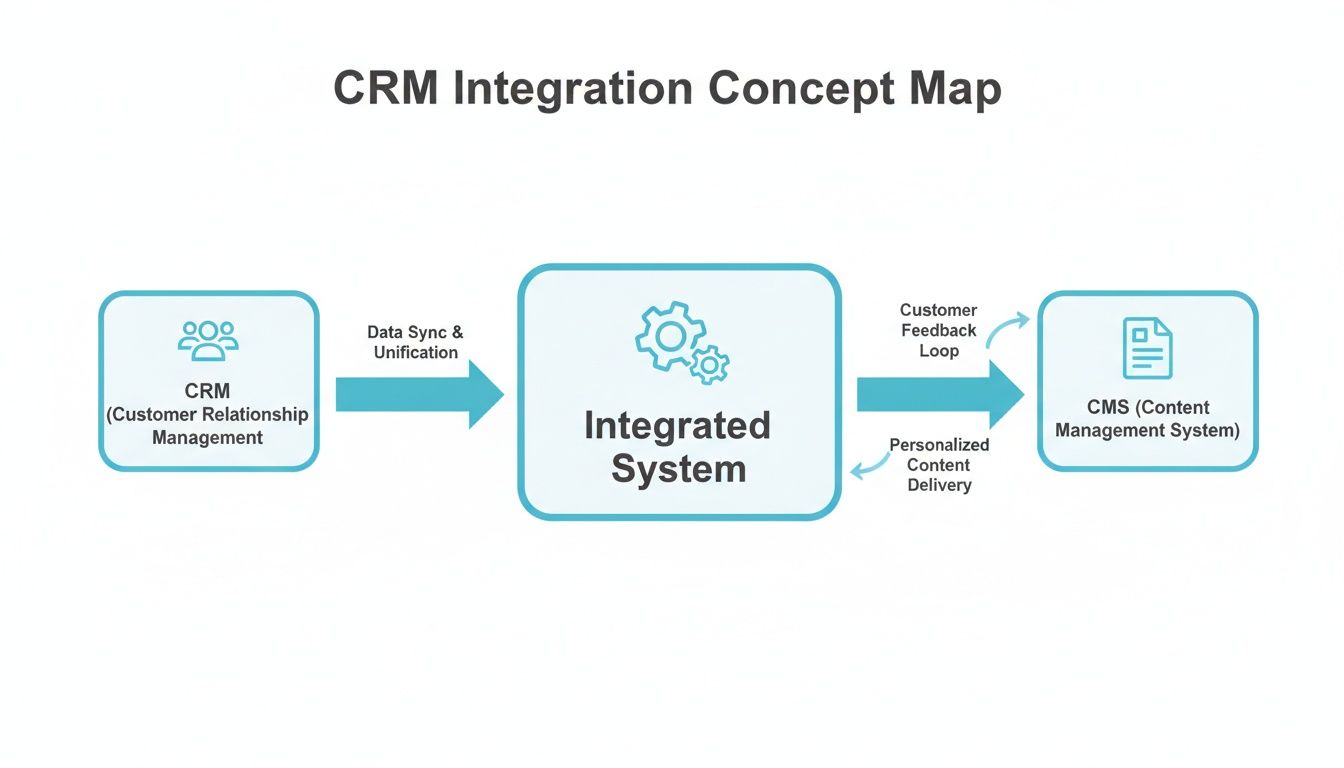
As the diagram shows, an integrated system acts as the central hub, allowing data to flow seamlessly between the client focused CRM and the case focused CMS.
For high volume practices like personal injury firms, the constant demand for updates can be a major source of staff burnout. When a CRM isn’t built to handle this communication load, the problem only gets worse. In response, specialized client portals like CasePulse emerged around 2017, designed specifically to solve this challenge with flexible, month to month pricing. By offering custom branding, secure file sharing, and automated reminders, these tools slash inbound queries and lead to a huge boost in client satisfaction and firm efficiency.
A Complementary Tool, Not a Competing One
It’s a common mistake to see a client portal as a replacement for a CRM. It’s much more accurate to view them as two distinct tools that make each other stronger.
Here’s a simple way to think about it:
- Your CRM’s Job: To capture leads, manage the intake pipeline, and convert prospects into signed clients. It is fundamentally a business development tool.
- Your Portal’s Job: To manage the relationship after the client has signed. It handles the day to day communication, document sharing, and status updates for active cases.
By automating routine client communication through a portal, you give your team the bandwidth to use your CRM more strategically. They can focus on nurturing new leads and analyzing marketing data instead of answering repetitive questions.
This division of labor creates a far more efficient and scalable workflow for your entire firm. You can learn more about how this fits together by exploring whether systems like Litify have a client portal. The right combination of a CRM for lawyers and a client facing portal ensures that both your potential clients and your current clients get the focused attention they deserve.
How to Measure Success and Calculate Your ROI
Signing off on a big software investment is a serious decision. You’re not just adding another line item to the budget; you need to know this new tool is actually going to pull its weight and deliver real value. To justify the cost of a CRM for lawyers, we have to get past fuzzy goals like “improving organization” and start looking at cold, hard numbers.
The only way to do that is by tracking the right Key Performance Indicators (KPIs). These are the metrics that tell the true story of whether your CRM is making the firm more efficient, more profitable, or just more complicated. You can’t just feel like things are better, you have to prove it with data.
Key Performance Indicators to Track
Before you even flip the switch on a new CRM, you need to take a snapshot of your firm’s current performance. This baseline is your “before” picture. Without it, you’ll never be able to truly appreciate the “after.”
Here are the critical metrics you should be tracking from day one:
- Lead Response Time: How many minutes (or hours) does it take for your intake team to get back to a new inquiry? A good CRM can shrink this from hours to seconds with automation.
- Lead-to-Client Conversion Rate: Of all the qualified people who contact you, what percentage actually end up signing a retainer? A structured follow up process should make this number climb.
- Client Status Calls: How many times a week is your team pulled away from work to answer the phone and give a case update? This is a massive productivity killer that a CRM and client portal can drastically reduce.
- Cost Per Signed Case: A CRM shows you which marketing channels are actually bringing in paying clients, helping you slash your spending on the ones that aren’t.
The real power of a legal CRM is that it connects your marketing and intake efforts directly to signed cases. It takes the guesswork out of growth and shows you exactly what’s working and what’s not.
When you focus on these numbers, your CRM stops being an expense and starts becoming a strategic asset. We dive much deeper into this in our article about the metrics that matter for law firm improvement.
A Simple ROI Calculation
You don’t need an accounting degree to figure out your return on investment. A simple formula can show you how a CRM pays for itself, often much faster than you’d think, by both creating new revenue and saving on operational costs.
Let’s walk through a straightforward example.
1. Calculate New Revenue Gained:
Say your new, more efficient intake process helps you sign just two extra cases per month. If the average case is worth $5,000, the impact is immediate.
- Calculation: 2 cases/month x $5,000/case = $10,000 in new monthly revenue.
2. Calculate Time and Costs Saved:
Now, let’s say automation and better client communication save your staff 20 hours of administrative work a month (think data entry, follow up emails, and update calls). If your team’s blended hourly rate is $50, that’s real money back in your pocket.
- Calculation: 20 hours/month x $50/hour = $1,000 saved in operational costs.
3. Put It All Together:
Just add your new revenue and your cost savings, then subtract what you pay for the CRM each month.
- Calculation: ($10,000 + $1,000) – $500 (CRM cost) = $10,500 net gain per month.
In this scenario, the CRM isn’t just a tool; it’s a profit center. By bringing in more business and making your existing team more efficient, the right system becomes one of the most powerful drivers of profitability for your firm.
Common Questions About CRM for Lawyers
Diving into legal tech often brings up more questions than answers. When it comes to picking a CRM for your law firm, you need straight talk to make the right call for your firm’s future. Let’s tackle some of the most common questions we hear from lawyers every day.
What Is the Difference Between a Legal CRM and a Case Management System?
It’s easy to get these two confused, but they serve very different, though connected, roles. Think of it this way: your CRM is the firm’s “business development” department, and your case management system is the “legal operations” department.
A CRM is all about the “pre client” journey. Its entire focus is on managing potential clients, tracking leads from your marketing, nurturing them through the decision making process, and automating intake until they sign on the dotted line. Its job is to grow your business.
The moment a prospect becomes a client, the case management system takes the baton. This is where you manage the actual legal work. It’s for tracking deadlines, organizing mountains of documents, logging case notes, and handling billing. The most efficient firms don’t see these as separate tools; they use a CRM that integrates deeply with their case management software, letting client data flow seamlessly from prospect to active case.
How Long Does It Take to Implement a CRM in a Law Firm?
The honest answer? It depends. A massive, custom built CRM rollout for a large firm could easily take several months. That kind of project involves deep process overhauls, extensive data migration, and training for the entire staff.
But it doesn’t have to be that complicated. Modern, specialized tools designed to plug into your existing case management system can be up and running surprisingly fast. For example, a client portal like CasePulse, which handles the crucial client communication piece of the puzzle, can be fully operational in about a week. It’s built from the ground up to integrate with platforms like Needles, Neos, LawBase, and Litify with almost no disruption to your daily workflow. The key is finding a solution with a clear, proven path to getting started.
Can a Client Portal Replace the Need for a CRM?
A client portal can’t fully replace a CRM, but for many firms, it solves the most painful communication problems far more effectively. A dedicated CRM is built to chase new business; a client portal is built to manage existing client relationships.
A client portal shines after you’ve signed the client. It automates case status updates, provides a secure way to share documents, and gives clients a direct line for messaging, all of which dramatically cuts down on the “just checking in” phone calls and emails that bog down your team.
For firms whose biggest daily headache is the constant barrage of client communications, a portal offers a huge and immediate win. It’s the perfect partner to a CRM, with the portal handling current client happiness and the CRM focused on bringing in the next one.
Ready to see how an integrated client portal can transform your firm’s communication and free up your staff? CasePulse offers a secure, easy-to-use platform that plugs directly into your case management system. Learn more about how CasePulse works.