
 CasePulse
 A missed statute of limitations is every lawyer’s worst nightmare. It's the kind of single, preventable slip up that can lead to a malpractice claim and do real damage to a firm's reputation. This is precisely where legal calendar software stops being a simple digital planner and becomes your firm’s best defense against human error. By automating how deadlines are calculated, it actively prevents the kinds of mistakes that manual systems practically invite.
Why Your Firm Can No Longer Afford to Ignore Legal Calendaring
For any busy law practice, the calendar is the central nervous system of every single case. Trying to manage it all with manual entries, sticky notes, or a generic scheduling app is like navigating a minefield blindfolded. It’s not a question of if a critical date will be missed, but when. The consequences can be devastating, from court sanctions to outright case dismissal.

This high stakes reality is forcing a major shift in the legal world. The market for legal calendar software was valued at a staggering USD 545 million in 2024 and is on a steep upward climb. What's fueling this growth? A pretty sobering fact: deadline related errors are behind over 40% of all legal malpractice suits in the U.S. That's why firms are jumping at solutions that can slash administrative time by up to 30%.
Moving from Reactive to Proactive
A standard calendar is purely reactive. You put a date in and just hope everyone remembers to check it. Modern legal calendar software, on the other hand, is proactive. It doesn’t just store dates; it actually understands what they mean in a legal context.
Here’s a glimpse of how it can completely change a firm's workflow:
- Automated Rule Sets: Instead of a paralegal spending hours manually looking up court rules for every single filing, the software does it instantly and accurately.
- A Single Source of Truth: Everyone, from the managing partner to the newest legal assistant, sees the same up to the minute schedule. This completely eliminates the chaos and confusion caused by conflicting personal calendars.
- Less Administrative Drag: Your staff can finally stop wasting time on non billable tasks like scheduling meetings and sending endless reminders, freeing them up to focus on work that actually moves cases forward.
Making this transition is essential for any firm that wants to grow efficiently and shield itself from entirely preventable mistakes. It’s a fundamental change in how you manage the lifeblood of your practice: your case timelines.
A Cornerstone of Modern Law Practice
At the end of the day, a dedicated legal calendaring system is all about managing risk. It’s a reliable safety net that catches potential errors before they can cause any harm.
This kind of technology isn't just a luxury for big, deep pocketed firms anymore. It's a foundational tool for any practice that takes its deadlines and its clients' futures seriously. A solid calendar system is also invaluable for navigating the complex timelines of a legal due diligence checklist during high stakes transactions, where one small oversight can be incredibly costly.
By bringing this technology into your firm, you shift your focus from just tracking dates to strategically managing your cases. You can learn more by reading about the importance of keeping up with technology in law firms to maintain a competitive edge.
The Core Features That Actually Matter
When you're shopping for legal calendar software, it's easy to get bogged down by a long list of shiny features that sound great but don't actually move the needle for your firm. A generic calendar app just can't keep up with the high stakes, detail oriented world of a legal practice. To really shield your firm from risk and make your team more effective, you need a tool built from the ground up for lawyers.
Not all legal calendars are built the same, and those differences are what separate a simple scheduler from a powerful tool that actively prevents malpractice. Let's dig into the features that truly count, the ones that deliver real, measurable value every single day.
Here's a quick look at the features we'll be covering and why they're so essential for any law firm.
Must-Have Features in Legal Calendar Software
| Feature | What It Does | Why It's Critical for Your Firm |
|---|---|---|
| Jurisdiction-Based Rules | Automatically calculates and populates all relevant deadlines based on specific court rules for that jurisdiction (federal, state, and local). | Eliminates the single biggest source of malpractice claims: missed deadlines. It removes human error from complex date calculations. |
| Conflict-Safe Calendaring | Instantly scans all relevant attorney and staff calendars for scheduling conflicts before an event is confirmed. | Prevents the chaos of double booking, which damages client trust and your firm's professional reputation. |
| Automated Reminders | Sends customizable, multi stage notifications to specific team members leading up to an important date or event. | Creates a built in safety net to ensure nothing is forgotten. It keeps everyone accountable without manual follow up. |
| Centralized Team Calendar | Provides a single, unified view of everyone's schedule, availability, and key case dates across the entire firm. | Breaks down information silos, improves team coordination, and makes scheduling faster and more transparent. |
| Case Management Integration | Natively connects with your case management system to sync deadlines, events, and notes directly to the relevant case file. | Creates a seamless workflow, ensuring the calendar and case file are always in sync and providing a complete picture of every matter. |
Now, let's explore what makes each of these features a game changer for your practice.
H3: Jurisdiction-Based Rules Automation
Manually calculating deadlines is one of the riskiest things a paralegal or attorney can do. It's tedious, non billable, and a single mistake like miscounting weekends or holidays can lead to a blown statute of limitations. This is exactly why rules based calendaring isn't a luxury; it's an essential safety net.
Think of it this way: you enter a single trial date for a case in Los Angeles Superior Court. The software, armed with an up to date library of court rules, instantly maps out every related deadline. Pre trial motions, discovery cut offs, expert witness disclosures all appear, perfectly calculated according to that specific court's local rules.
This one feature completely removes the guesswork and the hours spent poring over procedural codes. It’s like a GPS for your litigation timeline, charting the only correct path forward.
By automating deadlines based on court rules, your calendar transforms from a passive notebook into an active risk management system. It's the most effective way to guard against the simple human errors that fuel so many malpractice claims.
H3: Conflict-Safe Calendaring
Double booking a partner for two depositions at the same time is more than just embarrassing; it chips away at your firm’s credibility. Conflict safe calendaring is the simple, powerful feature designed to stop these scheduling disasters before they even happen.
When someone on your team goes to schedule a meeting or hearing, the system automatically cross references the calendars of everyone involved. If it spots an overlap, it flags the conflict immediately, forcing the scheduler to resolve it right then and there. This keeps your firm running like a well oiled machine and prevents those frantic, last minute calls to reschedule with clients or opposing counsel.
H3: Automated Reminders and Notifications
Even with a perfectly plotted calendar, people get busy and things get missed. Automated reminders are the persistent follow up that ensures crucial dates never slip through the cracks. This goes way beyond the simple 15 minute pop up you get from a basic calendar app.
A robust legal calendaring tool lets you build custom notification workflows. For instance, you could set up a sequence where:
- The lead attorney gets an email reminder seven days before a major filing deadline.
- The paralegal assigned to the case receives a task and notification three days out to finalize the documents.
- The entire case team gets a final alert 24 hours before the deadline hits.
This kind of layered system builds in accountability and gives everyone enough runway to prepare. It takes the mental burden off your staff, freeing them from having to manually track every single upcoming event.
H3: A Centralized Team Calendar
In a law firm, siloed information is a recipe for disaster. When every lawyer and paralegal is running their own separate calendar, chaos is just a matter of time. A centralized team calendar acts as the single source of truth for the entire firm.
This means a managing partner can see an associate's court schedule at a glance without having to send three emails to find out. A paralegal can book a client meeting with confidence, knowing all the key players are actually free. This transparency is the foundation of an efficient practice, killing off the endless "what's your availability?" email chains.
For many firms, the next logical step is to see how this centralized calendar integrates with their wider legal case management software. When your calendar and your case files talk to each other, you create a powerful, unified hub for every piece of information, making the whole firm more connected and effective.
How Calendar Integration Builds a Stronger Case File
A standalone calendar, no matter how good it is, creates dangerous information silos. Think about it: each entry becomes an isolated island of data, completely disconnected from the case file it belongs to. The real magic happens when your legal calendar software talks directly to your case management system. That's when it stops being just a schedule and becomes the central nervous system for your entire practice.
When your calendar syncs with systems like Needles, Neos, LawBase, or Litify, every appointment, deadline, and hearing automatically gets linked to the right client file. This isn't just about saving a few minutes here and there. It's about building a complete, accurate, and instantly accessible case timeline for everyone on your team.
This simple concept map shows how a central legal calendar connects all the dots, from court rules and conflict checks to keeping the whole team in sync.
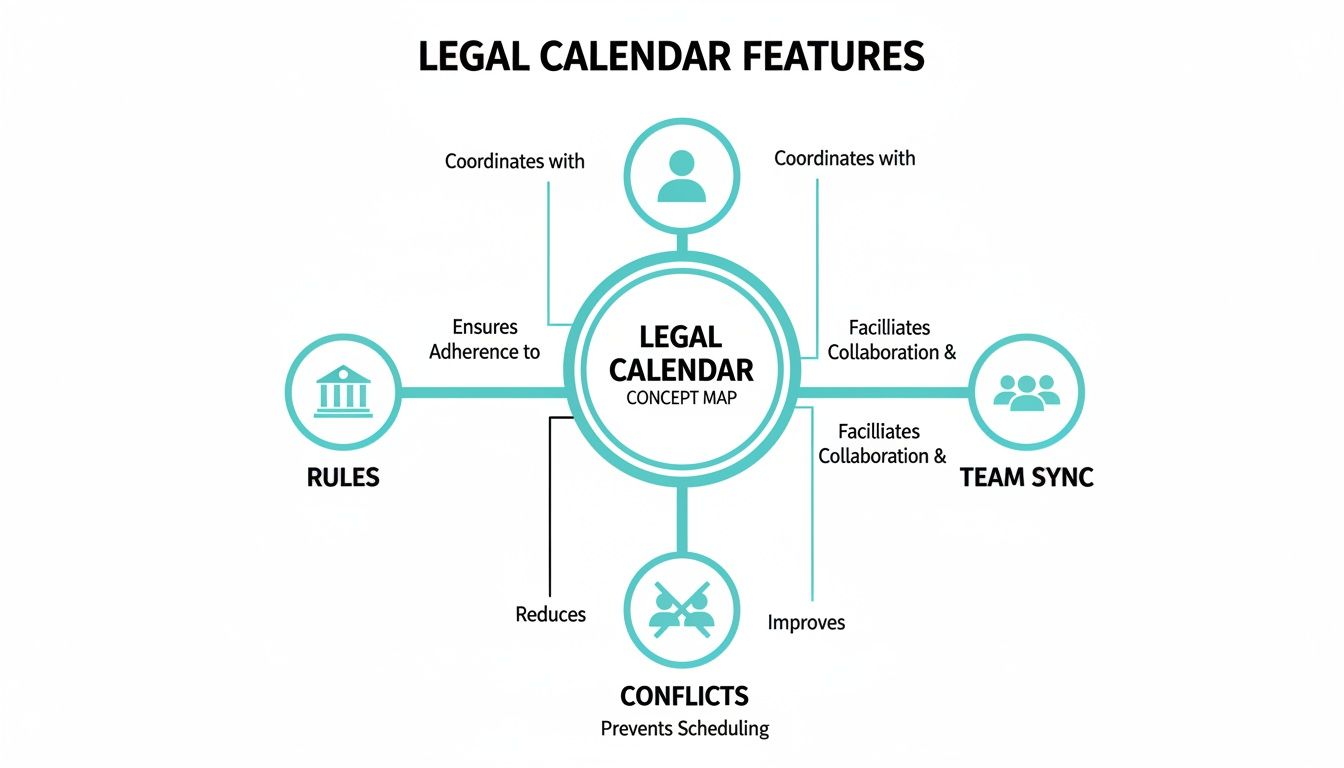
As you can see, an integrated calendar isn't just a scheduling tool. It’s a command center that actively manages critical firm operations.
From Double Entry to a Single Source of Truth
Without integration, your staff is trapped in a cycle of redundant work. A paralegal gets a new court date, puts it in the calendar, and then has to jump over to the case management software to type the exact same information into the case notes. This double entry is more than just inefficient. It’s a breeding ground for human error.
One simple typo or a forgotten update can create two conflicting records, leading to a world of confusion and risk. An integrated system gets rid of this problem entirely.
When a new court date is entered into the calendar, it instantly appears in the client's case file. This creates a single, undeniable source of truth that the entire team can rely on, ensuring everyone is working from the most current information.
A Real-World Integration Scenario
Let's walk through a common situation to see what this looks like in practice. Imagine a paralegal receives an order setting a trial date six months from now.
- In an integrated system: The paralegal adds the trial date to the calendar for that specific case.
- Instantly: The software’s rules engine kicks in, calculating and populating dozens of preceding deadlines for motions, discovery, and expert designations.
- Simultaneously: The trial date and all those related deadlines are automatically written to the case file in your case management platform.
- Finally: Tasks can be automatically assigned to the right team members, with reminders already scheduled.
What used to be a 15 minute manual task just became a 30 second, error proof entry. Every critical date is now logged, tracked, and visible right where it belongs: within the context of the case.
The Growing Need for Connected Systems
This shift toward integrated tools isn't just a niche trend; it’s where the entire industry is heading. Legal calendar software is a massive part of the legal tech market, making up around 63% of the application segment. The market, valued at USD 571.3 million in 2023, is expected to soar as more firms realize that manual calendaring can eat up 20-25% of a paralegal's time.
This growth is fueled by a simple truth: isolated tools are holding firms back. It goes beyond just tracking court dates. Integrating systems to manage all communications effectively, like using professional fax cover letters for legal needs, is crucial for building a stronger case file. A connected ecosystem ensures that every piece of information, from a deadline to a client fax, is captured and organized, creating a complete and defensible record for every matter your firm handles.
How Your Calendar Can Elevate the Client Experience
Think of your firm's calendar as more than just an internal tool for keeping track of court dates and meetings. When you plug it into your client communication workflow, it becomes one of your most powerful assets for building trust and transparency. Modern legal calendar software isn't just about scheduling; it’s about turning your calendar into the backbone of a stellar client experience.
The magic happens with integration, especially when you connect your calendar to a client portal. Picture this: your clients are never left in the dark, wondering what’s happening with their case. This connection creates a direct, automated pipeline of information that keeps them updated without your team having to lift a finger.

This kind of proactive communication is a game changer for reducing client anxiety. When people feel informed and in the loop, they're far less likely to call or email "just to check in," those constant interruptions that pull your staff away from focused, billable work.
Your Calendar as a Communication Hub
When your legal calendaring system syncs up with a client portal, every event you add to the schedule can automatically trigger a helpful update for your client. This creates a smooth, continuous flow of information that makes clients feel seen and respected. It completely flips the script from reactive, manual updates to proactive, automated engagement.
Let's take a simple deposition scheduling as an example.
- The Old Way: A paralegal schedules the deposition. Then, they have to switch gears, draft an email to the client, hunt down the notice to attach it, and create a separate reminder on their to do list to follow up later. It's a multi step, manual process.
- The Integrated Way: The paralegal schedules the deposition right inside the case management system. Instantly, the calendar integration sends an automated notification to the client through their secure portal. The event is also added to a shared case timeline they can access whenever they want.
That one small change makes a huge difference. It saves your team valuable time and gives the client immediate peace of mind.
Automating Reminders and Cutting Down on Friction
This integration is about more than just notifications for big events. It can also automate all those little reminders and follow ups that chew up so much administrative time. You can set up your calendar to automatically nudge clients for documents or information based on upcoming deadlines.
By linking your calendar to a client portal, you create an automated system that keeps cases moving forward. It’s no longer just a schedule; it becomes an active tool for client management and communication.
This hands on approach doesn't just make your firm more efficient; it empowers your clients. They gain a clear understanding of what you need from them and when, which smooths out the friction that so often accompanies the legal process. When clients feel like they're active participants in their own case, their satisfaction with your firm skyrockets. You can dive deeper into these kinds of strategies in our guide on client communication best practices.
The Power of a Transparent Timeline
At the end of the day, connecting your calendar to a client portal delivers the one thing every client craves: transparency. Giving them a clear, easy to access view of key dates and upcoming milestones demystifies the entire legal journey.
This visibility achieves several critical goals:
- Manages Expectations: Clients can see the case timeline and understand that progress is happening, even when things are quiet.
- Reduces Inbound Calls: It preemptively answers their most common questions, freeing up your team's time and attention.
- Builds Lasting Trust: A transparent process shows you respect your client and reinforces the fact that your firm is organized, professional, and in control.
By making your calendar a central pillar of your client communication strategy, you offer a level of service that truly sets your firm apart from the competition.
Choosing the Right Legal Calendar Software
Picking the right legal calendar software for your firm isn't just about ticking boxes on a feature list. It's a strategic decision that touches everything from your day to day efficiency to the security of your clients' most sensitive data. Think of it like buying a car. The brochure looks great, but you need to get under the hood and go for a test drive to see if it can really handle the demands of your practice.
This decision is especially critical in North America, which accounts for a massive 37.5% of the global legal calendar software market. The U.S. alone makes up 22.8% of that share, largely because of the sheer volume of litigation. U.S. courts are docketing over 100 million cases a year. With numbers like that, automated, reliable calendaring isn't a luxury; it's a necessity to avoid sanctions and malpractice claims. You can find more details on these market dynamics over at OpenPR.com.
Evaluating Security and Compliance
Before you even think about features, start with security. Your calendar will hold the crown jewels of your firm: client names, confidential case details, and court mandated deadlines. A data breach isn't just an IT problem. It's a reputational and financial catastrophe waiting to happen.
You need to ask potential vendors the tough questions. Where will our data be stored? What kind of encryption are you using? What happens if your servers go down? A provider worth your time will be completely transparent about their security protocols and have a rock solid disaster recovery plan.
Scalability for Your Firm's Future
The software you choose today has to work for the firm you want to be tomorrow. Whether you're a solo practitioner with big growth plans or an established firm expanding into new practice areas, you need a solution that can grow with you.
Think about what happens when you add new users, cases, and jurisdictions. Does the pricing become a burden as you scale? A good platform won't force you into a painful migration to a new system just a few years down the road because you outgrew it.
The best legal calendar software doesn’t just solve today’s scheduling problems. It provides a flexible foundation that supports your firm's long term growth and evolving needs.
Prioritizing an Intuitive User Interface
A tool can have all the power in the world, but it’s completely useless if your team won't use it. The interface has to be clean and intuitive. If your attorneys and paralegals need a week of training just to schedule a deposition, you've already lost the battle for adoption.
The goal is to find software that feels like a natural part of your team's workflow, not another complex program they have to wrestle with every day. A great user experience shortens the learning curve and gets everyone on board from day one.
Key Questions for Your Software Demo
A live demo is your test drive. This is your chance to get past the sales pitch and see how the software actually performs under pressure. Don't let the salesperson run the show. Come prepared with a checklist of what matters most to your firm.
Here are a few essential questions you should be asking:
- Integration Capabilities: How does it connect with our existing case management system, whether that's Needles, Neos, LawBase, or Litify? Can you show me exactly what that sync looks like in real time?
- Onboarding and Support: What does the implementation process actually look like, and how long does it take? What kind of ongoing support do you offer, and where is your support team located?
- Rules Automation: Show me how the system calculates a complex deadline for a specific jurisdiction we practice in. How often are your court rule libraries updated?
- Mobile Access: What can your mobile app really do? Can our attorneys effectively manage their calendars from a courthouse hallway on their phone or tablet?
Getting straight answers to these questions will help you see which legal calendar software truly has the power, security, and usability your firm needs to operate at its best.
Making Sure the New System Sticks: A Guide to Firm-Wide Adoption
Buying a great piece of legal calendar software is just the first step. The real test is getting your entire team to actually use it. A successful rollout isn't just about installing a program; it's about fundamentally changing how your firm operates for the better.
Let's be honest, lawyers and legal staff are creatures of habit. The goal is to make this new tool so valuable that it becomes an essential part of everyone's day, from the senior partners right down to the newest paralegal. This takes a real strategy, one that starts with proving the software is worth the effort.
How to Measure the Real-World Impact
To get buy in, you need to show, not just tell. Before you even start the rollout, take a snapshot of your firm's current performance. This gives you a baseline to measure against later, allowing you to highlight concrete wins that everyone will understand.
Here are a few key things to track:
- Time Saved on Admin Work: How many non billable hours are spent scheduling, calculating deadlines, and sending reminders? Track this, because seeing that number drop is a huge motivator.
- A Nosedive in Missed Deadlines: This is the big one. A sharp decrease in missed deadlines or even last minute scrambles is the most powerful proof that the software is working.
- Fewer "Just Checking In" Calls: If your new system integrates with a client portal, you should see a drop in phone calls and emails asking for status updates. That's time your team gets back for high value work.
When you can point to these numbers, you're not just talking about new tech. You're showing how the firm is becoming more efficient and less stressful for everyone involved.
Simple Steps to Get Your Team on Board
A single training session isn't going to cut it. Driving real adoption requires leadership, consistent encouragement, and a clear vision for how this tool makes life better.
The best software rollouts I've ever seen were driven by internal champions. It's not about forcing change from the top down. It's about empowering your team to see the new system as a tool that lets them focus on what they do best: practicing law.
Here’s how to build that momentum:
- Appoint a Champion: Find a tech savvy paralegal or associate who is excited about the new system. Make them the go to person for questions. Their genuine enthusiasm will be far more persuasive than any mandate from management.
- Celebrate the Small Victories: When a team uses the new software to effortlessly navigate a complex scheduling conflict or catches a tricky deadline, make a big deal out of it. Share that success story in a team meeting or an internal email.
- Lead by Example: Senior partners and managers need to use the system visibly and consistently. If the leadership team is still using their old methods, no one else will feel compelled to change.
These small wins build on each other, turning initial skepticism into firm wide belief. Before you know it, your new legal calendar software won't be "the new system." It'll just be how you get things done.
Frequently Asked Questions
Jumping into any new piece of software for your firm is going to stir up some questions. Let's tackle some of the most common ones we hear from law firms when they're looking at a dedicated legal calendar solution. The goal here is to give you clear, straight to the point answers about how this tech actually works in practice.
How Does Legal Calendar Software Handle Different Court Rules?
This is really the heart of the matter. Good legal calendar software isn't just a fancy digital planner; it's a rules engine. It contains a massive, constantly updated database of court rules for federal, state, and even hyper specific local jurisdictions.
So, when you enter a single, critical date, let's say a trial date, the system instantly gets to work. It references the rules for that specific court and automatically populates your calendar with every associated deadline. No more poring over rulebooks or second guessing your calculations. This automation is a core function designed to protect your firm from one of the biggest risks: missed deadlines.
Think of it this way: you're essentially outsourcing the incredibly tedious and high stakes job of deadline calculation. This frees up your team to focus on case strategy, not administrative busywork, and drastically cuts down the chance of a simple mistake causing a major problem.
Can This Software Integrate With My Existing Case Management System?
Absolutely. In fact, if it doesn't, you should probably walk away. Seamless integration is a non negotiable feature for any modern legal calendaring tool. The best solutions are built from the ground up to sync with the case management platforms firms actually use, like Needles, Neos, LawBase, or Litify.
This two way connection creates a single source of truth for every case event. When a paralegal enters a deposition date into the calendar, it shows up in the case management system. When an attorney updates a client meeting in the case file, it appears on the calendar. This completely gets rid of the double entry that wastes time and, more importantly, opens the door to costly data entry errors.
What Is the Implementation Process Like?
Gone are the days of year long software rollouts. Because most of this software is cloud based, the process is surprisingly quick and straightforward. A good provider will have a structured onboarding plan that usually includes:
- An initial discovery call to understand your firm's workflow
- Syncing your existing data securely
- Hands on training for your entire team
The whole point is to get your firm up and running with as little disruption as possible. For many firms, we're talking about a timeline of about a week from kickoff to being fully operational. You'll want to find a partner that provides dedicated support to walk you through every step, ensuring the transition is a success, not a headache.
CasePulse offers a secure, all-in-one client engagement solution that integrates directly with the case management systems your firm already relies on. By automating client updates, file sharing, and form collection, CasePulse helps firms slash call volume and boost efficiency—all without making your staff learn yet another new inbox. Find out how you can start inviting clients in about a week.