
 CasePulse
 The phones start early in a busy PI firm. A client wants to know whether medical records were received. Another asks if the demand package went out. Someone missed a text, so they call the front desk instead. A paralegal is chasing signatures, copying updates into the case management system, and answering the same status question for the fourth time before lunch.
None of that work is unusual. That's the problem.
When client communication, intake, reminders, and document follow-up all depend on people remembering the next step, the firm runs on interruptions. Attorneys lose time to avoidable internal questions. Paralegals spend their day switching between inboxes, voicemails, and the CMS. Managers know work is moving, but they can't always see where it slows down until a client complains or a deadline feels too close.
Legal workflow management software fixes that only when it's treated as an operating system for the firm, not just another tool to buy. The firms that get real value don't just install software. They structure intake, routing, communication, and follow-up so routine work moves without constant manual intervention.
The End of Constant Interruptions
In plaintiff work, the same friction shows up again and again. Intake notes arrive in one place. Case details live in another. Client questions come through phone, email, and text. Staff then spend hours stitching the whole thing together by hand.
That manual stitching is expensive, even when nobody labels it that way. It shows up as slower response times, more call volume, more context switching, and less time for legal work that moves a case forward.
What the day looks like without structure
A typical breakdown looks like this:
- Front desk overload: Clients call for updates they could have received automatically.
- Paralegal drag: Staff send reminders, chase forms, and repeat status information all day.
- Attorney interruptions: Fee earners get pulled into operational questions that should never reach them.
- Invisible bottlenecks: Managers know people are busy, but they can't easily see where matters are stalling.
Practical rule: If your team is answering the same status question across phone, email, and text, you don't have a staffing problem first. You have a workflow problem.
Legal workflow management software is the point where a firm stops relying on memory and inbox habits. It turns recurring tasks into a defined process. Intake gets categorized. Follow-ups trigger automatically. Clients get a reliable place to check status, send files, and complete forms. Staff work from one consistent process instead of making judgment calls on every routine step.
That shift matters because the broader market is moving in the same direction. The legal practice management software market reached $3.15 billion in 2026 with a 12.7% CAGR, and firms that maximize software utilization can reduce administrative overhead by roughly 31%, freeing up the equivalent of 12 hours per attorney weekly, according to Demand Pulse's legal practice management software analysis.
What changes when the workflow is defined
The primary benefit isn't that the firm becomes more technical. It's that the firm becomes more predictable.
Clients get fewer reasons to call. Staff stop recreating the same follow-up process on every matter. Partners get a cleaner view of operations. In a PI practice or a mid-sized firm with steady case volume, that's what scale looks like in real life. Less chaos. Fewer handoffs. Better use of the team you already have.
What Legal Workflow Management Really Means for Your Firm
Legal workflow management software is easiest to understand if you think of it as air traffic control for the firm. The software doesn't try the case, negotiate the settlement, or argue the motion. It keeps the work moving in the right order, with the right handoffs, and with fewer collisions.
Without that control layer, firms usually operate through scattered signals. A note in the CMS. An email flag. A calendar reminder someone created for themselves. A sticky note on a monitor. That setup can hold for a while. Then volume rises, a key employee goes on leave, or a high-maintenance client starts calling twice a day, and the whole system shows its weakness.
The software's real job
At a practical level, legal workflow management software does five things well:
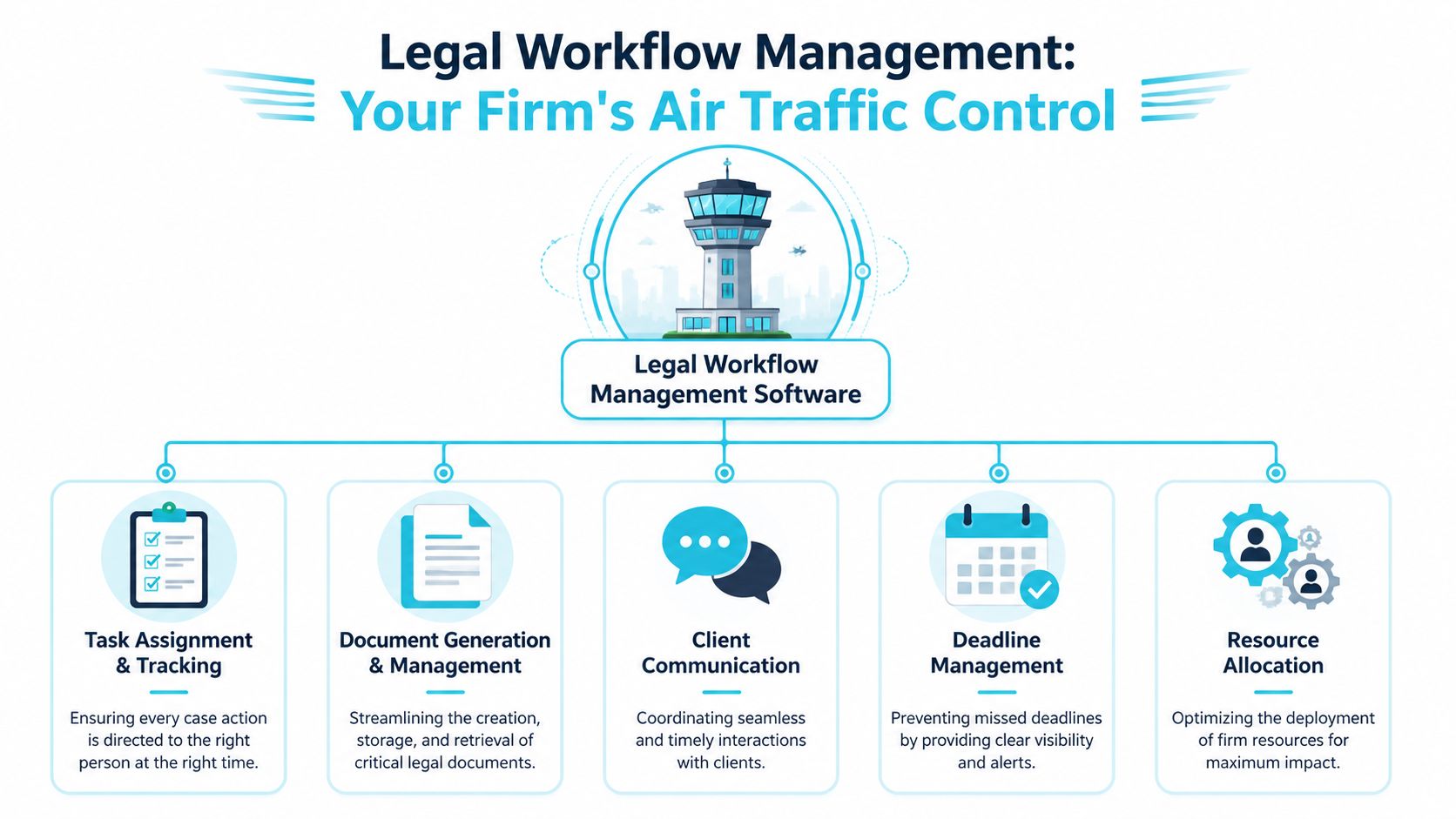
- It centralizes work. Requests, tasks, and updates stop living in separate channels.
- It standardizes handoffs. The next step doesn't depend on who remembers what.
- It automates routine communication. Clients and staff get updates without someone manually sending each one.
- It creates a single source of truth. Everyone sees the same matter status.
- It makes process visible. Leadership can spot bottlenecks before they become service problems.
That sounds simple. In practice, it's a major operational shift. The firm moves from ad hoc coordination to managed flow.
Why no-code matters more than most firms realize
A lot of firms hear "automation" and assume that means a long IT project. That's usually where momentum dies. The better approach is configuration, not custom development. If your team can adapt rules, reminders, and approval paths without opening a technical ticket every time, adoption gets much easier.
For firms that want a grounded look at mastering no-code workflow automation, that resource is useful because it frames no-code as an operational discipline, not just a software feature.
A good legal workflow setup also shouldn't force your staff to learn an entirely new way to think about work. It should support the way the firm already operates, then remove the repetitive parts that add no value.
Air traffic control works because every handoff is visible. Law firm workflows need the same discipline, especially when client communication and deadlines are involved.
What firms often get wrong
The most common mistake is treating legal workflow management software like a replacement for process. It isn't. Bad process inside new software is still bad process.
The second mistake is buying a system because the demo looks polished, then discovering the daily work still happens in the old CMS, inboxes, and phone logs. That's why the operating model matters more than the feature list. If the software can't support intake, task movement, communication, and status visibility in a way the staff will effectively use, it becomes one more layer to manage.
If you want a plain-English explanation of workflow structure before you evaluate vendors, this overview of workflow automation is a practical starting point.
Core Features That Drive Firm Efficiency
The firms that get traction with legal workflow management software usually rely on three pillars. Not ten. Not a giant wish list. Three.
They automate repetitive process steps, they give clients a secure way to self-serve routine updates, and they connect that experience to the firm's existing case management system. When one of those pieces is missing, the gains are partial. When all three work together, staff feel the difference quickly.

Workflow automation for recurring legal tasks
The first pillar is automation of repeatable work. This includes intake routing, reminders, task creation, document requests, approval chains, and status-driven follow-up.
AI-driven intake systems can automatically categorize and route incoming legal requests, reducing manual routing time by up to 50% and enabling teams to handle 30 to 40% more requests without additional headcount, according to Streamline AI's legal workflow software guide.
For a PI firm, that matters at the front end and throughout the life of the case. Intake doesn't sit in a shared inbox waiting for someone to review it. Follow-up doesn't depend on a staff member remembering to send the same reminder again. The software applies rules and moves the work to the right person.
A useful way to think about this shift is the same one finance teams use when transitioning from manual processes to automation. The category is different, but the operational lesson is the same. Manual systems fail at volume because every exception lands on a person.
Secure client portals that reduce status chasing
The second pillar is the client portal. Within it, many firms see immediate relief, especially in personal injury practices.
Clients don't call just because they're impatient. They call because they don't know what's happening, and the firm hasn't given them a dependable alternative. A secure portal changes that dynamic. Clients can check status, message the team, upload files, and complete forms from any device. Routine communication stops being a one-to-one activity for staff.
That doesn't mean every client stops calling. It means many routine calls never need to happen in the first place.
The right portal doesn't replace relationships. It replaces avoidable interruptions.
A portal is also more useful than a string of texts or email updates because it keeps the interaction tied to the matter. Files, forms, and messages stay organized. Staff don't have to reconstruct context from scattered channels.
Deep integration with your existing CMS
This is the pillar too many articles skip. Integration with the firm's existing case management system isn't a technical detail. It's the adoption decision.
If your lawyers and staff already live in Needles, Neos, LawBase, or Litify, asking them to duplicate work in a second core system is a fast way to create resistance. The better model is to let the workflow layer and client communication layer connect directly to the CMS so staff can continue operating where they already work.
That low-friction approach is especially important for mid-sized PI firms. They usually don't need a full rip-and-replace project. They need fewer phone calls, cleaner follow-up, better intake flow, and better client visibility without disrupting the case team.
A practical stack might look like this:
- Case management system as the source record: Needles, Neos, LawBase, or Litify remains the operational center.
- Workflow layer for orchestration: Rules trigger reminders, requests, and status-based tasks.
- Portal layer for client communication: Clients get visibility and self-service without staff managing another inbox.
- Document flow tied to matter status: Forms and file requests move as part of the process, not as one-off requests.
One example in this category is CasePulse, which provides a secure client portal for law firms and integrates with systems such as Needles, Neos, LawBase, and Litify so clients can check case status, message the team, share files, and complete forms while staff continue working inside their existing CMS.
Closed-loop operations beat disconnected tools
Firms often assemble separate tools for texting, forms, e-signature, document sharing, and reminders. Each tool solves one pain point. Together, they often create a coordination mess.
Legal workflow management software works best when it creates a closed loop. Intake enters the process. Tasks route automatically. Client updates happen through the portal. Documents and forms stay tied to the matter. Staff can see what happened and what needs to happen next.
That's how operational work stops leaking across channels.
A Practical Checklist for Selecting the Right Software
Most firms buy workflow software backward. They start with the demo. They react to polished screens, AI language, and a promise that everything will be easier. Only later do they ask the question that should have come first: how will this fit the systems and habits we already have?
For PI firms and mid-sized practices, the answer usually matters more than any flashy feature. If the software doesn't connect cleanly with Needles, Neos, LawBase, or Litify, your staff will end up double-entering updates, checking multiple places for the same answer, and drifting back to the old process.
Start with integration, not innovation theater
The market talks constantly about all-in-one platforms. In real firms, all-in-one often means all-at-once disruption.
A better buying lens is simpler. Ask whether the software helps your team do today's work with less friction inside the systems you already rely on. If it does, you've got a realistic path to adoption. If it requires retraining everyone around a brand new operating core, expect resistance, delays, and workarounds.
Selection rule: The most important feature is often the least glamorous one. Clean integration beats impressive theater in the demo.
This is also where managing partners should be skeptical. Vendors love broad claims. Your team needs concrete answers about workflow fit, client communication, implementation effort, and support after go-live.
Legal workflow software selection checklist
| Evaluation Area | Key Questions to Ask | Why It Matters |
|---|---|---|
| Integration with existing CMS | Does it integrate with Needles, Neos, LawBase, or Litify? Does staff work stay inside the existing system or require duplicate entry? | Adoption improves when staff don't have to change their daily workspace. |
| Client communication | Can clients securely check case status, send messages, upload files, and complete forms? | This is where firms reduce routine status calls and email clutter. |
| Workflow configuration | Can the team configure reminders, follow-ups, and routing rules without heavy technical work? | Process ownership should sit with operations, not only with IT or the vendor. |
| Security and compliance | What controls protect sensitive client information? Is there clear documentation on security practices, encryption, and compliance posture? | Legal data requires disciplined handling, and vague answers are a warning sign. |
| Implementation effort | How much internal time is required? What does onboarding actually involve? | Long, disruptive rollouts kill momentum and push firms back to manual habits. |
| Support model | Is support hands-on and responsive? Will your team get practical guidance during setup and after launch? | Software adoption usually fails in the gaps between purchase and daily use. |
| Pricing structure | Does pricing scale with firm size? Are there long-term contracts or rigid usage caps? | Firms need cost structure that matches actual operations, especially in high-volume practice areas. |
Questions that expose weak options fast
When evaluating vendors, don't ask only what the software can do. Ask what your staff will have to do differently.
Use questions like these in the meeting:
- Show me the integration path: Don't accept "we have an API" as the whole answer. Ask how updates, messages, files, or forms connect to the CMS your staff uses.
- Walk through a client status request: Ask the vendor to show how a client checks status without generating a manual follow-up for staff.
- Test a common exception: Ask what happens when a form is incomplete, a file is missing, or a reminder goes unanswered.
- Clarify ownership after launch: Find out whether your operations team can manage workflow changes or whether every small edit requires vendor intervention.
- Ask what the staff screen looks like: If daily work requires multiple tabs and duplicate updates, the workflow isn't really efficient.
Some firms also evaluate adjacent tools during this process, especially if intake records or recorded statements create downstream admin work. If that's part of your stack review, this guide to best legal transcription software solutions can help separate that issue from your core workflow decision.
What usually doesn't work
The weakest purchases tend to share the same pattern:
- A broad platform with shallow legal fit
- A beautiful interface with poor CMS integration
- A feature-heavy tool that creates another inbox
- A migration-heavy plan that drags on and loses internal buy-in
Those products can look advanced and still fail in practice.
The right legal workflow management software should reduce work, not rearrange it. For firms that already have a functioning case management backbone, the smartest move is usually augmentation. Keep the CMS. Add the workflow and communication layer that removes the avoidable friction.
Your Low-Friction Implementation Roadmap
A good implementation doesn't feel like a technology event. It feels like the firm finally stopped making people do the same avoidable tasks by hand.
That starts with scope. Don't try to redesign every workflow in the firm on day one. Start with the high-friction areas that staff and clients feel every week. In PI practices, that usually means client updates, form collection, file sharing, and routine follow-up.

Phase one with branding and configuration
Begin by configuring the portal and workflow rules around the firm's actual process, not an abstract template. The client-facing side should reflect the firm's identity so the experience feels consistent, not bolted on.
Internally, define a short list of workflow triggers that matter most. Think in plain operational terms:
- Status updates clients ask about repeatedly
- Forms clients often delay completing
- Files the team repeatedly requests
- Reminders staff send over and over
This phase should also settle the integration behavior. Staff need clarity on where they work each day and what syncs automatically.
Staff onboarding inside the existing workflow
Training works best when it focuses on fewer actions, not more. Show paralegals and case managers how communication, reminders, forms, and messages fit into the workflow they already use.
If the new setup requires them to babysit another dashboard all day, adoption will lag. If it lets them work from familiar systems while reducing repetitive touches, they'll use it.
A practical way to frame onboarding is this: the software is handling routine movement so the staff can focus on judgment calls, not status chasing.
Adoption improves when staff see one immediate relief point in the first week.
If your team needs a simple reference for implementation thinking, this guide on how to automate workflows is useful because it keeps the focus on process design rather than software hype.
Pilot before you roll out firm-wide
Start with a small group of active matters and a friendly set of clients. Not your hardest edge cases. Not the clients already frustrated with every step. Pick matters that will give you useful feedback without putting the team under unnecessary pressure.
During the pilot, watch for a few things:
- Client behavior: Are clients using the portal for updates, files, and forms?
- Staff friction: Are paralegals doing less manual follow-up or just doing it in a different place?
- Process gaps: Which reminders, messages, or workflow triggers need adjustment?
- Internal confidence: Do team leads trust the system enough to widen adoption?
Expand in stages
A phased rollout is usually the most durable path. Invite more active clients once the early kinks are fixed. Keep the communication simple. Tell clients where to go, what they can do there, and when they should still call.
The point isn't to force every interaction into a portal. The point is to move routine communication into a structured channel so staff can spend more time on substantive case work. When implementation stays focused on that outcome, firms usually avoid the months-long rollout that everyone dreads.
Real World ROI and Firm Success Stories
ROI in legal workflow management software usually shows up first in places firms used to accept as normal. Fewer status calls. Fewer reminder emails. Less time hunting for the latest file or message. Better visibility into which matters are waiting on the client and which are waiting on the firm.
The easiest way to understand the value is to look at two common operating patterns.

The plaintiff firm that can't keep up with client updates
This firm isn't poorly run. It's just buried in avoidable communication. Clients call for routine status updates. Paralegals answer the same questions, resend the same forms, and manually remind clients to complete basic tasks. Everyone stays busy, but a large share of that effort doesn't move cases forward.
Client portal workflows tend to produce a fast operational shift. When clients can log in, see status, exchange messages, upload documents, and complete fillable forms in one place, routine updates stop consuming the front desk and case team in the same way.
According to Workstorm's legal workflow benchmarks, firms implementing workflow automation with no-code builders can eliminate 70 to 80% of manual follow-ups. For PI practices, automating status checks via branded client portals can cut paralegal administrative work by 50% per case, delivering 20 to 30% overall efficiency gains.
That doesn't mean the firm becomes fully hands-off. It means staff stop spending so much energy on predictable, low-value communication loops.
The mid-sized practice stuck in approval and document lag
The second pattern looks different. This firm has capable lawyers and solid demand, but work stalls around internal approvals, signatures, document routing, and scattered follow-up. Nobody owns the whole chain, so staff chase updates by email and memory.
A structured workflow changes that. A matter can trigger the next task automatically. The right person gets notified. Files stay connected to the matter. Clients or internal stakeholders know what action is pending. Managers can finally see where work gets stuck.
Firms usually don't lose time because people are idle. They lose time because handoffs are unclear.
For leadership, measurement is essential. If you don't track response times, pending follow-ups, client completion rates, and communication volume, the firm can't tell whether operations are improving or just feeling busy in a different format. This overview of the metrics that matter for law firms is a useful reminder that workflow software only becomes a management asset when the firm uses the visibility it creates.
What success looks like in practice
The strongest outcomes usually share a few traits:
- Routine communication shifts to self-service where appropriate
- Staff stop duplicating updates across disconnected channels
- Follow-up becomes rules-based instead of memory-based
- Leadership gains clearer operational visibility
- Client experience improves because communication becomes more consistent
That's the practical ROI. Not a flashy dashboard by itself. A firm that handles volume with less friction, fewer interruptions, and better control over how work moves.
From Operational Drag to Strategic Advantage
Legal workflow management software isn't a nice-to-have layer for firms that want to grow without drowning in admin work. It's a business decision about how the firm will operate under real volume.
Manual workflows break in familiar ways. Clients call because they don't have visibility. Staff chase forms and updates because reminders live in people's heads. Lawyers lose time to internal coordination because nobody fully owns the process between steps. Firms often respond by adding effort. More calls. More checking. More chasing. That doesn't scale.
The better path for most PI and mid-sized firms isn't ripping out the systems they already depend on. It's adding structure around them. Keep the case management platform your team already knows. Add integrated workflow and communication tools that reduce avoidable work, improve client access, and make follow-up consistent.
That's where legal workflow management software becomes a strategic advantage. It protects attorney time. It reduces pressure on paralegals. It gives clients a better experience without asking the staff to manually deliver every update. And it gives firm leadership something more valuable than activity. It gives control.
If your firm wants a low-friction way to reduce client status calls and automate routine follow-up without replacing its existing case management system, CasePulse is built for that model. It provides a secure client portal for law firms, integrates with Needles, Neos, LawBase, and Litify, and lets staff keep working inside their current workflow while clients can check status, message the team, share files, and complete forms from any device.