
 CasePulse
 Secure file sharing is not just a fancy tech upgrade. It is a dedicated, encrypted platform to exchange sensitive documents instead of just hitting 'attach' on an email. For law firms, this means using a professional client portal that fiercely protects confidential information, keeps you on the right side of privacy regulations, and reinforces attorney client privilege.
This is no longer a "nice to have." It is a fundamental part of practicing law today.
Why Secure File Sharing Is No Longer Optional for Law Firms
The days of attaching highly sensitive legal documents to a standard email and hoping for the best are long gone. For any modern law firm, continuing that practice is not just outdated, it is a massive liability. When you handle medical records, financial statements, and privileged case strategies, the old way of doing things just does not cut it.
This is not about some far off, hypothetical threat. It is about managing very real, present day risks. The legal industry has become a prime target for cybercriminals, and insecure communication is one of their favorite ways in.
The Alarming Reality of Data Breaches
Over the last decade, the legal sector has quietly become one of the most targeted industries for data theft, with sloppy file sharing practices being a major weak point. According to the American Bar Association, somewhere between 27% and 30% of law firms have reported a security breach in recent years. By 2024, that number is closer to one in three.
The financial stakes are staggering. IBM’s 2023 data puts the average global cost of a data breach at $4.45 million. That means a single incident sparked by one emailed attachment or an unprotected link could be catastrophic for a mid sized firm.
This trend hammers home a critical point: your firm's reputation and financial health are directly tied to how you handle client data. One breach can trigger a domino effect of regulatory fines, client lawsuits, and a loss of credibility that is nearly impossible to recover from.
Adopting a secure client portal is not just an IT upgrade. It is a core business decision that protects your clients, your reputation, and your bottom line. It signals to clients that you take their privacy as seriously as their legal case.
Moving to the Professional Standard
There is a reason dedicated client portals have become the new professional standard. They create a controlled, auditable environment where every document is encrypted and every interaction is logged. This approach to secure file sharing with clients directly shores up the inherent weaknesses of email.
For total protection, law firms should look into implementing robust advanced cybersecurity frameworks for safeguarding sensitive data. But this professional approach does more than just lock down files.
- It builds client trust. Giving clients a secure, branded portal shows them you are genuinely invested in protecting their most sensitive information.
- It demonstrates due diligence. If a regulator ever comes knocking, you have a clear, documented record of your firm's security measures.
- It future proofs your firm. Data privacy laws are only getting stricter. Having a secure system in place is essential for compliance and growth, and you can explore more on the importance of staying up to date with technology in law firms.
Ultimately, secure file sharing is a cornerstone of modern legal practice. It is an investment in risk management and client service that pays for itself by shielding your firm from the very real threats you face every single day.
The Core Features of a Secure File Sharing System
Moving away from the built in risks of email means you need to know what makes a dedicated system genuinely secure. When you are looking at options for sharing files with clients, you have to dig deeper than just the marketing claims and focus on the core features that build a real defense for sensitive information. These pieces work together to create a controlled environment that email just was not built for.
The move from email attachments to secure file sharing portals has picked up serious momentum, especially since the late 2010s. This is not just a trend. It is a direct response to rising breach statistics and the daily workflow pressures firms face. Legal tech experts pretty much all agree now: traditional email is simply not up to the task of protecting confidential client documents.
Purpose built platforms add layers of protection like bank level encryption, role based permissions, and audit trails that email just does not have. If you want to dive deeper into how legal teams are adapting, you can find more details about secure file transfer on TitanFile.com.
Bank-Level Encryption Is Non-Negotiable
First things first: bank level encryption. This is not just a buzzword. It refers to a specific, high standard of data protection, usually AES 256 bit encryption. This protection has to cover data in two critical states.
- Data in transit: This is what protects information as it travels across the internet from your system to your client's device. Without it, you are basically sending a postcard that anyone could intercept along the way.
- Data at rest: This secures your files while they are sitting on a server. Even if someone physically broke into the data center, the encrypted files would be nothing but unreadable gibberish.
Proper encryption ensures a document is shielded from unauthorized eyes from the moment it is uploaded until the moment it is downloaded. Think of it as putting a document in an unbreakable, sealed container before you send it.
Granular Access Controls Put You in Command
Beyond encryption, you absolutely need the ability to control who can do what with a file. Once you hit 'send' on an email, you have lost all control. A secure system, on the other hand, gives you granular access controls, letting you set permissions with real precision.
This means you can decide on a per file or per user basis who can view, download, or edit a document. For instance, you could let a client review a draft settlement but block them from downloading it. Or you might give an expert witness permission to upload their report into a specific folder while keeping all other case files invisible to them.
That kind of control is flat out impossible with email, where an attachment can be forwarded, saved, and shared endlessly without you ever knowing.
A secure client portal transforms file sharing from a one way street into a controlled, two way exchange. It gives you the power to manage access dynamically throughout the entire lifecycle of a case, ensuring information only reaches the right people at the right time.
The risks that make these security features so vital are very real. Law firms are a prime target for cyberattacks, and the consequences can be devastating.
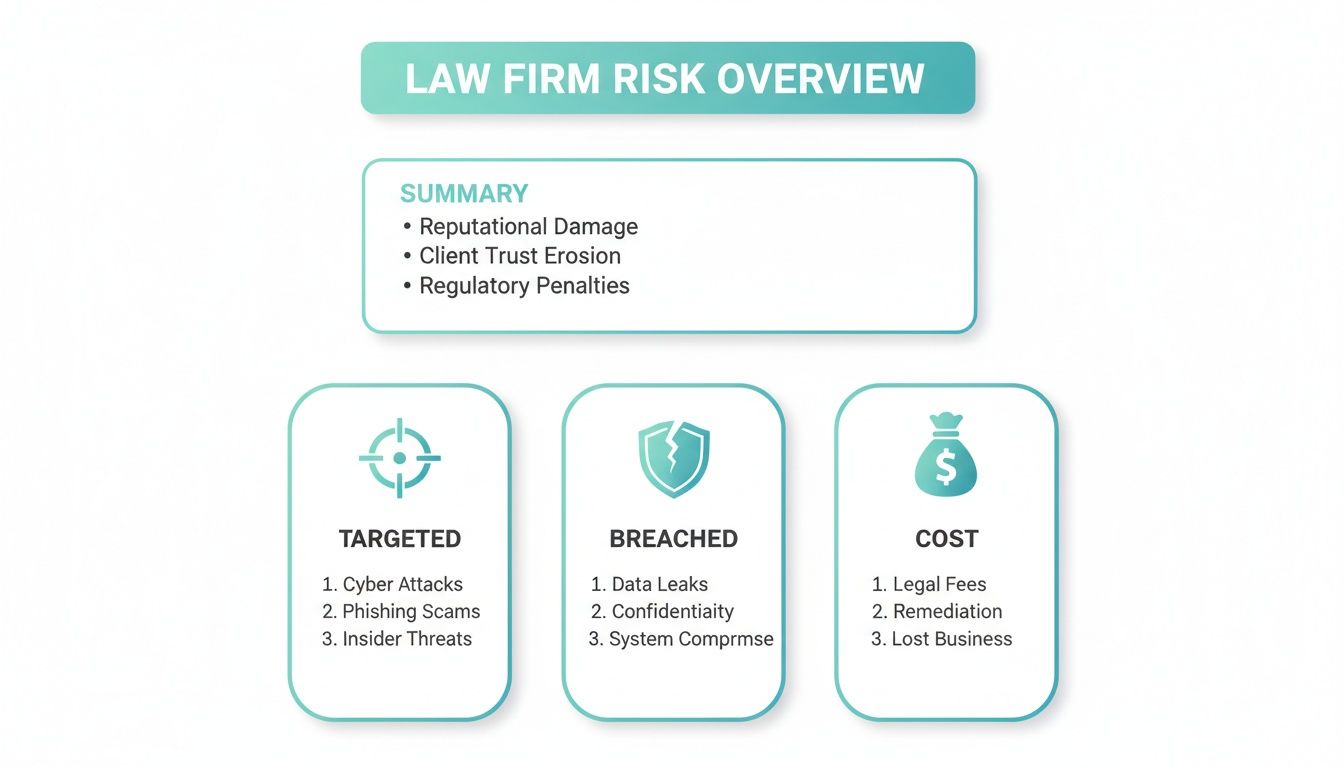
As this shows, it is not a matter of if a firm will be targeted, but when. The financial fallout from a breach is often the least of the worries when you factor in reputational damage and ethical violations.
Detailed Audit Trails for Compliance
Finally, a feature that is critical for both security and compliance is the audit trail. A good audit trail, sometimes called an activity log, records every single action taken within the portal. It tells you who accessed a file, when they did it, what they did, and even where they did it from.
This detailed log is invaluable. If a question ever comes up about who saw a specific document, the audit trail provides a definitive, time stamped answer. This is essential for proving you have done your due diligence and met your ethical obligations to protect client confidentiality.
When you put these features side by side with email, the difference is stark. It quickly becomes obvious why a purpose built system is the only responsible choice.
Feature Comparison: Secure Client Portal vs. Email Attachments
This table provides a side by side comparison of the security and workflow features available in a purpose built client portal versus traditional email for sharing sensitive legal documents.
| Feature | Secure Client Portal (like CasePulse) | Traditional Email |
|---|---|---|
| Data Encryption | Always on for data in transit and at rest, using bank level standards. | Varies wildly and is often not encrypted at rest. Relies on the security of every server it passes through. |
| Access Control | Granular permissions let you control who can view, download, or edit files. Access can be revoked at any time. | None. Once an email is sent with an attachment, you have lost all control over the document. |
| Audit Trail | A detailed, immutable log records every action, showing who accessed what and when. | No reliable or centralized tracking. You cannot prove who opened an attachment or if it was forwarded. |
| File Management | Provides a central, organized repository for all case documents, accessible 24/7. | Creates scattered, insecure copies of files across multiple inboxes and devices. |
This comparison really drives the point home. The core features of a secure client portal are specifically designed to neutralize the vulnerabilities that make email a liability for any law firm. They provide the encryption, control, and traceability you need to protect your clients' most sensitive information.
Navigating Compliance and Your Ethical Duties
For any law firm, the risk of a data breach is only part of the story. We operate under a strict framework of legal and ethical duties that are non negotiable. These are not just best practices. They are mandatory obligations dictating precisely how client information must be protected.
Failing to meet these standards goes far beyond a damaged reputation. It can trigger severe penalties, from hefty fines and professional sanctions all the way to disbarment. This is exactly why a generic, off the shelf approach to file sharing simply will not cut it. You need a system built to handle these high stakes requirements.
Key Regulations You Can’t Ignore
The specific rules your firm must follow will vary, but they all share one common goal: guaranteeing the confidentiality and integrity of your client's data.
For instance, if your practice handles personal injury, medical malpractice, or any case involving health records, the Health Insurance Portability and Accountability Act (HIPAA) comes into play. The moment you touch protected health information (PHI), HIPAA’s stringent privacy and security rules are triggered. Firing off an email with medical records is not just bad practice, it is a clear violation.
It is not just federal law, either. A growing number of states have their own data privacy legislation, each with unique rules for data handling and breach notifications. Staying compliant means your file sharing process has to be flexible enough for this complex regulatory map. Using tools like HIPAA compliant electronic signatures is a practical step to ensure you are meeting these tough standards.
The consequences for getting this wrong are very real. In 2022, the Ohio based firm Bricker & Eckler agreed to a $1.95 million settlement after a breach exposed sensitive client information. Regulators are cracking down, with penalties reaching as high as 4% of global annual turnover for serious GDPR violations.
How a Client Portal Demonstrates Due Diligence
This is where a purpose built client portal shifts from a "nice to have" to an essential risk management tool. It creates a controlled, secure environment that allows you to actively prove your compliance. It is not just about having security features. It is about having a record that you use them correctly.
A secure portal gives you several critical advantages:
- Granular Access Control: You decide exactly who sees what. Grant specific, limited permissions to clients, opposing counsel, or expert witnesses, and revoke that access in an instant.
- A Defensible Audit Trail: Every single action, from a document view to a download, is logged with a user ID, a timestamp, and an IP address. This immutable record is your evidence of due diligence.
- Centralized, Secure Storage: Instead of sensitive files being scattered across vulnerable email inboxes and personal devices, everything is stored in one encrypted location.
A secure client portal is not just about modernizing your practice. It is a tangible demonstration of your firm's commitment to its ethical duty of confidentiality, providing the documented proof needed to defend your actions if they are ever questioned.
Protecting Attorney-Client Privilege
The entire legal profession is built on the foundation of attorney client privilege. This sacred principle ensures that communications between a lawyer and their client remain confidential.
But this protection is not absolute. If you handle confidential information carelessly, a court can rule that you have waived the privilege.
Accidentally emailing sensitive documents to the wrong person or sharing an unsecured link can expose privileged communications in a way that is impossible to undo. The damage to your client's case could be devastating. A client portal reinforces that privilege by creating an exclusive, secure communication channel, ensuring that only the intended people can access sensitive information.
Weaving Secure Sharing into Your Case Management Workflow
Let's be honest: the last thing your firm needs is another piece of software to learn. When you are managing a heavy caseload, every minute is precious. The idea of adding a new tool can feel like a burden, not a benefit. That is why the goal is not to pile on more tech. It is to find a secure file sharing solution that slots right into the daily rhythm of your firm.
The best client portals are not the ones with the most bells and whistles. They are the ones your team barely even notices because they integrate so cleanly with the case management system you already live in. This is where you find real efficiency gains without the growing pains of a new platform.

Keep Your Team in Their Comfort Zone
If your firm runs on a platform like Needles, Litify, or another case management powerhouse, that system is your single source of truth. It is where your documents are organized, your deadlines are managed, and your case notes are kept. Any client portal that makes your paralegals jump out of that environment just to send a file is creating friction, not solving it.
A truly effective integration means your staff can handle all client facing communication without ever leaving their primary workspace. They can send a secure message, request a sensitive document, or share an update directly from the case file. This unified approach is the secret to getting your team to actually use the tool.
Better yet, this tight integration automatically logs every client interaction right back into the case file. No more manually saving attachments from emails or copy pasting chat logs. Everything is captured in one place, giving you a perfect, auditable record.
The real magic of an integrated client portal is that it enhances the workflow you have already perfected. It makes secure communication feel like a natural part of the process, not another box to check.
Put An End to "Just Checking In" Calls
We have all been there. The phone rings for the fifth time before lunch, and it is another client "just checking in" on their case. While completely understandable, these calls can grind productivity to a halt, pulling your team away from high value legal work.
This is where an integrated client portal becomes your firm's best friend. It tackles this problem head on by automating the routine updates clients crave. When a case manager updates a case status in your management system, that change can automatically trigger a notification in the client's portal. Suddenly, your clients have 24/7 access to the latest information without having to pick up the phone.
This is not just about freeing up your phone lines. It is about fundamentally improving the client experience. Clients feel empowered and respected when they can get the information they need on their own terms, from any device. It builds trust and shows you value their time.
Think about how a portal can automate these common, time consuming tasks:
- Document Requests: Your team sends a request for a specific document through the portal. The client gets an alert, securely uploads the file, and it drops right into the corresponding case file in your system. No more chasing down email attachments.
- Form Completion: Send fillable intake forms or medical releases directly to the client's portal. They can fill them out and sign them electronically, which eliminates the hassle of printing, scanning, and manual data entry.
- Automatic Status Updates: As we mentioned, any status change from "Discovery" to "Mediation Scheduled" can instantly and automatically be reflected in the client's portal.
By letting the portal handle these routine communications, you empower your team to focus on the work that actually moves cases forward. This shift not only makes your firm dramatically more efficient but also delivers a premium level of service that clients will remember. If you are exploring options, it is worth learning more about the various legal case management software platforms and how they support these kinds of powerful integrations. The right tool should always feel like an extension of the systems you already depend on.
How to Roll Out a Client Portal at Your Firm
So you have decided on a new client portal. Great. But just turning it on is not a strategy. A successful rollout is less about the tech and more about the people, your team and your clients. Getting this part right means the new system actually makes life easier, not more complicated.
The good news? The technical setup is usually the easy part. With the right support, you can be up and running in about a week. That leaves you free to focus on what really matters: getting your team and clients ready for a much better way to communicate.

Train Your Internal Team First
Before a single client gets an invite, your own team needs to be completely on board and comfortable. Your paralegals and case managers are the ones who will live in this system every day. If they do not buy in, the portal is dead on arrival.
Start by training them not just on the "how," but on the "why." Show them how this tool will directly reduce their daily headaches, fewer "just checking in" phone calls, no more chasing down email attachments, and a clear view of their caseload. Make it real by showing them how it slots right into the case management software they already use.
I have found these simple steps work wonders:
- Create Test Cases: Set up a few dummy client files so your team can practice sending messages and sharing documents without any real world pressure.
- Find Your Champions: Pick one or two tech friendly team members to be the go to experts. They can handle the small questions and build momentum from within.
- Set Clear Rules: Create a simple guide for how the portal should be used. For instance, establish a firm wide standard for responding to client messages within 24 hours.
When your team sees the portal as something that genuinely makes their job easier, they become its best advocates. That is the real key to getting clients to use it.
Onboard Your Clients Effectively
Getting clients to adopt new tech is a common worry, but it does not have to be a battle. The trick is to keep it simple and focus entirely on how it benefits them.
Forget the technical jargon. Your first message should be straightforward: "We're upgrading our service with a new, secure way to share documents and get case updates." You are not giving them a chore. You are giving them 24/7 access to their case.
A one page PDF guide or a short welcome email with a few screenshots is often all you need.
- Emphasize the "What's In It For Me?": Point out the big wins for them, instant access to case status, secure messaging with their legal team, and one central hub for every document.
- Set New Expectations: Gently let them know that the portal is now the best place for routine questions and file sharing, guiding them away from insecure email.
- Offer a Human Touch: For clients who are not as tech savvy, a quick phone call to walk them through logging in for the first time can make all the difference.
Customize the Portal with Your Brand
A generic login screen from a third party provider screams "impersonal" and can even make clients hesitate. Is this legitimate? Customizing the portal with your firm's brand is a non negotiable step for building trust.
Adding your logo, brand colors, and a familiar welcome message instantly makes the portal feel like a secure extension of your firm. It is a subtle but powerful signal that you have invested in a professional, high quality platform just for them.
While many case management systems like Litify offer their own portal features, a dedicated, branded solution often provides a more polished and tailored client experience. You can learn more about client portals for Litify to compare the options.
This final branding touch is what transforms the software into your firm's client portal, solidifying its role as the trusted, central place for your clients' most sensitive information.
Common Questions About Secure File Sharing for Law Firms
Even when the benefits are obvious, bringing a new system into the firm always kicks up a few practical questions. Partners and administrators want to know exactly how a client portal will affect their day to day, from staff workload to keeping clients happy. Let's tackle some of the most common concerns we hear from firms considering this change.
How Hard Is It to Get Our Clients Onboard?
Client adoption is a huge concern for many firms, but in our experience, it is a much smoother process than you might think. The trick is to make the experience as frictionless as possible. If a portal is easy to access from any device and does not demand complicated logins or software installs, clients will use it.
We always suggest starting with a simple onboarding message that frames the portal as the most secure and efficient way to share documents and stay updated. When you brand the portal with your firm's logo and colors, it feels like a natural, trustworthy part of your service. Most clients quickly come to love the convenience of having 24/7 access to their case status and the ability to message their team directly. It drastically cuts down on the calls they feel the need to make.
Will This Just Create More Work for My Staff?
This is the big one, and the answer is a firm "no." In fact, it is just the opposite. When a client portal integrates directly with your existing case management system, whether that is Needles, Neos, LawBase, or Litify, it actively reduces your staff's workload.
Your team does not have to learn a whole new platform or manage a separate inbox. They keep working inside the system they already know. By automating things like status updates, document requests, and form submissions, the portal handles the repetitive follow ups that eat up hours of your team's day.
This kind of automation frees up your paralegals and case managers to focus on high value legal work. Instead of spending half their day answering the same client questions, they can focus on the tasks that actually move cases forward.
Isn't a Client Portal Just for Sharing Files?
While secure file sharing is a critical piece of the puzzle, a modern client portal is so much more. Thinking of it as just a digital filing cabinet is really underselling its potential.
Beyond just uploading and downloading sensitive documents, a platform like CasePulse lets clients:
- Check Case Status 24/7: Clients can see real time updates on their case timeline whenever they want, which lowers their anxiety and your call volume.
- Send and Receive Secure Messages: All communication lives in one encrypted channel, creating a clean, auditable record.
- Complete and Sign Forms Online: Intake forms, medical releases, and other documents can be filled out and submitted digitally, which really speeds things up.
It is about consolidating every client touchpoint into one secure, organized hub. This does not just make clients happier. It makes your entire firm run more efficiently.
What if We Need Help During Setup or Have Questions Later?
Good, reliable support is non negotiable. You should never feel like you are on your own, especially when you are rolling out new technology that your clients will be using. It is crucial to partner with a provider that offers expert, hands on help from day one.
With a dedicated solution, a US based team can walk you through the entire setup, which usually only takes about a week. Look for providers that offer unlimited support on a month to month basis with no long term contracts. That way, you know help is always there when you or your team need it, ensuring you get the full value out of the platform for the long haul.
Ready to modernize how you communicate with clients and cut down on your firm's administrative drag? CasePulse offers a secure, integrated client portal that streamlines file sharing and automates the routine updates that keep your cases on track.
See how a solution built specifically for firms like yours can improve your workflow and delight your clients. Learn more about CasePulse.