
 CasePulse
 A case management system is the digital backbone of a modern law firm. Think of it as the central command center for every case. It brings together all the scattered pieces like client information, critical documents, deadlines, and team communications into one organized, accessible place. It replaces the endless stacks of paper files and chaotic email threads with a single source of truth.
What's a Case Management System, Really?
Imagine trying to cook a complex meal with ingredients scattered all over the city. You've got vegetables in one store, spices in another, and the main protein across town. It would be a nightmare. That's what running a law firm without a proper system can feel like. Information lives in physical folders, email inboxes, random spreadsheets, and sticky notes on someone's desk.
A case management system (CMS) brings everything into one well organized digital kitchen. It’s the platform that gives every attorney, paralegal, and staff member the same complete, up to the minute view of a case file. Instead of digging through five different places, your team logs into one secure system to find exactly what they need, when they need it.
The Move From Paper Piles to Smart Platforms
The transition from paper based chaos to an integrated software solution isn't just a minor upgrade. It's a fundamental shift in how legal work gets done. It wasn’t that long ago that "case file" meant a literal, physical folder that could get lost, misfiled, or damaged.
The legal industry's embrace of technology isn't just about keeping up with the times. It's driven by a real need for greater efficiency, accuracy, and security. It's no surprise that the global market for this software is booming, projected to hit around $17.2 billion by 2032. This isn't just a niche tool. It's becoming the standard for any firm that wants to compete.
The main job of a CMS is to wrangle the complexity of legal work. It creates a structured, predictable framework where every email, document, and deadline has its proper home. This systematic approach is what prevents critical details from slipping through the cracks.
A Day in the Life with a CMS
Let's walk through a real world example. Your firm just signed a new personal injury client. With a modern CMS, the entire case lifecycle is managed seamlessly from day one.
- One Hub for All Info: The client’s contact details, accident report, insurance information, and initial consultation notes are all logged in a single, easy to find digital file.
- Wrangling Documents: Every single document from medical records and police reports to court filings and discovery requests is uploaded, organized, and version controlled. No more "Final_v2_final_final.docx."
- Never Miss a Deadline: Key dates like statutes of limitations or court deadlines are automatically added to the firm’s calendar, with automated reminders and tasks assigned to the right team members.
- Clear Communication Trails: Every internal note, discussion, and strategy session about the case is captured within the platform, creating a permanent, searchable record of who did what and when.
A great case management system doesn't just store information, it connects it. It transforms disorganized data into an operational advantage, allowing your team to work smarter, not harder.
At the end of the day, a solid CMS is the engine that powers an efficient law firm. It breaks down the information silos that slow firms down and empowers your team to collaborate with confidence, knowing everyone is on the same page. For a deeper dive into the essentials, this guide on case management for law firms is a fantastic resource.
Key Functions of a Modern Case Management System
A top tier CMS does far more than just store files. It actively manages the workflows that keep a law firm running smoothly. Here’s a breakdown of its most critical roles.
| Function | Description | Impact on Firm |
|---|---|---|
| Intake Automation | Captures and organizes new client information through digital forms, reducing manual data entry and potential errors. | Speeds up the client onboarding process and ensures consistent data collection from the very start. |
| Matter Management | Creates a central, unified file for each case containing all contacts, notes, documents, deadlines, and tasks. | Provides a "single source of truth," eliminating confusion and saving countless hours spent searching for information. |
| Document Control | Organizes all case related documents with version history, templates, and secure cloud based access. | Prevents costly mistakes from using outdated documents and makes remote work seamless and secure. |
| Calendaring & Docketing | Tracks all critical deadlines, court dates, and appointments, often syncing with firm wide and individual calendars. | Dramatically reduces the risk of missed deadlines and potential malpractice claims. |
| Billing & Invoicing | Logs billable hours, tracks expenses, and generates professional invoices directly from case activities. | Improves billing accuracy, speeds up the payment cycle, and provides a clear picture of firm profitability. |
| Reporting & Analytics | Generates reports on case progress, staff productivity, and financial performance. | Delivers actionable insights that help firm leadership make smarter, data driven business decisions. |
In short, these functions work together to create a cohesive operational system. The goal is to move beyond simply managing cases to actively optimizing how the firm operates as a whole.
A Look Inside the Core Features of a CMS
To really get what a case management system is, you have to pop the hood and see what makes it run. This is so much more than a digital filing cabinet. A good CMS is an active tool, a central hub with specific features designed to automate and organize a law firm’s most critical day to day work. It's what turns the chaos of legal practice into a structured, predictable workflow.

These systems are now so foundational that they've created a massive global software market. In fact, the case management software market is projected to hit USD 8.26 billion in 2024 and is expected to balloon to over USD 24.09 billion by 2034. What's telling is that complete platforms, not just standalone tools, accounted for about two thirds of the market's revenue recently. This signals a clear shift: firms want integrated, all in one systems that bring everything together.
So, let's break down the core features that deliver this kind of value and make a CMS an absolute must have for a modern firm.
Seamless Client Intake and Onboarding
The entire client relationship kicks off with intake, a process that, let's be honest, can be messy and full of manual work. A CMS tackles this head on by digitizing and automating this crucial first step. Forget having your team manually type information from paper forms or copy paste from emails.
With digital intake forms, a potential client's information flows directly into the system. The CMS can instantly create a new case file, populate all the contact fields, and flag it for an attorney to review. This isn't just a time saver. It prevents the kind of data entry errors that can snowball into major headaches later on. Every new case starts on a solid, accurate foundation.
Intelligent Calendaring and Deadline Management
For any lawyer, missing a deadline isn't just an "oops". It's a nightmare scenario. A CMS calendar is more than a simple datebook. It’s an intelligent, firm wide safety net.
When a new file is opened, the system can automatically populate a series of critical deadlines based on the case type and jurisdiction. Imagine opening a new personal injury file, and the statute of limitations is automatically calculated and set with reminders. This multi layered defense is a game changer.
- Automated Reminders: Ping the right people on your team when a deadline is approaching.
- Centralized View: Give managing partners a bird's eye view of every critical date across the entire firm.
- Task Assignment: Link deadlines directly to specific tasks assigned to attorneys or paralegals.
This isn't just about tracking dates. It's about proactively managing risk and keeping every single case moving forward.
Centralized Document Organization
A single case can spawn a mountain of paperwork from retainer agreements to discovery documents and court orders. A CMS gives you a secure, centralized home for every last file connected to a matter.
A case management system brings order to document chaos. It ensures that every team member is working from the latest version of a file, eliminating the confusion and risk of using outdated information.
But it’s not just storage. Powerful document management features include version control, letting you see a complete history of who changed what and when. Plus, the search function is a lifesaver. You can find any document in seconds instead of wasting billable time digging through confusing server folders. To get a feel for the possibilities, you can explore the full range of case management features a modern system offers.
Accurate Time Tracking for Billing
For most firms, billing is the engine that keeps the lights on. A CMS weaves time tracking directly into the daily workflow, making it effortless for attorneys and paralegals to log their billable hours as they go.
No more trying to piece together a timesheet from memory or scattered notes at the end of the week. Time entries can be linked directly to specific cases, tasks, or even documents right inside the system. The result? Far more accurate and detailed invoices, which boosts client trust and gets the firm paid faster. It’s a direct line from work done to revenue earned.
Powerful Performance Reporting
Finally, a CMS gives firm leadership the data they need to stop guessing and start making strategic business decisions. It quietly collects information on everything from staff productivity and case lifecycle to client acquisition costs and matter profitability.
With built in reporting tools, you can pull up dashboards that give you a real time health check on the firm. You can finally get clear answers: Which case types are our most profitable? Where are the bottlenecks in our workflows? How are individual team members performing? This is the kind of data driven insight that separates firms that thrive from those that just survive.
How a CMS Can Transform Your Law Firm's Operations
Knowing the features of a case management system is one thing, but seeing how they actually change the game for a law firm is another. Bringing a CMS into your practice isn’t just a simple software upgrade. It's a fundamental shift in how your firm works. It becomes the engine for boosting efficiency, building stronger client relationships, and setting the stage for real, sustainable growth.
You’ll feel the impact almost immediately in your firm's daily rhythm. All those repetitive, non billable tasks that eat up hours like manual data entry, hunting down documents, and sending out reminder emails get automated. This frees up your team to focus on the high value legal work they were hired to do, and that's where the real power of a CMS starts to shine.
Unlocking New Levels of Efficiency
One of the biggest wins is creating automated workflows that just work. Think of a CMS as a digital assembly line for your cases, making sure every single step, from client intake to final resolution, follows a consistent, predictable path. This structure cuts down on human error and gets rid of the bottlenecks that always seem to slow things down.
The frustrating search for a specific document or piece of information is over. With everything centralized, every single person on your team, from senior partners to paralegals, has instant access to the exact same case file. This "single source of truth" ensures everyone is on the same page with the latest documents, notes, and deadlines, which is absolutely critical for a team to collaborate effectively.
A well implemented case management system stops being just software and becomes your firm's operational backbone. It frees your most valuable asset, your people, to focus on practicing law, not managing paperwork.
This centralized approach does more than just save time. It reduces risk. When you need to make a procedural change, you can push it out system wide in an instant, ensuring every case follows the new standard. That kind of consistency is vital for staying compliant and delivering reliable results for your clients.
Elevating the Client Experience
All those behind the scenes operational improvements have a direct, powerful impact on your clients. A smooth running firm is a responsive firm. When your team isn't drowning in administrative chaos, they have more bandwidth for meaningful client communication.
Faster access to information means you can answer client questions quickly and accurately. That responsiveness builds a ton of trust and confidence, showing clients they aren't just another case number. Ultimately, a well oiled internal system is what allows you to deliver a superior experience on the outside.
This improved service has a ripple effect. Happy clients don't just come back. They become your best marketers. A great experience leads to glowing reviews and the kind of word of mouth referrals that are the lifeblood of any growing practice.
- Boosted Satisfaction: Clients feel heard and valued when they get timely, transparent updates.
- Increased Referrals: A positive client journey directly fuels new business through powerful recommendations.
- Stronger Reputation: Delivering consistent, top tier service builds an unshakable brand in the legal community.
When you start looking at different CMS options, it’s smart to investigate tailored solutions for law firms that are built with the unique needs of a legal practice in mind.
Building a More Secure and Profitable Firm
Beyond making things run smoother, a modern CMS brings robust security protocols designed to protect sensitive client data. Keeping everything in one secure, encrypted platform is worlds safer than relying on scattered paper files, vulnerable email inboxes, or unsecured personal devices. This commitment to security isn't just good practice. It's an ethical necessity for maintaining client trust.
By cutting down on non billable hours and minimizing the risk of expensive mistakes, a CMS directly strengthens your bottom line. The system transforms wasted time into productive, billable work and acts as a safeguard against errors that could lead to financial headaches. It's an investment that pays for itself over and over through greater productivity, lower risk, and a solid foundation for scaling your firm.
CMS vs. Client Portal: What You Need to Know
In legal tech, two terms get tossed around a lot and often confused, but they serve completely different roles: the case management system (CMS) and the client portal. Getting the distinction right is the first step toward building a law firm that's not just efficient on the inside, but also a breeze for clients to work with.
Let’s break it down.
Think of your CMS as the firm’s internal "engine room." It’s the powerhouse software built for your attorneys, paralegals, and support staff. This is where the heavy lifting happens, managing deadlines, organizing mountains of documents, tracking billable hours, and collaborating on case strategy. It's for your eyes only.
A client portal, on the other hand, is the secure, polished "window" you give to your clients. It isn’t a whole new system you have to manage. It’s a direct extension of your CMS. It grants clients controlled, on demand access to specific information about their own case, without ever letting them peek behind the curtain at the complex machinery running your firm.
The Bank Analogy: A Clear Comparison
To make this crystal clear, let's use an analogy everyone understands: a bank.
The bank runs on a massive, highly complex internal system to manage accounts, process transactions, and handle regulatory compliance. This is their version of a CMS. It’s built for bankers and financial wizards, and as a customer, you never see it. You’d be completely lost if you did.
Instead, you interact with the bank through its simple, secure mobile app. That app is the client portal. It gives you a clean, easy to use interface to check your balance, transfer money, and see your statements. You get exactly the information you need, but you don't have access to the bank's core operational software.
A client portal extends the power of your CMS outward. It automates communication and delivers transparency, saving your team countless hours on phone calls and email updates while giving clients the self service access they expect.
This separation is crucial. Your team needs a robust system with all the bells and whistles to manage a case effectively. Your clients just need a simple, intuitive tool that gives them updates and makes communication easy, without overwhelming them with legal jargon or complex features.
To highlight the differences, here's a quick side by side comparison.
Case Management System vs. Client Portal
| Aspect | Case Management System (CMS) | Client Portal |
|---|---|---|
| Purpose | To manage the internal workflow and operations of a law firm. It's the firm's central database and workspace. | To provide clients with secure, on demand access to their case information and facilitate communication. |
| Primary Users | Attorneys, paralegals, legal assistants, and firm administrators. An internal facing tool. | Clients of the law firm. An external facing tool. |
| Core Functions | Document management, calendaring, deadline tracking, time and billing, internal messaging, and reporting. | Case status updates, secure document sharing (view/upload), direct messaging with the legal team, and calendar event viewing. |
| Goal | To increase the firm's internal efficiency, organization, and productivity. | To improve the client experience, enhance transparency, and reduce administrative communication tasks. |
This table shows how each system plays a distinct but complementary role. You can’t have an effective client portal without a solid CMS powering it from behind the scenes.
Bridging the Gap Between Internal Work and Client Communication
A client portal like CasePulse is designed to sit right on top of your existing CMS, acting as the perfect bridge between your internal workflow and your client.
Your staff continues to work exclusively inside the system they already know and use every day, whether that’s Litify, Needles, or Neos. When they update a case file, CasePulse securely pulls the relevant information like a new document or a scheduled hearing and displays it to the client through the portal. You can see exactly how this works by reading our guide on whether Litify has a client portal and how these integrations bring this functionality to life.
This structure means you don't have to juggle two separate systems or do double data entry. The client portal automates the communication layer, freeing up your team from the constant barrage of "what's the status of my case?" emails and phone calls. It’s a win win: your firm operates more efficiently, and your clients feel more informed, empowered, and connected to their case.
How to Integrate a Client Portal with Your CMS
If your firm runs on a well established system like Needles, Neos, LawBase, or Litify, the idea of bolting on another piece of software can feel overwhelming. But here’s the thing: integrating a client portal isn't about replacing what you have. It's about making what you already do even better.
A modern client portal like CasePulse is designed to connect directly with the case management system you use every day. Think of it as a secure bridge between your internal casework and your external client communication. It’s built to enhance your firm's capabilities, not to force your team to learn a whole new way of working.
Keeping Your Team in Their Comfort Zone
The number one rule of a successful integration? Your team shouldn't have to change a thing.
Your attorneys and paralegals live inside your CMS, and that’s exactly where they should stay. There’s no new software to learn, no switching between different windows, and no juggling multiple platforms. They'll continue to update case files, add notes, upload documents, and manage calendars just like they always have. The portal simply works in the background, acting as a secure channel for information.
This diagram shows how it all connects, moving information from your firm's internal system to the client facing portal.
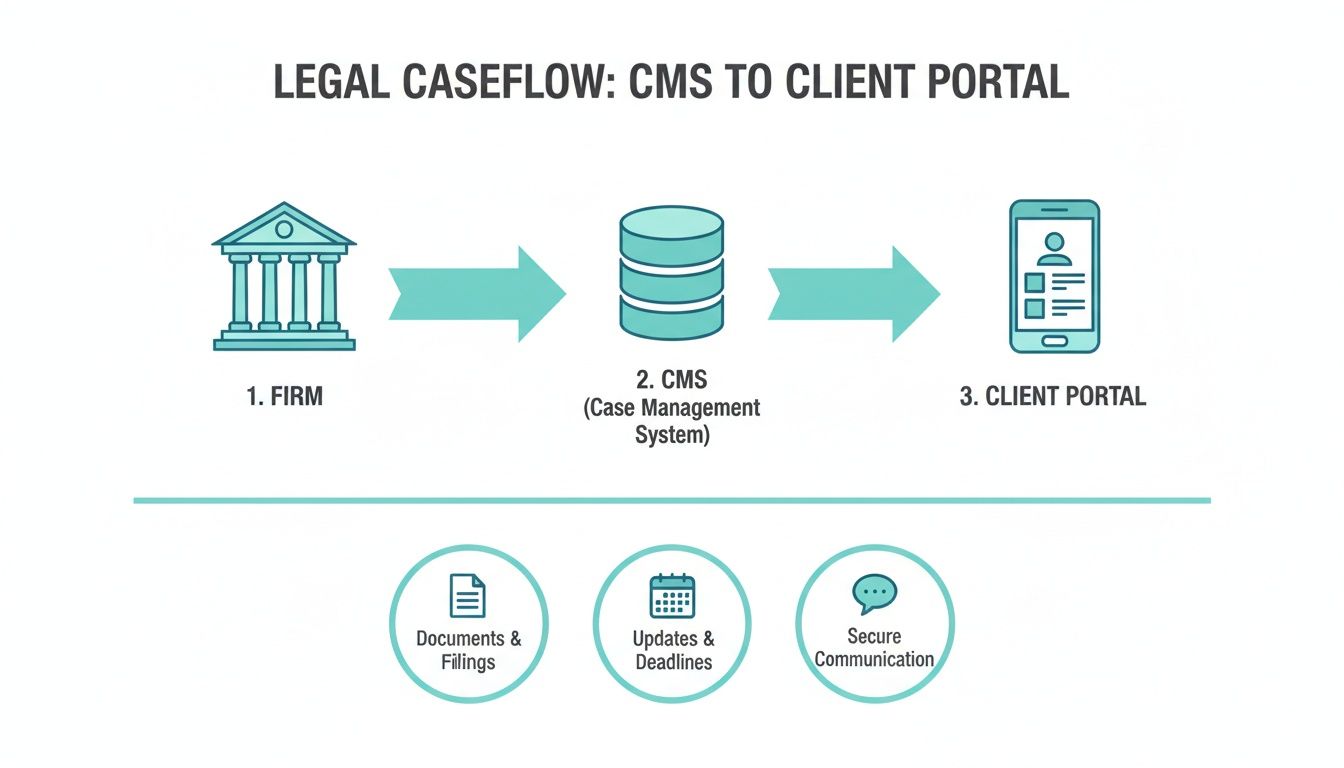
As you can see, all the complex work happens inside your CMS. The portal is simply the polished, easy to use endpoint for your client.
How Information Flows to the Client
So, how does it work in practice? Once your team updates a case file, the integration automatically takes over. CasePulse securely pulls the specific, client approved information and presents it cleanly through the portal. This isn’t just a raw data dump. You have complete control over what the client sees and when.
Here are a few real world examples:
- Document Sharing: A paralegal uploads a new medical record to the case file in your CMS. With a click, it becomes securely visible to the client in their portal. No more endless email attachments.
- Case Status Updates: When you move a case from "Discovery" to "Negotiation" in your system, that progress is instantly reflected for the client. They see forward movement without having to call for an update.
- Secure Messaging: Messages sent through the portal are automatically logged and saved directly to the case file, creating a permanent, unified record of communication.
The goal of integration is simple: allow your team to work in one system while giving clients self service access through another. This connection eliminates redundant data entry and automates the flow of information.
The outcome is a single source of truth that serves two very different audiences. Your staff gets the detailed, operational view they need to do their jobs, while your client gets a clear, transparent summary of their case's progress. You can see the different systems CasePulse connects with by reviewing our full list of CMS integrations.
The Setup Process: A Hands On Approach
Getting a portal up and running shouldn't be a months long technical nightmare. With a tool like CasePulse, the entire implementation is a hands on experience guided by our dedicated team. We don't just hand you a manual and wish you luck.
The typical setup takes about one week. Our US based team works directly with your firm to connect the portal to your existing CMS, making sure everything is configured perfectly to match your current workflows.
This guided process means you can start providing a better client experience almost immediately, and with total confidence. It’s all about adding a powerful new capability to your firm without the operational headaches that so often come with new tech.
Your Practical Checklist for Choosing the Right System
Picking a new case management system is a huge decision. It's not just another software purchase. It's an investment that will shape your firm's efficiency, your client relationships, and your ability to grow for years to come.
To cut through the marketing fluff and find a system that actually works for your practice, you need to ask the right questions. This checklist breaks down the key areas to investigate, making sure you cover all your bases before signing on the dotted line.
The best system should feel like a natural extension of how you already work, not some clunky tool that forces your team into awkward new processes.
Core Features and Practice Area Fit
First things first: does the software actually fit what you do every day? A personal injury firm runs completely differently than a corporate law practice, and a generic, one size fits all system is a recipe for frustration.
Drill down with these questions when you're talking to vendors:
- Practice Area Specialization: Was this system designed from the ground up for a practice like ours, specifically, personal injury?
- Workflow Support: Can it handle the nitty gritty of our daily work, from client intake and medical record requests to complex settlement tracking?
- Essential Tools: Does it have the non negotiables, like powerful document management, rules based calendaring, and integrated time and billing features?
When a system speaks the language of your practice area, your team will pick it up faster and you'll spend far less time on workarounds.
Integration and User Experience
A new piece of software is useless if it doesn't play well with the tools you already rely on every single day. Smooth integration isn’t just a nice to have, it’s essential for preventing duplicate data entry and keeping your firm running efficiently. Just as important is how the system feels to use for both your staff and your clients.
A great system shouldn't force your team to change everything. It should connect to your existing software and provide an intuitive interface that makes everyone's job easier, not harder.
Here’s what to look for:
- CMS Compatibility: Does it integrate seamlessly with our current case management system, whether that's Needles, Neos, LawBase, or Litify?
- Ease of Use: Is the interface actually intuitive? Can your staff log in and get to work, or will they need a PhD in computer science? If there’s a client portal, is it simple enough for your clients to use without constant hand holding?
- Onboarding and Support: What does the setup process truly involve? Will you have a dedicated expert guiding you, or will you be left to figure it out on your own?
Security and Scalability
Finally, you can't compromise on protecting your clients' sensitive information. Your chosen system needs to have bank level security. At the same time, you're not just buying for today. You're buying for the future. You need a platform that can grow with your firm, not one you'll have to replace in two years.
Make sure to ask about:
- Data Protection: Is all client data encrypted, both when it's being sent and when it's sitting on a server?
- Access Controls: Can we customize permissions to ensure the right people see the right information and nothing more?
- Future Growth: Is the system built to handle more users, more cases, and more data as our firm succeeds and expands?
Frequently Asked Questions
When you're thinking about adding a new tool to your firm, the practical questions are what matter most. Let's get right into the nuts and bolts of how this works. Here are straightforward answers to the questions we hear every day from firms just like yours.
How Long Does Implementation Take?
We can get you up and running in about one week. That’s not an exaggeration.
Our US based team works hand in hand with your firm to connect the portal directly to your existing case management system. We manage the technical side so the launch is seamless. You can start inviting clients and transforming your communication in a matter of days, not months.
Will My Staff Have to Learn a New Program?
Absolutely not. This is probably the most important feature of our entire design. Your team continues to work 100% inside the case management system they already live in, whether that's Needles, Neos, LawBase, or Litify.
CasePulse runs quietly in the background, acting as a secure bridge to your clients. There's no new software to learn, no separate login to remember, and no extra inbox to check. Your firm's workflow doesn't change one bit.
Think of it this way: your staff works entirely within their existing CMS. CasePulse is the automated communication layer that securely shares their updates with your clients, completely eliminating the need for new software training.
How Is My Client's Information Protected?
Protecting your client's sensitive data is our top priority. We've built CasePulse from the ground up with security at its core.
Every piece of information that moves between your CMS and the client portal is fully encrypted. We also give you granular control over what gets shared and who can see it. You decide what information your clients have access to, ensuring confidentiality is always maintained and giving you total peace of mind.
Why Do You Offer a Month to Month Plan?
Because we believe in earning your business every single day, not just locking you into a contract. A month to month plan gives you the freedom and flexibility a modern law firm needs.
This model keeps us accountable to you. It pushes us to provide exceptional, hands on support and to constantly make our product better. If your firm's needs evolve, you can adapt without being stuck in a rigid, long term commitment. It simply puts you in the driver's seat.
Ready to modernize your client communication without adding a single new task to your team's plate? CasePulse is the secure client portal that plugs right into the case management system your firm already relies on. See how it works at CasePulse.