
 CasePulse
 The warning signs usually show up before anyone calls it an accounting problem.
A billing manager is rebuilding invoices from time entries spread across email, notes, and a practice system that doesn't quite match the ledger. A controller is trying to reconcile trust balances while partners ask why collections look soft this month. Someone in operations knows the firm has too many handoffs, too many duplicate entries, and too many moments where staff have to “just check one more system” before answering a client or approving a disbursement.
That's when the search for accounting software law firms need becomes urgent. Not because the books matter less than the cases, but because financial workflow sits underneath everything else. If billing drags, cash flow drags. If trust records are hard to verify, risk rises. If accounting can't connect to case activity, staff spend their day stitching systems together instead of moving work forward.
Why Your Firm's Accounting Software Matters More Than Ever
A lot of firms reach a breaking point the same way. They didn't choose chaos. They just added one workaround at a time.
First came spreadsheets for tracking costs that didn't fit neatly into the old system. Then a manual process for invoice review. Then a separate trust ledger that only one or two people fully understood. Then the monthly close became a high stress project because every reconciliation depended on someone remembering how the workaround worked.
The real cost of manual financial workflow
In a law firm, accounting isn't a back office island. It touches trust accounting, billing, cash flow monitoring, partner reporting, and compliance sensitive records. That's why the shift to specialized legal systems has been so significant. By 2025, 93% of respondents said accounting software saved them time in LawPay's Legal Industry Report, a marker that legal accounting software had become mainstream operational infrastructure rather than optional admin tech (LawPay legal accounting overview).
What matters about that figure isn't just time savings. It reflects a broader operational move away from generic bookkeeping tools and manual processes toward systems built to keep client funds separate from operating funds and reduce administrative burden.
Practical rule: If your trust process depends on one experienced employee catching mistakes by memory, your firm does not have a durable accounting system.
For firms with cross team workflows, this gets even more serious. Intake, matter management, billing, and client communication all rely on clean financial data. If one part breaks, the rest slows down. Teams working through regulatory and operational pressures in the UK legal market will recognize the same pattern in this discussion of finance data management in UK legal sector, where resilience depends on how well firms control financial information across systems.
This is a business decision, not a software purchase
Firms often frame the decision too narrowly. They ask, “Which accounting package should we buy?” The better question is, “What operating model are we supporting?”
A weak system creates friction in places partners feel immediately:
- Billing cycles slow down because time, expenses, and approvals live in different places.
- Trust oversight gets harder because reconciliation becomes a manual exercise.
- Financial visibility suffers because reports depend on cleanup before review.
- Client confidence drops when staff can't answer payment or disbursement questions quickly.
The right platform doesn't just tidy bookkeeping. It gives the firm a more stable way to run money through the full case lifecycle.
Defining Your Must Have Legal Accounting Features
Most software demos go wrong because firms ask about features in the abstract. They hear “billing,” “reporting,” and “trust accounting,” but they don't force the vendor to show how those functions work inside daily operations.
Legal accounting software has matured into a compliance centered category with a fairly clear baseline. A 2025 guide identifies the core must haves as trust accounting, invoicing, time tracking, custom business reporting, and expense tracking, and legal accounting guidance also points to the need to record and monitor money in and out, send bills and statements, write checks, and generate financial reports ranging from profit and loss to balance sheets and customized reports (must have law firm accounting features).
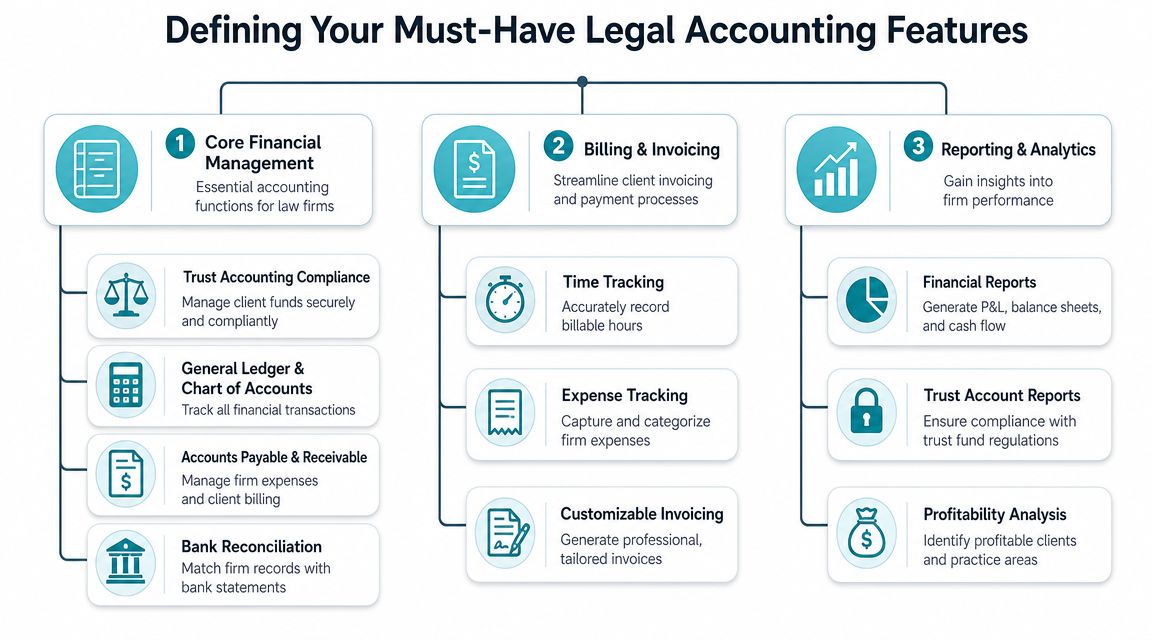
Trust accounting has to work at the transaction level
This is the first screening question. If the product can't support trust accounting cleanly, stop the evaluation.
You're not looking for a vendor to say “yes, we handle trust.” You need to see how the system tracks client funds separately, how balances are reviewed, how transactions are tied back to matters, and how users reconcile activity without exporting data into spreadsheets.
Trust accounting isn't a reporting feature. It's a control system for client money.
A platform that handles trust poorly creates downstream problems everywhere else. Billing gets delayed because staff need to verify available funds manually. Disbursements become risky. Audit preparation turns into reconstruction work.
If your team is still defining what trust controls should look like in software, review how trust accounting software for law firms fits into a legal workflow before you book product demos. It helps to walk in with a concrete checklist.
Billing needs legal logic, not generic invoicing
A lot of products can generate invoices. That doesn't make them suitable for law firms.
Legal billing usually has more moving parts than standard business invoicing. Time entries need to flow into bills correctly. Expenses have to be associated with the right matter. Statements need to be clear enough that attorneys, staff, and clients can all understand what happened without a separate explanation thread.
Here's what I'd treat as non negotiable in practice:
- Matter linked billing: Charges, expenses, and payments should connect to the file that generated them.
- Time tracking that feeds billing: Staff shouldn't have to re enter work before bills go out.
- Expense capture: Costs need to be logged in a way that supports both internal review and client billing.
- Custom invoicing: Firms need flexibility in how bills and statements are structured.
- Check writing and financial posting: The accounting side has to reflect real operating workflow, not just client facing invoices.
Reporting should answer management questions quickly
Partners don't need more reports. They need reports they can trust without waiting for cleanup.
Good legal accounting software should produce financial reports that help leaders understand the firm's position and support basic management decisions. That includes standard financial statements and customized reporting suited to how the firm runs.
A practical test during demos is simple. Ask the vendor to show the path from raw transaction entry to partner level reporting. If the answer involves manual exports, spreadsheet reformatting, or “most firms create a custom workaround,” you're looking at future labor, not future efficiency.
It should fit into a broader legal workflow
The strongest systems don't operate alone. They sit inside a broader stack that may include practice management, payment processing, and secure client communication. That matters because accounting quality often depends on whether data moves once or gets re keyed by different teams at different stages.
When firms buy legal specific tools, they're often buying workflow coherence as much as accounting functionality. That's the part many firms miss until implementation.
A Comparison of Leading Law Firm Accounting Software
Before you compare brands, compare categories. Most firms make faster progress when they decide what type of system they want first, then shortlist products inside that category.
The core differentiator isn't brand recognition. It's whether the platform supports trust accounting compliance alongside standard accounts receivable and accounts payable workflows, while keeping billing, trust balances, and case linked financial records synchronized in one system. Legal software guidance also treats trust accounting, financial reporting, time tracking, billing, document management, calendaring, and integrations as capabilities that should be benchmarked together, not bought as isolated modules (legal accounting software evaluation guidance).
Here's a practical comparison framework.
| Feature/Capability | All-in-One Practice Management | Standalone Legal Accounting | Generic Software + Add-ons |
|---|---|---|---|
| Trust accounting support | Usually stronger when built for legal workflow | Often strong if legal specific | Often requires workarounds and tighter manual oversight |
| Billing and time tracking | Commonly native to the platform | May depend on integration with practice tools | Often disconnected unless customized |
| Financial reporting | Usually adequate to strong, depends on product depth | Often strong on accounting side | Strong in general accounting, weaker on legal context |
| Document and calendaring connection | Often built in | Usually separate | Usually separate |
| Duplicate data entry risk | Lower when implementation is done well | Moderate, depends on integrations | Higher if staff move data between systems |
| Best fit | Firms wanting one operational hub | Firms with mature practice stack but weak accounting | Firms with simple needs or legacy commitment to a general system |
| Main trade-off | One platform may force process changes | Integration quality becomes critical | Compliance and workflow friction can increase |
All in one systems
These platforms combine practice management with accounting, billing, and often client or matter workflow.
For many mid sized plaintiff firms, this category is attractive because it reduces handoffs. Time, expenses, billing, and matter level information stay closer together. When it works, staff don't have to ask which system holds the latest record.
The trade off is control. An all in one product may do many things reasonably well but still require the firm to adapt to its structure. If the accounting team has complex requirements, they may feel constrained by a system designed first as practice management software.
This category tends to work best when the firm wants operational consistency more than best of breed depth in each module.
Standalone legal accounting tools
This option fits firms that already have a solid case management environment and don't want to replace it just to modernize finance.
A dedicated legal accounting platform can be a strong choice when finance operations need attention first. It lets the firm improve trust accounting, reporting, and billing discipline without blowing up the entire technology stack.
The risk is integration quality. If accounting, case management, and billing aren't synchronized properly, staff may still end up bridging gaps manually. Before selecting this route, make vendors show exactly how data moves between systems and where human review is still required.
Generic business accounting with legal workarounds
Some firms start here because these products are familiar and often widely used outside legal. They may also compare them against broader small business options. For UK based readers evaluating mainstream business tools, this overview of best accounting software for UK businesses is useful context for understanding what general platforms do well and where legal specific needs may sit outside their design.
But in law firms, generic accounting tools usually become expensive in a different way. Not always in license fees. In process friction.
You'll often see the same symptoms:
- Separate trust tracking outside the core accounting file
- Manual links between matters and transactions
- Patchwork billing workflows that rely on exports or add-ons
- Higher training burden because users must learn exceptions, not just the software
If your firm is evaluating revenue workflow at the same time, it helps to pair the accounting review with a look at legal billing software so finance and billing aren't selected in isolation.
The wrong category creates permanent rework. The wrong brand inside the right category is usually easier to fix.
Integrating Software Into Your Firm's Workflow
Selection gets all the attention. Implementation determines whether the project improves operations.
The most common mistake I see is treating accounting deployment like a data migration exercise. It's not. It's a workflow redesign project that happens to include data migration.
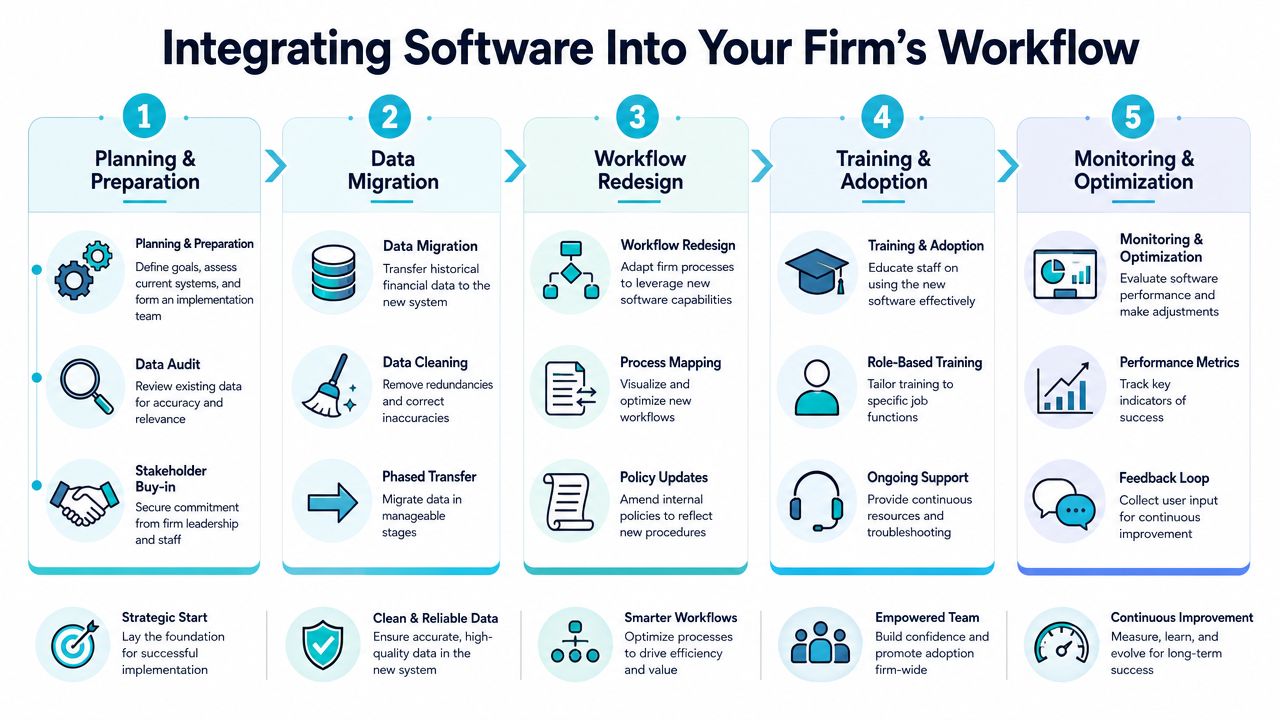
Start with process mapping, not configuration
Before anyone imports historical data, map the work as it exists today.
Who opens matters. Who records retainers. Who reviews bills. Who approves costs. Who answers client payment questions. Who handles trust reconciliation. If you skip this step, the new platform will inherit old confusion with a cleaner interface.
I usually tell firms to identify three kinds of workflow at the start:
- Financial control workflow such as trust handling, reconciliations, check requests, and approvals.
- Revenue workflow such as time capture, billing review, invoice release, and collections follow up.
- Client communication workflow such as payment questions, document requests, status updates, and settlement related notices.
That third one gets ignored too often. It shouldn't.
Accounting works better when clients can see what they need
A modern accounting setup becomes more valuable when it connects to the firm's communication process.
Take a simple example. A settlement related payment is recorded, the supporting document is added to the matter, and the client is notified that there's an update available. If that notice happens through a secure portal tied to the case management workflow, staff avoid a round of phone calls, manual email attachments, and status chasing.
That's where a tool like CasePulse can fit alongside accounting software. It provides a secure client portal for law firms that integrates with case management systems such as Needles, Neos, LawBase, and Litify, letting clients check status, message the team, share files, and complete forms while staff continue working inside their existing system.
A clean workflow is one where staff don't have to leave the system they already use just to keep clients informed.
Adoption depends on role clarity
Training often fails because firms train by feature instead of by job.
The accounting team needs one set of workflows. Attorneys need another. Intake, pre litigation, settlement, and case management staff need something else again. If everyone gets the same training, nobody sees how the system fits their actual day.
Focus training on role based tasks:
- Controllers and finance staff need reconciliation, reporting, vendor, and posting workflows.
- Billing staff need invoice generation, review cycles, edits, and exception handling.
- Attorneys need clean time entry, bill review, and visibility into matter level financial status.
- Client facing staff need to know what they can confirm, what they should escalate, and where supporting records live.
The right implementation closes loops between teams. It doesn't just replace software.
A Decision Roadmap for Plaintiff Law Firms
Plaintiff firms should make this decision more carefully than they usually do. The workflow is too interconnected, and the operational cost of a bad fit lasts for years.
A rushed choice usually comes from pain. Billing delays. Reconciliation headaches. Leadership frustration with poor reporting. Those are valid reasons to act, but they're not a good way to buy.
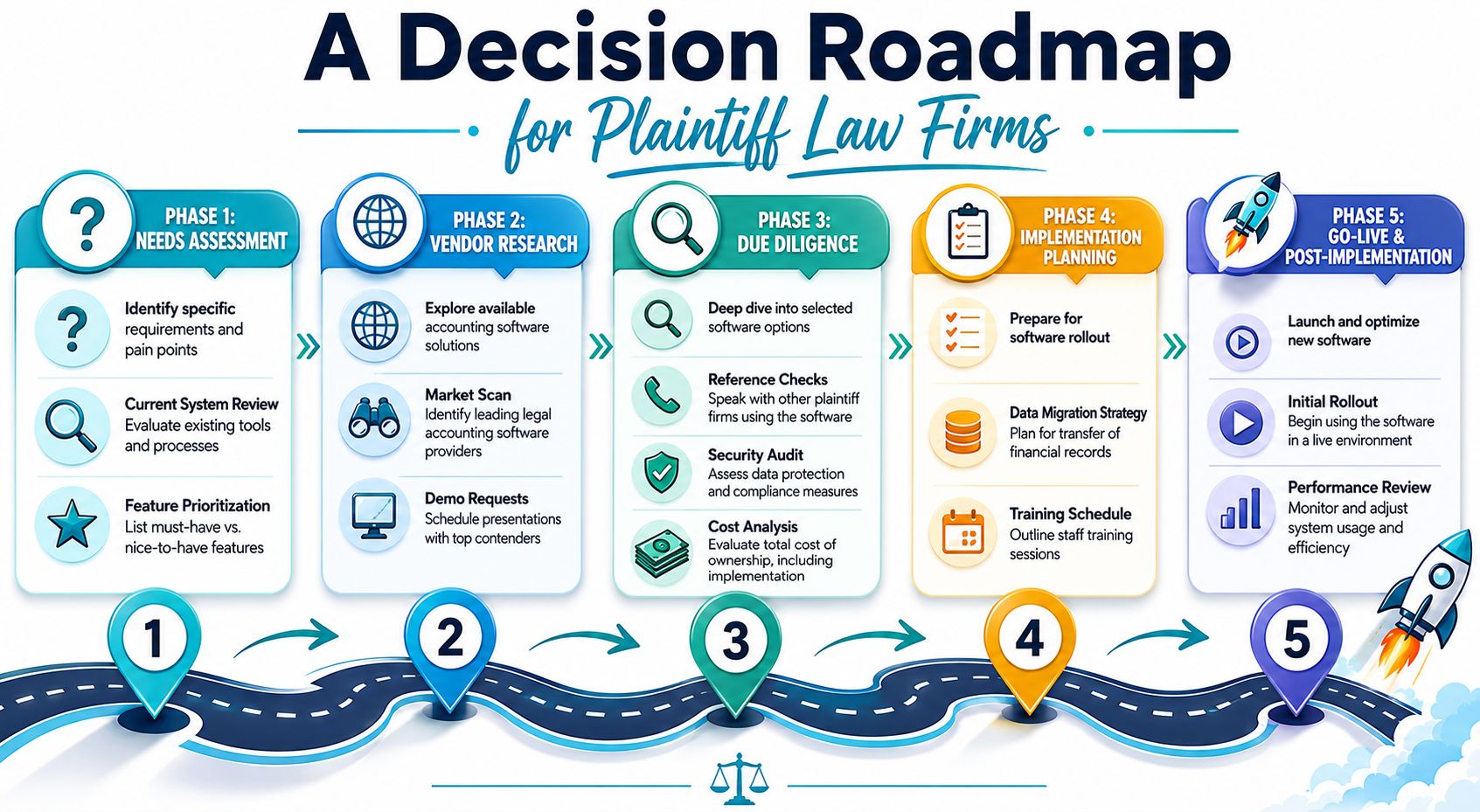
Build the evaluation team correctly
Don't let this become a finance only project or an IT only project.
The right evaluation group usually includes someone from firm leadership, accounting, billing, operations, and the case management side of the business. In plaintiff practices, I also want someone who understands settlement workflow and disbursement handling, because those are often where system gaps become painful.
A useful team structure looks like this:
- Executive sponsor who can resolve trade offs quickly
- Operational owner who understands cross department workflow
- Finance lead who can pressure test trust and reporting requirements
- End user representatives who can spot friction that leadership won't see in demos
Define requirements from actual case flow
A generic feature checklist won't get you far. Build requirements from how money moves through your practice.
Ask questions tied to the life of a matter. How are costs recorded? When does billing occur? How are trust funds applied? Who reviews statements? How are disbursements documented? What does a client ask after an invoice or payment event?
That exercise usually reveals the actual priorities faster than any vendor scorecard.
Buy for your busiest workflow, not your cleanest one.
Run demos like working sessions
Vendors love polished tours. You need scenario based proof.
Give each vendor the same sample workflows and ask them to show the process live. Don't ask whether the product “supports billing.” Ask how a pre bill is reviewed, revised, approved, and posted. Don't ask whether trust accounting is included. Ask how the team verifies matter level trust balances and resolves discrepancies.
I also recommend keeping a demo scorecard in plain language, not vendor language. Use categories like ease of review, exception handling, reporting confidence, and user handoff risk.
Pilot before full commitment
Even if leadership is aligned, don't roll out across the entire firm on optimism alone.
A pilot should test:
- Data migration reality: Not whether data imports, but whether imported records are usable.
- Workflow reliability: Whether real staff can complete daily tasks without side spreadsheets.
- Support quality: Whether the vendor helps solve operational issues, not just technical tickets.
- Change tolerance: Whether the new process is teachable at scale.
Contract review should follow the same discipline. Don't focus only on the headline subscription price. Look at implementation burden, integration dependencies, training expectations, and what happens when you need help after go live.
The firms that do this well don't buy faster. They buy with fewer regrets.
Choosing Software to Fuel Firm Growth
At some point, the question stops being which accounting package has the longest feature list. The better question is whether the system helps the firm operate with less friction as case volume, staff count, and client expectations rise.

Strong accounting software for law firms supports growth because it removes avoidable manual work from the middle of the business. Billing moves with fewer delays. Financial reporting becomes more usable. Trust related processes are easier to verify. Staff spend less time translating between disconnected systems.
That matters even more when firms think beyond accounting alone. The principal gain comes from aligning finance, matter management, and client communication into one operating model. If your leadership team is thinking about technology decisions in that broader way, these business IT alignment best practices are a useful management lens.
There's also a practical reason to keep the ecosystem in view. A firm that improves its books but leaves client communication fragmented still carries unnecessary admin load. A firm that streamlines communication but leaves billing and trust workflow manual still creates internal drag. Operational strength comes from the fit between systems.
For firms reviewing that full finance picture, it helps to assess accounting decisions alongside the realities of law firm bookkeeping. Bookkeeping discipline, billing workflow, trust controls, and case linked communication all reinforce one another when the stack is designed coherently.
The firms that get this right usually make the same shift in mindset. They stop treating software as overhead and start treating it as operating infrastructure. That's the difference between buying a tool and building a firm that can scale cleanly.
If your firm is trying to connect accounting, case management, and client communication without forcing staff into another disconnected workflow, CasePulse is worth a look. It provides a secure client portal built for law firms and integrates with systems like Needles, Neos, LawBase, and Litify, so clients can get updates, send messages, share files, and complete forms while your team keeps working inside the case management environment they already use.