
 CasePulse
 The problem usually shows up at month end.
A paralegal has one screen open to the bank statement, another to a spreadsheet, and a third to the case management system. A settlement check cleared two days ago. A lien payment is pending. Someone updated the matter notes, but nobody updated the trust ledger. The managing partner wants to know whether funds are ready to disburse, and the answer is still, “Let me double check.”
That’s not a workflow problem alone. It’s a compliance problem waiting to surface.
For plaintiff PI firms, trust accounting sits in the middle of everything that can go wrong with client money. The risk isn't abstract. It lives in duplicate entry, delayed reconciliation, unclear permissions, and disconnected systems that force staff to rekey the same information in more than one place.
Why Manual Trust Accounting Is a Risk Your Firm Cannot Afford
The firms that struggle most with trust accounting usually aren't careless. They’re busy. They’ve grown past the point where one bookkeeper and one office manager can keep the whole picture in their heads, but they’re still relying on spreadsheets, exported reports, and inbox follow ups to hold the process together.
That works until it doesn’t.
A PI practice has too many moving parts for manual trust handling to stay reliable for long. Settlement funds arrive. Medical liens shift. Costs get allocated. Client disbursements need approval. If staff must copy data from a case file into a trust ledger and then cross check it against a bank statement by hand, the firm has created multiple opportunities for error before anyone even gets to reconciliation.
The market tells the story. The global trust accounting software market was valued at about USD 1.2 billion in 2024 and is projected to reach roughly USD 2.5 billion by 2033, which makes clear that firms now treat this as standard operating infrastructure, not an optional add on, according to Data Insights Market’s trust accounting software market analysis.
Where manual processes start breaking down
Manual trust accounting usually fails in familiar ways:
- Duplicate entry creates mismatches: Staff records a deposit in the case management system, then separately enters it into the accounting record.
- Timing gaps distort balances: A matter note says funds are available before the trust ledger or bank activity reflects the same status.
- Spreadsheet logic hides mistakes: A formula error can sit unnoticed until month end.
- Audit prep becomes a scramble: The firm knows the information exists, but not in one defensible place.
When firms are still moving data by hand, even simple automation can remove a lot of friction. For teams reviewing ways to reduce repetitive intake and finance admin, DigiParser's automation platform is a useful example of how structured document data can be pulled out of manual workflows.
Practical rule: If your trust process depends on one employee remembering the next step, it isn’t a controlled process.
A firm also needs clients to trust what they can’t see. Clear, current financial status matters just as much as internal accuracy. That’s why many PI firms start by tightening the client facing side of trust communication through a dedicated client trust account portal workflow, then address the accounting layer behind it.
Understanding Your Core Compliance Obligations
Trust accounting software matters because the underlying rules are strict. Client money is not firm money. It doesn't become easier to manage just because your staff knows the clients well or because your bookkeeper has done things the same way for years.
A trust account is closer to a secured holding area than a general bank account. The firm is safeguarding funds that belong to clients or third parties. Every deposit, withdrawal, transfer, and earned fee has to be recorded in a way that can be proven later.
Keep funds separate and ledgers precise
The first obligation is segregation. Client funds must stay separate from operating funds. Inside that trust account, each client also needs an individual ledger so the firm can show exactly what belongs to whom at any point in time.
For PI firms, that ledger discipline matters most when settlement money starts moving. One matter may have a pending provider payment. Another may have disputed costs. Another may be ready for client disbursement but not fee transfer. A pooled account can still be compliant, but only if the underlying client ledgers are meticulous.
This process view is helpful:
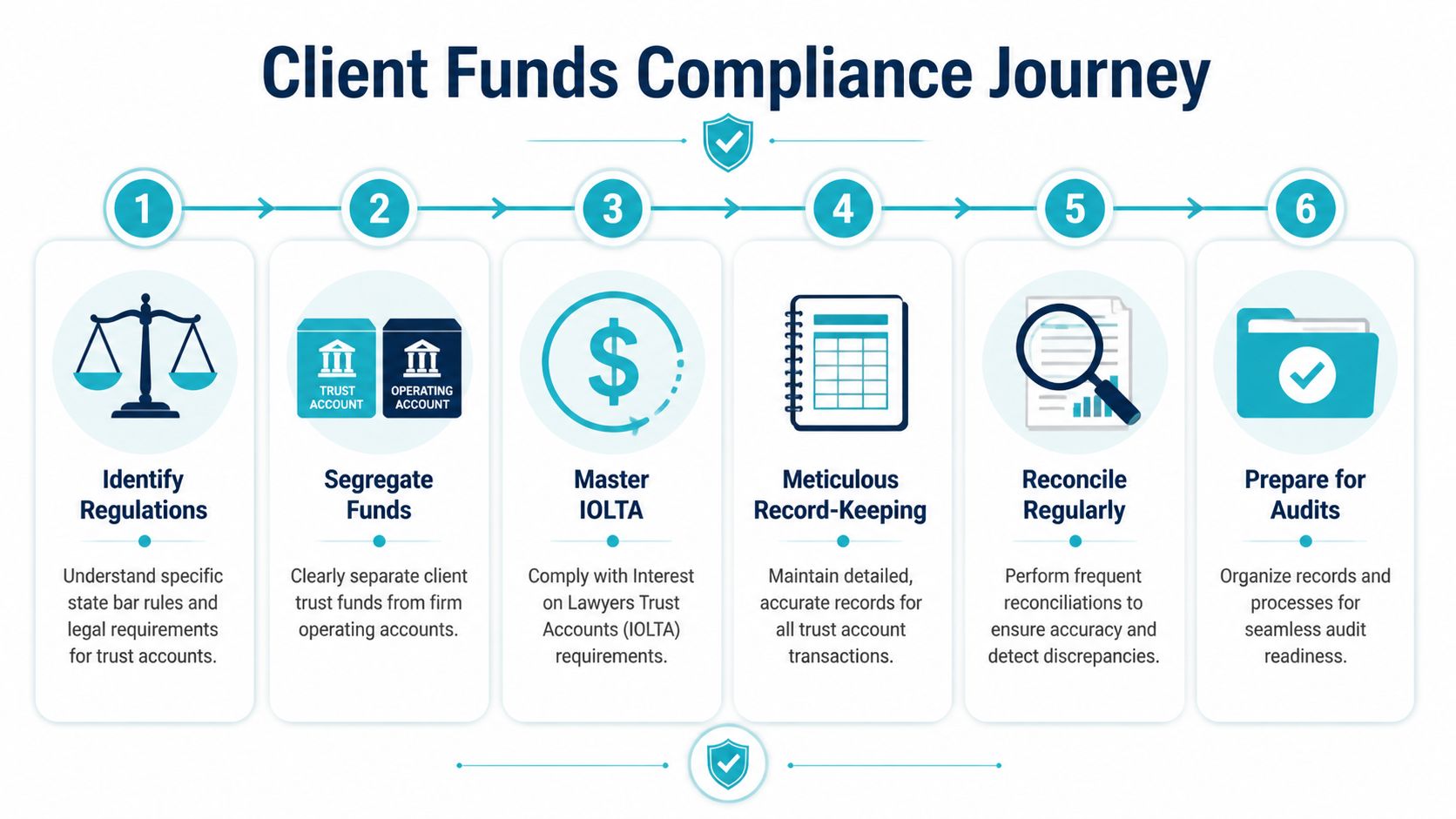
Three way reconciliation is the standard
The most important control is three way reconciliation. In practice, that means matching three records against each other:
- The bank statement
- The trust account register or software balance
- The total of all client ledgers
If those three don’t line up, something is wrong. The cause might be minor, like a posting delay, or serious, like a transaction assigned to the wrong matter.
Proper software enforces this discipline and automates transaction matching with 99% accuracy, reducing the human error that causes 70% of trust account discrepancies in U.S. law firms, according to Hyperbots’ overview of trust accounting software.
For teams that want a broader accounting refresher, the process of reconciling business finances is worth reviewing because the logic behind reconciliation stays the same even though legal trust work carries stricter obligations.
Good trust accounting records do two things at once. They tell you the current balance today, and they let you prove every step that got you there months later.
What IOLTA means in daily operations
IOLTA requirements are often discussed in abstract compliance language, but in daily practice the issue is simple. The firm must place qualifying client funds in the correct type of trust arrangement and handle interest according to the rules of the jurisdiction.
For a PI firm, that affects intake, settlement handling, and disbursement timing. If you operate in more than one state, your staff can’t rely on habit alone. The software and the workflow have to reinforce the right treatment.
A clean compliance routine usually includes:
- Matter opening controls: Trust settings are established when the file is created, not later.
- Deposit discipline: Funds are recorded promptly and tied to the correct client ledger.
- Disbursement review: No one releases funds without confirming availability and authorization.
- Monthly reconciliation: The firm doesn’t carry unresolved differences forward.
- Audit readiness: Supporting records are organized before anyone asks for them.
State bars don’t care whether an error came from a bad spreadsheet, a rushed staff member, or a system gap. They care whether client funds were handled correctly and whether the firm can prove it.
Essential Features of Trust Accounting Software
The best trust accounting software earns its place by removing fragile manual steps. It shouldn’t just store transactions. It should stop the kinds of mistakes PI firms make when accounting sits outside the daily case workflow.
Surveys indicate that over 60% of legal firms now use trust accounting software, with the main drivers being better compliance, lower risk, and time savings from automation, according to this trust accounting software market report.
Here’s what the software needs to do in practice.

The controls that matter most
Some features sound nice in a demo but don't change much on the ground. Others are non negotiable.
- Client level ledgers: Every matter needs its own running balance and transaction history. If staff can't see exactly which funds belong to which client, the software isn't doing trust accounting.
- Bank transaction imports: Direct transaction feeds reduce posting lag and give accounting staff a faster starting point for review.
- Negative balance prevention: This is one of the clearest safeguards. The system should stop users from creating a disbursement that would push a client ledger below zero.
- Three way reconciliation tools: The software should make reconciliation a guided process, not a monthly scavenger hunt.
- Audit trails: Every change should be timestamped and tied to a user.
What helps PI firms specifically
Plaintiff firms tend to feel pressure at settlement. Funds come in all at once, but disbursement depends on approvals, lien resolution, and internal signoff. Generic accounting software often tracks the money, but it doesn't understand the matter context.
That’s why features tied to legal operations matter more than broad bookkeeping capability.
A useful setup often includes:
| Capability | Why it matters in PI work |
|---|---|
| Real time trust balances | Staff can confirm whether funds are actually available before discussing disbursement |
| Matter linked transaction history | Accounting and case teams can review the same financial story |
| Compliance reporting | Monthly review and audit prep become repeatable instead of improvised |
| User permissions | Only the right people can post, approve, or release funds |
One practical mistake I see often is firms buying software based on accounting screens alone. They ask whether it can produce reports, import bank data, and support the bookkeeper. They don’t ask whether the litigation team can work with it without leaving the systems they already use.
For that reason, many firms evaluate trust accounting alongside adjacent tools such as legal billing software for law firms, because fees, costs, trust movements, and case status all affect one another.
A trust accounting platform that saves the accounting team time but creates extra work for paralegals is only solving half the problem.
Connecting Software into Your Firm's Daily Workflow
Most buying decisions go sideways here.
A firm selects trust accounting software because the compliance features look solid. The demo shows reconciliations, ledgers, reports, and permissions. Then implementation starts, and the main problem appears. The accounting system doesn’t connect cleanly to Needles, Neos, LawBase, or Litify, which means the staff still has to enter the same matter data twice.
For PI firms, that duplication is the primary operational leak.
A major underserved issue in this market is the integration gap with specialized PI case management systems. A 2023 ABA survey found that 62% of PI firms using those systems reported integration issues as a top trust accounting pain point, according to LeanLaw’s trust accounting feature page.

A standalone tool creates a second source of truth
When trust accounting lives in its own silo, firms start compensating with workarounds:
- Paralegals rekey settlement details from the case file into the trust system
- Accounting staff chase status updates by email or hallway conversation
- Partners ask for balances that depend on whether someone completed the second entry
- Client communication slows down because nobody wants to confirm numbers before checking three places
That isn’t just inefficient. It undermines confidence in the data.
The cleaner model is a connected workflow. A settlement deposit is entered or recognized in the case process. The trust ledger updates through integration. The right people review it. The client facing team sees status without asking accounting to manually verify every movement. The financial record and the matter record stay aligned.
What a useful integration actually looks like
Many vendors claim “integration,” but firms need to press on what that means.
A useful trust accounting integration should answer questions like these:
- Does the system sync matter level data with Needles, Neos, LawBase, or Litify?
- Can trust events reflect case milestones without manual export and import?
- Will staff work from their existing screens, or are they switching systems all day?
- Can client visible status updates be controlled without exposing sensitive ledger detail?
The strongest implementations usually rely on APIs or structured data exchange, but the technical method matters less than the operational result. Staff should not have to wonder which system is current.
Field note: If a vendor says “we integrate” but the workflow still depends on CSV handoffs, that isn’t integration in any meaningful day to day sense.
Why this matters beyond accounting
A connected trust workflow does more than help your bookkeeper. It changes how the whole firm operates.
When trust data stays tied to the matter lifecycle, intake staff, case managers, litigation support, and accounting all work from a shared record. That reduces internal friction. It also improves client communication because staff can respond with confidence instead of saying they need to check with finance.
This is especially important in PI because settlement periods are communication heavy. Clients want updates. Staff wants clean disbursement files. Attorneys want visibility without chasing reports. If trust accounting software sits apart from the case management system, everyone pays the price in delays and uncertainty.
The firms that get this right stop treating trust accounting as a back office island. They make it part of the same operational chain that runs the case.
Maintaining Security and Preparing for Audits
A surprising number of firms evaluate trust accounting software for convenience first and security second. That order should be reversed.
Trust records contain exactly the kind of information that creates trouble when access is loose. Financial balances, transaction histories, disbursement activity, and user actions all need to be controlled. In PI firms, the number of people touching a matter can be high, which makes permission design more important, not less.
Security controls that pull their weight
The practical baseline starts with role based access controls. Not everyone should be able to post adjustments, release funds, or edit records. Good systems also support two factor authentication and maintain a detailed log of who did what and when.
Those controls matter because trust accounting disputes often start as simple internal ambiguity. Who approved the transfer. Who changed the ledger note. Who posted the adjustment. If the answer depends on memory, the firm is exposed.
A serious review should include:
- Access by role: Accounting, attorneys, paralegals, and admins should not all have the same permissions.
- Audit logs: Every meaningful action should leave a trail.
- Documented review steps: Sensitive transactions should move through a defined approval path.
- Secure remote access: Cloud access can be an advantage, but only if the access controls are disciplined.
For firms tightening their broader risk posture, this connects directly with cybersecurity for law firms, because trust accounting is one of the places where technical security and professional responsibility overlap.
Audit readiness is a daily discipline
Most firms think about audits too late. They prepare for an audit when they hear from a regulator, a bank issue appears, or a partner gets nervous about the books.
That’s backward.
Audit readiness is really the result of consistent records, clean reconciliation, controlled access, and defensible reporting. If those elements are already in place, an audit is unpleasant but manageable. If they aren't, staff has to reconstruct history under pressure.
For finance teams building a more systematic process, this guide on how to prepare for your first financial audit is useful because the habits behind strong audit preparation apply just as much to legal trust records.
Firms don't fail audits only because funds were mishandled. They also fail because they can't produce clear, complete, and organized proof of proper handling.
One reason dedicated trust accounting software helps so much is that it turns documentation into a byproduct of normal work. When approvals, postings, reconciliations, and reports live in the same system, the firm spends less time rebuilding the record after the fact.
A Checklist for Choosing the Right Software
By the time a PI firm starts shopping seriously, it usually knows what’s wrong with the current setup. The harder question is how to evaluate replacements without getting distracted by polished demos.
For cross state practices, the risks are more pronounced. Seventy percent of PI firms operate in multiple jurisdictions and face 3x higher audit risks without national formats for mass disbursements, according to TrustBooks’ discussion of trust accounting needs for multi jurisdiction firms. If your firm handles cases across state lines, software selection has to account for varying IOLTA rules and disbursement practices.
The shortlist should start with operational fit
Don’t start with a generic feature matrix. Start with your actual workflow.
If your firm runs on Needles, Neos, LawBase, or Litify, the first screen in any vendor conversation should be your matter lifecycle, not the vendor’s dashboard. Ask how a settlement deposit enters the system, how a trust ledger updates, how disbursements are reviewed, and where staff members work.
Use this checklist as a working document during demos and reference calls.
| Evaluation Criteria | What to Ask/Verify | Why It Matters for PI Firms |
|---|---|---|
| Integration with your case management system | Ask whether the software connects directly with Needles, Neos, LawBase, or Litify, and ask for a live workflow example | PI firms lose time and create risk when trust entries have to be duplicated outside the matter record |
| Client ledger controls | Verify separate client ledgers, balance visibility, and prevention of improper postings | Settlement funds, liens, fees, and client shares must be tracked clearly at the matter level |
| Reconciliation workflow | Ask how monthly three way reconciliation is performed inside the product | A cumbersome process usually means unresolved differences get carried forward |
| Negative balance prevention | Confirm the system blocks disbursements or transfers that would overdraw a client ledger | This is one of the most important trust safeguards in daily use |
| Audit trail depth | Ask what gets logged, whether edits are traceable, and how reports are produced | During an audit, the firm needs evidence, not explanations |
| Multi jurisdiction support | Ask how the product handles different state requirements and disbursement formats | Cross state PI work adds compliance complexity fast |
| User permissions | Review role based access and approval structures | Trust functions should be segmented by responsibility |
| Reporting and exports | Verify whether the system can produce the reports your accounting team and regulators need | Staff shouldn’t have to manipulate exports just to create standard trust records |
| Implementation process | Ask who handles migration, configuration, and training | Good software can still fail if rollout is rushed or ownership is unclear |
| Ongoing support | Ask what support looks like after go live and who answers legal workflow questions | Trust accounting issues rarely fit a generic software support script |
What works in selection meetings and what doesn’t
The best internal selection meetings usually include accounting, operations, and one power user from the case team. That mix catches problems early. Accounting can test compliance logic. Operations can map handoffs. Case staff can spot whether the daily workflow is realistic.
What doesn't work is delegating the whole decision to one department.
A few buying habits save a lot of pain later:
- Insist on matter based demos: Don’t accept a generic tour. Make the vendor walk through a PI settlement from deposit to disbursement.
- Ask about exceptions: Normal workflows are easy. Ask how the system handles disputed funds, corrected entries, and partial disbursements.
- Check implementation ownership: Someone on your side needs authority to make decisions about mapping, permissions, and process changes.
- Plan for training by role: Bookkeepers, paralegals, attorneys, and managers don’t need the same training.
- Test reports before signing: If a report is critical for compliance or management review, see it during evaluation.
The right software for a PI firm isn't the one with the longest feature list. It's the one that fits the way settlement money actually moves through the firm.
Implementation also deserves realism. Data migration takes cleanup. Permissions take thought. Old habits don’t disappear on launch day. Firms that succeed usually simplify the workflow first, then configure the software around that cleaner process instead of preserving every workaround from the old system.
CasePulse helps plaintiff firms bring client communication into the same ecosystem where their teams already work. If your firm uses Needles, Neos, LawBase, or Litify and wants a secure portal that supports status updates, messaging, forms, and files without forcing staff into another disconnected tool, take a look at CasePulse.