
 CasePulse
 The firms that struggle with attorney email marketing usually don’t have an email problem. They have a workflow problem.
A paralegal spends half the morning answering status calls. Intake follows up with a lead once, gets pulled into something urgent, and that prospect goes cold. A managing partner looks at marketing spend and can’t tell which campaigns turned into signed cases. Meanwhile, the case management system already holds the facts that should trigger the right update at the right time.
That’s why email deserves a different role inside a law firm. It isn’t just a newsletter channel. Used properly, it becomes part of intake, client service, and reporting. It helps you nurture prospects who aren’t ready to sign yet, and it helps current clients feel informed without forcing staff to send the same explanation over and over.
Why Email Marketing Is Critical for Modern Law Firms
Law firms still treat email like an optional add on. That’s expensive thinking.
Email marketing delivers an average ROI of $36 for every $1 spent, and it outperformed banner ads and SMS by 108% in 2023, yet only 41% of law firms currently use email newsletters according to attorney marketing statistics compiled here. For managing partners, that gap matters. It means a channel with strong economics is still underused by much of the market.
Why the outdated label no longer fits
The old objection is familiar. Email feels old. Social feels more visible. Search feels more direct. PPC feels easier to track.
That logic misses how legal hiring works. Most prospects don’t hire at the first touch. They research, compare, wait, ask a spouse, call back later, or disappear for a week after an intake conversation. Email is one of the few channels that lets a firm stay present during that delay without asking staff to manually chase every lead.
It also solves a service problem inside active matters. Clients want updates, reminders, and clarity about what happens next. If your team handles that only through phone calls, you create avoidable interruption all day long.
A good email program should reduce friction for both sides. Prospects get timely follow up. Clients get predictable communication. Staff get fewer repetitive conversations.
What email does better than scattered manual follow up
Attorney email marketing works best when firms stop thinking only in terms of promotion. The practical uses are broader:
- Lead nurture: A prospect who didn’t retain after a consultation can still receive helpful follow up instead of going silent.
- Client communication: Current clients can receive updates, reminders, and document prompts in a consistent format.
- Expectation setting: Intake, onboarding, and milestone emails reduce confusion before it turns into a status call.
- Operational discipline: Automated messages force the firm to define what clients should know at each stage.
Here’s the trade off. If you don’t build this system, someone on your team still does the work manually. They just do it inconsistently, at a higher labor cost, and with less visibility into what happened.
The firms that benefit most
Plaintiff firms, especially personal injury practices, tend to feel the pain first because volume exposes every communication gap. A handful of missed follow ups can become a serious intake leak. A flood of routine update calls can bury case managers.
But the principle applies across practice areas. If your firm already has structured intake, recurring client questions, and a case management system full of status data, you already have the ingredients for a useful email strategy. What’s missing is the process.
Building Your Strategic Foundation
Before you write a newsletter or set up an automation, decide what the program is supposed to do inside the firm. That sounds obvious, but most attorney email marketing efforts fail because nobody defines success beyond “send something monthly.”

Email is responsible for 2.5% of total leads for law firms, and firms that use it well often treat it as their best tool for nurturing unconverted leads into clients, according to legal marketing statistics collected here. That lead share matters, but the bigger point is strategic. Email does its best work between first touch and signed engagement, and between case opening and case resolution.
Start with firm goals, not campaign ideas
If I’m advising a firm on setup, I push them to define goals in operational terms first. “Get more clients” is too vague. Better goals are tied to an actual business problem.
Examples that make sense in a law firm:
- Reduce inbound status calls: If clients ask the same questions every week, proactive updates can absorb part of that volume.
- Improve intake follow up: If consultations aren’t converting consistently, a timed sequence gives every lead a second and third touch.
- Standardize onboarding: New clients should receive the same instructions and expectations every time.
- Support referrals and reviews: Past clients are more likely to engage when communication doesn’t stop the day the matter ends.
Those goals affect everything else, from segmentation to copy to reporting. If your main problem is intake leakage, your content mix should look very different from a firm that needs better current client communication.
Segment in ways your staff can actually maintain
Segmentation is where many firms overcomplicate things. They create dozens of tags, never maintain them, and then fall back to mass sends.
Use categories your intake staff and case managers already understand:
| Segment | What they need | Good email types |
|---|---|---|
| Prospective clients | Reassurance, education, next steps | Consultation follow up, FAQs, service explanations |
| Current clients | Clarity, timing, document prompts | Milestone updates, reminders, process explanations |
| Past clients | Ongoing relationship, light re engagement | Legal updates, referral requests, review requests |
| Referral partners | Professional visibility, credibility | Firm updates, educational summaries, relevant wins |
A plaintiff firm can also segment by case type, such as motor vehicle collisions, premises claims, or workers compensation matters. The point isn’t sophistication for its own sake. The point is relevance.
Compliance note: Only segment by information your firm already has a legitimate reason to store and use. Don’t create targeting logic that your staff can’t explain or defend.
Build compliance into the workflow
This part gets skipped until someone has a problem. That’s backwards.
Email content for lawyers sits at the intersection of general email rules and attorney advertising rules. Your team needs a simple review standard before anything goes live.
Include a clear unsubscribe option, accurate sender information, and your firm’s physical address in every marketing email. Keep claims specific, measured, and free of promises about outcomes.
A few practical rules help:
- Separate education from guarantees: Explain process, timelines, and common issues. Don’t imply a result.
- Be careful with case stories: If you use examples, anonymize appropriately and avoid turning them into implied promises.
- Define what counts as marketing: A case update email is different from a newsletter, but both should be reviewed through a compliance lens.
- Document approvals: Someone should own final review, even if the emails are automated.
Choose an owner and keep the build simple
The strongest programs usually have one operational owner. Not ten contributors. One.
That person doesn’t need to write every email. They need to keep the list clean, coordinate with intake and legal staff, and make sure triggers still match real workflow. In many firms, that’s a legal operations manager, intake manager, or senior marketing coordinator with access to the case management side of the business.
If you’re starting from zero, don’t launch five automations and a complex newsletter calendar. Start with one nurture sequence, one client update flow, and one monthly send that helps people.
Creating Compliant Content That Converts
Most law firm emails fail for a simple reason. They read like internal announcements that accidentally got sent to clients.
People don’t care that you redesigned the lobby or sponsored a luncheon unless that news connects to something useful for them. Effective attorney email marketing gives the reader a reason to open the next message. In practice, that means educational content, clear expectations, and timely updates.
What a useful legal newsletter actually looks like
A monthly newsletter can work, but only if it earns attention. The safest structure is a simple mix of practical information and light firm visibility. The general rule from legal email guidance is an 80/20 split, with most content educational and a smaller portion promotional.
A newsletter worth sending often includes:
- A plain language legal update: Explain a change, deadline, or common misunderstanding in terms a client can use.
- One focused FAQ: Answer a question intake hears repeatedly.
- A process explainer: Walk through what happens after a demand, after filing, or after a records request.
- A small firm note: Community involvement, a new attorney, or a new office can fit here if it doesn’t crowd out substance.
The tone matters as much as the topic. Write the way a case manager would explain the issue to a client on the phone. Short paragraphs. No showy legal jargon. No false urgency.
Content that works better than generic promotion
The strongest firms build a small library of repeatable email types instead of reinventing every send. That usually includes educational emails and milestone templates.
For prospects, send things like:
- “What happens after a consultation”
- “Documents we may ask for and why”
- “How medical treatment records affect a personal injury claim”
For current clients, write templates around predictable stages:
- Matter opened
- Records requested
- Demand sent
- Mediation scheduled
- Settlement documents ready for review
If your firm needs a practical starting point, this overview of email for lawyers is useful because it frames email around client communication workflows, not just broadcast marketing.
Clients usually don’t need more volume. They need fewer surprises.
Subject lines and calls to action that stay ethical
Legal subject lines work when they are specific and restrained. They fail when they sound like retail marketing.
Better examples:
- Your consultation follow up and next steps
- What to expect after your injury claim is opened
- Documents we need to move your matter forward
- Questions clients ask before mediation
Weaker examples usually promise too much, sound vague, or trigger distrust. “Don’t miss this,” “Guaranteed help,” and “Urgent legal offer” all create the wrong reaction.
Calls to action should also stay narrow. Ask the reader to schedule, review, upload, confirm, or reply. Don’t cram multiple decisions into one email.
Consent and list hygiene deserve more attention
A lot of firms collect addresses casually and sort out permission later. That’s risky. It also creates weak engagement because the list itself was never built cleanly.
For firms trying to sort out the gray areas around opt ins, prior relationships, and managing email consent risks, it helps to review the issue before you import old contacts into a marketing platform. That’s especially true if intake forms, event lists, and former client records have all been mixed together over time.
A practical content system is usually enough to start:
- One monthly educational newsletter
- A short FAQ series for prospects
- Case stage templates for current clients
- A closing sequence for past clients and referrals
That’s enough to create consistency without overwhelming staff.
Implementing Drip Campaigns and Automation
Automation gets oversold when vendors talk about it and undersold when law firms try to implement it. The truth sits in the middle. Good automation doesn’t replace human judgment. It removes the repetitive follow up your team keeps forgetting to do.
The easiest place to start is the consultation follow up sequence.
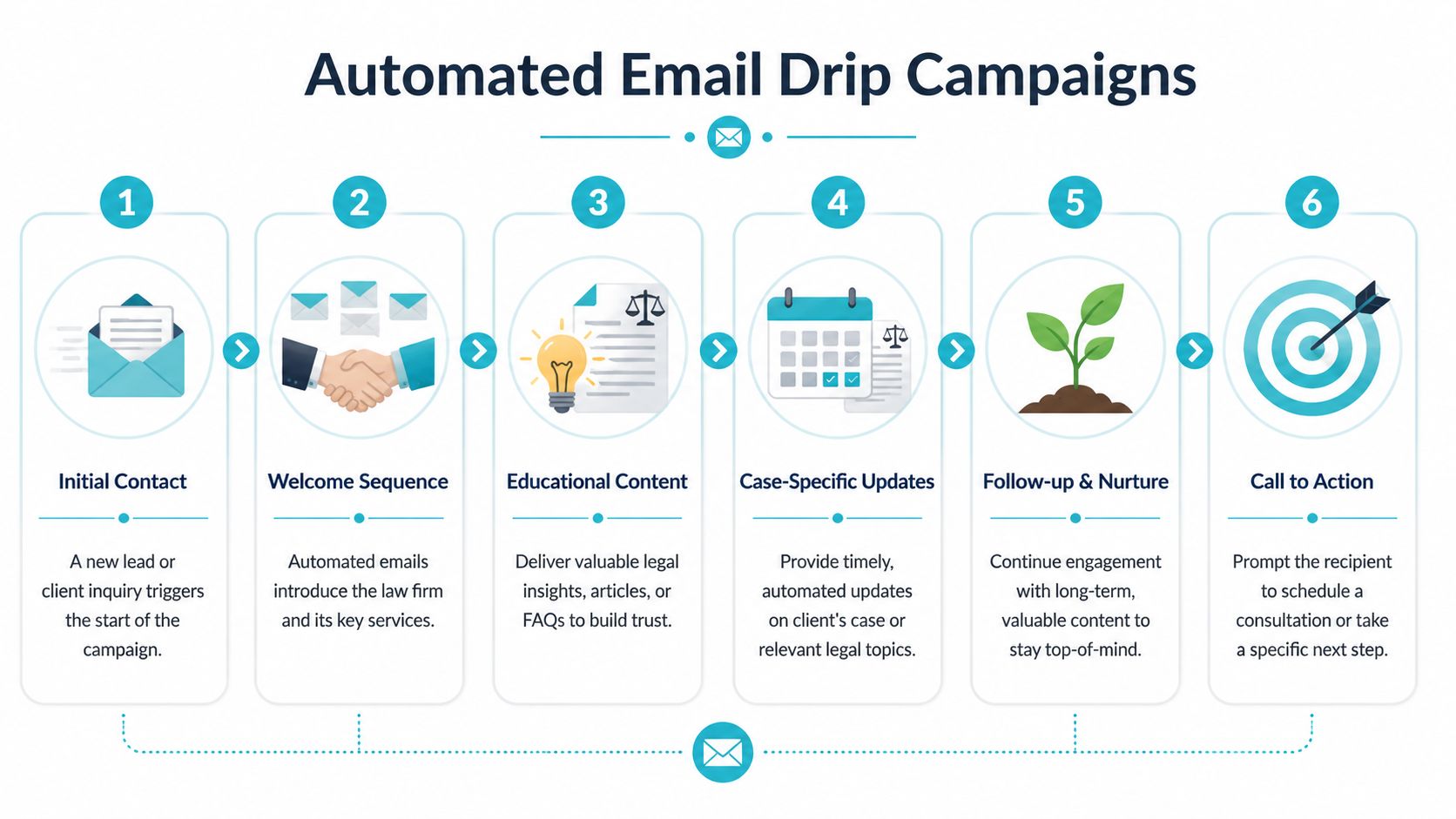
A consultation follow up sequence can achieve 25 to 40% conversion rates when handled with the right timing and personalization, based on Campaign Monitor’s guide for lawyers. The proven structure is simple: a same day thank you, a value add resource email 2 to 3 days later, and a gentle nurture email after 5 to 7 days.
The three email follow up sequence
This works because it mirrors how prospects make decisions. They need acknowledgment first, useful information second, and a low pressure invitation third.
Same day thank you
Send this while the consultation is still fresh. Reference the actual matter type or concern discussed. If the prospect called about a car accident claim, say that. Generic follow up reads like a mail merge.Value add resource a few days later
This email should answer the question they didn’t ask well during the call, or explain the process they’re still unsure about. Think checklists, FAQs, or a short explanation of next steps.Gentle nurture after several more days
Keep the tone light. Offer the next step. Invite them to schedule, reply with questions, or confirm whether they want to move forward.
That structure is effective because it doesn’t ask for commitment in every message. It earns it.
What to put in each email
The first email should feel personal, even if it’s automated. Mention the practice area. Mention the issue. Remind them what happens next.
The second email should carry the most value. In a plaintiff firm, that could be a short explanation of records, insurance contact issues, or what documentation helps evaluate a claim. Keep the educational tone dominant.
The third email should narrow the decision:
- Schedule your next call
- Reply if you want us to review additional documents
- Let us know if you’d like to move forward
Practical rule: If an automated email sounds like it could apply to any person in any practice area, it probably won’t convert well.
For firms that want a broader overview before building sequences, Mailadept’s email automation guide is a useful operational reference because it focuses on workflow logic, timing, and maintenance.
Triggered automation for current clients
The second high value use case is current client communication. In this area, law firms often leave the most efficiency on the table.
A case management system already knows when a matter changes status, when a document is ready, when a task is assigned, or when staff need something from the client. That means some emails should be triggered by those moments, not manually drafted each time.
Examples that fit legal operations well:
- Matter opened confirmation
- Records or documents requested
- Upcoming appointment reminders
- Settlement paperwork ready for review
- Portal notification that a new item needs attention
If your team wants to reduce hand sent reminders, a workflow based approach to automating legal processes helps map these events before you configure the emails.
Keep the logic clean or automation will create noise
Automation fails when firms overbuild it. They create too many branches, too many exceptions, and too many overlapping messages.
A better model is boring and dependable:
| Trigger | Recipient | Email purpose |
|---|---|---|
| Consultation completed, no retainer signed | Prospect | Follow up and nurture |
| Matter status changed | Current client | Update and expectation setting |
| Document uploaded for review | Current client | Prompt action |
| No activity after intake | Prospect | Re engagement |
| Matter resolved | Former client | Closing steps and relationship follow up |
Start with workflows that occur often enough to matter. A rarely used automation creates maintenance work without meaningful return.
Integrating Email with Your Practice Management Tech
Standalone email tools can send messages. They can’t tell you much about the case unless they’re connected to the system where your team works.
That’s the missing piece in most attorney email marketing setups. The marketing platform knows opens and clicks. The case management platform knows the matter stage, staff activity, tasks, and client record. If those systems never connect, reporting stays partial and staff keep duplicating work.

A major underserved need in attorney marketing is a framework for tracking which email campaigns convert to new cases, and integrating email platforms with case management systems is the key to closing that attribution gap. That’s the operational issue managing partners should care about most. Without integration, you can measure activity. You can’t confidently measure business impact.
What integration changes in day to day operations
When email and practice management are connected, the firm can use actual case events to drive communication. That matters for both marketing and service.
In practical terms, integration lets you:
- Trigger messages from real milestones: Intake completed, matter opened, documents requested, or settlement materials posted.
- Keep staff inside the system they already use: Needles, Neos, LawBase, and Litify remain the source of truth.
- Reduce duplicate data entry: No one should update a status in one system and then manually email the client from another.
- Create cleaner attribution: The firm can tie communications to intake progress and matter activity instead of isolated email metrics.
A client portal offers significant benefits. A portal handles secure status visibility, file sharing, messaging, and forms while the case management system remains the staff workspace. Email becomes the notification layer, not the entire experience.
A practical workflow for firms using legal tech already in place
A mid sized plaintiff firm doesn’t need to rip out its stack to improve communication. It needs to map the handoffs.
A sensible workflow looks like this:
Case management system records the event
A matter status changes, a task is completed, or a document becomes available.Portal reflects the update
The client can log in and see status, files, forms, or messages without calling the office.Email notifies the client
The message tells them something changed and what action, if any, is needed.Firm reviews activity in context
Staff can see whether the communication tied to movement in intake or case progress.
One option firms evaluate for this kind of workflow is CRM software for lawyers, especially when they need client communication to sit closer to case activity rather than in a separate marketing silo.
Where tools like Needles, Litify, and portals fit
Needles, Neos, LawBase, and Litify already organize the matter. That’s why they should inform email triggers. The portal should then give clients a controlled place to act on those updates.
CasePulse fits in this layer by providing a secure client portal that integrates with those case management systems so clients can check status, message the team, share files, and complete forms while staff stay in their existing workflow. That setup is useful when a firm wants email notifications tied to actual client service events rather than just newsletter sends.
When email sits apart from matter data, firms measure attention. When email sits inside the workflow, firms can start measuring progress.
That distinction is the core of ROI attribution. You’re no longer asking whether an email was opened in isolation. You’re asking whether a consultation moved forward, whether a client completed a requested action, and whether routine communication happened without staff manually touching every step.
Measuring Success and Your Launch Checklist
Most firms start by watching opens. That’s understandable, but it’s incomplete.
Open rate tells you whether the subject line and sender recognition did their job. It doesn’t tell you whether intake improved, whether clients stopped calling as often, or whether a campaign led to signed matters. Those are the outcomes that matter to a managing partner.

Systematic A/B testing can lift open and click rates by 15 to 30%, and top performing law firms see 28% open rates and 4.5% click rates on segmented lists according to attorney email marketing benchmarks summarized here. Those numbers are useful, but they should sit below the metrics tied to business performance.
Track outcomes first, channel metrics second
If a law firm wants measurable ROI, I’d organize reporting in three levels.
Business outcomes
This is the top layer. It answers whether attorney email marketing is helping the firm operate better.
- Consultation bookings from email
- Signed engagements after follow up sequences
- Client completion of requested forms or documents
- Retention and re engagement from past clients
- Reduction in repetitive status inquiries
These are the numbers partners care about because they connect to revenue, labor cost, and client experience.
Workflow metrics
These show whether automation is reducing manual work.
| Metric | Why it matters |
|---|---|
| Follow ups sent on time | Confirms the sequence is actually running |
| Milestone notifications triggered | Shows whether case events are mapped correctly |
| Client actions after email | Reveals whether updates drive uploads, replies, or portal activity |
| Staff exceptions handled manually | Helps identify where automation should stop and a human should step in |
Channel metrics
These still matter. They just come after the operational picture.
- Open rate
- Click rate
- Unsubscribes
- Replies
- Bounces
If you need ideas for diagnosing weak click performance specifically, this piece on how to improve email click-through rates gives practical ways to think about CTA placement, link structure, and friction in the path from email to action.
Use A/B testing selectively
A/B testing helps when you test one thing at a time and you already know what action matters. It becomes a distraction when teams start testing trivial wording with no clear downstream goal.
Useful law firm tests include:
- Subject line style: straightforward versus question based
- CTA wording: “Schedule your review” versus “Reply to discuss next steps”
- Email timing: morning versus afternoon for consultation follow up
- Format: short summary versus FAQ style explanation
What not to do:
- Test multiple elements in one send and then pretend you learned something precise
- Optimize opens while ignoring whether anyone booked or replied
- Keep losing variants live because no one owns review
A test only matters if the winning version changes what the client does next.
Your launch checklist
A clean launch beats a big launch. Before sending anything, make sure the operating pieces are in place.
Strategy and ownership
- Pick one owner: Assign responsibility to one person who can coordinate intake, compliance, and reporting.
- Define two or three goals: Focus on outcomes such as lead nurture, onboarding consistency, or reducing routine status calls.
- Choose initial audiences: Start with prospects, current clients, or past clients. Don’t launch every segment at once.
List and consent setup
- Audit your contacts: Remove stale, unclear, or duplicate records before importing them.
- Separate list types: Keep prospective clients, current clients, former clients, and referral contacts distinct.
- Review permission status: Make sure your team understands which contacts can receive what type of email.
Content build
- Draft one monthly newsletter: Keep it educational first.
- Write three consultation follow up emails: Same day, a value add message later, and a gentle follow up after that.
- Create milestone templates: Build drafts for matter opened, documents needed, and key status changes.
- Standardize calls to action: Ask for one next step per email.
Compliance review
- Add the footer elements: Include accurate sender details, unsubscribe functionality, and the firm’s physical address.
- Review claims and tone: Remove guarantees, exaggerated urgency, and vague promises.
- Set an approval process: Someone should approve templates before automation goes live.
Technology and workflow
- Map triggers from your case workflow: Decide which events should generate an email.
- Confirm integration points: Make sure contact fields, matter status, and activity signals move where they need to go.
- Test with internal records first: Send to staff, review formatting, and verify links and triggers.
Measurement
- Set baseline reporting: Record current booking rates, response patterns, and common service bottlenecks.
- Choose one or two channel metrics: Opens and clicks are enough to start.
- Schedule regular review: Check results consistently and adjust one variable at a time.
What a strong first quarter looks like
The first quarter shouldn’t be about volume. It should be about reliability.
If the consultation sequence goes out on time, milestone updates trigger correctly, and staff trust the workflow, you can expand. If the basics are sloppy, adding more campaigns only creates more confusion. Firms get better results when they run a small number of dependable automations than when they launch a large calendar nobody maintains.
Attorney email marketing works when it becomes part of firm operations. Once that happens, the question changes. You stop asking, “Should we send more emails?” and start asking, “Which communication should still require a human, and which one should happen automatically every time?”
If your firm wants email updates tied to real case activity instead of a disconnected marketing tool, CasePulse is built for that workflow. It gives law firms a secure client portal that integrates with systems like Needles, Neos, LawBase, and Litify so clients can check status, message the team, share files, and complete forms while staff continue working inside their existing case management environment.