
 CasePulse
 A managing partner usually notices the problem before anyone says it out loud. Drafts are taking too long. Staff are reentering the same family and asset data in multiple places. A client calls asking whether the latest trust version is the one they signed, and nobody wants to answer too quickly.
That friction isn't just annoying. In an estate planning practice, it creates risk. Small inconsistencies in names, beneficiaries, fiduciary appointments, and execution packets can turn a routine matter into a cleanup project.
The firms getting traction with attorney estate planning software aren't buying a fancier word processor. They're building an operating system for the practice. Drafting matters, but the larger win is operational control. The software should hold client data in one place, move work forward, reduce version confusion, and support the handoff between attorneys, paralegals, and clients without constant manual follow up.
The Hidden Costs of Manual Estate Planning
Most estate planning bottlenecks don't look dramatic. They look ordinary.
A prospective client fills out a paper intake form or sends details by email. A paralegal keys that information into one system, then copies it into a will template, then updates a trust draft, then checks whether the durable power of attorney still matches the mailing address listed elsewhere. Later, the attorney catches a mismatch in a beneficiary name because one draft pulled from an older document and another pulled from a newer intake note.
That kind of work drains time without creating much value for the client. Worse, it creates scattered data. Once client information lives in inboxes, Word files, handwritten notes, and separate staff checklists, the firm loses its single source of truth.
Where manual work hurts the most
The heaviest costs usually show up in places firms have normalized:
- Duplicate data entry: Staff retype the same family, asset, and fiduciary information across multiple documents.
- Template drift: One lawyer updates language in a favorite form, another keeps using an older version, and both assume they're current.
- Administrative chasing: Someone has to confirm signatures, collect missing information, send reminders, and answer status calls.
- Version confusion: Drafts circulate by email, attachments get renamed inconsistently, and nobody wants to guess which file is final.
Manual drafting rarely fails all at once. It fails one small inconsistency at a time.
Why firms outgrow patchwork systems
A lot of firms can tolerate manual work when volume is low. That stops working when the calendar fills up. Estate planning matters often involve sets of related documents that have to stay consistent. If your process depends on memory, individual habits, and checklists buried in email, growth adds pressure faster than it adds capacity.
That's why attorney estate planning software has become a practical requirement. The point isn't to automate judgment. The point is to remove routine friction so attorneys can spend more time reviewing strategy and less time supervising clerical repair work.
The Evolution from Drafting Tools to Firm Engines
The category changed when estate planning software stopped acting like a standalone drafting utility and started behaving like shared firm infrastructure.
The clearest marker of that shift is cloud adoption. The ABA's 2025 Legal Technology Survey reported that 73% of law firms now use cloud-based tools, a change that helped estate planning software scale from isolated drafting tools into integrated systems that support intake, collaboration, and compliance across the firm, as summarized in this estate planning software guide.

What changed in practical terms
Older drafting programs did one thing reasonably well. They assembled documents. Modern platforms do more than that because the work around the document is where firms lose time.
A stronger setup usually includes:
- Centralized client data so the matter record doesn't splinter across forms and emails.
- Template automation so wills, trusts, directives, and related documents pull from the same information set.
- Workflow visibility so staff can see what is waiting, what is complete, and what needs attorney review.
- Shared access so attorneys and support staff aren't passing files back and forth as if only one person can touch a matter at a time.
Why managing partners should care
This isn't just a technology upgrade. It's an operating model shift.
When firms move to cloud based, integrated tools, they can standardize how matters start, how drafting happens, and how files move to signing and closing. That reduces the number of handoffs that depend on informal habits. It also makes supervision easier because work is happening in one visible system rather than in private folders and inboxes.
I've found that firms often underestimate how much process discipline comes from software design. If the system expects consistent intake, centralized templates, and tracked workflow steps, the team usually follows that structure more reliably than they would with a policy memo alone.
For a broader view of what that connected environment should look like, Nutmeg Technologies' legal tech insights are useful because they frame legal software as part of a wider operational stack rather than a set of disconnected apps.
The best estate planning platform doesn't just produce documents. It gives the firm one place to run the matter.
Essential Features for Daily Workflow Automation
If you're evaluating attorney estate planning software, start with the features that remove routine handling work. These aren't flashy. They're the functions your staff will lean on every day.
The non negotiables
At a minimum, the platform should support a disciplined drafting workflow built around a single matter record. That means client intake data should flow into document templates instead of being retyped. It also means staff should be able to manage document status, reminders, and related communications without shifting between too many separate systems.
The practical baseline usually includes:
- Single entry document generation: Client and matter data should populate across related estate planning documents from one record.
- Central template control: The firm needs a governed document library so attorneys aren't pulling from personal versions saved years ago.
- Workflow tracking: Staff should be able to see where a matter sits, what is outstanding, and what needs review.
- Calendar and reminder support: Estate planning work still has appointments, follow ups, and signing coordination that need a reliable task structure.
- Reporting visibility: Managing partners need enough oversight to spot bottlenecks and uneven work distribution.
A good overview of how document automation fits into that operational picture appears in this guide to legal document automation.
Core versus advanced capabilities
The easiest way to evaluate products is to separate what drives baseline efficiency from what supports long term growth.
| Capability Area | Core Feature (Essential for Efficiency) | Advanced Feature (For Growth and Differentiation) |
|---|---|---|
| Client data handling | Single matter record used across documents | More adaptive intake and planning workflows |
| Drafting | Automated template population for wills, trusts, and directives | More sophisticated planning support and analysis |
| Document control | Centralized repository for current templates and drafts | Broader oversight across the full client lifecycle |
| Task management | Reminders, status tracking, and workflow visibility | More proactive triggers tied to changing client needs |
| Team coordination | Shared access across attorneys and staff | Deeper cross system orchestration and management insight |
| Client interaction | Basic intake and document collection support | More continuous communication and self service options |
What firms often miss during evaluation
Some products demo well because the drafting screen looks polished. That isn't enough. You need to know whether the software reduces the invisible work around the draft.
Ask simple operational questions:
- Can staff find the current version quickly?
- Can matter data move into templates without copy and paste?
- Can the team track next actions inside the same environment?
- Can the firm keep template usage consistent across attorneys?
If the answer to those questions is weak, the platform may still produce documents, but it won't solve the daily workflow drag that's slowing the practice down.
Advanced Capabilities That Drive Firm Growth
Once the basics are in place, the next layer of estate planning software matters because it changes how the firm scales. At this stage, a system starts helping the practice not just process work, but expand capacity and improve service consistency.

AI is useful when it's constrained
AI is now part of the estate planning technology conversation in a practical way, not a speculative one. According to ACTEC's 2026 update, use of AI in estate planning is increasing because of significant time and cost savings. That same update noted use cases such as AI chatbots for customized intake, retrieval augmented generation to ground responses in vetted firm information, and analysis tools that generate tax reduction strategies, while also warning that attorneys must verify outputs to avoid professional consequences, as summarized here in a review of estate planning software for attorneys.
That last point matters most. AI helps when it shortens low value work and broadens issue spotting. It hurts when firms treat generated text as if it were reviewed legal analysis.
The advanced layer that actually matters
Not every "advanced feature" belongs on your shortlist. The better question is whether the feature improves one of three things: supervision, consistency, or strategic capacity.
Consider the difference:
- Helpful advanced capability: Intake tools that adapt questions based on earlier responses, which can reduce back and forth before drafting starts.
- Helpful advanced capability: Analysis support that surfaces planning options attorneys can review and refine.
- Less useful capability: Cosmetic dashboards that look impressive but don't change work allocation or review quality.
Practical rule: If an advanced feature doesn't reduce attorney review time or improve the quality of the review, it probably isn't worth paying for.
Growth comes from controlled delegation
Firms grow when more of the process can move forward before the attorney's final judgment step. That requires software that lets staff collect information, prepare documents, manage workflow stages, and flag exceptions cleanly.
The gain isn't that lawyers disappear from the process. The gain is that lawyers spend their time where it belongs:
- reviewing planning choices
- confirming accuracy
- advising on trade offs
- approving final outputs
That's also where AI belongs. It can assist intake, surface possibilities, and organize information. It can't replace attorney verification, especially in a practice where bad citations, fabricated authorities, or unsupported recommendations create real professional exposure.
Evaluating Software on Security and Integration
A surprising number of firms still evaluate estate planning software by template quality first and architecture second. That's backwards.
In an estate planning practice, the software will hold sensitive family, financial, and personal information. It also has to fit the systems your team already uses. If it doesn't handle security well or connect cleanly to the rest of the firm's workflow, it adds risk while pretending to remove friction.
Security is a threshold question
At minimum, you should expect encrypted storage, role based access, and secure portals for client data handling. Those aren't premium extras. They're baseline requirements for software that touches estate planning matters.
More important, the permissions model has to match how legal work is supervised. Attorneys, paralegals, and support staff shouldn't all see or edit the same things in the same way. If access control is crude, your process will become crude too.
A practical discussion of the broader environment firms need around these tools appears in this overview of cybersecurity for law firms.
Integration is where ROI is won or lost
A key benchmark for modern estate planning software is deep integration with systems like Microsoft Word, Outlook, scheduling tools, e-signature tools, and practice management platforms, because that reduces process fragmentation, which is a common cause of missed deadlines and inconsistent versions in trust and estate matters, according to this analysis of estate planning attorney software.
That sounds technical, but the operational meaning is simple. Your staff shouldn't have to leave one system, download something, rename it, email it, calendar it, and then manually note the update somewhere else.
What a bad fit looks like
You can usually spot a poor fit during the demo if you ask the vendor to walk through an actual matter from intake to signing.
Watch for these warning signs:
- Too many handoffs: Users have to move data manually between systems.
- Weak Word workflow: Documents don't integrate naturally with how attorneys already draft and review.
- No Outlook alignment: Email, scheduling, and matter updates live in separate places with no practical sync.
- Portal gaps: Client communication exists outside the main matter workflow, forcing staff to monitor another channel manually.
For firms thinking beyond the software itself, Blowfish Technology for law firms has useful material on the operational support legal teams need when security and infrastructure decisions become more complex.
Standalone tools look affordable until your staff has to bridge the gaps by hand.
A Practical Checklist for Implementation and Adoption
Buying software is easy. Getting lawyers and staff to use it the same way is the hard part.
The firms that succeed treat implementation as a workflow redesign project, not an IT event. They decide which data belongs in the system, which templates are official, who owns each step, and where attorney review should occur.
Implementation checklist
- Audit the current process
Identify where information enters the firm, where it gets reentered, who updates templates, and where drafts commonly stall. Don't start by mapping ideal workflow. Start by documenting the actual one.
Clean up templates before migration
Most firms have too many versions of the same core documents. Pick the approved forms, archive the rest, and define who can change them going forward.
Standardize intake fields
If one assistant records family data one way and another records it differently, automation won't help much. Agree on the matter data structure before importing records or building workflows.
Set review rules
Decide what staff can prepare, what attorneys must verify, and what requires partner sign off. This becomes even more important if the platform includes AI assisted functions.
Train by role, not all at once
Attorneys, paralegals, and administrative staff use the system differently. Show each group the tasks they perform most often.
Pilot on a narrow matter set
Start with a small, repeatable estate planning workflow before expanding to every document type and every attorney preference.
Adoption usually fails for predictable reasons
The most common implementation problem isn't software confusion. It's inconsistent usage. One attorney keeps using old templates. Another stores drafts outside the system. Staff then have to support both the old process and the new one.
That won't fix itself. Someone needs authority to enforce the standard process.
Software adoption improves when the firm removes old workarounds instead of preserving them "just in case."
Enhancing Client Service with a Secure Portal
Most discussions about attorney estate planning software stop at drafting. That's too narrow, especially for firms that want stronger long term client relationships.
A significant operational issue in estate planning isn't creating the first set of documents. It's keeping plans relevant as client circumstances change. A 2026 platform launch from Trust & Will included proactive life event monitoring and automated detection of events such as death, marriage, and divorce, signaling a shift from one time document generation toward ongoing client lifecycle management, according to this announcement on attorney platform development.
Internal engine versus client facing interface
That shift creates a practical distinction many firms need to make more clearly.
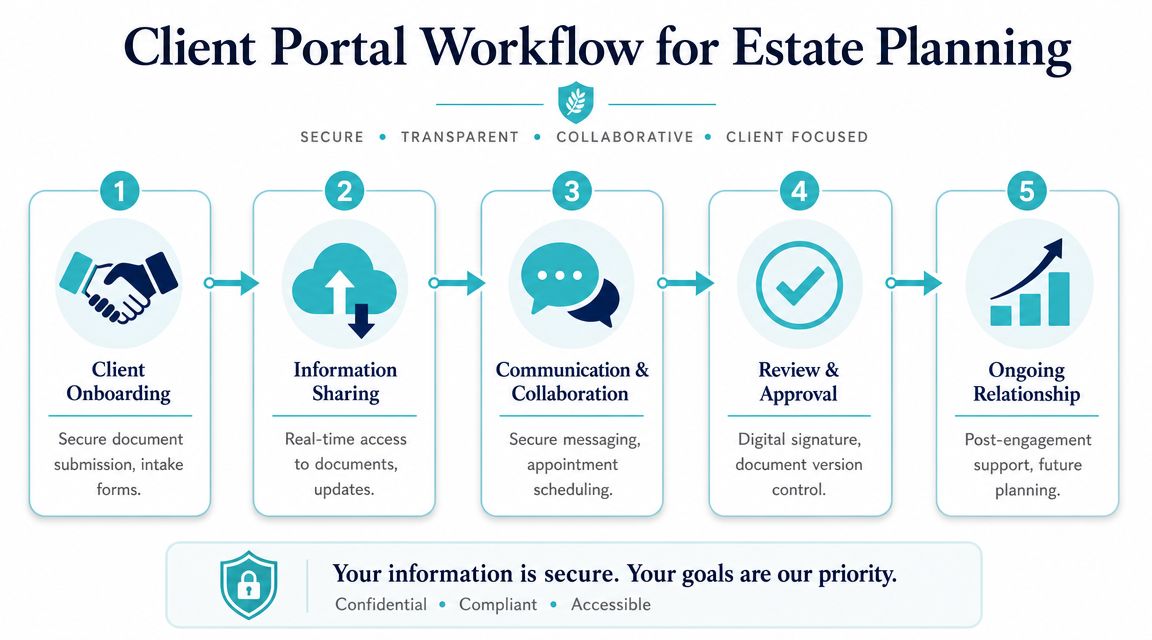
Your estate planning system handles the internal work. It stores matter data, manages templates, supports drafting, and tracks workflow. A secure client portal handles the external side. It gives clients a structured way to send information, receive updates, share files, complete forms, and stay connected to the firm without turning every routine question into a phone call.
Those are different jobs. Trying to force one tool to do both often creates a mediocre experience for staff and clients alike.
Why the portal matters after signing
Post signing communication is where many firms lose continuity. Clients move, marry, divorce, lose a family member, or forget what they signed and where it lives. If the only communication path is email and phone, the firm has no efficient way to maintain an ongoing relationship.
That's where a dedicated portal can complete the stack. A tool such as secure client portal software for law firms can sit alongside the firm's main system and support secure messaging, file sharing, forms, and status visibility while staff continue working inside their established workflow.
The value isn't just convenience. It's structure. Clients know where to go. Staff know where communications live. The matter record is easier to maintain. Follow up becomes more manageable.
What works better in practice
The cleanest model is separation with integration:
- Internal software: drafting, document control, workflow, review, task management
- Client portal: updates, intake completion, secure file exchange, routine communication
- Connected process: staff don't have to monitor scattered channels or duplicate responses
That's the modern estate planning stack in practical terms. One system runs the matter. Another supports the relationship.
If your firm already has internal estate planning workflows in place but still struggles with client communication, status requests, file sharing, or form collection, CasePulse is one option to evaluate as the client facing layer. It provides a secure legal client portal designed to work with existing case management workflows, so firms can handle messaging, files, forms, and updates without forcing staff into a separate daily process.