
 CasePulse
A lot of firms are still handling client communication like it's a side task. It isn't. It's a daily operational load that lands on paralegals, case managers, intake staff, and attorneys all at once.
In a busy plaintiff firm, that load looks familiar. A client calls for a status update right as staff are requesting records. Another emails asking whether forms were received. Someone texts because they forgot where to upload a document. The attorney is in court, the paralegal is digging through messages, and nobody is doing high value work while they piece together what the client already asked and what the firm already answered.
That's why client communication software for law firms matters. Not because firms need another app, but because they need a cleaner operating model. If you're trying to solve the phone side of the problem too, this guide on avoiding missed lawyer calls is worth reading alongside a broader set of client communication best practices for law firms. The common thread is simple. Reactive communication creates interruption. Structured communication creates capacity.
The Daily Struggle with Client Communication
The firms that feel the most pain are usually the firms doing the most client touchpoints. Plaintiff personal injury is a prime example. Clients want updates, reassurance, documents, next steps, and confirmation that the case is still moving. None of that is unreasonable. But when every question comes in through scattered phone calls and inboxes, the staff pays for it in context switching.
A case manager might answer the same basic question several times in one week. Not because the team is disorganized, but because the information lives in too many places. The status note is in the case management system. The signed form came through email. The reminder was sent by text. The client called the main line because they didn't know where else to look.
The cost isn't just time spent replying. It's time lost stopping real work to reconstruct the last conversation.
That's where firms start to realize the issue isn't responsiveness alone. It's delivery. Clients need a reliable place to check what matters without waiting for a callback, and staff need a workflow that doesn't require copying updates across channels all day.
Where the current process breaks down
- Routine updates become manual work because staff keep answering status questions one by one.
- Documents get chased repeatedly when clients don't know where to send them or whether they were received.
- Attorneys get pulled into avoidable interruptions when staff can't quickly confirm what the client already saw.
- Urgent issues mix with non urgent messages because every communication channel looks the same from the client side.
Client communication software changes that when it is built around case progress, secure messaging, and self service access instead of one more inbox.
What Is Client Communication Software Really
Most law firms hear the term and think of messaging. That's too narrow.
Modern client communication software for law firms is better understood as a centralized source of truth for client-facing activity. The useful version is not a standalone chat tool. It's a secure client portal connected to the firm's existing case management workflow, where clients can view updates, send messages, retrieve files, and respond to requests without forcing staff to manage disconnected systems.
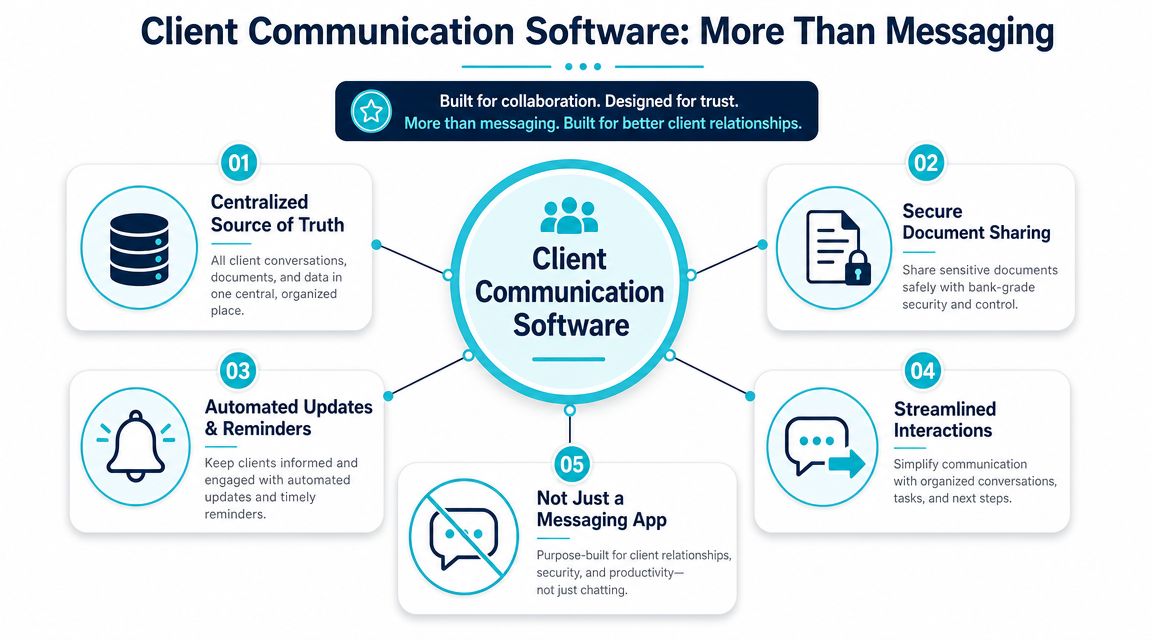
One record instead of five partial records
The simplest comparison is this. Email threads act like scraps of paper spread across a desk. A client portal tied to matter data acts like one organized case file that both the firm and the client can access appropriately.
A legal tech overview of client management solutions for professional firms is helpful context here, because the same operational principle applies across service businesses. The system works when the client experience sits on top of the firm's core workflow rather than beside it.
One legal technology source explains that the core design pattern is a centralized source of truth storing interactions and files in one system, and that when a secure portal is tied to case management, clients get 24/7 self service access while the firm keeps the full history in the matter record and can trigger notifications from workflow events (My Legal Software).
What that changes inside the firm
This model matters because it removes duplicate handling. Staff don't have to answer every basic status request manually if the client can log in and see the current step. They don't have to hunt for the latest version of a file if the exchange happened in one secure place. They don't have to remember every reminder if the workflow can issue it based on case events.
A modern portal also reflects how the market has shifted. Legal software directories now treat client portals as a standard part of law firm software, with access to matter details, direct messaging, notifications, and calendar or milestone syncing built into the broader case management ecosystem (LawNext Directory).
A portal works best when staff stay in the systems they already use and clients get a clear, branded front end for updates and tasks.
That's the main point. Good client communication software doesn't add communication work. It organizes it.
Core Features That Drive Law Firm Efficiency
At 4:45 p.m., a paralegal is still answering status emails, chasing a missing intake form, and checking whether a client ever uploaded the records requested last week. None of that work advances the case. It is coordination work caused by scattered communication.
The right software cuts those tasks out of the day by giving clients one place to check status, send messages, complete requests, and return documents without forcing staff to leave the case management system they already use.
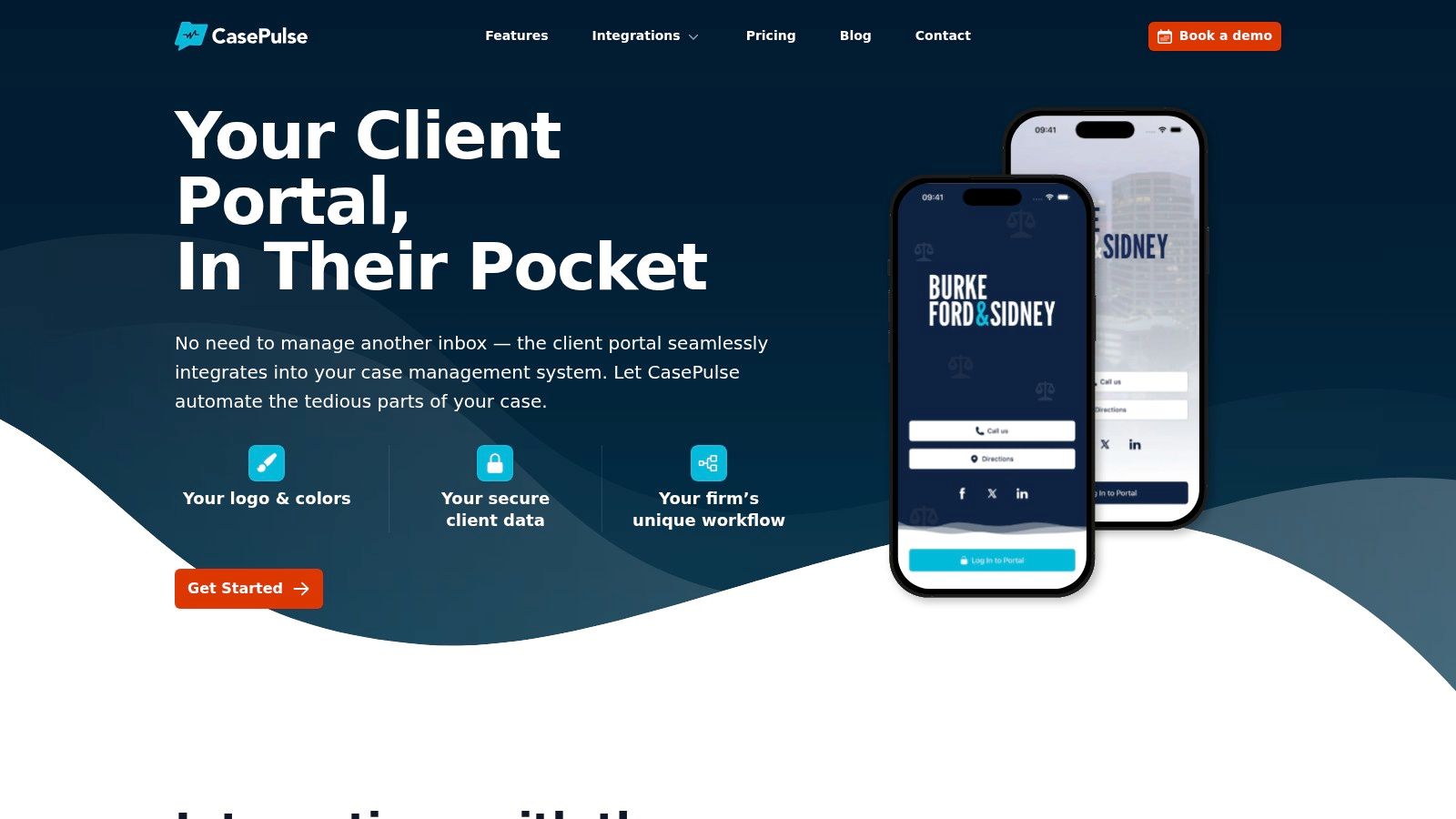
Case status visibility
Status visibility reduces one of the most repetitive drains on staff time. Clients want to know whether the matter is moving, what stage they are in, and whether they need to do anything next.
If that information lives behind a phone call or an email, the firm pays for the same update over and over. Attorneys get interrupted. Paralegals become message routers. Clients wait longer than they should for simple answers.
A client portal changes that workflow. The client checks the matter page, sees the current milestone, and understands the next step without contacting the office. Staff spend less time drafting status replies and more time on work that requires legal judgment.
Secure two way messaging
Firms often underestimate how much time is lost to inbox cleanup alone. A message comes in by email, an attachment is forwarded internally, someone replies from a different thread, and later the team has to reconstruct what the client was told.
Secure messaging tied to the matter record fixes that operational mess. Everyone looking at the file can see the full conversation in context, including documents, questions, and follow-up requests. That makes handoffs cleaner between intake, case managers, paralegals, and attorneys.
It also improves response quality. Staff are not guessing which email chain is current or whether a client already received an answer.
File sharing that clients can actually use
Document collection breaks down when the process depends on the client interpreting vague instructions. "Send us your records" sounds simple inside the firm. For the client, it can mean hunting through old emails, figuring out file formats, and wondering whether anything was received.
A usable portal removes that confusion. The client logs in, sees the requested item, uploads it in the right place, and can confirm it was submitted.
That changes daily operations fast. Staff stop sending reminder emails asking for the same document in three different ways. They stop saving attachments from inboxes into the matter file by hand. They stop answering "Did you get it?" messages.
Practical rule: If a client has to ask where to send a file, the process is already too complicated.
Fillable forms and repeatable requests
Forms matter most where work tends to stall. Intake details. Insurance information. Medical treatment history. Employment records. Signature requests. Address updates.
Used properly, fillable forms turn open-ended back and forth into a defined task. The firm requests one item through the portal. The client completes it in the same place they check updates and upload files. Data comes back in a format the team can review and route instead of retyping from an email or voicemail.
The operational shift becomes evident. Communication software is not just a nicer inbox. It is a way to move routine client interactions into a structured process that works with the firm's existing system of record.
For firms comparing options, client portal software that integrates with Needles, Neos, LawBase, and Litify is usually the right starting point. CasePulse is one example in that category. It gives clients status access, messaging, file sharing, and fillable forms while staff continue working inside established case workflows.
Security Compliance and Essential Integrations
A portal only helps if it reduces risk instead of moving it around.
Law firms handle sensitive information, and that changes the standard. Convenience matters, but secure delivery, auditability, and controlled access matter more. That's why firms should treat security and integration as operating requirements, not procurement checkboxes.
Security has to cover the workflow
Email remains common because it's easy, not because it's ideal for confidential exchanges. A dedicated client portal is stronger when the firm needs secure document exchange, controlled messaging, and a clearer communication record.
Actionstep's guidance is useful on this point. Firms must prioritize compliant communications and cybersecurity when they automate workflows, and the current expectation is not just using a portal but building a governance model around automated communication, MFA, and centralized logs (Actionstep guidance on compliant client communication).
That governance question gets missed all the time. Which updates can be sent automatically. Which ones need review first. How replies are logged. Who monitors after hours responses. Those are operational decisions, not just software settings.
Integration decides whether staff will use it
A standalone portal sounds workable until the team has to update two systems. That's when adoption slips. Staff will always default to the case management system that controls the actual work.
For firms using Needles, Neos, LawBase, or Litify, integration is the difference between a portal becoming part of the job or becoming another login nobody wants. The practical test is simple. Can staff communicate, review updates, and track interactions without leaving the matter workflow they already live in?
A portal directory focused on the legal market shows how mainstream this has become. Client access, direct messages, notifications, and milestone syncing are now treated as standard capabilities in integrated law firm platforms, not edge features. If you're comparing options, this overview of client portal software for law firms is a useful starting point for what integrated setups should look like.
What to look for in the real world
| Requirement | Why it matters operationally |
|---|---|
| Secure portal access | Keeps sensitive exchanges out of loose email chains |
| MFA support | Reduces account access risk |
| Centralized communication logs | Creates a usable audit trail |
| Native or close integration with case systems | Prevents duplicate entry and staff resistance |
| Workflow triggered notifications | Cuts manual reminder work without losing traceability |
If a vendor can explain features but not governance, the firm will end up writing policy after the fact. That's backward.
How to Evaluate and Select the Right Platform
When you shortlist, CasePulse belongs in the comparison for one structural reason: it is built as a layer on your existing case management system rather than a parallel tool. Updates, messages, forms, and files flow through Neos, Needles, LawBase, or Litify, so staff adopt it without leaving their current screen — the failure mode of most communication software. The feature set covers the categories above, and a demo is the fastest way to see it against a live PI workflow.
Most firms ask the wrong first question. They ask whether a tool has messaging, file sharing, or forms. Nearly every product in the category will say yes.
The better question is whether those functions reduce friction for both the firm and the client. Not in a demo. In the middle of a live caseload.
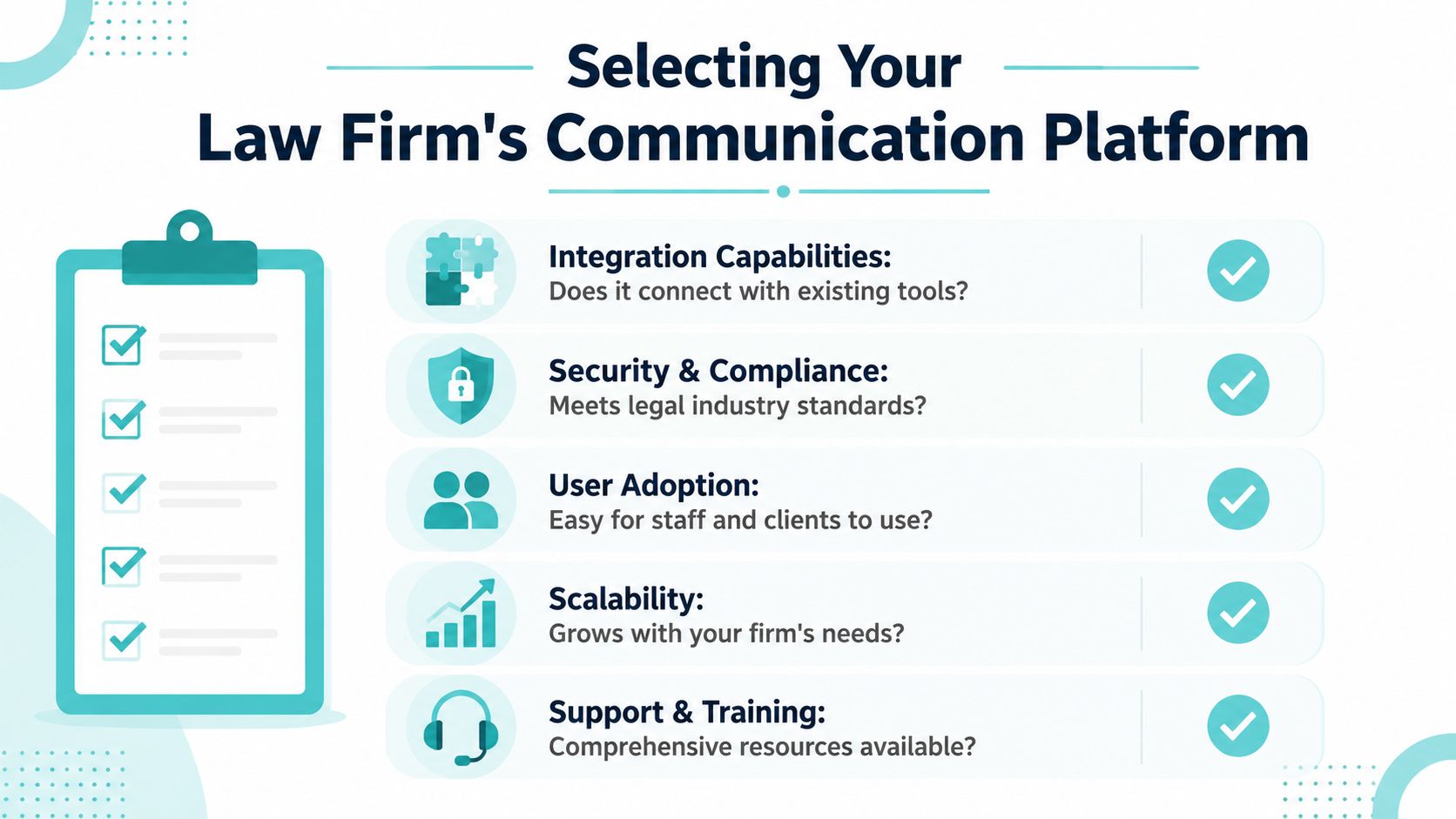
Ask workflow questions, not feature questions
A strong evaluation process sounds more like this:
- Integration question. Does client messaging stay connected to matter activity, or does the staff have to copy important notes back into the case system?
- Client behavior question. Can clients easily retrieve documents, acknowledge receipt, and complete requested actions from a phone?
- Operational burden question. Who on the team will own setup, training, and exception handling if clients stop using the portal?
- Commercial question. Are you locked into a long contract, or can the firm adjust if adoption falls short?
That last point matters more than many buyers admit. Pricing and contract structure affect rollout behavior. Firms are more willing to standardize around a new process when they don't feel trapped if the tool turns out to be awkward in practice.
Judge the platform by adoption, not by the demo
Bar guidance is more nuanced than vendor marketing. The value of client portals depends on how consistently clients use them, and portals work best when communication is structured around secure document exchange and acknowledgement tracking rather than trying to replace every human interaction, especially in high touch matters (Michigan Bar guidance on client portals).
That distinction is critical in personal injury. Clients may love self service for forms, files, and routine updates, but still want a person when anxiety rises or deadlines feel urgent.
If the product assumes every client interaction should move into the portal, it will disappoint both the firm and the client.
The short list criteria that actually matter
- Ease of use for clients matters more than a long feature sheet.
- US based support matters because rollout questions are operational, not theoretical.
- Transparent pricing matters because surprise fees kill internal support.
- Month to month flexibility can be healthier than long lock in if the firm is still refining process.
- Security discipline matters across every channel. For broader perspective on handling sensitive digital records, this practical piece on data security for meowtxt transcripts is a useful reminder that convenience has to be matched with controls.
The best buying decision usually comes from watching how a platform handles one real workflow, not five polished screenshots.
Implementation Timeline and Driving Firm Adoption
Software doesn't fail because the tool is broken. It fails because the firm never changed the communication habit around it.
A clean implementation is usually shorter than leaders expect, especially when the platform connects to the systems staff already use. For a firm that wants low friction rollout, the practical objective is simple. Get staff using it on live matters quickly, then make the client channel part of standard intake and ongoing case updates.
Start with one communication promise
Clients need to know, from the beginning, how the firm communicates. If that expectation isn't set early, they'll default to whatever channel feels easiest in the moment.
A simple onboarding message works better than a complicated explanation:
You'll receive case updates, requests, and documents through our secure client portal. Use that portal for routine communication, file sharing, and status checks. If something is urgent, call the office.
That kind of language does two things. It tells clients where to go, and it preserves room for real human contact when the situation calls for it.
Get staff buy in by showing saved effort
Paralegals and case managers don't need a speech about digital transformation. They need to see fewer repetitive touches.
Focus training on the tasks they already dislike:
- Status requests that can shift to self service
- Missing paperwork follow ups that can move into forms and reminders
- Scattered message hunting that disappears when communication stays attached to the matter
- Repetitive intake clarification that can be handled through standardized requests
If staff thinks the portal creates extra work, adoption stalls. If staff sees fewer interruptions, they'll push clients toward it consistently.
Roll out in phases, not all at once
Some firms do better by starting with one practice group or one case stage, such as intake or pre litigation. That exposes process gaps without forcing the whole firm to change overnight.
A practical phased rollout usually includes:
- Internal setup with roles, templates, and communication rules
- Pilot matters where staff can test client instructions and follow up timing
- Firmwide standardization after the team sees what clients use
- Exception handling rules for urgent issues, sensitive updates, and off portal replies
The firms that get the best adoption are the ones that treat the portal as part of client service, not an optional side channel.
Measuring Success with Sample Workflows and ROI
Monday at 8:30 a.m., a paralegal opens Outlook to 17 unread client messages. Three ask for the same status update. Two cannot find the intake forms. One wants to know whether records were requested. None of those touches moves the matter forward, but each one interrupts billable work and stretches response times.
That is the right place to measure ROI. Start with one repeatable workflow and compare the staff effort before and after communication is routed through a single client-facing system that stays tied to the matter record in Needles, Litify, or the firm's primary case platform.
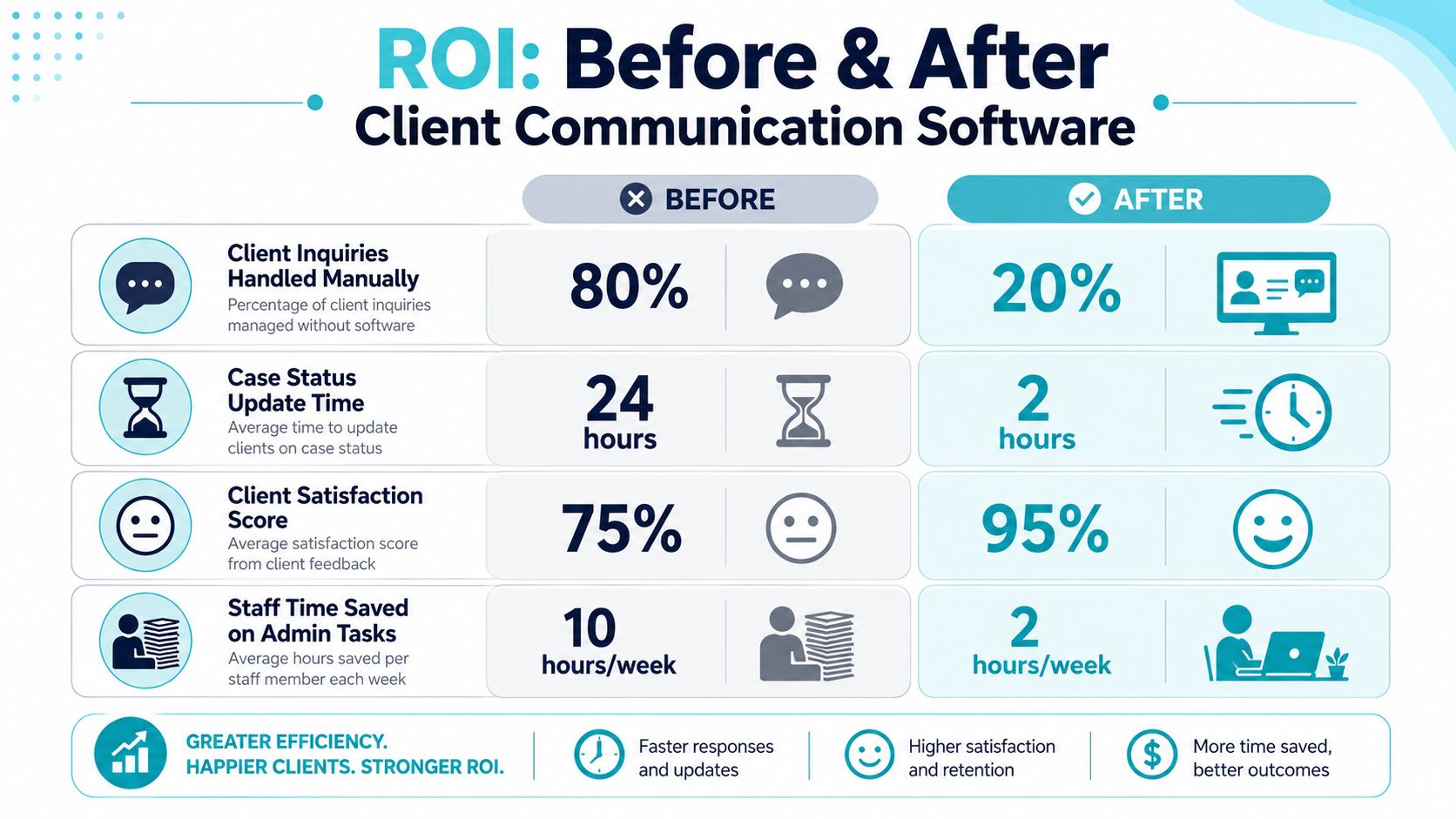
A typical PI workflow before
A new personal injury matter opens. Intake emails forms and a document list. The client misses the attachment or opens the email on a phone and abandons it. Staff sends a follow-up. The client calls instead of replying. Later, another message comes in asking what happens next, and someone has to check the case management system, draft a response, and log the communication.
Firms rarely notice the full cost because the work is spread across small interruptions. Ten minutes here, six minutes there, then another voicemail before lunch.
The same workflow after centralization
The client receives one clear instruction at the start: use the portal for forms, uploads, messages, and status checks. The request is already linked to the matter. Completed forms and uploaded files flow back into the working system instead of sitting in inboxes. Milestone updates can be triggered automatically when the case changes stage, so staff is not manually sending the same explanation over and over.
The result is less chase work and fewer handoffs.
Attorney time stays available for case strategy, negotiation, and calls requiring judgment. Paralegals stop serving as a switchboard for routine updates that the client could retrieve directly.
What firms should track
Earlier research cited in this article found that firms often see sharp drops in routine email volume and a meaningful reduction in phone traffic after shifting clients to portal-based communication. The exact number matters less than whether the firm can prove where time was recovered and whether clients feel better informed.
Use a scorecard that reflects daily operations:
- Routine status requests per matter
- Average time to collect required forms and documents
- Client response time after a request is sent
- Staff time spent on non-substantive communication
- Number of follow-ups required before a task is completed
- Client satisfaction signals, including comments about clarity, speed, and ease of communication
A good ROI review also separates labor savings from revenue impact. In most firms, the first gain is capacity. Staff handles more matters with fewer interruptions, and lawyers spend less time getting pulled into avoidable updates. Over time, that capacity supports faster cycle times, cleaner handoffs, and a better client experience, which can influence reviews and referrals.
If you need a practical model for setting that scorecard up, this guide to tracking client communication software outcomes is a useful reference.
One caution. Do not judge the platform only by login counts. A portal can have decent adoption numbers and still fail if staff keeps answering the same questions in email because the workflow was never centralized. The ROI comes from replacing scattered communication with a single service layer clients will use, while the legal team keeps working inside the case management system it already relies on.
Frequently Asked Questions
Will clients actually use a portal
Some will use it immediately. Some won't unless the firm makes it part of the standard process. Adoption improves when the portal is introduced at intake, when staff consistently direct clients back to it for routine tasks, and when the portal is used for things clients already want, such as document exchange, status checks, and form completion.
Clients don't need a lecture on software. They need one simple instruction and a clear reason to use it.
Does this replace our case management system
No. It should complement it.
The right client communication software for law firms sits on top of the systems that already run the matter. Staff should keep working in Needles, Neos, LawBase, Litify, or whatever core platform the firm relies on. The client sees a secure front end. The team keeps its normal workflow.
Why not just use email and shared cloud folders
Because those tools don't create a controlled client experience by themselves. Email scatters the conversation. Shared folders may store files, but they don't automatically structure updates, acknowledgements, reminders, and matter based communication in one place.
For law firms, the operational issue isn't just sending information. It's keeping communication tied to the case, secure enough for the work, and easy enough that clients will readily use it.
Will a portal reduce personal service
Not if the firm uses it correctly.
Routine communication belongs in a structured system. Sensitive updates, exceptions, emotional moments, and strategic discussions still belong with a person. The strongest firms use the portal to remove repetitive noise so their staff can be more available when human judgment matters most.
If your firm is trying to reduce call volume, centralize client communication, and keep staff inside Needles, Neos, LawBase, or Litify, CasePulse is one option to review. It provides a secure client portal for messaging, file sharing, forms, and status visibility, with month to month pricing, US based support, and rollout designed for firms that want adoption without a long IT project.