
 CasePulse
 At 4:45 p.m., a high value PI lead comes in through a web form. Intake calls back, leaves a voicemail, sends a text, and opens a conflict check. The prospect replies with partial details. Someone copies the information into Neos, then updates Litify after the consultation is set, and by the next morning the lead has already signed elsewhere.
That pattern shows up in mid sized and large PI firms all the time. The root cause is usually a broken intake system, inconsistent handoffs, unclear ownership, duplicate data entry, and tools that were added on top of old habits instead of being configured to support a defined process.
A strong client intake process does more than collect contact information and schedule a callback. It controls how a prospect moves from first contact to screening, conflict review, consultation, signature, and file opening. In PI, where prospects often reach out to several firms at once, intake functions like an operating system for growth. If the process is slow, fragmented, or hard for staff to follow, marketing spend gets wasted and good cases slip out of the pipeline.
I have seen this firsthand in firms using Needles, Neos, LawBase, and Litify. The software is rarely the only issue. The challenge is getting forms, portals, call scripts, follow up rules, and case management workflows to work together in a way staff will use under pressure. A sample client intake form for law firms can help clarify what information belongs at the first touch, but forms alone do not fix intake. Mid and large PI firms need a full system, plus the operational discipline to implement it across teams.
The firms that get this right tend to share a few habits. They define the intake path before they automate it. They connect client-facing tools to the case management platform already running the firm. They automate routine communication without making the experience feel cold. And they assign clear responsibility so the process survives busy days, staff turnover, and changing case volume.
Designing Your Intake Blueprint
Most intake problems start before a prospect ever touches your form. The firm hasn't defined who it's trying to sign, what information matters at each stage, or how staff should ask for it. So the team over collects, under screens, and creates friction for everyone.
Start with who you want. In PI, that means getting specific about the matters your firm is built to handle well. Not every inquiry deserves the same effort. If your best cases share patterns, your intake criteria should reflect that. Staff need a written screen for fit, not a vague sense of what sounds promising.
Define the right cases first
Build your intake blueprint around decision points.
- Practice fit. Does the matter match the case types your firm actively pursues?
- Basic viability. Is there enough information to justify attorney review?
- Conflict risk. Can your team identify names and entities early enough to avoid wasted time?
- Urgency. Does the matter need same day movement because of a deadline, hospitalization, or another practical issue?
That first screen should be short. Intake teams don't need a life story on the first touch. They need enough to route the inquiry correctly and decide the next step.
A useful model is to think of intake as a trust exercise as much as an information exercise. Guidance for law firms has emphasized that intake should build rapport, use active listening, and reduce anxiety, not just gather facts, as discussed in Advocate Magazine's intake guidance.

Decide what to ask and when
One of the most common mistakes I see is firms trying to collect everything up front. That sounds efficient. In practice, it depresses completion and overwhelms people who are already stressed.
Break questions into phases:
- Initial inquiry questions ask for contact details, incident basics, opposing party names where appropriate, and the best callback method.
- Pre consult questions gather the facts needed for conflict checking, qualification, and scheduling.
- Post consult intake captures the deeper details and supporting documents once the prospect is engaged.
This staged approach keeps the first interaction light while preserving the rigor large PI firms need.
Practical rule: If a question doesn't change routing, qualification, or the next action, it probably doesn't belong in the first intake touch.
Choose language that lowers resistance
Scripts matter. So do form labels, confirmation messages, and the way your staff explains next steps. Prospects don't read your process chart. They experience your tone.
Good intake language does three things:
- Shows empathy. Acknowledge that the caller may be dealing with pain, confusion, or urgency.
- Sets expectations. Tell them what happens next, who will contact them, and what information they'll need.
- Explains why you're asking. People are more likely to answer sensitive questions if they understand the purpose.
If you're reworking your forms, it helps to review a practical sample client intake form guide and compare it against your current questions. Most firms discover they have duplicate fields, unclear prompts, or sections that belong later in the journey.
Integrating Technology for Seamless Intake
A prospect submits a web form at 9:12 p.m. By 9:20, they have uploaded photos from the crash, answered your screening questions, and expect the firm to know who they are in the morning. Instead, the details are sitting in one system, the documents in another, and your intake team is retyping everything into Needles, Neos, LawBase, or Litify before anyone can act on it.
That is the integration problem mid-size and large PI firms run into. The issue is rarely a total lack of software. It is poor handoff design between the tools they already bought.
Modern intake depends on digital forms, automated reminders, client messaging, and case management platforms. The value comes from connecting those pieces in a way that fits how the firm already works. If the intake layer and the CMS are not configured together, technology adds another queue instead of removing work.

What the stack should do
In practice, most PI firms need two layers and clear rules between them.
The first is the case management system. That stays central because matter records, tasking, notes, reporting, and downstream case work already live there.
The second is the client-facing layer, which handles forms, messaging, reminders, and file collection on a phone or desktop without making the client fight the interface. If that layer does not sync cleanly with the CMS, staff end up checking a second inbox, reconciling duplicate records, and copying notes by hand. Adoption drops quickly once the team sees the new tool as extra work.
The test is simple:
| Component | What it should handle | What usually breaks |
|---|---|---|
| CMS | Matter records, staff workflow, reporting | Staff retype intake data |
| Client portal | Forms, messages, file sharing, updates | Clients get a disconnected experience |
| Integration layer | Syncs data to the right case file | Duplicate records and missed follow up |
Where firms get integration wrong
The expensive mistakes usually happen before launch. Firms choose a portal, turn it on, and assume the workflow will sort itself out. It will not.
Someone has to decide when a lead becomes a matter, which fields create a new record, how duplicate contacts are handled, who owns field mapping, and what happens when a prospect starts intake on mobile but calls the office before finishing. Those are operating decisions, not software settings.
Three trade-offs show up in almost every rollout I see:
- Speed versus data cleanliness. Sending every inquiry straight into the CMS creates clutter and duplicate contacts. Holding everything outside the CMS for too long pushes staff back into email and spreadsheets.
- Client convenience versus internal control. Short mobile forms improve completion rates. Intake teams still need enough structure to screen the case, run conflicts, and route it correctly.
- Automation versus exception handling. The process should cover the common path, but staff need a clear way to step in when a case involves multiple claimants, language issues, missing documents, or urgent deadlines.
This is also where change management matters. Mid and large PI firms already have habits built around Needles, Neos, LawBase, and Litify. A new portal succeeds when it supports those habits where they still make sense, then removes the parts that create delay, especially rekeying, status chasing, and document collection by email.
That is why firms evaluating a CRM for lawyers should look past feature lists and test the handoffs. Can the portal write data into the right fields? Can staff see message history inside their normal workflow? Can reminders and document requests be timed without manual intervention? For firms that rely on scheduled outreach, tools discussed in Ciphar's guide to timed texts can also inform how reminder sequences are structured around consultations, unsigned retainers, and missing documents.
A connected portal can solve much of this if it lets clients complete forms, exchange messages, and upload files while staff continue working in the CMS they already know. One option in that category is CasePulse, which is built as a secure client portal for law firms and integrates with systems such as Needles, Neos, LawBase, and Litify so staff can stay inside their existing workflow.
The right intake technology removes retyping and status chasing. It should not force your staff to work in two places.
Automating Follow Ups and Key Communications
The leak in most intake pipelines isn't the initial inquiry. It's what happens after it.
A prospect fills out part of a form, gets distracted, and never returns. Someone calls after hours and leaves a voicemail. A consultation gets scheduled, but nobody sends a reminder until the morning of the appointment. Staff think they're following up. The prospect thinks the firm forgot about them.
Response speed matters here. Firms are advised to contact new leads within minutes because that's when they're most likely to hold a prospect's attention before the person moves on to another provider, according to Consultwebs' discussion of intake response timing.
Before automation
In a manual setup, the intake coordinator keeps a running list in email or a spreadsheet. A paralegal sends reminders when they remember. Attorneys ask for updates in hallway conversations. Nobody sees a complete timeline of what the prospect received or ignored.
That creates two bad outcomes at once. Good leads cool off, and staff spend half the day answering preventable status questions.
After automation
A better system uses triggers tied to real events.
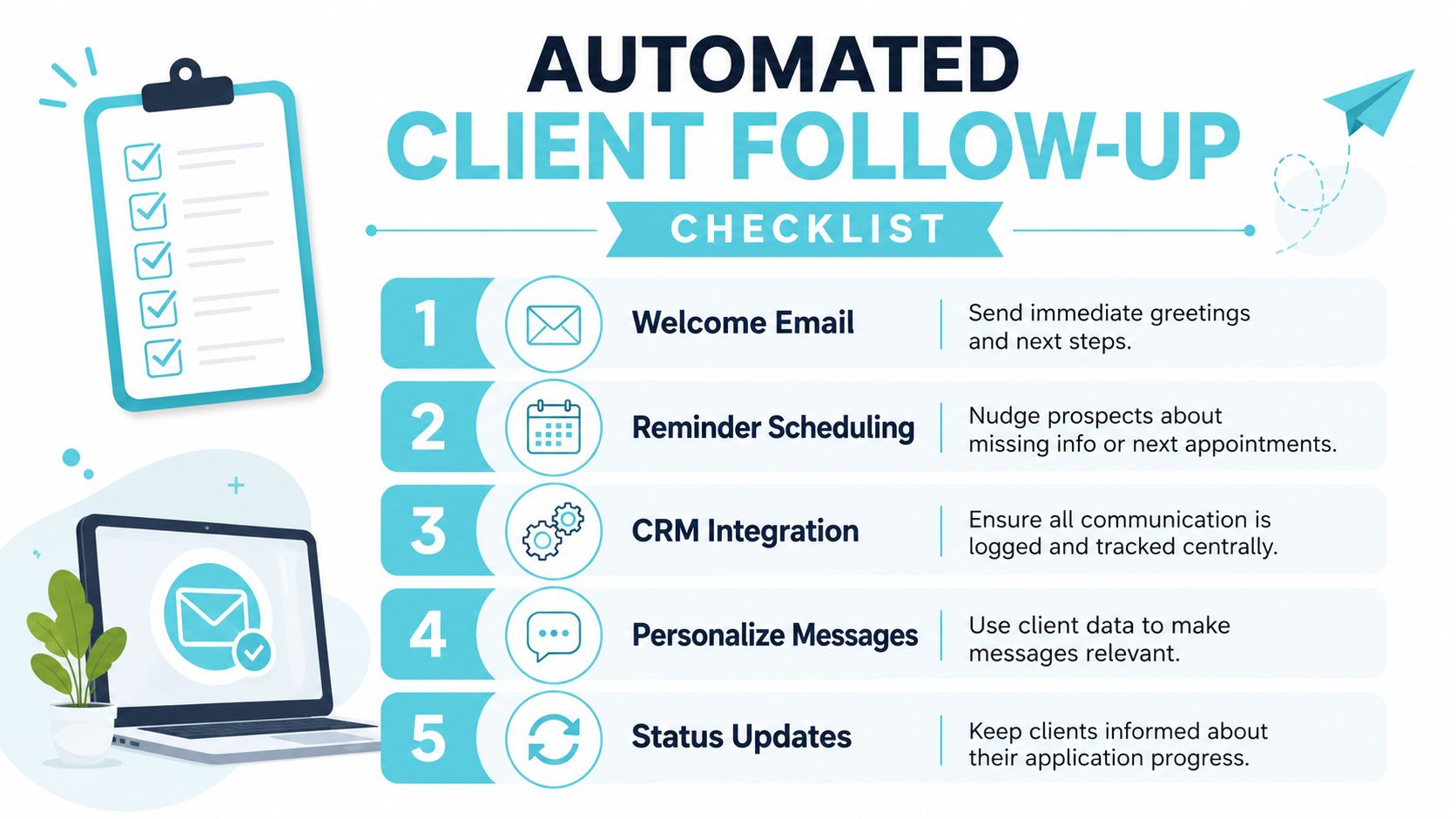
If a prospect submits an inquiry, they receive an immediate confirmation with next steps. If they start a form but don't finish it, the system sends a polite reminder. If they book a consultation, the calendar confirmation goes out automatically and the reminder sequence starts. If the firm requests a document, the client gets a secure prompt instead of a vague phone call asking them to "send that thing over."
This isn't about replacing people. It's about reserving people for judgment and conversation.
A practical automation sequence often includes:
- New inquiry acknowledgment so the prospect knows the message was received
- Incomplete form reminder with a direct path back to the unfinished intake
- Consultation confirmation that states date, time, and what to prepare
- Document request follow up tied to missing items
- Status updates when the matter moves from one intake stage to the next
If your team uses scheduled text reminders, it's worth understanding timing logic and delivery considerations. A useful outside reference is Ciphar's guide to timed texts, which helps frame how scheduled communication can be organized without becoming spammy or random.
What should stay manual
Some firms automate too aggressively and flatten the client experience. The first outreach on a high value or emotionally sensitive PI matter should still feel human. Use automation to support the handoff, not to impersonate care.
Keep these interactions personal:
- High emotion first calls involving serious injury, death, or confused family members
- Case fit decisions where nuance matters
- Fee discussions and expectation setting
- Any message that requires interpretation rather than acknowledgment
The sweet spot is simple. Automate repetition. Keep judgment with people.
For firms tightening this part of the workflow, a solid starting point is to map the events that should trigger messages and then build them inside a documented workflow automation process. That's where follow up stops being dependent on memory.
Defining Roles and Driving Staff Adoption
Software won't fix an intake team that doesn't know who owns the next step. That's the point many firms miss when they invest in portals, forms, and reminders. The tools go live, but the same confusion stays underneath.
A practical intake workflow often follows a four stage pipeline of lead acquisition, consultation, information collection, and agreement signing, and the first response is the most impactful control point. A 15 minute contact window is a common benchmark in intake optimization guidance, as noted in Clio's overview of intake stages. Hitting that mark consistently takes role clarity, not just good intentions.

Assign one owner for each handoff
The best intake systems have a named owner at every transition. Not a department. Not a shared inbox. A person or clearly defined role.
In larger PI firms, that usually looks something like this:
| Intake stage | Primary owner | Common failure if unowned |
|---|---|---|
| New lead review | Intake specialist | Delayed first contact |
| Conflict check escalation | Intake manager or designated reviewer | Matters stall in limbo |
| Consultation scheduling | Intake coordinator | Back and forth with prospects |
| Post consult documentation | Paralegal or case assistant | Missing forms and unsigned agreements |
This doesn't mean one person does everything. It means everyone knows who is accountable when a lead is sitting idle.
Train people on why, not just where to click
Most software training fails because it starts and ends with buttons. Staff learn where to open the form, where to send the message, and where to check the box. Then the first exception appears and the whole process falls apart.
Training needs to answer three questions:
- Why does this step exist?
- What risk appears if we skip it?
- What should the staff member do when the normal path doesn't fit?
When intake staff understand that a cleaner first screen reduces attorney interruptions, or that consistent follow up prevents warm leads from disappearing, adoption gets easier. People support systems that make their day simpler and reduce avoidable rework.
If your rollout depends on staff remembering unwritten rules, you don't have a process. You have tribal knowledge.
Expect resistance and manage it directly
Attorneys may worry the process feels impersonal. Paralegals may assume the new portal creates more work. Intake coordinators may fear they'll lose control if clients fill out forms on their own. All of those reactions are normal.
The fix isn't more enthusiasm from leadership. It's a short list of operational truths:
- Show the current friction. Pull examples of duplicate entry, missed callbacks, and incomplete files.
- Demonstrate the future state. Staff should see the exact path from client submission to CMS record to follow up.
- Pilot with one team first. Use a limited rollout to catch field mapping issues and script problems before full deployment.
- Write exception rules. Who handles duplicate leads, incomplete conflict data, or clients who refuse portal use?
Client adoption needs the same care. Don't announce a portal as if clients asked for software. Explain the benefit in plain language. They can send information securely, complete forms from their phone, and check updates without waiting on office hours. That message lands better than a feature tour.
Measuring Success and Optimizing Your Process
A client intake process gets better when the firm reviews real outcomes instead of debating anecdotes. One attorney thinks intake is slow. The intake manager thinks staff are overloaded. Marketing thinks the leads are weak. Without measurement, all three stories survive.
You don't need a complicated analytics stack to start. You need a short reporting set, consistent definitions, and a monthly review habit.
What to track
For PI firms, the useful metrics are the ones that expose delays, leakage, and avoidable friction.
- Lead response time tracks how quickly the firm makes first contact after an inquiry enters the system.
- Lead to client conversion rate shows how many qualified inquiries end up signed.
- Intake form completion rate tells you whether your forms are reasonable or burdensome.
- Consultation show rate reveals breakdowns in scheduling and reminders.
- Unsigned agreement backlog highlights cases that reached the final stage but stalled before retention.
- Cost per signed case helps connect intake operations to business performance.
Notice that none of these metrics work unless the stages are defined consistently. If one team marks a lead as "qualified" after a brief call and another waits until attorney review, your reporting becomes noise.
Sample intake performance KPIs
Use a table like this in monthly or quarterly operations reviews.
| KPI (Key Performance Indicator) | What It Measures | Target for PI Firms |
|---|---|---|
| Lead Response Time | Time between inquiry receipt and first human or automated acknowledgment | As fast as operationally possible, with special attention to rapid first touch |
| Lead to Client Conversion Rate | Share of qualified leads that become signed clients | Improve over your current baseline by removing avoidable friction |
| Intake Form Completion Rate | How often prospects finish the assigned intake form | High and stable enough to suggest the form isn't too long or confusing |
| Consultation Show Rate | Whether scheduled consults actually happen | Consistently strong, with reminders reducing no shows |
| Unsigned Agreement Backlog | Number of matters waiting on signature or final follow up | Kept low through clear ownership and reminders |
| Cost Per Signed Case | Intake and marketing cost tied to signed matters | Reviewed alongside case quality, not in isolation |
How to use the data
Don't turn this into a spreadsheet ritual that nobody acts on. Review a few examples behind each number.
If form completion is weak, look at the exact questions where people stop. If agreements sit unsigned, review whether the delay is fee explanation, document delivery, or lack of follow up. If conversion varies by source, compare not just volume but case fit and intake handling.
A useful review rhythm includes:
- One monthly operations meeting with intake, marketing, and case management representation
- A short exception log for dropped leads, duplicate records, and stalled agreements
- One process adjustment at a time so you can tell what changed the result
Measure the handoffs, not just the headline outcome. Most intake problems happen between stages, not inside one stage.
The firms that improve fastest don't chase more dashboards. They close one gap, document the new rule, and then move to the next bottleneck.
Your Modern Intake Process Starts Now
A modern client intake process isn't a single project. It's a working system made up of design, technology, people, and measurement.
The design piece makes sure your firm asks the right questions in the right order and creates trust from the first interaction. The technology piece connects client facing tools to the systems your staff already use, so intake data doesn't get trapped in side channels. The people piece gives each handoff an owner and gives staff a reason to adopt the process. The measurement piece keeps the whole thing honest.
For PI firms, this work pays off in practical ways. Fewer leads drift into silence. Staff spend less time retyping information and chasing updates. Clients get a clearer, calmer path from first contact to signed engagement.
Most firms don't need a total rebuild on day one. They need a cleaner blueprint, one integration plan, a short follow up sequence, and clear accountability. That's manageable. It's also where substantial gains usually begin.
If your intake still depends on memory, inboxes, and heroic staff effort, that's the place to start fixing it. Not because intake is trendy, but because it's one of the few operational areas that shapes client experience, attorney workload, and firm growth at the same time.
If your firm wants a more connected intake experience, CasePulse offers a secure client portal built for law firms that integrates with Needles, Neos, LawBase, and Litify. It lets clients complete forms, message the firm, share files, and check status from any device while staff continue working inside their existing case management workflow.