
 CasePulse
If your plaintiff firm is growing, the stress usually shows up before the reports do. Intake lives in one system, case work lives in another, staff answer the same status questions all day, and someone is still copying data from one screen to the next because the tools don’t quite connect.
That’s the moment many firms start looking at clio practice management software. Not because they want another software project, but because the current setup is costing time, consistency, and attention. Clio has become a serious option for firms that want a cloud based operating system for legal work, especially as they move beyond a small team and need tighter control over intake, matters, billing, and communication.
Is Your Firm Outgrowing Its Systems
A lot of mid sized plaintiff firms reach the same point. They didn’t make a bad technology decision. They made a practical one for the size they were at the time. Then the firm added staff, increased case volume, took on more moving parts, and the patchwork started to show.
One person updates the client. Another updates the file. A third person enters the same information into billing. If a case management platform, intake tool, and communication workflow aren’t aligned, staff create workarounds. Workarounds are expensive, even when nobody calls them that.

Why Clio gets real attention
Clio isn’t just another legal app. It was founded in 2008 and built its position by pushing a cloud based model into a market that had been dominated by expensive on premises systems. By October 2025, Clio had reached $400M in annual recurring revenue and had expanded from its small firm roots to serve over 1,000 mid sized firms in the US alone, according to Sacra’s Clio market analysis.
That kind of scale matters because it usually means three things. The product is mature, buyers can find implementation talent, and the vendor has enough market presence to keep expanding its ecosystem.
The real evaluation isn’t just feature based
For a plaintiff firm, the right question usually isn’t “Is Clio good?” It’s “Will Clio reduce friction in the way our firm works?” Those are different questions.
Practical rule: A platform can be strong in general and still be the wrong fit for a PI firm with specialized workflows.
That’s especially true if your team is already dealing with a broader modernization project. Firms changing practice management tools often also revisit intake forms, client communications, and even site infrastructure. If that’s happening at the same time, a seamless website migration guide can help you avoid creating a second operational mess while fixing the first one.
Clio deserves a close look. It also deserves a critical one.
Understanding The Clio Ecosystem
A mid-sized PI firm usually feels the limits of a platform at the handoff points. Intake signs the client. The case team needs records requests, treatment tracking, statute control, and client updates to keep moving. Accounting needs clean billing data. If those steps live in different tools, the question is not whether Clio has features. The question is whether Clio can sit at the center of your workflow without forcing your staff into workarounds.
Clio is best understood as a product family. The two products that shape most buying decisions are Clio Grow and Clio Manage, and they serve different parts of the matter lifecycle.
Clio Grow handles intake and pre-engagement workflow
Clio Grow covers the front end of the client journey. It is built for lead capture, intake, follow-up, e-signature, and the early screening work that determines whether a case should become a file.
That can be a real improvement for firms still piecing intake together through email inboxes, spreadsheets, and form submissions that no one owns. A defined intake system usually reduces missed follow-ups and gives managers better visibility into where prospects stall. Firms reviewing legal workflow automation basics should look closely at this stage, because intake is often where preventable friction starts.
For plaintiff firms, the catch is familiar. General intake structure is useful, but serious PI screening often goes beyond standard CRM steps. Referral source rules, conflict checks tied to related parties, accident detail capture, treatment status, and signed authorization packets can require more tailoring than some firms expect from an all-in-one setup.
Clio Manage runs active matters and firm operations
Clio Manage takes over once representation begins. Teams use it to handle calendars, tasks, documents, matter activity, timekeeping, billing, and day-to-day case administration.
That division matters. Firms get into trouble when they assume Grow and Manage are interchangeable, or when they expect one product to cover a specialized workflow that really belongs in the other.
| Feature Area | Clio Grow (Client Intake & CRM) | Clio Manage (Practice Management) |
|---|---|---|
| Primary role | Intake and lead management | Matter and firm operations |
| Best use stage | Before representation is active | After the client is signed |
| Workflow focus | New inquiries, client onboarding, pipeline visibility | Documents, calendars, time, billing, matter management |
| Main user need | Organize demand coming into the firm | Coordinate legal work already in progress |
Where the ecosystem fits, and where PI firms should pause
Clio’s main advantage is operational simplicity. One vendor can cover intake, matter management, payments, and a growing set of adjacent tools. That often works well for firms that want fewer systems to supervise and cleaner ownership over firm data.
Mid-to-large plaintiff firms need to be more selective.
If your firm already runs on Needles, Neos, or another PI-specific system, Clio is rarely a straight replacement decision. It is a stack design decision. You are deciding whether to consolidate into Clio and accept some workflow compromise, or keep a best-of-breed core system and add only the pieces that solve a clear problem, such as intake, client communication, or portal experience.
That trade-off shows up fast in practice. Clio can standardize broad legal operations. Specialized PI platforms often go deeper on litigation-specific case structure, medical chronology workflows, settlement processes, and reporting built for contingency practices. A dedicated client portal can complement either model. For some firms, that means pairing Clio with a stronger communication layer. For others, it means keeping Needles or Neos as the operational core and avoiding a disruptive rip-and-replace project.
The same logic applies outside pure legal ops. Firms often get more value from a focused tool that solves one stubborn process well than from forcing everything into one platform. The same principle shows up in this practical guide to contract compliance, where fit and process discipline matter more than feature volume.
Clio is a credible ecosystem. It is not automatically the right center of gravity for a plaintiff firm with mature PI workflows. The better evaluation asks where standardization helps your team, where specialization still wins, and whether your client experience depends on a portal or communication layer Clio does not fully replace.
How Clio Automates Daily Firm Workflows
On Monday morning, your intake team signs up a new client, a paralegal is chasing records on three older files, and someone still has to enter deadlines from a court notice before the day gets away from them. That is the kind of operational load Clio is built to reduce. The question for a plaintiff firm is not whether automation sounds good. It is whether the automation fits the way your cases move.
A common Clio workflow starts in Clio Grow, where staff screen leads, collect intake details, and move qualified prospects toward engagement. After sign-up, the file shifts into Clio Manage for matter setup, task assignment, document organization, calendar control, and billing activity. For firms coming from email, spreadsheets, and disconnected point tools, that alone can remove a lot of routine follow-up work.
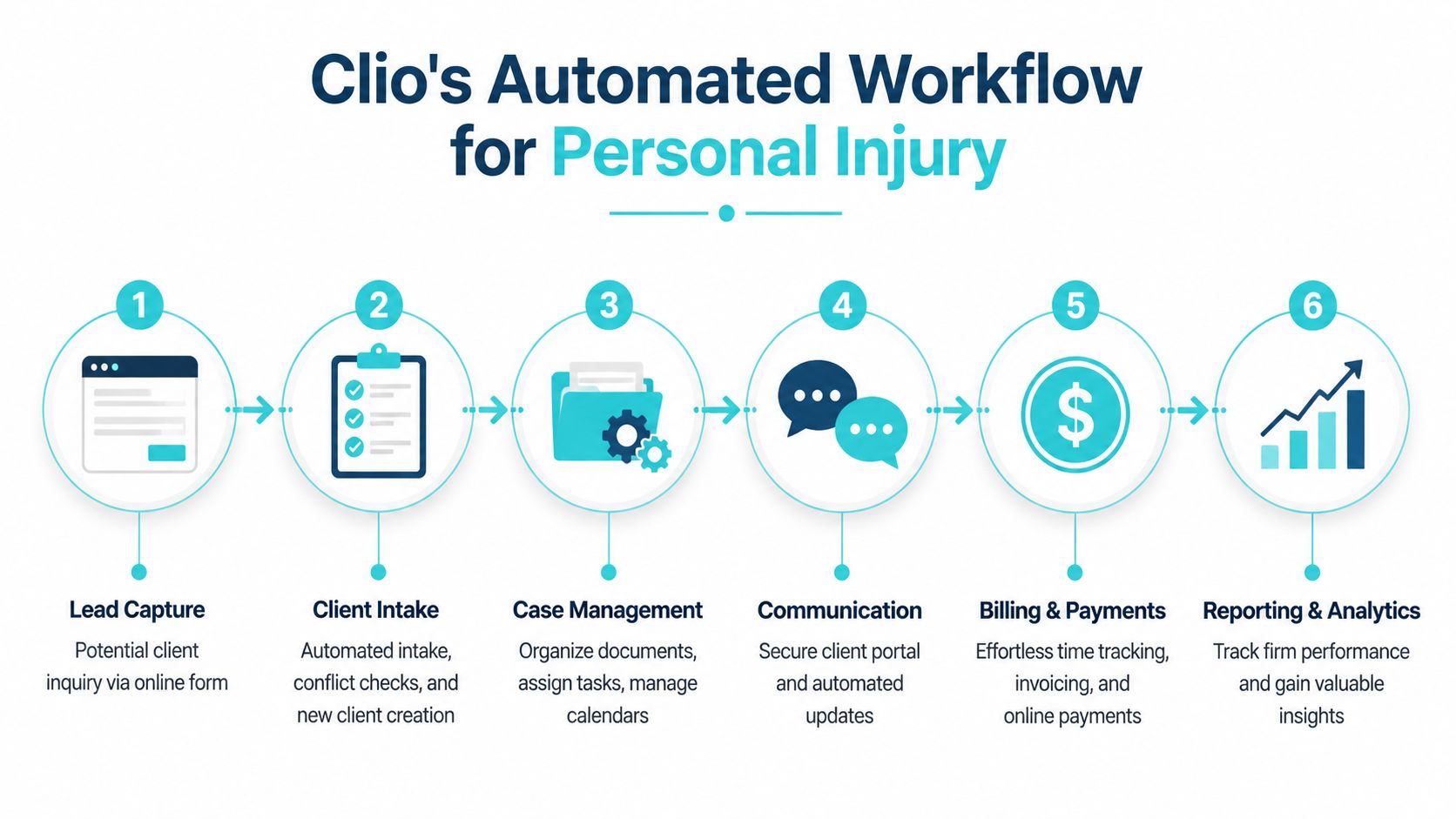
Where automation helps most
In practice, Clio automation tends to pay off in administrative tasks that are high volume, repeatable, and easy to miss when staff are overloaded. Calendar entry, task creation, matter updates, billing prep, and client-facing status communication fall into that category.
Clio Duo adds another layer by helping extract details from documents and turn recorded activity into draft billing entries. Used well, that can shorten the gap between work performed and work recorded. It can also reduce manual calendar entry from court documents, which is useful because deadline mistakes usually come from rushed handoffs, not from hard legal analysis.
For a mid-sized plaintiff firm, the gains usually show up in a few specific places:
- Intake handoffs get cleaner when signed clients move from intake to active matter workflows without staff rebuilding the file.
- Task follow-through improves when follow-up steps are triggered automatically instead of living in someone's inbox.
- Deadline management gets more consistent when document-driven dates are captured in a structured workflow.
- Billing and activity capture improve when work performed during the matter is easier to convert into time entries or invoices.
- Client communication becomes easier to standardize when updates, reminders, and document requests follow a set process.
That is the practical version of legal workflow automation. It removes repeated clerical steps so legal staff can spend more time on case strategy, negotiation, and client counseling.
The trade-off for plaintiff injury firms
This is also where many PI firms hit the limit of the all-in-one model.
Clio automates broad firm operations well. It is less convincing when a larger plaintiff practice needs deep support for medical treatment tracking, lien workflows, demand package assembly, litigation-stage case structure, or reporting tied closely to contingency-fee economics. Firms already using Needles or Neos usually notice that gap quickly because their existing workflows were built around PI-specific work, not general legal operations.
That does not make Clio a bad choice. It means firms should be precise about what they want Clio to automate.
If the primary bottleneck is intake, client messaging, document collection, or portal adoption, a dedicated client portal can complement Clio effectively. If the primary bottleneck is litigation workflow inside an established PI system, replacing that core platform with Clio may create new friction while solving the wrong problem. I usually advise firms to map the handoffs first, then decide whether Clio should be the system of record or one layer in a broader stack.
Clio also publishes strong business-case language around automation and phased rollout. The important caveat is simple. Automation only produces results when the underlying process is already clear, owned, and enforced by the team.
What works in practice: Start with workflows tied to deadline capture, intake progression, billing lag, and routine client updates. Those are easier to test, easier to audit, and more likely to get staff buy-in than a full rebuild of every case process.
The same principle applies outside legal software. This practical guide to contract compliance makes a similar point. Tools help after the workflow is defined. They do not define it for you.
Who Is Clio Practice Management Software Built For
Clio started with a strong small firm identity, but it has clearly moved upmarket. That matters because software built for a five person office often breaks down when more people, more matters, and more internal handoffs enter the picture.
For firms evaluating clio practice management software today, the best fit is usually a growing general practice or a firm that wants a more standardized operating model than it has now. The platform has enough breadth to support firms that need intake, matter management, billing, payments, and a broader cloud infrastructure under one roof.

Mid sized firms appear to benefit most
The strongest argument for Clio in the mid market is operational efficiency. Clio’s 2025 Legal Trends Report found that 65% of mid sized firms said AI enables them to handle higher work volumes without expanding headcount, compared with 43% of solo practices, as summarized by the 2025 Clio Legal Trends Report coverage.
That gap tells you something important. Larger firms usually have enough process volume for automation and centralized workflows to pay off more clearly. They also have more internal roles touching the same matter, which makes consistency more valuable.
Where plaintiff firms need to pause
Plaintiff personal injury firms sit in a more complicated spot. A PI firm may like Clio’s broader ecosystem and cloud model, but still find that specialized plaintiff workflows don’t fit neatly into a general purpose platform.
That doesn’t mean Clio is a bad option for PI. It means the decision should turn on operating model, not brand recognition.
A plaintiff firm should pressure test three issues:
- Workflow specificity: Does the firm need PI specific matter structures or is a generalized practice management framework enough?
- Existing system investment: Is the team already strongly committed to platforms built around plaintiff litigation workflows?
- Communication demands: Does the client experience need a specialized layer that goes beyond what a general system handles comfortably?
For firms comparing mainstream cloud tools, this Clio vs MyCase comparison is a useful side by side look at how these categories differ.
A growing plaintiff firm usually isn’t choosing between good software and bad software. It’s choosing between a broader platform and a tighter fit.
Clio Security and Integration Considerations
A mid-sized PI firm usually hits this point during growth. Intake is faster, case volume is up, and leadership wants one cloud platform that gives better visibility. Then the operations team starts mapping what has to connect: case data, documents, texting, e-signature, accounting, referral tracking, and the client portal. That is where the Clio evaluation gets more serious.
Clio generally clears the baseline security review for a modern law firm. It offers 256 bit encryption, maintains SOC 2 Type II certification, and supports desktop file access through Clio Drive. For firms that want cloud access but still need staff to work from familiar desktop folders, that setup is useful.

Security, though, is rarely the deciding issue for a plaintiff firm. Workflow fit is.
Clio’s marketplace is broad, with over 250 integrations, and that matters. A firm using common business apps can often assemble a workable stack without custom development. For general practice firms, that breadth is often enough to keep operations reasonably connected.
PI firms should be more skeptical. Needles, Neos, LawBase, Litify, and similar systems are not just databases. They carry the firm’s matter structure, litigation process, medical records workflow, and staff habits. If Clio sits beside one of those systems instead of replacing it, the question is not whether an integration exists. The question is whether the integration preserves the way the firm works.
That is where firms start making trade-offs.
A broad legal platform can centralize calendaring, billing, and general matter management. A specialized PI platform often handles case progression with more precision. A dedicated client portal can fill another gap entirely by improving intake, status updates, document collection, and client communication without forcing the firm to rebuild its case management foundation.
I usually tell firms to test integrations at the workflow level, not the feature level. A vendor demo may show that two systems connect. Your team still needs to confirm what syncs, what does not, how often it updates, and who owns exception handling when records do not match.
Use a short working checklist:
- Matter creation: Can staff enter client and case data once, or will intake repeat work across systems?
- Document handling: Do documents stay tied to the correct matter and version, or does staff have to sort and rename files manually?
- Client communications: Can the client receive updates, upload records, and complete forms in one place that fits your process?
- Billing and trust: Does the connection maintain clean financial records, or will accounting need side workflows?
- Failure handling: If a sync breaks, is someone alerted, and is there a clear owner for fixing it?
The essential integration question is straightforward. Does the connection reduce administrative work, or does it just shift that work to intake staff, paralegals, or accounting?
For firms with specialized PI software already in place, Clio may still fit well as part of the stack. But it should earn that role. If your lawyers love Neos or Needles for litigation work, forcing a full all-in-one conversion can create more disruption than value. In that situation, a better approach is often to keep the specialized system and add a dedicated client-facing layer where Clio’s native experience may not be the best fit.
If your team is reviewing vendor risk and internal controls at the same time, this guide to B2B SaaS data security is a useful reference. For law-firm-specific policies, access controls, and incident planning, this cybersecurity guidance for law firms helps frame the questions to ask before you sign.
Migration and Implementation Tips for Firms
Most law firms don’t fail at software selection. They fail in implementation. A strong platform rolled out badly can create more resistance than the old system ever did.
For firms moving to Clio from legacy software or a collection of separate cloud tools, the first practical step is data cleanup. Don’t migrate clutter just because it exists. Standardize matter naming, review custom fields, and decide which records are authoritative before anyone maps data into a new structure.
Use a phased rollout
A phased rollout usually works better than a firm wide launch. Start with one workflow that matters and that staff can validate quickly. Intake is common. Billing is another. If the pilot group sees cleaner handoffs and less duplicate work, broader adoption gets much easier.
The biggest implementation mistake I see is trying to recreate every old process exactly as it existed before. That usually bakes old inefficiencies into the new platform. Migration is the right moment to decide what the firm should stop doing, not just what it should transfer.
Build internal ownership early
Training should be role based, not generic. Intake staff need one version of Clio training. Paralegals need another. Billing teams need another. The more specific the training, the less likely staff are to abandon the system and revert to side spreadsheets or inbox based work.
A practical implementation plan usually includes:
- A small champion group that tests workflows before launch.
- Clear decisions on field ownership so staff know which system is the source of truth.
- A short issue log that tracks what broke, what confused users, and what needs vendor follow up.
- Scheduled follow up training after launch, once people have real questions instead of hypothetical ones.
Don’t judge adoption in the first week. Judge whether the firm is using the system correctly by the time the first real matters move through it end to end.
If a firm is moving from PI specific tools into a broader platform, implementation discipline matters even more. The software can only improve operations if the firm is honest about what must be preserved and what can be simplified.
Common Questions About Clio Software
A mid-sized plaintiff firm usually starts asking harder questions about Clio after the demo, not during it. The basic features often look good. The real test is whether Clio fits the way your intake team, paralegals, attorneys, and client communication systems already work, especially if the firm has PI-specific tools in place.
Can a firm use Clio Manage without Clio Grow
Yes. A firm can adopt Clio Manage on its own if intake already runs well in another system. That setup makes sense for firms that want better matter organization, calendaring, billing, and document management without changing the front end of intake right away.
For plaintiff firms, that split setup is common. Some want Clio for internal operations but prefer to keep a specialized intake process or a separate client communication tool that better matches PI workflows.
Is Clio Duo a replacement for staff work
Clio Duo is best viewed as a productivity tool for routine administrative tasks. It can help staff process information faster, turn activity into billable time, and reduce manual follow-up on standard work.
It does not replace legal judgment, case strategy, or careful review. In plaintiff practice, that distinction matters. Automation can save time, but it does not fix a weak workflow design or a poor handoff between systems.
Is the mobile and desktop experience practical for lawyers in the field
Yes, for many firms. Cloud access is one of Clio’s better qualities, particularly for attorneys who need to check matters, notes, or documents outside the office. Clio Drive also helps firms that want easier access to files through a more familiar desktop-style experience.
Security matters here too, but the practical question is broader than certifications. A plaintiff firm should ask whether mobile access supports how lawyers work in the field, and whether staff can retrieve the right information quickly without depending on workarounds or duplicate storage.
What usually pushes a firm to a more advanced setup
Operational complexity does. More users, more matters, more handoffs, and more exceptions expose the limits of a simple all-in-one rollout.
That is usually the point where firms have to make a real technology decision. They can standardize more of the practice inside Clio, or they can keep Clio in a defined role and connect it to specialized systems for PI case management, intake, or client communication. There is no universal right answer. The better answer is the one that reduces duplicate entry, preserves key workflows, and keeps one clear system of record for each job.
Is Clio the right fit for every plaintiff firm
No. Clio is a credible option, but it is not automatically the best fit for every plaintiff practice.
For smaller or general practice firms, the breadth of the platform can be a good trade. For mid-sized and larger PI firms, the trade-offs get sharper. If the firm already depends on Needles, Neos, Litify, or another PI-specific platform, the question is not just whether Clio has the feature. The question is whether the integration depth is good enough to avoid staff doing the same work twice.
That is why many firms pair their core case management system with a dedicated client portal instead of forcing all client communication through one platform. If your firm wants to modernize client communication without forcing staff to leave their existing case management workflow, CasePulse is worth a look. It’s built for law firms and integrates directly with platforms such as Needles, Neos, LawBase, and Litify, giving clients a secure portal for case updates, messaging, files, and forms while your team keeps working inside the systems they already use.