
 CasePulse
 Your intake team already knows the pattern. A prospective client calls while someone else is chasing medical records, another lead comes in through the website, and a paralegal copies details from voicemail into the case management system by hand. By noon, half the office is doing rework. By evening, someone realizes the web form never asked for the opposing party or the deadline that mattered.
That's why a law firm client intake form can't be treated like a simple website widget. It sits at the front of your conversion process, your risk screen, and your staff workflow all at once. When firms get intake wrong, the cost is not theoretical. A widely cited benchmark says the average law firm loses 8% of potential revenue because of inefficient intake processes, according to Filevine's intake KPI discussion.
For plaintiff PI firms, the problem usually isn't whether a form exists. It's that the form was built as a static questionnaire instead of an operating system. It asks too much too early, too little where risk matters, and it drops data into a place where staff still have to clean it up manually. The firms that fix this stop thinking in terms of “the form” and start thinking in terms of intake flow, qualification, conflict awareness, follow up, and system integration.
Why Your Intake Form Is More Than Just a Form
A law firm client intake form should do three jobs at the same time. It should capture enough information to protect the firm, make it easy for a prospect to take the next step, and move the data into the system your staff already uses.
That's where many firms get stuck. They build a form for administrative convenience, then wonder why qualified leads disappear or why staff keep chasing missing facts after the consultation is booked. In practice, the form is only one touchpoint inside a larger intake chain.
The form sits inside a real intake workflow
Clio describes intake as a process that moves from contact capture to pre screening, conflict checking, consultation scheduling, intake questionnaire completion, fee agreement signing, and onboarding. That sequence matters because the form has to support the handoff, not replace it.
If your website form just emails a PDF to staff, you haven't built intake. You've built another inbox problem.
Practical rule: If the form creates more manual follow up for staff than clarity for the prospect, it's doing the opposite of what intake should do.
For PI firms, that gap shows up in familiar ways:
- Missed urgency: A form asks for a long narrative but misses the deadline or jurisdiction issue that should have triggered immediate review.
- Duplicate entry: Staff key the same contact and incident data into Neos, Litify, or another system after the client already typed it once.
- Weak screening: The form captures contact info but not the names needed for an early conflict check.
- Poor client experience: Prospects on their phones hit a wall of fields, abandon the form, and call another firm.
Revenue loss usually starts with process failure
The firms I've seen improve intake don't do it by adding more questions. They tighten the sequence, assign ownership, and build around response discipline. Filevine's benchmark on lost revenue is useful for one reason. It reminds firms that intake friction is not a minor operational annoyance. It's a financial leak tied to how quickly and cleanly the firm handles first contact.
That's also why form design has to align with staffing. Filevine notes that firms with dedicated intake specialists should target 100+ calls per day as a strong operating benchmark in a larger conversion system, which reinforces that forms work alongside call handling, follow up, and lead capture discipline, not in isolation.
A good starting point is to treat your form as one control point in a broader intake machine, the same way discussed in building the ultimate intake specialist law firm. When firms adopt that mindset, they stop asking “what fields should we add?” and start asking “what should happen next, and who shouldn't have to touch this twice?”
Structuring Your Form for Maximum Information
Most intake forms fail for one of two reasons. They either ask almost nothing and force staff to chase details later, or they ask for everything at once and drive prospects away before submission.
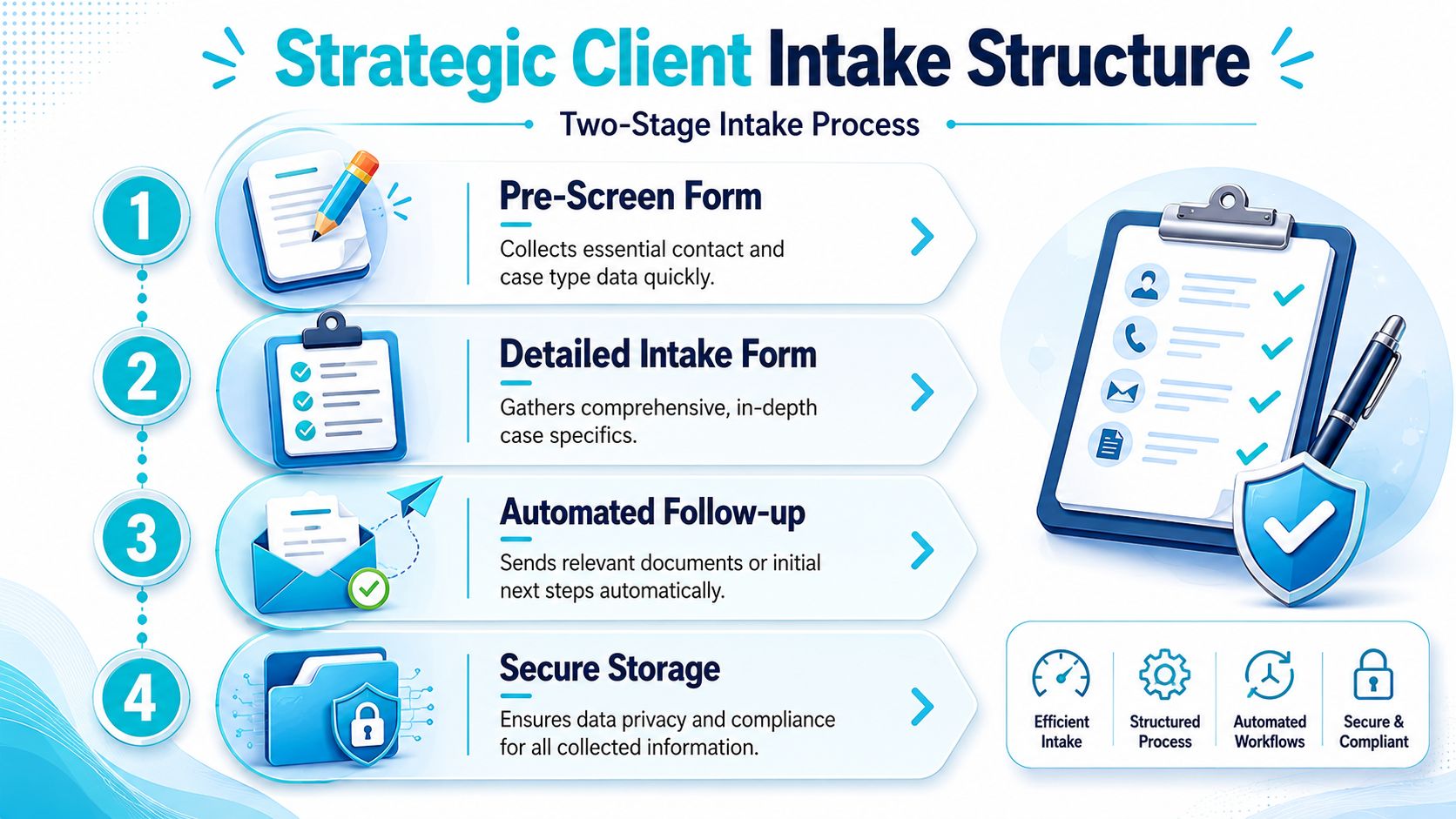
The fix is a two stage intake structure. Legal Intaker's guidance is straightforward: a law firm client intake form works best as a short pre screen first, followed by a deeper intake only for qualified leads. That sequence reduces unnecessary data collection and lowers drop off, as explained in Legal Intaker's client intake workflow guidance.
What belongs in stage one
The first form should qualify, route, and flag risk. It should not try to build the entire case file.
A strong pre screen usually includes:
- Basic contact details: Name, phone, email, and preferred contact method.
- Matter type: Car crash, slip and fall, trucking case, premises liability, and similar categories.
- Jurisdiction cues: Where the event happened and where the prospect is located.
- Opposing party basics: Enough naming information to support an early conflict screen.
- Urgency markers: Incident date, upcoming hearing, filing deadline, or other time sensitive trigger.
- High level case summary: A short plain language description, not a long essay box.
That first stage should help your team answer a few immediate questions. Is this the kind of matter the firm handles? Is there any obvious conflict issue? Is there a timing problem that requires fast review? Does this need a call right now rather than a standard consultation flow?
What belongs in stage two
Only qualified prospects should see the deeper form. On it, you gather fuller facts for evaluation, consultation prep, and onboarding.
Use the second form for items such as:
| Intake stage | Best use |
|---|---|
| Stage one pre screen | Fit, urgency, conflict names, contact capture |
| Stage two detailed intake | Additional incident facts, multiple contacts, supporting documents, authorizations, fee related logistics |
The second stage is where firms can ask for:
- Expanded factual detail: Treatment status, insurance information, witness names, prior counsel, or claim history when relevant to the matter.
- Additional contacts: Emergency contact, alternate phone, spouse or family contact when appropriate.
- Documents and photos: Basic uploads that help staff review the matter before consultation.
- Administrative details: Communication consent, form acknowledgments, and any pre consultation authorizations your process requires.
A short first form protects conversion. A deeper second form protects operations.
What doesn't work
Three patterns cause most intake headaches in PI:
The giant universal form
One form for every practice area usually creates clutter. PI firms end up asking irrelevant questions or forcing prospects through branches that don't fit.The no filter form
If every inquiry gets the same long intake, staff spend time reviewing unqualified matters and prospects feel like they're doing work before the firm has even decided to talk.The consultation first, details later approach
This sounds client friendly, but it often pushes essential screening work into rushed phone calls. Then staff recontact the prospect for names, dates, and records that should have been collected in a cleaner way.
The practical target is simple. Let stage one decide whether the matter moves forward. Let stage two prepare the firm to handle it well.
Designing a Form People Actually Complete
Lawyers often design forms for internal completeness. Clients complete them based on convenience, trust, and effort. Those two priorities are not the same.
That's why mobile first design matters. A 2024 global consumer survey found 61% of respondents prefer to complete forms online rather than on paper, and 82% said digital forms are faster, according to MyCase's discussion of digital legal forms. If your law firm client intake form is clumsy on a phone, you're creating friction where the client expects speed.

Design for the person holding the phone
A prospect filling out a PI intake form may be in pain, distracted, stressed, or doing this after business hours. Dense screens, legal jargon, and endless required fields lose people fast.
What tends to work better:
- Short screens: Keep each step visually simple so the user sees progress.
- Conditional logic: Only show follow up questions when earlier answers make them relevant.
- Plain language prompts: Ask “When did the accident happen?” instead of internal phrasing that sounds like a pleading.
- Mobile friendly inputs: Large tap targets, date pickers that work on phones, and upload steps that don't break on iOS or Android.
- Clear expectation setting: Tell the prospect what happens after submission.
The real trade off is conversion versus risk control
Firms often oversimplify. Yes, fewer required fields can reduce abandonment. But a PI firm also needs enough information early to screen fit, conflicts, and urgent deadlines. The answer isn't “make the form short” in the abstract. The answer is to put the right questions first.
A strong client centric design asks:
- What must we know before anyone spends time on this lead?
- What can wait until the lead is qualified?
- Which answers should trigger a different path?
For example, a question about whether the client had prior counsel may matter. It probably doesn't belong before you've collected the basic matter type and incident timing. A detailed treatment history might help case evaluation. It rarely belongs on the first screen.
Clients will forgive a careful question. They won't forgive a confusing process.
Friction usually comes from bad sequencing
The firms that struggle most with abandonment often blame prospect quality. In many cases, the bigger issue is sequencing. They ask for information in the order the office wants to file it, not in the order a client can easily provide it.
Here's a practical comparison:
| Form choice | Likely result |
|---|---|
| Front load every field | More drop off, more incomplete submissions |
| Ask essentials first, branch later | Better completion and cleaner qualification |
| Use one large narrative box | Messy answers and more staff cleanup |
| Use targeted prompts | Better data quality and easier review |
If you want more completed forms, stop treating completion as a test of client commitment. Treat it as a user experience problem the firm controls.
Automating Intake with Your Case Management System
A digital form is only half the solution. The true gain comes when submission triggers the next steps automatically inside the system your staff already uses.
That's the practical value of treating intake as a workflow instead of a document. Industry guidance from Knack emphasizes that digital intake should use structured workflows with required fields, conditional logic, secure uploads, automated reminders, and data mapping into case management systems to support faster onboarding and fewer manual errors, as outlined in Knack's law firm intake workflow guide.

What an integrated workflow looks like
In a good setup, the prospect fills out the form once. After that, the system handles the routing.
A common intake flow looks like this:
Submission lands in a structured format
The form captures standardized data instead of dumping free text into an email thread.Data maps to the right record fields
Contact details, matter type, incident date, and related names move into the matching fields in your case management system.The system creates or prepares a record
Staff review cleaner information instead of rebuilding the file from scratch.Tasks and notifications trigger automatically
A paralegal gets a review task, the prospect receives confirmation, and the next intake step is queued.The legal team works inside the CMS
They don't need to manage intake from a separate inbox all day.
Where Neos and Litify projects usually break
For firms using Neos or Litify, intake problems usually aren't caused by the form itself. They come from weak field mapping and poor workflow decisions.
The common failures are operational:
- Staff still reenter core data: The form captures information, but the CMS record fields aren't aligned, so users copy and paste anyway.
- Too much free text: Narrative fields become the default for information that should have been structured.
- No trigger logic: Completed forms don't create tasks, reminders, or consultation steps automatically.
- Bad exception handling: The process works for a clean lead but breaks when the matter needs manual review.
Needles and LawBase firms run into the same issue when intake is bolted on instead of planned around their existing process. The lesson is the same across platforms. Don't start with the form builder. Start with the exact fields, record owners, and handoffs that have to happen after submission.
One practical setup that fits legal ops teams
For firms that want forms and client communication tied directly to existing workflows, CasePulse client intake software for law firms is one example of a portal based approach. CasePulse is built to integrate with systems such as Needles, Neos, LawBase, and Litify, while letting clients complete forms, share files, and message the firm from any device.
That kind of setup matters because the legal team can keep working in the primary case management system instead of managing intake in a disconnected tool. For most PI firms, that's the difference between automation that sticks and “automation” that still creates clerical work.
The intake system should remove handoffs, not create new ones.
What to automate first
If your current intake is mostly manual, don't try to automate every edge case on day one. Start with the parts that eat staff time repeatedly:
- Contact and matter creation
- Confirmation messages
- Document requests
- Review task assignment
- Reminders for incomplete next steps
Once those are stable, expand into more advanced routing and document workflows. The best intake automations feel boring. Data goes where it belongs, the next step fires, and nobody has to ask who owns the lead.
Ensuring Privacy and Compliance with Intake Forms
A law firm client intake form collects sensitive information before representation is formalized. That means privacy and compliance can't be an afterthought tucked into the footer.
The basics are simple, but they need to be deliberate. Use a secure intake channel, limit unnecessary collection, and make sure the form tells prospects what submission does and does not mean.
The non negotiables
Every digital intake flow should include these elements:
- A clear non engagement disclaimer: Submitting the form does not create an attorney client relationship.
- Consent language for communications: If the firm will follow up by email, text, portal message, or phone, the form should say so clearly.
- Privacy policy access: Give prospects an easy way to review how the firm handles submitted information.
- Secure file handling: If the form allows uploads, those documents should move through a secure process rather than loose email attachments.
For firms that want a client friendly way to collect documents after intake, a secure portal approach like secure file sharing with clients is usually cleaner than ad hoc email exchanges.
Compliance language should match your actual workflow
A disclaimer copied from another firm often creates problems because it doesn't reflect the way your office communicates. If your intake team texts prospects, the consent language should address that. If you collect records, IDs, or signed payment authorizations later in the process, your notices should line up with those steps.
This matters even more when intake touches billing or consultation payments. Teams dealing with payment workflows can review broader guidance on Regulatory adherence for payments to understand how compliance expectations attach to financial transactions and data handling.
A weak disclaimer won't save a messy intake process. Clear wording and secure handling have to work together.
Keep staff behavior aligned with the form
One of the biggest compliance gaps is operational, not technical. The form says one thing, but staff do another. They ask clients to resend documents by regular email. They skip the approved portal. They improvise with personal inboxes when things get busy.
Set a simple rule. If information came through secure intake, follow up through the same controlled channel whenever possible. That protects the client and gives the firm a cleaner record of what was shared, acknowledged, and completed.
Testing and Optimizing Your Intake Process
Once the form is live, the important work starts. A law firm client intake form should be treated like a measurable intake channel, not a static asset that nobody revisits.
That's not just theory. In its 2024 Legal Industry Report, MyCase reported that customers captured 58,395 leads from customized lead intake forms, which shows that digital intake is a measurable acquisition channel at scale, as noted in Clio's overview of legal client intake.

What to watch after launch
You don't need a complicated analytics stack to improve intake. You do need discipline about what you review.
Focus on questions like these:
Where do people stop?
If users consistently abandon the same screen, something there is unclear, intrusive, or badly timed.Which matters complete cleanly?
Compare auto cases, premises cases, and other matter types. One branch may be creating more friction than the rest.Which lead sources submit usable forms?
Referral traffic, paid traffic, and organic traffic often behave differently. Intake should help you see quality, not just volume.How much staff cleanup is still required?
If the team still rewrites narratives, chases basic names, or rekeys contact info, the form or mapping needs work.
Small changes usually beat full rebuilds
Most firms don't need a new form every quarter. They need cleaner iteration. Rephrase one confusing question. Split one overloaded screen. Move one field from stage one to stage two. Add one trigger where staff currently rely on memory.
That kind of testing is usually more useful than a dramatic redesign because it isolates the source of friction.
A practical review cycle often looks like this:
| Review area | What to ask |
|---|---|
| Completion behavior | Where do prospects stall or quit |
| Data quality | Which fields arrive incomplete or unusable |
| Operational handoff | Where does staff reenter or correct data |
| Lead quality | Which submissions actually progress to consultation or review |
The best intake process is rarely the one with the most fields. It's the one your staff trusts and your clients will actually finish.
Treat intake as a living system
PI firms change over time. Marketing campaigns shift. Practice focus evolves. Staff roles move. Your intake flow should keep up.
When firms review intake consistently, they spot problems earlier. They catch duplicate questions, broken routing, weak mobile screens, and fields that made sense a year ago but no longer belong. That's how a law firm client intake form becomes more than a front door. It becomes a reliable operating layer between inquiry and signed matter.
If your firm wants intake forms, secure client messaging, and file sharing connected directly to the case management systems your team already uses, CasePulse is built for that workflow. It supports client facing forms and portal activity while staff continue working inside systems such as Needles, Neos, LawBase, and Litify.