
 CasePulse
 Law firms stopped having the luxury of treating technology as a side project. In 2025, law firms posted record financial performance, with profits growing by 14.1% and profit margins exceeding 40%, and Thomson Reuters tied that performance in significant part to strategic technology investment in a shifting market environment (Thomson Reuters on 2025 law firm financial performance).
For a mid sized plaintiff firm, that changes the conversation. The question isn't whether software is modern enough to look good in a demo. The important question is whether your systems help staff move cases faster, keep clients informed without constant phone traffic, and protect lawyer time for work that matters.
The overlooked part of the law firms and technology discussion is integration. Plenty of articles talk about AI in broad terms. Very few deal with the operational reality inside plaintiff firms that already run on Needles, Neos, LawBase, or Litify and can't afford to disrupt intake, case handling, or client communication just to add one more tool.
The Technology Tipping Point for Law Firms
Mid-sized plaintiff firms hit the tipping point when routine case updates, document requests, and intake follow-up start consuming more staff time than the work itself.
At that stage, technology stops being an IT line item and becomes an operations decision. I see this most often in firms that already have a case management system in place, but still force staff to answer status calls manually, resend forms by email, or enter the same client data in more than one place. The problem is rarely a lack of software. It is a lack of fit between the client-facing tools and the system that runs the case.
For plaintiff firms, that distinction matters. Needles, Neos, LawBase, and Litify already hold the matter record, deadlines, notes, documents, and task history. If a client portal cannot pull from that system reliably, staff ends up maintaining two versions of the file. That creates delay, missed updates, and avoidable write-offs in administrative time.
I tell firms to judge new technology by one standard first. Does it reduce touches inside the current workflow?
A portal that connects cleanly to Needles or Neos can post status updates, collect signed forms, route messages into the right matter, and cut down incoming call volume. A portal that sits outside the case management system usually adds another inbox, another login, and another training burden. On paper, both products look modern. In practice, only one improves case flow.
Security belongs in the same conversation. A client portal is only useful if clients will use it and the firm can trust it for medical records, settlement documents, and sensitive intake data. Firms evaluating portal tools should review basic cybersecurity requirements for law firms at the same time they review integrations, permissions, and audit trails.
The firms getting traction are not buying more software for its own sake. They are choosing tools that fit the way plaintiff work already moves through intake, treatment, negotiation, and litigation. In a mid-sized firm, the tipping point is operational. Once your volume is high enough, disconnected systems stop being an inconvenience and start cutting into margin, staff capacity, and client satisfaction.
Why Technology Is No Longer Optional for Modern Firms
Nearly every client now expects the same basics from a law firm that they get from a bank or healthcare provider. Secure messages, document access, status visibility, and updates without having to call twice. For a mid-sized plaintiff firm, that expectation changes the economics of service delivery.
If clients have to phone the office to ask whether records were ordered, whether treatment bills arrived, or whether a demand package went out, staff time gets consumed by routine status work. At volume, that is not a minor inconvenience. It is a margin problem.
Growth is tracking with adoption
Industry reporting has shown a widening gap between firms that put technology into daily operations and firms that leave key steps manual. The same report summary also pointed to a scale advantage in adoption, with larger firms using AI more widely across the firm than smaller firms. Mid-sized plaintiff firms should read that as an operational warning, not a prompt to buy every new tool on the market (2025 Clio Legal Trends Report summary and adoption data).
The practical issue is process discipline. Firms that standardize intake, messaging, document collection, and task routing earlier can take on more cases without increasing support staff at the same rate.
That matters most in plaintiff work, where case volume, client anxiety, and document flow all stay high at the same time.
Client expectations changed, and plaintiff firms feel it first
PI clients judge communication by speed and clarity. They also judge it by convenience. A client who can see the next step in a portal is less likely to call for reassurance. A client who has to leave a voicemail for every update usually assumes the firm is disorganized, even when the legal work is solid.
For firms running Needles, Neos, LawBase, or Litify, the question is no longer whether client-facing technology belongs in the practice. The question is whether the portal and communication layer are tied directly to the system your staff already uses all day. If a portal cannot reflect matter status, push secure documents, capture signed forms, and write activity back into the case file, the firm still pays for manual follow-up. The software may look modern, but the workflow stays expensive.
Three business risks usually show up first:
- Client retention risk: existing clients lose confidence when updates depend on phone tag and email chains.
- Intake conversion risk: prospective clients notice delays, duplicate questions, and missing follow-up.
- Labor cost risk: staff spend time relaying information that should already be available through the case management system.
Security has to be reviewed at the same time. A portal connected to case management improves communication only if permissions, audit trails, and document handling are set up correctly. Firms updating client communication and file sharing should review practical cybersecurity requirements for law firms before rollout, especially where medical records, settlement documents, and intake data are involved.
Required systems are the ones your workflow already depends on
Technology decisions in plaintiff firms should be judged by output. Does the tool reduce staff touches, shorten response times, and keep the file current inside the CMS?
That is why technology is no longer optional for modern firms. Once your intake volume and active caseload reach a certain level, manual status updates, disconnected messaging, and duplicate data entry stop being manageable workarounds. They become a direct drag on case capacity and client service.
For most mid-sized plaintiff firms, the practical baseline now includes a reliable case management system, secure client communication, and portal tools that work cleanly with platforms such as Needles, Neos, LawBase, or Litify. Firms that get this right do not just look more current. They spend less time chasing information and more time moving cases forward.
The Five Pillars of a Modern Firm's Tech Stack
A workable tech stack isn't a pile of subscriptions. It should support one coherent operating model. For plaintiff firms, five pillars matter most.
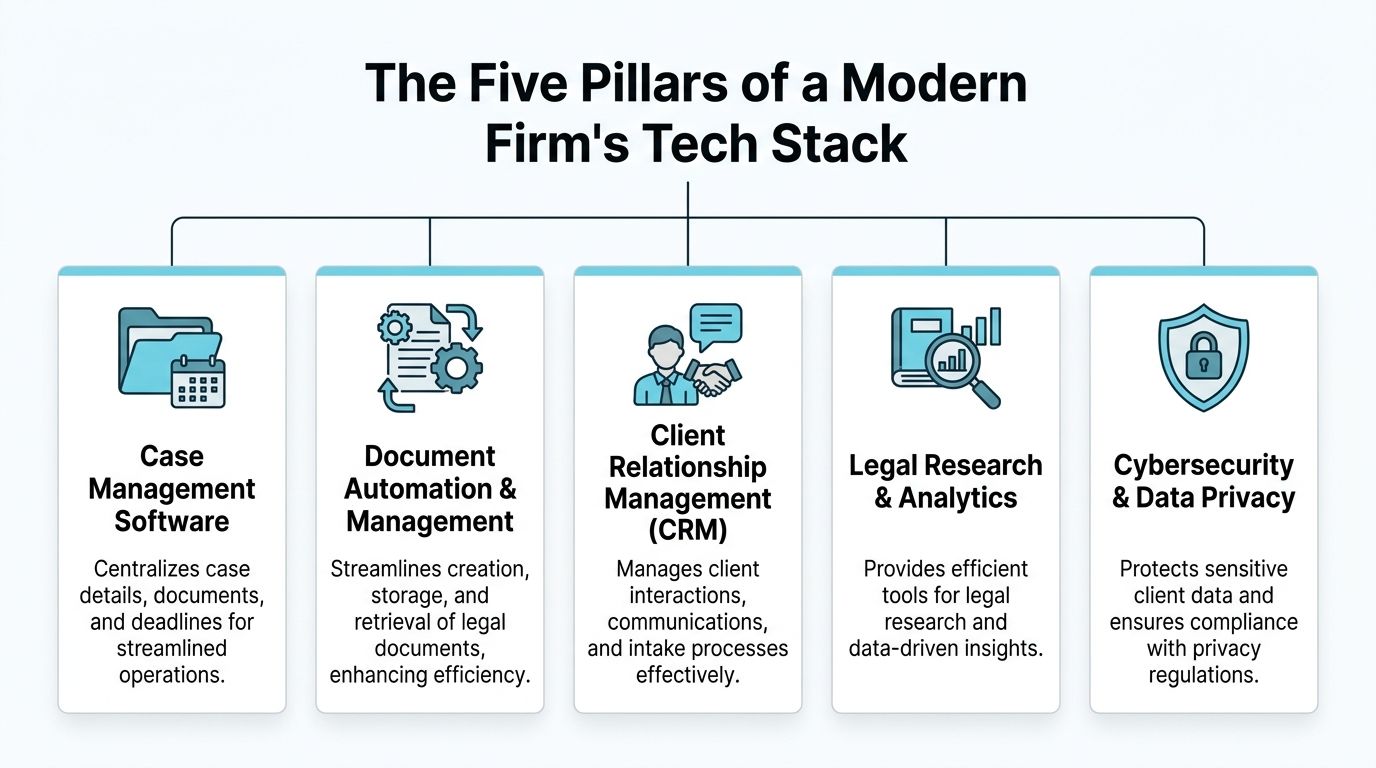
Case management as the system of record
Everything starts here. If your case management system doesn't hold the current truth about case status, tasks, notes, deadlines, and documents, every downstream process gets messy.
For most mid sized plaintiff firms, the practical question isn't whether to replace the CMS immediately. It's whether the rest of the stack respects it as the operational center. That's why firms evaluating their foundation usually begin with a clear view of what strong legal case management software should support across daily case handling.
When this pillar is weak, teams compensate with email threads, spreadsheets, side notes, and memory. That's where response times slow down and duplicate work starts creeping in.
Client portals that reduce friction instead of adding it
Client portals are often misunderstood. A good portal isn't just a nicer inbox.
For a PI firm, a useful portal should let clients check case status, send secure messages, share files, and complete forms from any device. The key design principle is simple. Clients work in the portal, while staff stay inside the system they already use. If a portal forces your team to monitor another queue separately, you may improve the client experience while damaging internal efficiency.
Here the trade off is obvious. A standalone portal can look polished but create operational drag. An integrated portal may be less flashy in a demo, but it usually performs better in practice because it fits the staff workflow.
Automation that removes repetitive legal admin
Automation has become the most practical AI use case for many firms. The goal isn't to automate judgment. It's to reduce low value repetition.
According to ALA, AI powered automation tools can reduce up to 23% of a lawyer's everyday tasks and can minimize human error rates by up to 90% in template based outputs when handling repetitive work such as document generation and client intake (ALA on AI automation in legal workflows)).
That matters in plaintiff work because the volume is relentless. Intake confirmations, reminder messages, standard forms, follow ups, and routine document handling are exactly the kind of tasks that consume time without requiring constant lawyer attention.
A practical way to think about automation:
- Good automation: reminders, form routing, standard updates, template based document steps
- Bad automation: anything that hides legal judgment, creates unreviewed risk, or breaks your existing process
- Best automation: steps that happen consistently in every matter but still get missed when people are busy
Research and analytics tools for faster decisions
Not every part of the stack is client facing. Research and analytics tools support internal decision making, issue spotting, and pattern recognition.
In plaintiff firms, that may mean faster access to records, damages support, case development inputs, or matter level reporting that helps management see bottlenecks. The point isn't novelty. The point is whether the tool helps lawyers and staff answer recurring questions faster and with less manual assembly.
Cybersecurity and privacy controls
This pillar is easy to underfund because it doesn't always produce a visible workflow win on day one. It's still foundational.
Client messages, medical records, settlement documents, and intake data all require careful handling. Any modernization effort that expands digital access also expands the need for disciplined permissions, secure sharing, and dependable support.
| Pillar | What it should do | What usually goes wrong |
|---|---|---|
| Case management | Hold the authoritative case record | Teams store updates elsewhere |
| Client portal | Give clients secure self service access | Staff must manage a second inbox |
| Automation | Remove repeat admin work | Firms automate the wrong steps |
| Research and analytics | Speed internal insight | Reports don't connect to workflow |
| Cybersecurity | Protect client data and access | Security gets added too late |
Calculating the True ROI of Your Technology Investment
A mid-sized plaintiff firm does not need a larger software budget. It needs a tighter business case.

The firms that get real returns from technology start with one question. Which manual tasks are consuming attorney and staff time every week, and what happens to revenue if those tasks shrink? For plaintiff practices, the answer often sits in intake follow-up, status calls, document requests, medical-record chasing, and settlement updates. If those steps still depend on phone tag, email threads, and hand-entered notes, the firm is paying skilled people to do process work.
Start with reclaimed lawyer and staff time
I usually model ROI from the inside out. First, count the hours spent on repeat work that does not advance a case on its merits. Then test whether the tool removes those steps inside the systems your team already uses.
That distinction matters for firms on Needles, Neos, LawBase, or Litify. A client portal only produces measurable savings if status updates, document requests, and client messages post back to the case file without a second round of staff entry. If the portal creates another inbox or another task list, the promised savings disappear quickly.
Before buying anything, map five recurring workflows. Intake completion. Treatment updates. Missing-document follow-up. Client status requests. Settlement or disbursement communications. A tool that reduces two or three of those workflows can justify itself. One that only looks modern usually cannot.
Then measure capacity and cash flow
The next ROI layer is capacity. Can the same team move more matters without adding the same number of coordinators, intake staff, or paralegals?
For plaintiff firms, that often comes down to communication volume. If clients can log in, upload records, check case status, and complete forms through a portal tied to the CMS, staff spend less time repeating information and more time pushing cases forward. That is where mid-sized firms usually see the first operational gain. The savings are not theoretical. They show up in fewer status calls, fewer incomplete intakes, and fewer internal handoffs.
Cash flow should be part of the calculation too. Faster document collection, fewer missed follow-ups, and more consistent task completion can reduce delays that slow down case progression. Firms reviewing workflow automation use cases for legal operations should evaluate whether the automation affects milestones that matter financially, not just back-office convenience.
If a portal does not reduce call volume, staff touchpoints, or follow-up delays inside 90 days, the ROI case needs another look.
Use a simple ROI lens
Keep the model simple and specific:
Labor savings
Measure hours now spent on client updates, reminder calls, form chasing, and duplicate entry between the portal and the CMS.Capacity gain
Estimate how many additional active matters the current team can support if those manual steps drop.Cash flow effect
Track whether intake completion, records collection, document turnaround, and billing-related steps happen faster and with fewer stalls.Support cost
Include the cost of implementation, training, and ongoing IT support for legal firms, especially if the portal must connect to an older Needles or LawBase environment.
This is also where firms need to be honest about trade-offs. Litify may offer broader workflow flexibility, but configuration can take time. Needles and Neos firms often need a more careful integration plan because even small workflow changes can disrupt high-volume staff routines. LawBase shops may need to budget more for connector work and testing. The right choice is not the one with the longest feature list. It is the one that reduces manual steps without forcing the firm to rebuild how it already runs cases.
A portal integrated with the case management system usually outperforms a disconnected client app because the case record stays current in one place. That is the version of ROI leadership can defend. Less duplicate work, steadier throughput, and a cleaner path from client communication to case progress.
Seamless Integration Your Key to Workflow Efficiency
Firms do not lose efficiency because they lack software. They lose it when client communication sits outside the case management system and staff have to reconcile two versions of the same matter.

For a mid sized plaintiff firm, the portal question is usually an integration question. Needles, Neos, LawBase, and Litify all support different operating habits, reporting structures, and staffing patterns. A portal only helps if it fits that existing environment without forcing staff to work in two systems or maintain duplicate status updates for the same file.
Many legal tech guides miss that point. They compare feature lists. Mid-sized plaintiff firms need something narrower and more practical. They need client portal integration without workflow disruption, with clear rules for what syncs, who owns updates, and how staff stay inside the CMS they already use all day.
The operating model that holds up
The firms that get adoption usually follow one simple model. Staff work from the case management system. Clients use the portal. Matter data moves between the two through defined triggers, and the case file in Needles, Neos, LawBase, or Litify remains the source of truth.
That structure matters because plaintiff practices are volume businesses. Intake coordinators, case managers, and paralegals rely on habit and speed. If the portal creates a second inbox, a second task list, or a second place to upload documents, usage drops fast.
A better setup looks like this in practice. A paralegal updates a status field in Neos, sends a records request from Litify, or posts a document checklist from LawBase. The client sees the update in the portal, uploads what is missing, and replies in the same thread. Staff do not re-key the same information elsewhere.
Where integrations usually fail
Most portal rollouts break for operational reasons, not because the software is unusable.
Common failure points include:
- Split communication: portal messages live outside the matter file, so staff must monitor another queue
- Manual syncing: case status, forms, or documents have to be updated twice
- No ownership rule: nobody is responsible for deciding which events should appear to the client
- Feature overload: the firm launches messaging, forms, e-signature, questionnaires, and status tracking all at once
If the portal adds steps, staff will work around it.
That is why integration design matters more than a polished demo. I usually tell firms to map three workflows before they buy anything: status updates, document collection, and client messaging. If a portal cannot support those three inside the CMS workflow, the rest of the feature set does not matter much.
What to require from an integrated portal
For plaintiff firms, the requirement list should stay tight and tied to daily work:
| Requirement | Why it matters for PI firms |
|---|---|
| Secure client messaging | Keeps communication attached to the matter record |
| Client status visibility | Cuts routine update calls without staff sending manual messages |
| Document upload and sharing | Speeds intake, records collection, and case support |
| Fillable forms | Reduces back-and-forth on signatures, questionnaires, and missing information |
| CMS-driven triggers and updates | Lets staff keep working from Needles, Neos, LawBase, or Litify |
Infrastructure still matters. If logins fail, devices are inconsistent, or system access is unstable, even a well-planned portal rollout will stall. Firms assessing portal integrations often need better operational support at the same time. This overview of IT support for legal firms is a useful reference for teams trying to improve reliability while modernizing client communication.
Roll out the portal in stages
A phased launch works better than a firmwide switch.
Start with one matter type that generates heavy client contact, such as pre-lit PI files with frequent document requests and routine status questions. Define exactly which case events appear in the portal, which messages stay internal, and which staff actions trigger a client-facing update. Train to the task level. Show the team what happens when they upload a demand package document, request insurance information, or mark a treatment milestone complete.
This is also the point where firms should understand workflow automation for law firms. The portal is only one layer. The value comes from the rules behind it, which determine when a message is sent, when a form appears, and when a task is created inside the case management system.
CasePulse is one example of this approach. It is a secure client portal that integrates with systems such as Needles, Neos, LawBase, and Litify, so clients can check status, send messages, share files, and complete forms while staff continue working inside their existing case workflow.
That model fits plaintiff firms because it respects how they already operate. The CMS remains the place where legal work gets done. The portal extends that process to the client side without adding unnecessary friction.
Navigating Adoption Barriers and Measuring Your Progress
Most technology projects do not achieve their intended impact. The software stays live, but the team falls back to old habits. That's why implementation should be treated as an operational change, not a purchasing event.
Adoption fails for human reasons first
Attorneys and staff don't usually resist technology because they hate efficiency. They resist tools that add uncertainty, extra steps, or hidden risk. If a paralegal already has a full caseload, the phrase "new platform" can sound like "new burden."
The fix is practical framing. Position the tool as a way to remove repetitive communication and administrative load, not as a test of whether the team is modern enough. People adopt systems faster when they can see what disappears from their day.
A few tactics work better than broad motivational messaging:
- Name the pain clearly: repeated status calls, scattered messages, and form chasing are the problem
- Train by task: show how to send an update, request a file, or route a form in the actual workflow
- Use internal champions: one respected case manager often drives more adoption than formal memos
- Limit the first rollout: start with one team or one matter type before expanding
Rollouts succeed when staff can say, "this saved me time today," not just "leadership wants us to use it."
Set progress measures before launch
A firm can't prove return if it never defined success. The strongest KPIs are visible, boring, and tied to daily work.
Use a short scorecard for the first phase:
| KPI | What to watch |
|---|---|
| Inbound status call volume | Whether routine update calls begin dropping |
| Portal engagement | Whether clients actually use messaging, forms, and file sharing |
| Staff time on manual updates | Whether paralegals spend less time answering repeat questions |
| Response consistency | Whether clients get updates through a standard process |
| Form completion speed | Whether intake and follow up documents come back faster |
Keep the measurement simple enough that someone will review it. If the dashboard requires manual assembly from five places, it won't survive.
Watch for the real warning signs
Poor adoption doesn't always look dramatic. More often, it shows up in small signals:
- Staff continue sending updates outside the approved process
- Clients still call for information that should be visible digitally
- Internal teams disagree about where the latest message or document lives
- Managers can't tell whether the system is reducing work
If those signs appear, don't assume the team needs more enthusiasm. Check the workflow. Usually the process asks people to do too much in too many places.
The law firms and technology conversation gets more useful when leaders stop asking, "Did we install the tool?" and start asking, "Did the work get easier, faster, and more consistent?" That's the standard that matters.
Your Action Plan A Checklist for Firm Modernization
A modernization plan works better as a sequence than as a grand initiative. Start with the points where friction is obvious and staff time disappears.

The checklist
Audit your current systems
List the tools your intake, case management, document handling, and client communication teams already use. Mark where information gets entered twice or where staff switch systems just to finish one client task.Map your highest volume communication loops
Identify the updates clients ask for most often. In PI work, these usually involve case status, requested records, document collection, and next steps.Ask staff where time gets lost
Talk to paralegals, intake coordinators, and case managers. They know where the bottlenecks are. Leadership often sees the symptom, while staff sees the exact step that breaks.Choose one workflow to modernize first
Don't launch everything at once. Start with a communication heavy process that has clear repetition and obvious client impact.Review portal and integration options against your CMS
For firms on Needles, Neos, LawBase, or Litify, compatibility should come before novelty. The right question is whether staff can stay in their normal workflow while clients get secure access on the other side.Define rollout rules in plain language
Decide what clients will see, what messages belong in the portal, who owns updates, and when staff should trigger forms or reminders.Set a short measurement window
Review early indicators after launch, especially call volume, portal usage, and staff feedback on repeat work.
Keep the plan grounded
Many firms overcomplicate modernization because they borrow enterprise playbooks that don't match a plaintiff practice. Better results usually come from simple operating discipline and phased execution. If you're looking for broader examples of how organizations structure this kind of change, these digital transformation strategies are useful as a planning reference, even though your law firm rollout should stay much narrower and more workflow specific.
What to do this month
If I were advising a managing partner to start now, I would push for three immediate actions:
- Pull one week of status call data
- List every step staff takes to give a routine case update
- Book demos only with vendors that can explain integration with your existing case system clearly
That keeps the project tied to reality. You don't need a perfect long term blueprint before you improve one expensive, repetitive process.
Modernization doesn't begin when a firm announces a tech initiative. It begins when the team stops doing avoidable work by hand.
If your firm uses Needles, Neos, LawBase, or Litify and wants to modernize client communication without forcing staff into a separate inbox, take a look at CasePulse. It provides a secure client portal built for law firms, with status updates, messaging, file sharing, and forms tied to the case management workflow your team already uses.