
 CasePulse
 A lot of managing partners are dealing with the same bottleneck right now. The firm is bringing in cases, the phones keep ringing, clients want updates, intake needs follow-up, and attorneys are spending too much of the day on work that doesn't require a law license. The result isn't just frustration. It slows response times, creates handoff errors, and keeps paralegals stuck in reactive mode.
That pressure is one reason the virtual legal assistant has moved into the legal mainstream. Firms aren't looking at it as a novelty anymore. They're using it as an operating model for the work that clogs the day but still has to get done well.
The End of the Overwhelmed Law Firm
The pattern is familiar. A plaintiff firm grows, caseload rises, and the support team doesn't get more strategic. It just gets busier. Someone is always answering a status call, chasing a missing document, moving a date on the calendar, or forwarding the same routine message to three different people because no one is quite sure who owns the task.
That kind of growth feels productive from the outside, but inside the firm it creates drag. Lawyers review inboxes they shouldn't be touching. Senior case managers spend prime hours on scheduling and follow-up. Intake loses momentum because every urgent task jumps the line.
A virtual legal assistant fits this moment because it gives the firm another layer of capacity without defaulting to another in-office hire. And this is no longer a fringe staffing experiment. A recent industry report says 78% of U.S. law firms now use virtual legal assistants to handle administrative and specialized tasks in some form, which shows how normal this model has become in practice (industry report on virtual legal assistant adoption).
Where the pressure usually shows up first
In most firms, the early warning signs look like this:
- Client updates are too manual because staff answer the same "what's happening in my case" question all day.
- Calendars become a risk point when multiple people adjust appointments, reminders, and deadlines.
- Documents pile up outside the main system in email threads, desktop folders, and side spreadsheets.
- Attorneys become backup admins whenever support staff gets overwhelmed.
Some firms first try to patch the issue with a phone answering service or front desk coverage. That can help at the edge, especially if you're evaluating tools like Recepta.ai for legal firms, but it doesn't solve the broader workflow problem if intake, document handling, and status communication still live in disconnected places.
Practical rule: If your lawyers are still serving as the escalation point for routine updates, your staffing model isn't really absorbing the work. It's just delaying it.
What Is a Virtual Legal Assistant Really
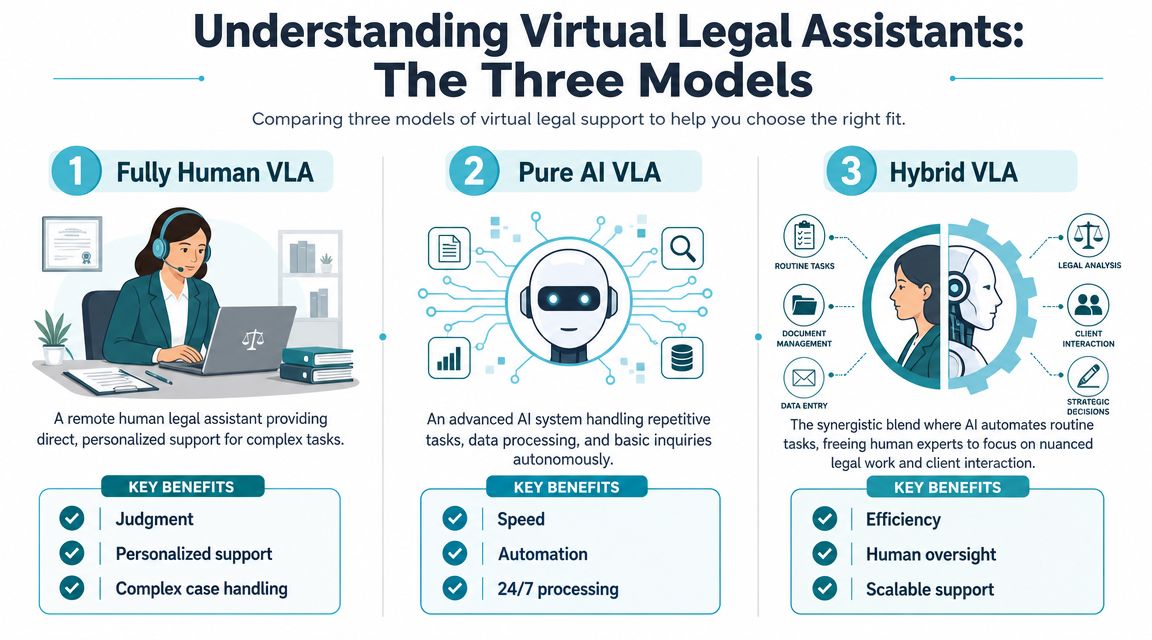
A virtual legal assistant isn't one thing. Firms use the phrase loosely, which causes bad buying decisions. In practice, there are three distinct models. A remote human assistant, a software-driven AI system, and a hybrid setup that combines both.
That matters because these models solve different problems. If you buy one expecting the behavior of another, the rollout usually disappoints.
The three models in plain English
Imagine it as support coverage at a busy front desk.
A fully human virtual legal assistant is a remote staff member. They can handle nuance, context, tone, and judgment within defined limits. This model works well when the job involves client communication, calendar coordination, document handling, and workflow tasks that require a person to interpret what they're seeing.
A pure AI virtual legal assistant is software automation. It can route inquiries, prompt for information, summarize, answer routine questions, or move data from one step to another. It works best when the task is repetitive, rule-based, and high volume.
A hybrid model combines the two. AI handles the repetitive first layer, and a human steps in for exceptions, empathy, and edge cases. For many plaintiff firms, this is the most realistic model because intake and client service contain both predictable work and emotionally sensitive interactions.
| Model | What It Is | Best For | Key Limitation |
|---|---|---|---|
| Fully Human VLA | A remote legal support professional working inside firm processes | Nuanced communication, scheduling, document handling, intake follow-up | Capacity depends on staffing and handoff discipline |
| Pure AI VLA | Software automation for routine requests and data handling | Repetitive inquiries, standard forms, routing, basic triage | Struggles when facts are incomplete or emotion matters |
| Hybrid VLA | AI handles the first layer, human handles exceptions | High-volume firms that need both speed and judgment | Requires thoughtful process design |
What firms are actually buying
The buying mistake I see most often is this. A firm says it wants a virtual legal assistant, but what it really wants is one of three things:
- Capacity relief for repetitive administrative work
- Faster response coverage for inbound client communication
- Workflow discipline so tasks stop escaping the case management system
Those are different goals. A human assistant can improve responsiveness and task ownership. AI can improve consistency and speed on routine items. A hybrid model can do both, but only if the firm has clear rules for what gets automated and what gets escalated.
If you want a broader primer on the roles and benefits of virtual assistants, it's useful to read that before evaluating legal-specific options. And if your team is also sorting out where generative AI belongs in legal work, this guide on ChatGPT for lawyers is a practical companion to the staffing decision.
The model matters less than the fit. The right question isn't "Should we use a virtual legal assistant?" It's "Which layer of work are we trying to remove from attorneys and case staff?"
Benefits and Use Cases for Plaintiff Firms
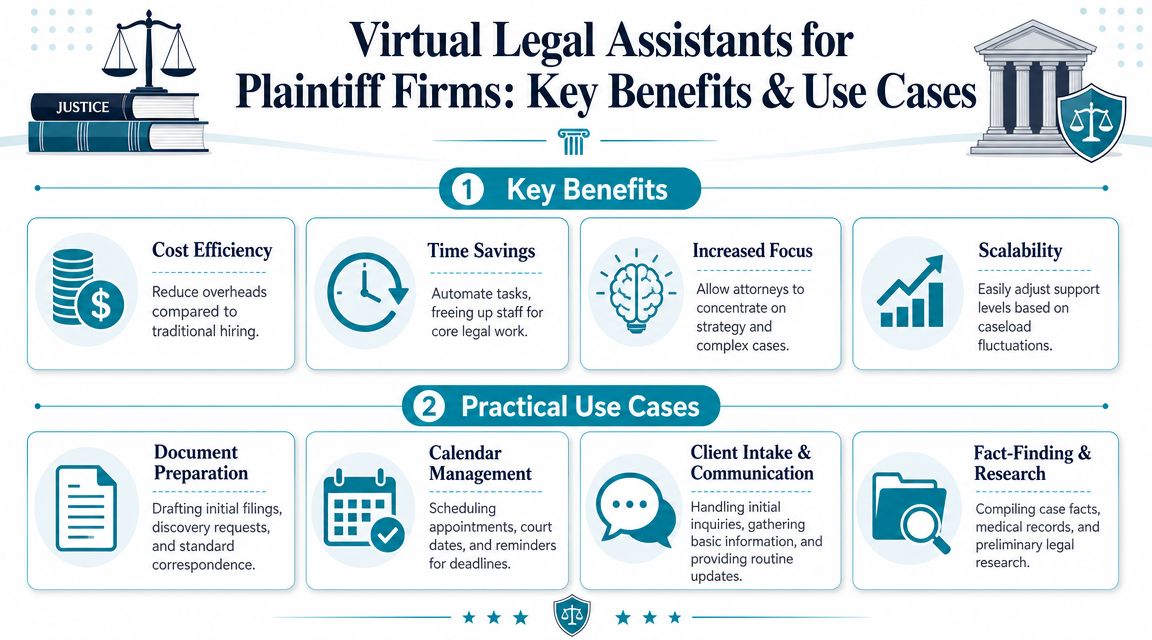
Plaintiff firms feel the value of a virtual legal assistant faster than many other practice types because the work is so communication-heavy. A high-volume caseload creates repeating administrative patterns. Intake screening, appointment scheduling, client follow-up, document collection, medical record requests, and routine status questions all come in waves.
That's exactly the kind of environment where delegation pays off. Hiring a remote legal assistant or paralegal can save firms 50% to 70% compared with in-office staff, and a skilled assistant can handle up to 80% of non-billable work such as appointment scheduling, client follow-up, and document formatting (cost and workload comparison for remote legal support).
Where plaintiff firms usually get the fastest return
The best uses are not glamorous. They are the recurring tasks that consume attention.
Intake follow-up
Leads go cold when nobody follows up quickly, gathers missing facts, and keeps the matter moving toward attorney review.Medical record and document chasing
Someone has to request, log, track, and follow up. This work is structured, time-consuming, and easy to delay when the office gets busy.Routine status communication
Many client calls are not legal strategy calls. They are requests for updates, next steps, appointment information, or confirmation that the firm received something.Document formatting and file hygiene
Pleadings, letters, uploaded records, naming conventions, and file placement all matter. Sloppy execution here creates downstream cleanup for the legal team.
What works and what usually doesn't
A virtual legal assistant works well when the task has a clear owner, a repeatable flow, and an obvious endpoint. Intake scripts, standard follow-ups, reminder sequences, file processing, and calendar coordination all fit that profile.
It works poorly when the firm tries to use the assistant as a catch-all buffer for work nobody has explicitly defined. If the instruction is "help wherever needed," the assistant usually becomes an inbox sorter with no authority, no priorities, and no measurable output.
For plaintiff firms, I usually tell leaders to start with one lane of work, not five. Intake is often the cleanest starting point. If you're mapping that process, reviewing examples of legal intake automation can help clarify which steps should stay human and which ones should become standardized.
The practical payoff
The benefit isn't just lower labor cost. It's the ability to protect your trained staff from being consumed by work that can be delegated. When that happens, attorneys spend more time on case strategy. Paralegals spend more time on substantive coordination. Clients still get contact, but the firm stops paying senior staff rates for entry-level administrative throughput.
How to Evaluate Virtual Legal Assistant Services
Most firms start the evaluation process in the wrong place. They compare hourly rates, turnaround promises, and generic task lists. Those things matter, but they are secondary. The first question is whether the service can be trusted inside a legal environment where privileged information, medical records, litigation deadlines, and client communications move across multiple systems.
That is not an abstract concern. With the average U.S. data breach cost hitting $10.22 million and the professional services sector being a key target, evaluating a virtual assistant's security and data governance practices is a critical risk management step for any law firm (security and breach risk considerations for virtual legal assistants).
What to ask before you talk about price
A provider should be able to answer basic operational questions without hand-waving.
How is access controlled
Ask whether assistants receive least-privilege access and whether permissions are set according to role.Where does work happen
If they rely on downloading files, forwarding emails, or moving data into side tools, the risk increases fast.How are audit trails handled
You need to know who touched what, when they touched it, and whether that action is visible.What is the file-sharing method
Secure file exchange is different from "we send documents by email."How are confidentiality boundaries enforced
A legal support provider should understand that access to information is not the same as authority to use it.
Signs of a weak setup
A weak vendor often sounds polished until you ask operational questions. Then the answers get vague.
Watch for these red flags:
| Red flag | Why it matters |
|---|---|
| They describe security in broad marketing language | You need concrete workflow controls, not general assurances |
| They depend on shared inboxes and forwarded attachments | That creates routing mistakes and weakens accountability |
| They can't explain permission boundaries | Remote support without access control is a governance problem |
| They treat legal confidentiality like ordinary business privacy | Law firms have higher stakes and stricter expectations |
If a provider can't explain how they protect privileged information in day-to-day workflow, don't move forward just because the staffing economics look attractive.
Quality is also a compliance issue
The second evaluation layer is competence inside legal tools and legal drafting standards. A virtual legal assistant should be comfortable with legal research resources and operational platforms such as Westlaw, LexisNexis, PACER, Clio, MyCase, PracticePanther, document-management systems, e-filing tools, and encrypted communications, and they should understand why formatting precision and confidentiality matter in legal work (core skills for virtual legal assistants in legal software and secure document handling).
That isn't just a software checklist. It tells you whether the person or service can function inside an error-sensitive workflow without creating rework for the rest of the team.
Your Implementation and Integration Checklist
The easiest way to make a virtual legal assistant fail is to bolt them on as a parallel process. If they work from forwarded emails, standalone spreadsheets, and side-channel task lists, the firm won't gain efficiency. It will create duplicate work and lose visibility.
The operating principle is simple. For a virtual assistant to be effective, they must work inside the firm's existing case and document management systems. When routine communications and document routing are handled within the workflow, attorneys and paralegals reduce manual tasks and can focus on substantive work (workflow integration guidance for virtual legal assistants).

Start with workflow, not staffing
Before assigning tasks, map the actual path of work inside Needles, Neos, LawBase, Litify, or whatever system your firm uses. Identify where intake begins, where documents land, who reviews them, where status updates originate, and how deadlines are recorded.
If you skip that step, you'll hire a capable person and still get poor results because the process itself is messy.
A rollout checklist that holds up in practice
Define the lane of work
Pick a narrow starting scope such as intake follow-up, records coordination, or appointment scheduling. Avoid broad role definitions at launch.List the source system for every task
For each assigned task, note where the work starts and where completion must be recorded. The answer should be your case or document system, not email memory.Write the escalation rules
Specify what the assistant can complete independently, what requires paralegal review, and what must go to an attorney.Create message standards
Give the assistant approved language for routine client communication, reminders, and status acknowledgments.Set review cadence
Early on, review output frequently. Not because remote support is in itself risky, but because every firm has local habits that need correction.Measure workflow compliance
Don't just ask whether tasks got done. Ask whether they were completed in the right system, in the right order, with the right documentation.
For firms that need to clean up process design before adding remote support, this overview of workflow automation is useful because it forces the right question. Not "Who will do the task?" but "How should the task move through the firm?"
A virtual legal assistant should reduce system sprawl. If they need their own side process to function, the implementation is off track.
Pairing Virtual Assistants with Client Portals
A virtual legal assistant can absolutely reduce staff burden. But if your firm is drowning in routine client communication, staffing alone won't solve the whole problem. It may answer more messages, yet still leave the firm dependent on humans to deliver information that could have been available on demand.
That trade-off matters because 49% of consumers expect a response from a business within one hour, and a client portal can handle routine status updates and document exchanges while a virtual assistant handles exceptions and more personal communication (client response expectations and portal-based communication model).

Human support versus self-service
Firms often make an avoidable mistake. They treat every client update as a staffing problem. It isn't. Some communication needs empathy and context. Some just needs access.
Use a virtual legal assistant for:
- Exception handling
- Relationship-sensitive follow-up
- Clarifying incomplete submissions
- Escalating concerns to the legal team
Use a client portal for:
- Case status visibility
- Secure file exchange
- Fillable forms
- Routine reminders and follow-ups
Why the combination works better
A portal reduces repetitive inbound traffic because clients don't need to call just to ask whether the office received a document or whether there has been a recent case update. The assistant then works on the interactions that benefit from a human touch.
For firms using Needles, Neos, LawBase, or Litify, this model is especially practical because the best communication layer is the one that doesn't force staff to manage another inbox. One example is CasePulse client portals for law firms, which are built to let clients check status, message the team, share files, and complete forms while staff continue working inside the firm's existing case management workflow.
The better operating model
The goal isn't to replace people with software. It's to stop using people for the work software can reliably handle. Once that happens, your virtual legal assistant becomes more valuable, not less valuable, because they're no longer buried under routine status requests all day.
Clients don't judge communication by how hard your staff worked to produce it. They judge it by whether they got a clear answer quickly and securely.
Building Your Modern Support Team
The right virtual legal assistant setup is not a staffing shortcut. It's an operating decision. You're redesigning who handles routine work, where that work happens, and how client communication moves through the firm.
The firms that get real value from a virtual legal assistant usually do three things well. They choose the right model for the work. They treat security and confidentiality as essential. And they integrate support inside the existing workflow instead of creating another side system.
For plaintiff firms, there's an additional lesson. Human support helps, but it doesn't need to carry the full burden of client communication. Routine updates, document collection, and basic status access can be handled more cleanly through structured workflow and client self-service, leaving the assistant to manage the moments where judgment and responsiveness matter more.
That is what a modern support team looks like now. Not lawyers doing admin work. Not staff trapped in repetitive communication loops. A better division of labor, built around process, permissions, and client access.
Client experience is now part of operations. Firms that modernize that layer will be easier to work with, easier to scale, and harder to beat.
If your firm is evaluating how to combine virtual legal assistants with a secure client communication layer, CasePulse is worth a look. It gives law firms a client portal that works with existing case management workflows so clients can check status, exchange documents, send messages, and complete forms without pushing your team into another disconnected process.