
 CasePulse
An intake form is a structured document or digital form used to collect the initial information needed to begin a workflow. It replaces scattered emails, phone calls, or meetings with one consistent format, so a plaintiff personal injury firm can gather essential facts before staff decide what happens next.
At 9 a.m., the front desk has three voicemails, two emails, and a walk-in. Each person needs help, but none has provided the same information. One caller mentions a crash date but not the insurer. An email includes medical details but no reliable phone number. The walk-in remembers the treatment provider but can't recall the exact incident date. Staff spend the first part of the morning asking the same questions in different ways, copying answers into different systems, and trying to work out which matters require immediate attention.
That's the situation an intake form is designed to control. In a personal injury practice, it's the first structured record of a prospective plaintiff's identity, incident, injuries, treatment, insurance, and reason for contacting the firm. Because the form front-loads information, staff can prepare before the first substantive interaction and reduce unnecessary back-and-forth, as reflected in this patient medical history form example.
The Morning Intake Chaos Every PI Firm Knows
A personal injury firm doesn't need more paperwork for its own sake. It needs a dependable way to turn an initial inquiry into an actionable matter.
Without that structure, every staff member creates a slightly different intake process. One person starts with contact information. Another asks about injuries first. A third forwards the message to an attorney without checking whether the firm has already represented someone involved in the incident. The firm may eventually collect the necessary facts, but the path is inconsistent and difficult to monitor.
The scattered inquiry problem
Consider a prospective client who submits a short website message after a vehicle collision. The message says only that the person was hurt and wants a consultation. A staff member calls back and learns about the date of the collision, the other driver, an emergency room visit, and a health insurer. Those details arrive through a conversation, then someone types them into a case system. Later, another employee asks for information that was already given because the original notes were incomplete or hard to find.
An intake form gives the prospective client one organized place to provide those answers. In healthcare and other service settings, forms commonly collect demographics, history, insurance or payment details, consent, and the reason for the visit. For a plaintiff PI firm, the equivalent structure can cover personal information, incident facts, injury details, medical treatment, insurance, and the people or businesses connected with the event.
Operational rule: Intake should give the firm a usable starting record, not merely a collection of messages to interpret later.
The distinction matters because intake is not the same as representation. A completed form doesn't decide whether the firm will accept a case, and it doesn't replace attorney review. It gives the firm a consistent fact pattern for screening, follow-up, and preparation.
The first control point
The best way to understand what is an intake form is to view it as an operational control point. It establishes which information must be captured before staff move a prospect into the next step. That might mean requesting records, scheduling a consultation, checking for conflicts, or sending the inquiry to the right team member.
The form also shows what remains unknown. If the prospective client leaves the injury description incomplete or doesn't identify an insurer, staff can follow up with a specific request instead of restarting the entire conversation. The result is a calmer front desk, more consistent records, and a clearer handoff from inquiry to evaluation.
What an Intake Form Really Does
An intake form is often treated like a library card. The card isn't the book, and it doesn't contain the whole library. It gives the library enough structured information to identify the borrower, create a record, and decide what happens next.
A PI intake form works the same way. It isn't the case file, medical record, or signed representation agreement. It's the structured entry point that lets the firm begin building the right record and determine the next workflow action.
From fields to decisions
The technical value of an intake form is highest when submitted fields drive classification and routing, rather than sitting in storage. Workflow systems can validate entries against existing records and split the next steps based on responses, such as treating a person as a new or existing client or routing an inquiry according to qualification criteria. This creates a direct connection between what the prospect enters and what the firm does next, as described in the guidance on intake form workflow nodes.
For a plaintiff PI firm, useful routing logic might distinguish between:
- New inquiries, which need an initial conflict screen and consultation path.
- Existing clients, whose submission may belong in an active matter.
- Incomplete submissions, which need a targeted follow-up.
- Different incident types, which may go to different staff queues.
- Urgent responses, which require prompt human review under the firm's own procedures.
The form doesn't make the legal decision. It organizes the facts so the firm's rules and people can make that decision more reliably.
Why routing matters
A static PDF may collect the same questions as an online form, but staff still need to open it, read it, interpret it, and re-enter details. A routed intake event can send the captured values into the next stage of a defined workflow. That's why firms evaluating converting more legal leads 2026 should look beyond the visual form and ask what happens immediately after submission.
A well-designed intake form therefore has three jobs:
- Capture the facts in a consistent structure.
- Check whether entries are complete and usable.
- Trigger the appropriate next action.
If the form only performs the first job, it's digitized paperwork. If it performs all three, it becomes part of the firm's operating system.
Paper Digital and Portal Based Intake Types
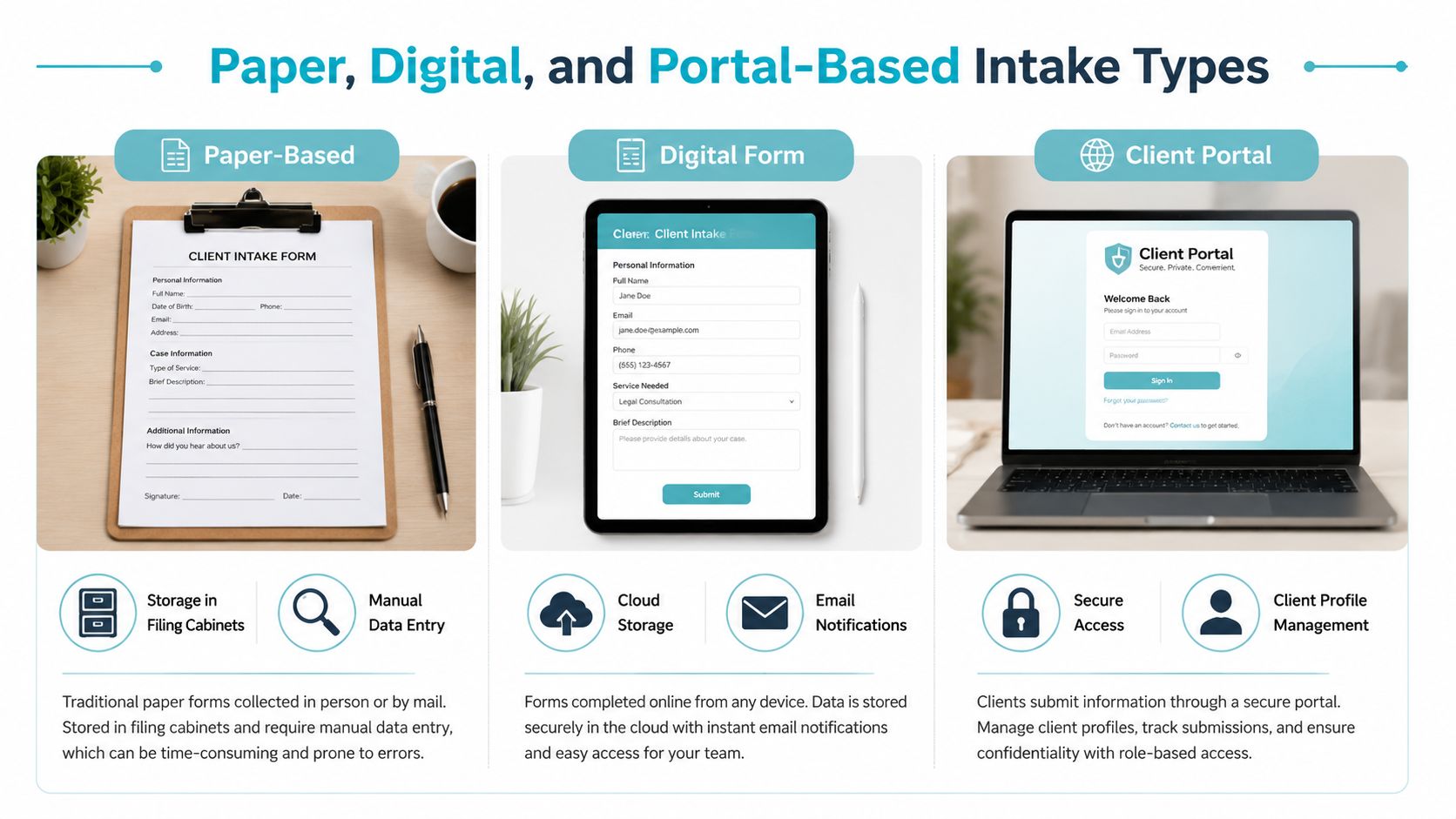
The same questions can produce very different workloads depending on how a firm collects them. Paper, digital PDF, and portal-based intake each solve a different part of the problem.
Paper forms are familiar and easy to hand to someone in an office. They also require physical handling, manual review, and re-entry before the information can support a broader digital workflow. A digital PDF removes printing and mailing, but it can still leave staff responsible for downloading attachments, checking whether fields are complete, and transferring answers into the firm's case system.
A client portal changes the handoff. The prospective client completes the form through a controlled online experience, and the information can be connected to the firm's broader intake process. That doesn't eliminate the need for staff judgment. It reduces the number of manual steps between submission and review.
Intake Type Comparison for PI Firms
| Aspect | Paper | Digital PDF | Portal Based |
|---|---|---|---|
| Client completion | Completed by hand or with staff assistance | Completed on a device and returned as an attachment | Completed within a client-facing portal |
| Staff workload | Manual collection, reading, filing, and re-entry | Downloading, reviewing, and often re-entering information | Review within the connected workflow |
| Data consistency | Depends heavily on handwriting and staff interpretation | Depends on PDF field design and completion quality | Structured fields can support validation and routing |
| Follow-up | Usually handled through calls or separate messages | Usually handled through email or phone | Can be connected to workflow reminders and follow-up actions |
| PI workflow fit | Useful for office visits or limited access situations | Better than paper for remote collection, but still document-centered | Better suited to intake processes that connect client responses with case operations |
A portal isn't automatically effective just because it's online. The firm still needs clear questions, sensible routing, privacy controls, and a review process. The platform should support the way staff already work rather than forcing them to monitor another disconnected inbox.
For firms examining how client portals support law firms, the practical question is simple: Where does the information go after the client submits it? That answer usually reveals whether the firm has a workflow or only an electronic version of its old paperwork.
Five Categories of a Legal Intake Form
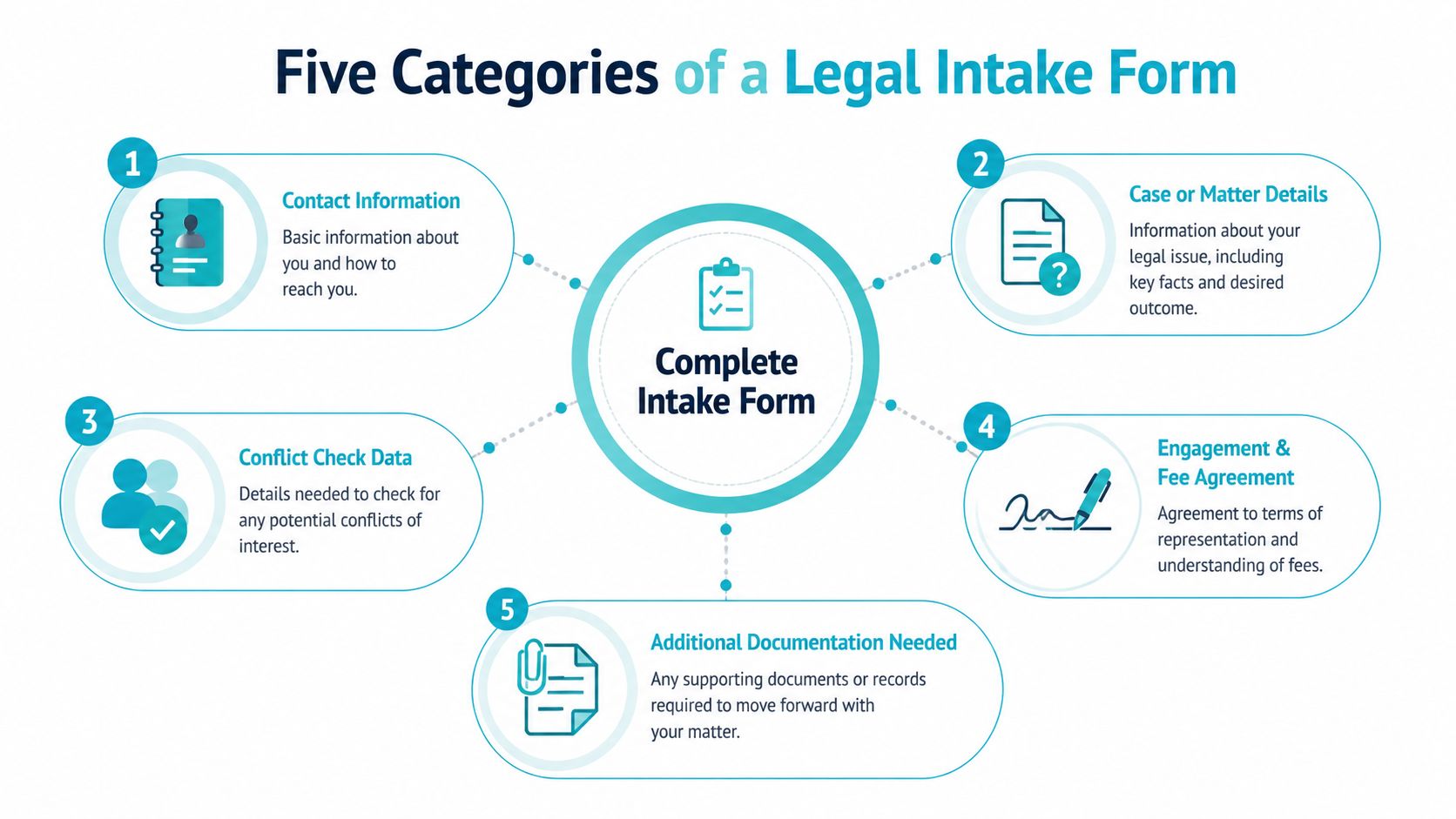
A complete client intake form can be organized into five functional categories, basic contact information, service-specific questions, payment and billing details, legal and compliance disclosures, and a digital signature field, as outlined in these client intake form examples.
For a plaintiff PI firm, the categories should reflect the decisions staff need to make before a consultation or file-opening step.
Basic contact information
This section identifies the person and establishes reliable communication details. It can include the prospective client's name, address, telephone number, email address, preferred contact method, and an emergency or alternate contact where the firm's process calls for one.
The form should make it clear which entries are required. A firm can't schedule a consultation effectively if the client provides a name but no dependable way to reach them.
Service-specific questions
These questions describe the matter itself. A PI firm might ask for the incident date, location, incident type, body parts injured, treatment received, current providers, involved parties, and insurer information.
The wording should help a person who doesn't know legal terminology. “Tell us what happened” can invite a useful narrative, while separate fields for the date, location, and injury type provide structure for screening and routing.
Payment and billing details
Legal intake may also capture billing structure preferences or information needed for the firm's administrative process. This section should be designed carefully and should not request sensitive payment information unless the firm has an appropriate process for handling it.
Legal and compliance disclosures
This category can address acknowledgments, privacy language, conflict-related questions, communication permissions, and other disclosures the firm's counsel or policies require. The exact content depends on the firm and applicable obligations.
Digital signature
A signature field can record formal acknowledgment or consent at submission. It shouldn't be treated as a substitute for attorney review or a complete engagement process, but it can provide a clear record that the person completed and acknowledged the relevant form content.
Together, these categories show why intake is more than contact capture. It combines identity, matter facts, administration, compliance, and authorization in one controlled workflow.
What Intake Must Prove Before Representation
A weak legal intake process asks, “Who is this person?” A stronger PI process asks, “What must the firm establish before it can responsibly move this inquiry forward?”
That distinction changes the form's design. The firm isn't collecting information just to fill a profile. It's gathering facts that support conflict screening, jurisdiction and standing analysis, preliminary case viability review, and compliance documentation. Legal-industry guidance frames intake as the operational foundation for those steps and notes that no federal or state law requires a specific intake-form format in this context, as discussed in this legal client intake guidance.
Conflict screening
Conflict screening requires more than the prospective client's name. Depending on the firm's process, staff may need names of opposing parties, employers, insurers, witnesses, related businesses, and other people or organizations connected with the incident.
The form should capture names in a way staff can search and compare against existing records. A free-text narrative may contain the answer, but a dedicated field makes the information easier to locate and review.
Jurisdiction, standing, and viability
An intake form can collect the facts attorneys need to assess where an incident occurred, who may be involved, whether the prospective client appears connected to the claim, and whether the basic circumstances fit the firm's practice criteria.
That isn't a legal conclusion generated by the form. It's a disciplined fact-gathering step. The form should help staff identify missing information instead of encouraging them to infer facts that the prospect never provided.
Privacy and consent
Intake information can include sensitive personal, medical, and financial details. The submission is therefore a controlled data-collection event, not an ordinary website message. Privacy-focused practice guidance emphasizes that clients should understand their information will be kept private and handled in line with applicable privacy obligations, while the firm should control access, consent language, and downstream use.
Practical rule: Collect only what the next workflow step needs, explain why sensitive information is requested, and decide who can view each category before launching the form.
The form format matters less than the controls around it. A polished template can still create risk if staff download it into unmanaged locations, send it through ordinary email, or retain information without a defined process. Workflow design, permissions, review, and documented consent deserve as much attention as the questions themselves.
Design Intake Forms That Get Answers
A form can be legally thoughtful and operationally useless if prospective clients can't understand it or finish it. Good design makes the next answer obvious, limits unnecessary effort, and prevents avoidable entry mistakes.
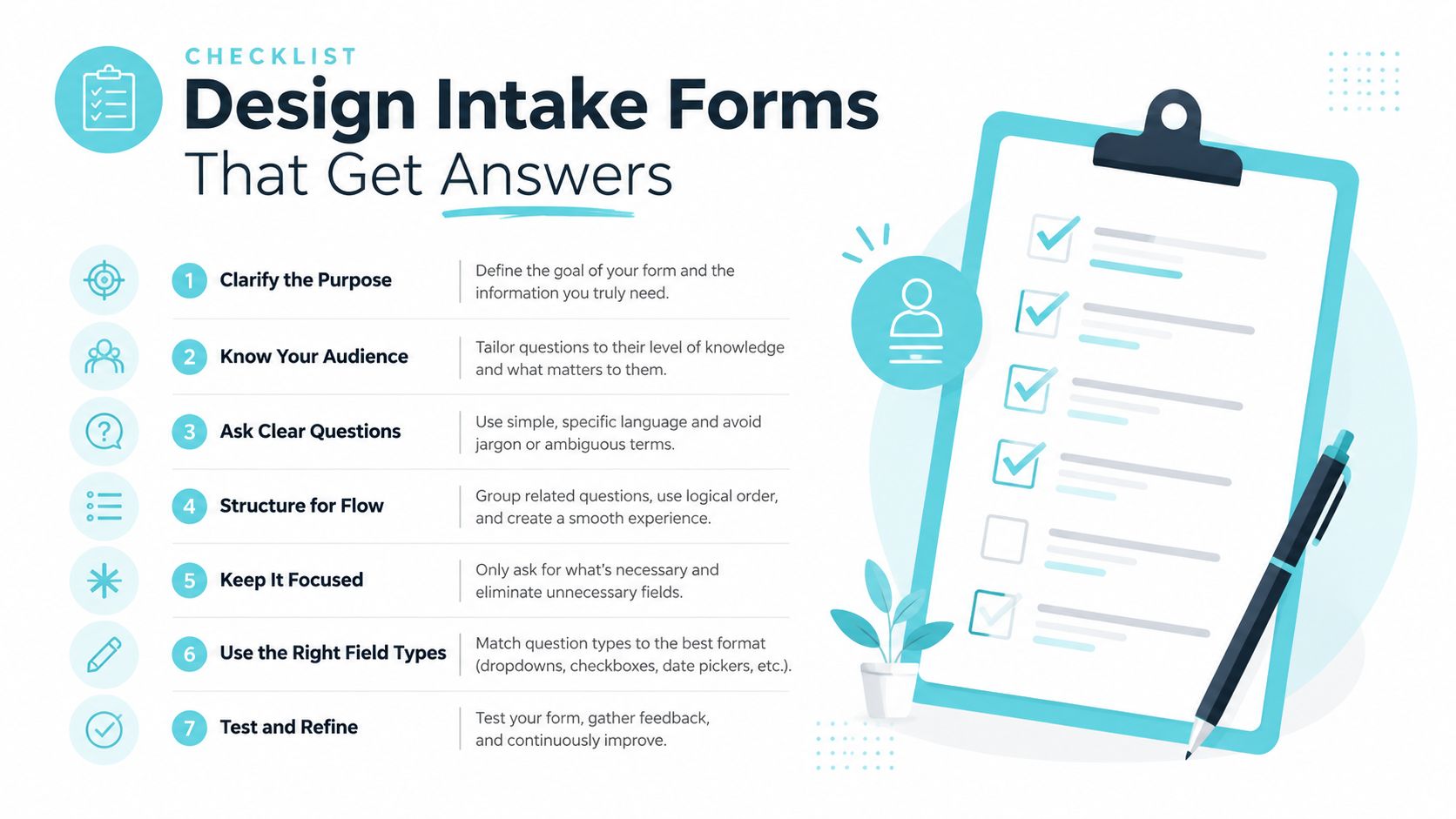
One practical recommendation is to keep the form to 8 to 12 essential fields maximum, use logical question grouping with conditional logic, and test it on multiple devices, according to this intake form design guidance. For a PI firm, that may mean asking only the details needed for an initial screen, then displaying additional injury or treatment questions when the client selects the relevant response.
Put the important questions first
Required fields should support the next decision, not satisfy curiosity. A firm may need the client's name, contact details, incident date, incident type, injury status, and opposing-party information before it needs a detailed narrative.
Use one question per row when possible. For entries that are easy to mistype, use checkboxes, radio buttons, or drop-down menus, and distinguish required from optional fields with clear labels, color, or asterisks.
Use conditional logic
Conditional logic prevents every prospect from seeing every question. Someone reporting a vehicle collision may need fields about drivers, insurers, and passengers. Someone reporting a premises incident may need fields about the property owner, location, notices, and witnesses.
This approach keeps the experience relevant without hiding information the firm needs. It also produces cleaner data because a response is connected to the question that caused it to appear.
Test the real experience
Open the form on a phone, tablet, and desktop computer. Check whether the text is readable, the buttons are easy to use, and the submission status is clear. Have staff test incomplete answers, unusual names, long narratives, and attachments if the workflow accepts them.
Professional branding, mobile responsiveness, CRM integration, team notifications, and an automated response email can support a consistent experience. They should serve the intake workflow, not distract from it.
Design principle: Every field should earn its place by helping staff identify, evaluate, route, or prepare the matter.
Example Questions for a PI Intake Template
A useful PI template starts with the client's immediate situation, then gathers enough context for the firm to decide what deserves attention next. The questions should feel straightforward to an injured person, not like an examination in legal vocabulary.
A legal client intake form can gather personal information, preliminary case details, potential conflicts, consultation scheduling information, and billing structure preferences, as shown in this legal client intake template.
A practical question sequence
Contact and communication
- What's your full legal name?
- What phone number and email address should the firm use?
- What's your preferred way to hear from us?
- Is there a safe time or method for contacting you?
Incident details
- What type of incident occurred?
- When and where did it happen?
- In your own words, what happened?
- Who else was involved?
- Were there witnesses, photographs, videos, or reports?
Injury and treatment
- What body parts were injured?
- Did you receive emergency or other medical treatment?
- Which providers have treated you?
- Are you still receiving treatment?
- Has a medical provider given you work or activity restrictions?
The form shouldn't force a person to know the legal classification of their claim. “What happened?” and “Where did it happen?” often produce more useful initial information than a menu filled with unfamiliar legal terms.
Screening and administration
A separate group can ask whether the prospective client has spoken with another attorney, whether anyone connected with the incident is already represented, and whether the client has an insurance claim or relevant policy information. These questions support preliminary conflict review and matter qualification without promising that the firm will accept the case.
The template can also offer consultation scheduling choices and ask about billing structure preferences. Keep those administrative questions distinct from the injury narrative so staff can find them quickly.
For more ideas on organizing questions, review these examples of intake forms, then adapt the structure to the firm's actual screening rules, practice areas, and privacy process.
A final acknowledgment can confirm that the information is accurate to the client's knowledge, explain how the firm will handle the submission, and capture a digital signature where appropriate. The form should make clear that submission starts review, it doesn't itself establish representation.
How CasePulse Streamlines Intake and Automation
A plaintiff PI firm can turn intake into a routing event by placing the form inside a client portal connected to the firm's existing case workflow. CasePulse supports client portals where clients complete fillable forms from any device, while staff continue working in systems including Needles, Neos, LawBase, and Litify.
That setup addresses a common operational failure. The client doesn't need to send answers through a chain of emails, and staff don't need to build a separate intake inbox just to monitor submissions. The firm can use structured client responses as part of the process for creating or updating client information, then review the matter within its established system.
From submission to follow-up
A portal-based intake experience can connect the initial form with automated follow-ups and reminders. If a client starts but doesn't finish, the workflow can support a reminder process. If staff need a missing incident date or provider name, the firm can request that information without recreating the entire intake conversation.
CasePulse also supports client communication, file sharing, case status access, and fillable forms from a single portal experience. For firms comparing software for modern law firms, the important evaluation point is whether the tool fits the staff's current operating environment and reduces disconnected administrative steps.
The adoption model matters, too. CasePulse states that firms can begin inviting clients in about a week, with US-based support, month-to-month pricing, unlimited cases, and no long-term contract. Those are product terms, not a guarantee that every firm's workflow will be configured identically, so the firm should confirm the details and map its own intake requirements before implementation.
Keep the case system central
The purpose of a portal isn't to move staff into another application for every client interaction. It's to give clients an easier way to submit information while keeping the firm's work connected to the system it already uses. That principle is central to what CasePulse is, particularly for firms that want client-facing forms and follow-up without adding another inbox.
The result is a more deliberate intake chain: the client provides structured facts, the workflow identifies the next action, staff review the matter, and the firm can continue communication through the same connected environment. That's the practical answer to what is an intake form for a PI firm. It's the controlled starting point that turns an inquiry into a reviewable, routable matter.
CasePulse provides secure client portals, fillable forms, automated reminders, file sharing, and case status access while integrating with Needles, Neos, LawBase, and Litify. Visit CasePulse to see how your firm can move plaintiff personal injury intake beyond standalone PDFs and into a connected client workflow.