
 CasePulse
 If you're evaluating accounting software for your law firm, you're probably already feeling the friction. Billing lives in one place. Trust records live somewhere else. Your accountant exports data into spreadsheets to make reports usable. Partners want matter profitability. Staff want fewer duplicate entries. Nobody wants a trust accounting problem.
That tension usually leads firms to the wrong buying process. They compare vendor feature grids, sit through polished demos, and focus on interface preferences. The more important question comes first: do you want accounting inside a unified legal platform, or do you want a separate accounting system connected to the rest of your stack?
That decision affects compliance, reporting, training, data ownership, and how much administrative drag your team will carry every month. It also determines whether your software helps operations or creates hidden reconciliation work in the background.
Early in the process, it helps to frame the choice clearly:
| Criteria | All-in-One Suite | Integrated Accounting Platform |
|---|---|---|
| Primary model | Practice management, billing, client communication, and trust/accounting in one environment | Separate accounting system connected to case management and related tools |
| Best fit | Firms that want one workspace and fewer systems to manage | Firms with existing systems they don't want to replace |
| Operational upside | Less duplicate entry, better shared visibility | More flexibility in how the stack is assembled |
| Main risk | Less room for highly customized workflows or reporting in some setups | More reconciliation and governance burden across systems |
| Implementation style | One platform rollout | Integration planning plus process mapping |
| Reporting posture | Often simpler and more centralized | Depends on how well data moves across tools |
| Compliance management | Easier to manage in one environment if trust workflows are truly native | Requires stronger controls if trust, billing, and GL are split |
The rest of the decision flows from that model choice.
Why Generic Accounting Software Is a Risk for Firms
Generic bookkeeping tools can work for ordinary businesses. A law firm isn't an ordinary business. Client funds, matter based billing, and ethics driven recordkeeping create requirements that standard accounting products weren't built to handle. Clio's legal accounting guidance makes that point directly by noting that modern legal accounting software emerged because legal finance has distinct needs, especially trust or IOLTA compliance, matter level billing, and security.

Where generic tools break down
The first failure point is trust accounting. A legal practice must keep client funds separate and track them accurately. When firms try to force a generic ledger product into that job, they often end up relying on manual workarounds, extra spreadsheets, or staff memory. That's not a system. That's a risk.
The second problem is matter level visibility. Managing partners don't just need firm wide financial statements. They need to see revenue, time, expenses, and balances at the client and matter level. Generic products can record transactions, but they don't naturally reflect how legal work is opened, staffed, billed, and reconciled.
The third issue is security and workflow fit. Legal accounting guidance emphasizes secure client portals and compliance oriented workflow simplification because legal finance touches sensitive client information and regulated records. If your accounting process requires people to move data by hand between systems, email attachments around the office, or maintain side ledgers, your control environment weakens fast.
Practical rule: If trust, billing, and matter reporting depend on spreadsheets outside the system of record, the software isn't really solving the problem.
The hidden cost isn't just inconvenience
A lot of firms tolerate generic accounting software because it looks cheaper on paper. That can be shortsighted. The actual cost shows up in staff time, exception handling, delayed invoicing, and cleanup work before audits or internal reviews.
Firm leaders often need to think beyond software itself and look at the broader legal operations environment, including security and process design. Resources like Vulnsy legal solutions are useful because the accounting decision sits inside a wider risk picture that includes data handling, access, and workflow discipline.
For firms that want to tighten financial controls around client money, a focused review of client trust account practices is often more valuable than another vendor demo. It exposes whether the current stack can support the controls the firm needs.
What works better
Accounting software for law firms works best when it treats trust accounting, billing, and reporting as core functions rather than add ons. Firms usually get into trouble when they buy a general business tool first and then try to bolt legal requirements onto it later.
That's why legal specific accounting software became a real category in the first place. It wasn't about novelty. It was about the fact that legal finance has operational and ethical requirements that ordinary bookkeeping tools don't consistently handle well.
Must Have Features in Legal Accounting Platforms
Once you stop treating legal accounting like ordinary bookkeeping, the feature list gets much clearer. The baseline isn't flashy automation. It's control. Accounting Seed's guidance on legal accounting features identifies the operational core as trust accounting, invoicing, time tracking, expense tracking, and customizable business reporting because those capabilities determine whether a firm can reconcile client funds correctly and monitor profitability at the matter or firm level.
Features that should be non negotiable
Some features belong on every shortlist. Others depend on your billing model or client mix. These are the ones I treat as mandatory in legal operations reviews:
- Trust accounting: The platform should support compliant handling of client funds and make reconciliation practical, not theoretical.
- Time tracking tied to billing: Lawyers and staff should record work in a way that flows directly into invoices.
- Expense tracking by matter: Case costs need to land on the correct file without side logs and duplicate entry.
- Customizable reporting: Leadership needs reports that answer management questions, not just tax questions.
- Invoicing built for legal work: Bills should reflect how the firm charges and how matters are managed.
A lot of products can claim some version of these. What matters is whether the workflows are native and dependable.
Why these features matter operationally
Trust accounting isn't just another ledger function. It's a control system around client money. If the software makes it hard to keep separate ledgers, review activity, and reconcile balances cleanly, staff start inventing manual fixes. Those fixes create the exact audit and ethics problems the software was supposed to prevent.
Time and expense tracking have a direct effect on billing accuracy. When time lives in one system and billing happens in another, firms lose speed and confidence. Entries get missed. Costs get parked in the wrong place. Attorneys review prebills with incomplete information. That's when realization and collections become an operations problem instead of a pricing problem.
Reporting is where many buyers underspecify their needs. A law firm should be able to see what is happening at the matter level, not just in aggregate. If the system can't show revenue, costs, and financial performance in a way leadership can effectively use, partners end up asking the accounting team for custom spreadsheets every month.
Firms don't need more data. They need fewer places where the data can go wrong.
Features that deserve a tougher demo
When you're in vendor demos, push past the screen tour. Ask the team to show a full workflow:
- Open a matter
- Record time and expenses
- Apply trust funds where appropriate
- Generate the invoice
- Run a matter level report
- Show how corrections are handled
That sequence reveals much more than a feature checklist.
For firms refining billing operations, this overview of contract billing software considerations from Steingard Financial is a useful companion because it keeps attention on how billing logic affects back office execution, not just invoice output.
If your current billing process is fragmented, reviewing legal billing software options can help clarify whether the issue is the accounting platform itself or the handoff between timekeeping, billing, and collections.
Mapping Your Firm's Integration Needs
The accounting platform doesn't operate alone. In most firms, it sits in the middle of a larger workflow that includes case management, document handling, payment collection, payroll, and client communication. Efficiency gain comes from data flow, not from buying the product with the longest feature list.

What a fragmented stack looks like in practice
Many firms run a split model. The general ledger sits in QuickBooks or Xero, while timekeeping, billing, and trust activity live inside a legal case management system. Accounting Seed's review of law firm accounting software notes that this setup can improve flexibility, but it also raises reconciliation and data governance risk, especially when a firm needs three way trust reconciliation and matter level reporting.
That tradeoff is easy to underestimate. A fragmented stack can look fine in a demo because each tool does its own job well. The trouble starts in daily operations:
- Billing staff export and recheck information between systems
- Accounting teams reconcile timing differences and mismatched records
- Partners see reporting inconsistencies across matters
- Administrators become dependent on a few people who understand the handoffs
None of that appears in a feature comparison page.
Map integrations by workflow, not by vendor logo
A smarter approach is to start with the firm's recurring financial workflows and identify where data crosses system boundaries. For most firms, that means asking:
- Where does a matter begin: In intake, case management, or accounting?
- Where is time entered: In the legal platform or elsewhere?
- Who controls trust activity: Accounting, billing, or both?
- How are payments posted back: Automatically or through manual reconciliation?
- What system produces management reporting: The GL, the case system, or spreadsheets?
Those answers tell you whether you need a tightly integrated ecosystem or whether your firm can tolerate a more modular setup.
The integration point firms miss most often
Client communication doesn't always get included in accounting software discussions, but it should. Payment questions, invoice delivery, document sharing, and status updates all affect collection speed and staff workload. A disconnected client experience usually creates more calls, more manual follow up, and more billing friction.
That broader relationship between financial operations and client workflows is why firms should also review how accounting connects with law firm client management software. The best accounting setup isn't just accurate. It reduces the number of places where staff must copy information from one system to another.
If two systems both store matter financial data, someone in your firm is already doing reconciliation work whether leadership sees it or not.
Evaluating Legal Accounting Software Models
The most important strategic choice is structural. Do you want an all in one legal platform with accounting built in, or do you want a dedicated accounting system integrated with the rest of your stack?
LawPay's overview of legal accounting software describes the technical distinction clearly. Some platforms embed accounting inside a broader practice management suite, while others handle accounting as a separate module or connected system. Integrated platforms centralize case management, billing, client communication, and trust accounting in one system, which reduces duplicate entry and improves visibility into performance.
Comparison of Legal Accounting Software Models
| Criteria | All-in-One Suite | Integrated Accounting Platform |
|---|---|---|
| Core design | One legal platform handles case work, billing, trust functions, and accounting together | Accounting sits alongside case management and other legal systems |
| Data entry burden | Usually lower because staff work inside one environment | Often higher unless integrations are strong and well maintained |
| Visibility for leadership | Better for firms that want one shared operational view | Can be strong, but only if reporting logic is aligned across tools |
| Flexibility | Better for firms willing to adapt to a unified system's structure | Better for firms that need to preserve an existing tech stack |
| Implementation risk | Simpler conceptually, but can require broad workflow change | More moving parts, especially during integration and reconciliation design |
| Compliance control | Easier to standardize when trust and billing are native | Depends heavily on handoffs, permissions, and oversight |
| Best fit | Newer firms, firms standardizing operations, firms tired of duplicate entry | Firms with mature internal processes or deep investment in specific platforms |
When an all in one model works best
An all in one suite usually fits firms that want simplicity and consistency. If your staff are already struggling with duplicate entry, fractured reporting, and too many logins, bringing accounting into the same legal platform can remove a lot of friction. It often works well for firms that are building a stack from scratch or replacing legacy tools that were never designed to work together.
This model also helps when leadership wants one operational dashboard and one source of truth. That matters more than many partners realize. When intake, matters, billing, trust activity, and client communication are managed in the same system, day to day visibility improves.
When a separate accounting platform makes more sense
A dedicated accounting platform can be the better choice when the firm already has a strong case management system and doesn't want to rip it out just to solve finance problems. That's common in larger or more specialized firms. They may value deeper accounting control, different reporting needs, or tighter alignment with an existing back office process.
This model can work well, but it only works well if the firm is realistic about overhead. Connected systems need governance. Someone must own mappings, permissions, reconciliation rules, exception handling, and change management when one vendor updates an integration.
What managing partners should ask first
Don't start with brand preference. Start with operating reality.
Ask these questions in order:
- Is our current case management platform staying?
- Do we want one system of record or a coordinated stack?
- Can our staff absorb workflow change across the whole firm?
- Who will own reconciliations between systems if we keep them separate?
- Do we need flexibility badly enough to accept more administrative control work?
The wrong software model doesn't fail all at once. It fails one handoff at a time.
That is why two firms can buy capable products and get completely different outcomes. The deciding factor is often not the software's promise. It's whether the model fits the firm's operating discipline.
Navigating Security Compliance and Data Migration
Security, compliance, and migration planning usually decide whether a software change succeeds. They just don't get the same attention as demos.
Security questions worth asking vendors
Law firm finance systems hold sensitive data and access to client fund activity. That means you need concrete answers on:
- Access controls: Who can view, post, edit, approve, and reverse financial transactions?
- Audit visibility: Can the system show what changed, who changed it, and when?
- Data protection: How does the vendor protect financial and client information in the platform and in related portals?
- Operational resilience: What happens during outages, support escalations, or failed syncs?
If a vendor responds with general assurances instead of operational detail, keep pushing.
Compliance is about workflow discipline
Compliance doesn't come from buying a legal branded product. It comes from using software that supports the firm's required controls. That includes separation of client funds, accurate records, reliable reconciliation routines, and reporting that can stand up to review.
For firms comparing products in the current market, The Cash Room's 2025 comparison of law firm accounting options describes legal accounting software as a mature category with expected core capabilities such as robust trust accounting, integrated time and billing, practice management integration, and automated compliance checks. It also estimates that firms should expect to invest about $30 to $100 per user per month for quality legal accounting software.
That pricing range matters less than what the firm gets operationally. A lower subscription cost can still produce a more expensive outcome if staff spend hours each week fixing imports, reconciling split systems, or maintaining manual trust controls.
A migration plan that avoids preventable damage
The safest migrations are boring. They rely on process, not optimism.
Use a checklist like this:
- Define the source of truth: Decide which system owns clients, matters, balances, and historical records.
- Clean data before migration: Old naming issues and duplicate records become permanent if you move them unchanged.
- Test trust workflows first: Don't leave trust and reconciliation logic for late stage testing.
- Limit custom exceptions: Every special rule adds support and training burden.
- Run parallel validation: Compare key reports and balances before you fully switch.
A migration goes off course when firms try to redesign every workflow at once. Move what must change. Preserve what already works.
A Decision Framework for Selecting Your Software
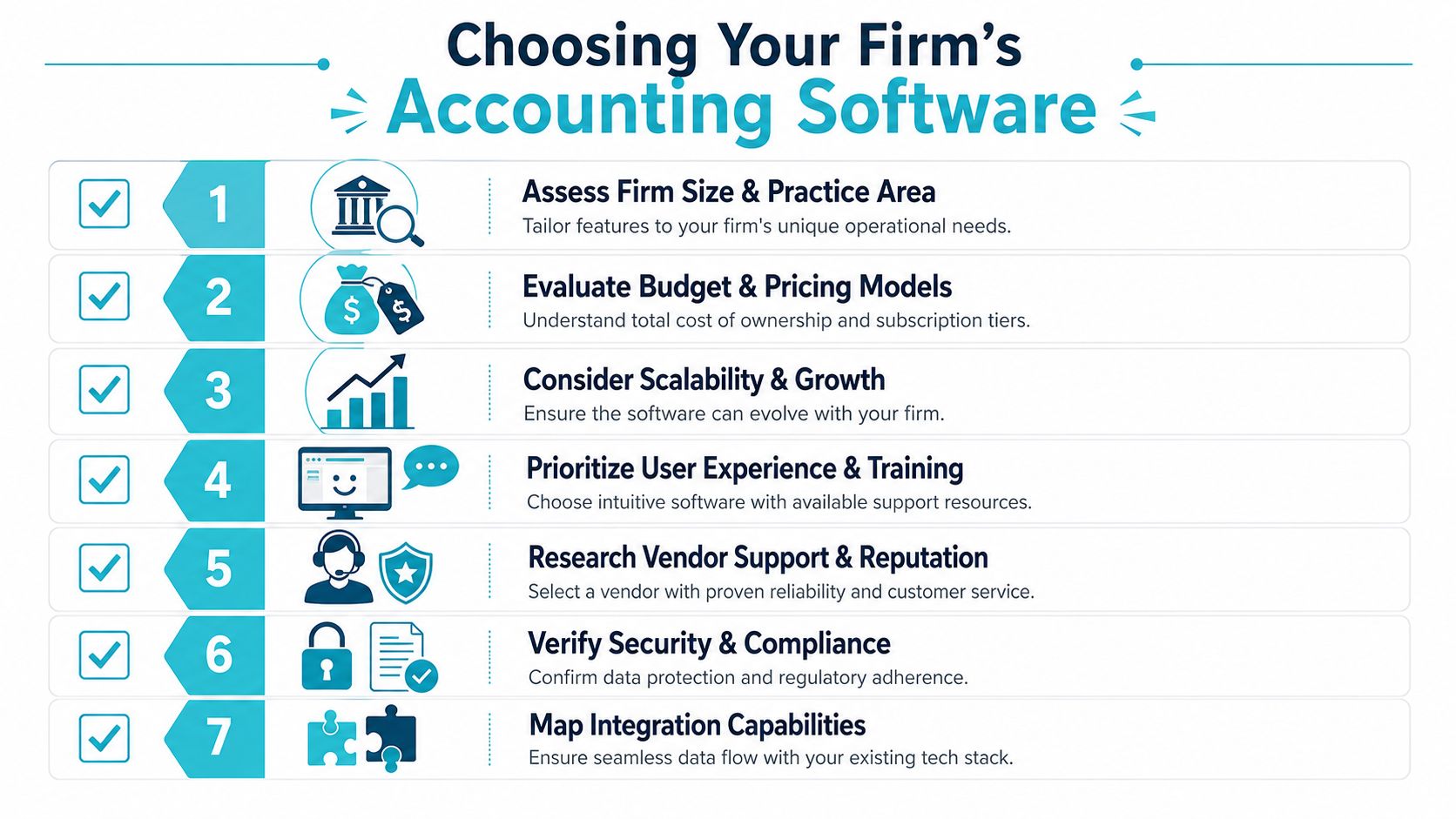
The right decision depends less on firm size than on organizational complexity. Multi office firms, high volume practices, and firms with established case systems usually face a different choice than a newer practice buying software for the first time. The Michigan Bar Journal noted that buyers often focus on what is best for a small firm while overlooking workflow scalability, implementation burden, integration depth, training, data security, and cost management. It also points out that the practical question is whether the software fits existing processes without disrupting staff productivity in this discussion of legal software adoption.
The questions that drive the decision
Start with these:
- How complex are our workflows really? A firm with multiple offices, varied billing arrangements, and layered approval paths shouldn't buy for a simplified version of itself.
- Are we replacing systems or connecting them? That answer determines your implementation burden more than the vendor brand.
- Where do reporting problems show up today? If leadership can't trust matter level reporting, don't let a demo distract you with cosmetic features.
- How much change can the team absorb? Even good software fails when training and rollout design are weak.
- Who owns the stack after go live? If the answer is vague, your integration model is probably too complicated.
A practical vendor evaluation checklist
Bring this into demos and procurement meetings:
- Show trust workflows: Don't accept screenshots. Ask for end to end trust handling and correction scenarios.
- Demonstrate matter reporting: Have the vendor show how a partner would review financial performance by matter.
- Explain integration ownership: Ask what depends on native connectivity versus third party connectors.
- Clarify support boundaries: Find out who helps when data doesn't match across systems.
- Test user fit: Include accounting, billing, legal ops, and attorney reviewers in the evaluation.
- Review total operating burden: Subscription cost matters, but so do training time, reconciliation work, and admin overhead.
For a broader non legal perspective on the buying process, this guide to selecting business accounting software is useful because it reinforces the basics around fit, usability, and long term maintainability.
The best accounting software for law firms isn't the one with the longest feature sheet. It's the one whose model matches how your firm works, how your data moves, and how much complexity your team can manage without creating new risk.
If your firm is tightening operations around client communication, billing follow up, and case visibility, CasePulse is worth a look. It gives law firms a secure client portal that works with leading case management systems, helps reduce routine status calls, and lets staff manage communication inside existing workflows instead of adding another disconnected tool.