
 CasePulse
Maria, a senior paralegal at a plaintiff firm, answers her eleventh “any update on my case?” call before 10 a.m. Three subpoenas sit unopened on her desk. She knows the callers aren't being unreasonable. They want to know whether treatment records arrived, whether the demand is moving, or what happens next. But every interruption pushes substantive case work later into the day.
That pattern is exactly where automated client communications should begin. Not with a flashy chatbot, and not with a goal of eliminating human contact. Start with the operational leak: repetitive status questions, missed follow-ups, incomplete forms, and clients who feel forgotten. The right system gives plaintiffs clear, timely touchpoints while returning focused time to paralegals and attorneys.
The Real Cost of Manual Client Updates at a Law Firm
Manual updates create more than inconvenience. They split attention across phone calls, inboxes, handwritten notes, calendar reminders, and case records. A paralegal may answer a question accurately, then spend additional time documenting the conversation and checking whether another staff member already gave a different answer.
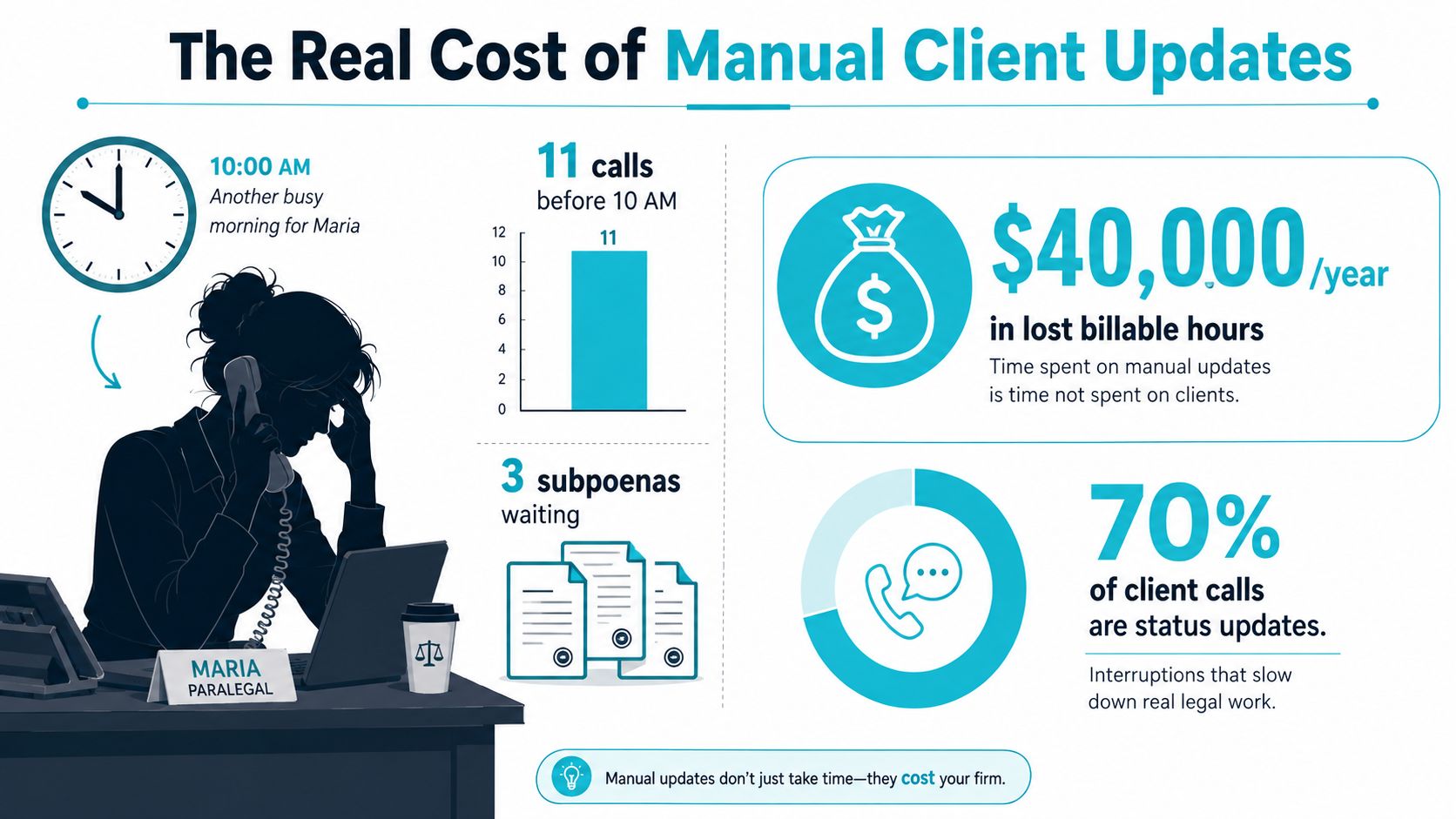
The firm also carries a relationship cost. A plaintiff who hears nothing may assume nothing is happening, even when the legal team is ordering records, evaluating damages, or preparing a demand. That uncertainty encourages repeated calls. In the worst cases, frustration becomes a reason to question the firm's attention, switch counsel, or complain about service.
Practical rule: Treat every recurring “any update?” call as evidence of a missing client touchpoint, not as a difficult client.
Find the leak before buying software
Begin by reviewing a representative set of recent matters and listing every client initiated contact. Separate questions that staff answer repeatedly from communications that require legal judgment. Case status, document receipt, appointment reminders, and requests for missing information usually belong in a structured workflow. Settlement advice, litigation strategy, medical interpretation, and changes in legal position remain human responsibilities.
One report found that only 34% of firms use software to send physical mail, while 65% still print, stuff, stamp, and log outbound mail by hand (USA Today's report on law firm communication practices). The same source reports that physical mail remains the most trusted channel for 37% of respondents, narrowly ahead of email at 35%, custom software at 25%, and phone at 3%. Those figures point to a mixed-channel reality, not a reason to discard established communication methods.
Protect case-building time
Your objective isn't merely fewer calls. It's preserving the time needed to investigate liability, obtain records, prepare discovery, and evaluate damages. A portal that lets a client check status, receive a reminder, or upload a requested file can prevent a paralegal from repeating the same explanation throughout the day.
Firms evaluating staffing support can also review resources on virtual assistants for law firms, particularly when deciding which administrative tasks should remain assisted rather than automated. For a broader view of client tracking software, map the communication leak to the underlying matter workflow before selecting a solution.
Define Scope Before You Touch Any Tool
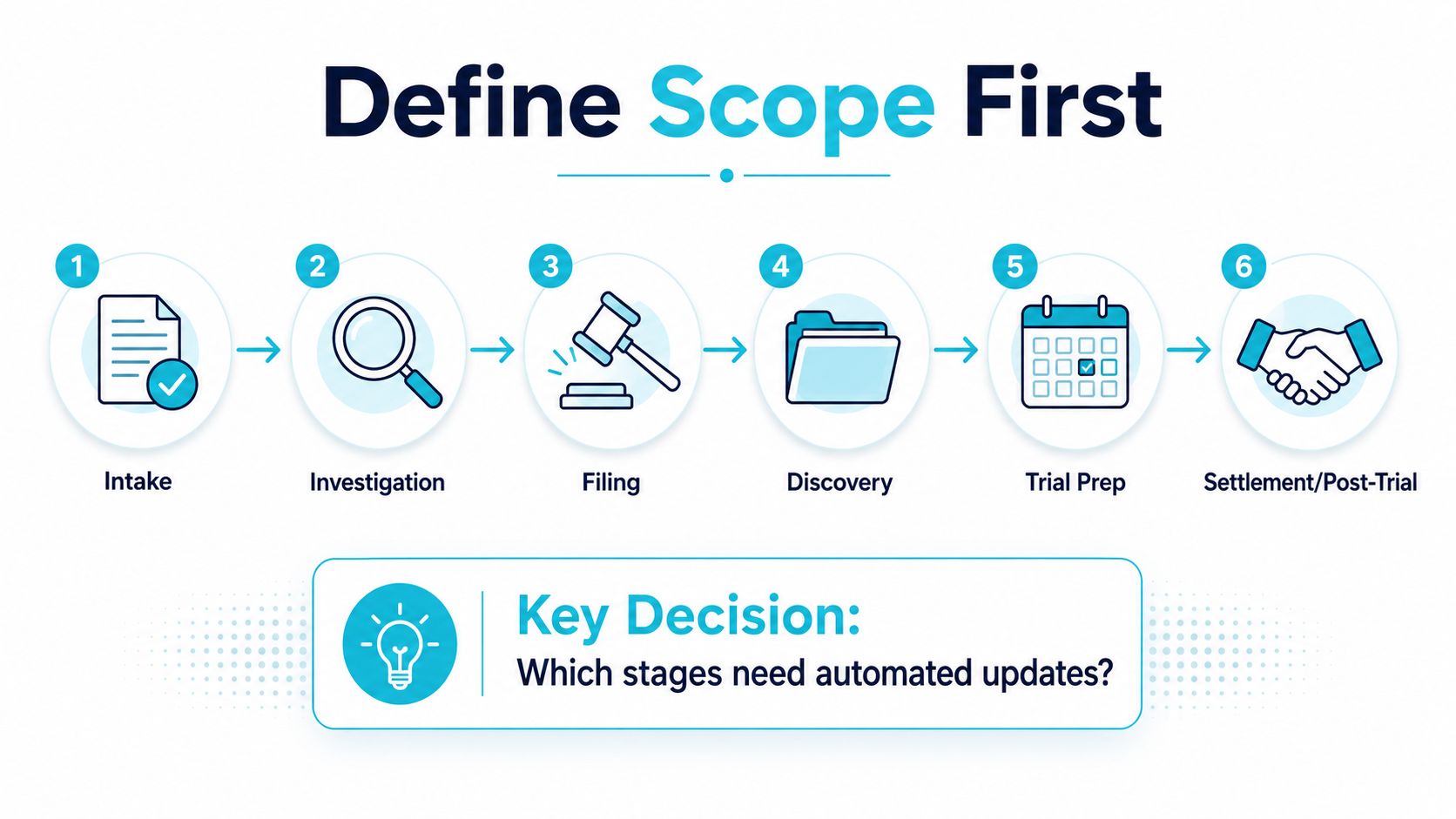
Technology won't repair an undefined process. Before comparing platforms, write down the client journey from first contact through post-resolution and mark the moments when a client needs information, an action, or reassurance.
Map the plaintiff lifecycle
Use the stages your firm handles:
- Intake: Confirm receipt, explain next steps, and identify missing information.
- Sign-up: A signed retainer should trigger a clear welcome message and an immediate explanation of what the client should expect.
- Document collection: Send matter-specific requests and identify what remains outstanding.
- Medical treatment: Remind clients to provide updates or records when the workflow requires them, without giving medical or legal advice.
- Demand preparation: Explain what information the team still needs and what milestone comes next.
- Negotiation: Provide appropriate process updates while reserving valuation and strategy discussions for the legal team.
- Settlement: Coordinate forms, signatures, deadlines, and logistical instructions.
- Post-resolution: Deliver closing information and identify any remaining administrative action.
Mark each touchpoint as either repetitive and rule-based or judgment-dependent. A signed retainer is a strong trigger. A new record received can trigger confirmation. A period of silence can prompt a carefully worded check-in. Whether a settlement offer should be accepted cannot be automated.
A legal technology report found that 61% of firms didn't offer online initial consultation setup, while 39% did (the report on law firm client communication automation). That gap illustrates why scope should include simple intake mechanics, not only advanced artificial intelligence.
Assign ownership before launch
Name the person who approves client-facing language, the person who can edit templates, the person who receives escalations, and the person who reviews performance. If everyone owns the workflow, nobody owns the failure.
Create a trigger register with four columns: event, client message, responsible team member, and escalation condition. Include signed retainers, received records, missing forms, scheduled appointments, and prolonged inactivity. Use the client intake process as a reference point, but adapt the workflow to your firm's actual stages and responsibilities.
Choosing the Right Channels for Legal Clients
No single channel works for every legal client or every message. The right stack combines a durable record for substantive information, a fast channel for short reminders, and a human option for sensitive or confusing situations.
A client portal is the strongest choice for document exchange, structured forms, and a central history of messages. It gives clients a consistent place to return for status information, but staff must teach login behavior and provide an alternative for people who struggle with digital access.
Email supports longer explanations, formal summaries, and attachments. Its weakness is visibility. Important messages can be buried, filtered, or separated from the client's other matter materials.
SMS is useful for appointment reminders, deadline nudges, and short requests. Evidence summarized in research on automated reminders and engagement reports that SMS and WhatsApp-style messages often outperform email and app push notifications in engagement, with open rates commonly above 80%, compared with roughly 20% to 40% for push and around 21% for email. Treat those figures as channel evidence, not permission to send sensitive information casually.
Voice, including voicemail drops and IVR, remains important for clients who won't use apps or who need a personal handoff. It's less convenient for structured recordkeeping, so document the interaction in the matter history.
| Channel | Best Use | Open Rate | Formal Tone | Recordkeeping |
|---|---|---|---|---|
| Client portal | Documents, forms, status history | Not specified | Moderate to formal | Strong, centralized history |
| Longer updates and attachments | Around 21% in the cited reminder literature | Formal | Good if retained consistently | |
| SMS | Short reminders and deadline nudges | Commonly above 80% in the cited literature | Casual to moderate | Requires deliberate capture and retention |
| Voice | Escalations, sensitive moments, and human handoff | Not specified | Personal | Depends on call logging and notes |
Use the portal first for documents and forms, SMS for short operational nudges, email for case-status summaries, and voice when a person needs to take over. Review this workflow automation playbook when you're designing triggers across channels, then confirm that your chosen secure messaging approach fits confidentiality and retention requirements.
Building Templates, Follow-Up Rules, and Forms That Actually Work
Good automation sounds like a prepared member of the team. Bad automation sounds like a machine repeating a generic sentence to every plaintiff. Write messages around the client's next decision, not the firm's internal terminology.
Start intake with three practical touchpoints:
- Send a portal welcome message within five minutes of signup.
- Provide a document checklist tied to the matter type.
- Send a reminder after 48 hours if required forms remain incomplete.
Use editable message patterns
Case status update
Hi [Client Name], this is an update for matter [Matter ID]. We've completed [current milestone]. The next milestone is [Next Milestone]. You don't need to take action right now. If you have information related to this step, reply through the secure portal.
Deposition preparation
Hi [Client Name], your deposition preparation for matter [Matter ID] is scheduled for [Date and Time]. Please review the preparation materials before the meeting. Your next milestone is [Next Milestone]. Contact the team through the secure portal if you need to discuss scheduling.
These templates avoid promising an outcome and make the next milestone visible. They also give the client a clear action path without burying it in legal jargon.
Add rules that protect attention
Set quiet hours so messages don't go out before 8 a.m. or after 7 p.m. in the client's local time. If a client misses two portal logins, create a paralegal task rather than sending endless reminders. If a client replies “stop” or marks a message urgent, stop the automated sequence and route the matter for review.
Conditional logic matters. A pre-litigation client may need treatment and record requests, while a client in active discovery needs different reminders and explanations. Don't force both groups into one cadence.
Before launch, have a senior attorney review each template for accuracy, privilege concerns, tone, placeholders, channel suitability, escalation instructions, and outdated terminology. Test every trigger with sample matters. A message that looks correct in a template editor can still fail when a field is blank or a milestone changes.
Measuring Success Without Optimizing the Wrong Numbers
A dashboard full of sent messages can hide a worsening client experience. Open rates are useful for diagnosing delivery, but they don't tell the managing partner whether a plaintiff understood the update or received help when needed.
Track three primary groups. First, measure response time, with a target of a median reply to client questions under four business hours. Second, measure completion rate, such as the share of intake forms finished within 72 hours of link delivery. Third, measure the change in inbound status calls week over week.
Those targets belong to the operating plan described here, not to a universal benchmark. Establish each baseline before launch, then review performance at 30, 60, and 90 days. The comparison matters more than the first report because the firm needs to see whether communication is becoming clearer and more predictable.
Add relationship signals
Operational efficiency isn't enough if clients feel processed. Track post-matter NPS, referral rate, and complaints about communication as a secondary layer. Read complaint notes, not just totals. A client may praise fast reminders while still reporting that no one explained what a delay meant.
| Metric Category | What to Track | Why It Matters | Review Cadence |
|---|---|---|---|
| Response time | Median reply time to client questions | Shows whether the human team responds when automation can't answer | Weekly and monthly |
| Completion rate | Intake forms completed within the chosen window | Reveals whether requests are clear and usable | Weekly |
| Call reduction | Inbound status calls week over week | Indicates whether routine uncertainty is falling | Weekly |
| Relationship health | NPS, referrals, and communication complaints | Tests whether clients feel informed and cared for | Monthly and post-matter |
| Escalation quality | Urgent, advice-seeking, and negative replies handled by staff | Shows whether automation is handing off correctly | Weekly |
Expect inbound calls to rise immediately after rollout. Clients may be testing the new channel, asking questions about access, or using the first visible response path they trust. Treat that spike as an implementation signal, then examine whether staff are resolving the underlying confusion.
The managing partner's monthly dashboard should feature median client-question response time. A low call count means little if unanswered questions sit in a queue. Fast, accurate human follow-through is the clearest test of whether automation is supporting the relationship.
Ethics, Transparency, and the Human Escalation Layer
Automation isn't merely an efficiency project. A law firm is communicating with people about injuries, financial pressure, privacy, and legal uncertainty. A faster message that lacks context can make the client feel less secure.
Control the three pressure points
Informed consent comes first. Clients should opt in to text or portal notifications through clear language explaining the communication method and data use. Don't hide consent inside a long intake packet or treat silence as permission.
Confidentiality requires encrypted channels and disciplined message content. Don't place protected health information in SMS bodies. Keep attorney-client privilege in mind at every touchpoint, including notifications that reveal more than the client needs to know on a shared lock screen.
Competence means the firm understands the system it deploys. Established client portal guidance recommends multifactor authentication, role-based access control, session timeouts on shared devices, encryption in transit and at rest, separate client and internal administrator access paths, and virus scanning with file-type checks for uploads (client portal security guidance). The same source connects portal design with immutable audit logs, AES-256 encryption for stored data, TLS 1.2 or higher in transit, and alignment with HIPAA, GDPR, and ABA confidentiality standards.
Put a person behind every exception
Create an immediate human route for three categories:
- Urgent flags: The client marks a message urgent or describes an immediate concern.
- Requests for legal advice: The client asks what to do, whether to accept an offer, or how a legal development affects the case.
- Negative sentiment: The reply indicates anger, fear, confusion, or a loss of confidence.
Set a 60-minute response SLA for those escalations during staffed hours. The automation should create visibility and urgency, not answer questions beyond its approved scope.
Use a plain disclosure
Give clients a short intake disclosure:
We use automated messages for routine updates, reminders, document requests, and scheduling information. These messages don't provide legal advice or replace communication with your legal team. You may choose your communication preferences, and you can request human assistance at any time.
Sample consent language:
I consent to receive routine case communications through the channels I select, including portal notifications, email, or text message. I understand that automated messages may contain limited matter information, that I should use the secure portal for confidential details, and that I can withdraw consent or request human assistance by contacting the firm.
The firm still has communication duties under ABA Model Rule 1.4. Cutting out the human layer entirely is the fastest way to turn a convenience project into a bar complaint.
A 30-Day Rollout Plan and Common Snags to Expect
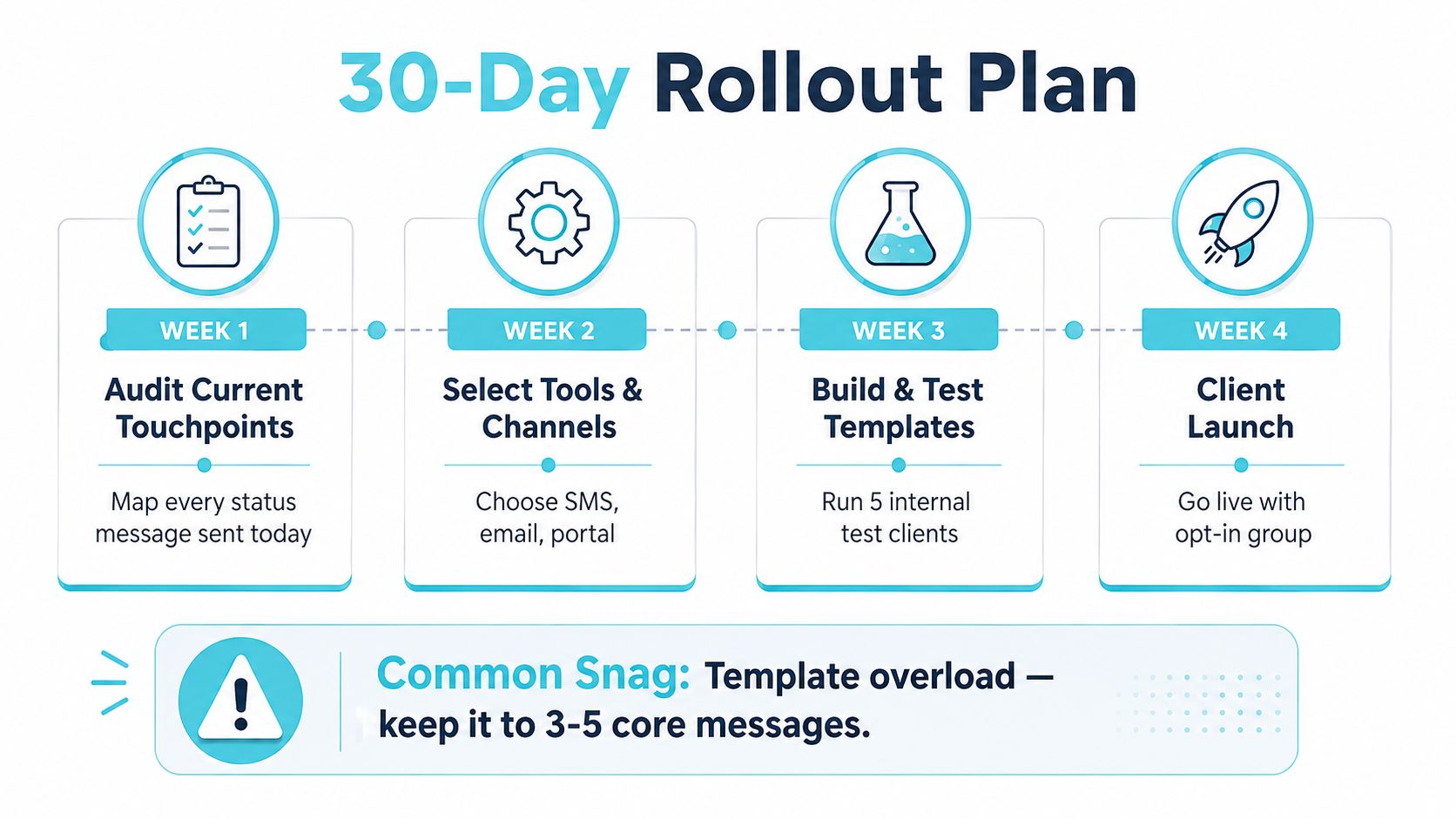
A controlled rollout beats a firm-wide switch. Start with the messages staff send most often, prove that the workflow works, and expand only after the team has handled real exceptions.
Week by week
Week 1, audit current touchpoints. List every status message, reminder, form request, and appointment notice sent today. Assign each to a proposed channel and identify the staff member who owns the response.
Week 2, draft and review templates. Write the highest-volume messages first. Have a senior attorney review language, confidentiality, consent, placeholders, and escalation instructions before anyone builds the workflow.
Week 3, build and test rules. Create follow-up rules in the portal and test them against three sample matters representing different stages. Confirm that incomplete forms, replies, urgent flags, and stop requests behave as intended.
Week 4, soft launch. Invite a small case set, preferably clients with predictable communication needs. Have paralegals log every question the automation failed to answer, then revise the workflow before expanding access.
Fix the snags without overreacting
Clients who never log into the portal need a human-assisted invitation and a channel preference check. SMS replies that arrive at 11 p.m. need an autoresponse explaining staffed hours and an urgent path, not an overnight promise the firm can't keep. Forms that fail to sync require a manual review queue until the integration is stable.
The most dangerous early temptation is over-automation. Don't create a separate sequence for every conceivable event. Keep the first release focused on three to five core messages, including welcome, document request, status update, reminder, and escalation.
Use this launch checklist:
- Audit complete: Every recurring message has an owner and proposed channel.
- Templates approved: A senior attorney reviewed client-facing language.
- Triggers tested: Sample matters produced the expected messages and tasks.
- Consent captured: Clients selected communication preferences.
- Escalations staffed: Urgent and advice-related replies reach a live person.
- Exceptions logged: Paralegals record failures for the next revision cycle.
CasePulse offers a secure client portal where law firm clients can check case status, message the team, share files, and complete fillable forms while staff work within their existing workflow. Visit CasePulse to evaluate whether its portal-based updates, reminders, and client requests fit the communication workflow you've mapped.
What this looks like in practice
CasePulse implements the playbook above for plaintiff firms: milestones recorded in Neos, Needles, LawBase, or Litify become automatic client updates, follow-ups and reminders send themselves, and forms collect the documents staff currently chase by phone. Messages stay secure and inside your case management workflow rather than scattered across inboxes. If the paralegal in the opening paragraph works at your firm, the walkthrough is worth ten minutes, and a demo can be scoped to your case types.