
 CasePulse
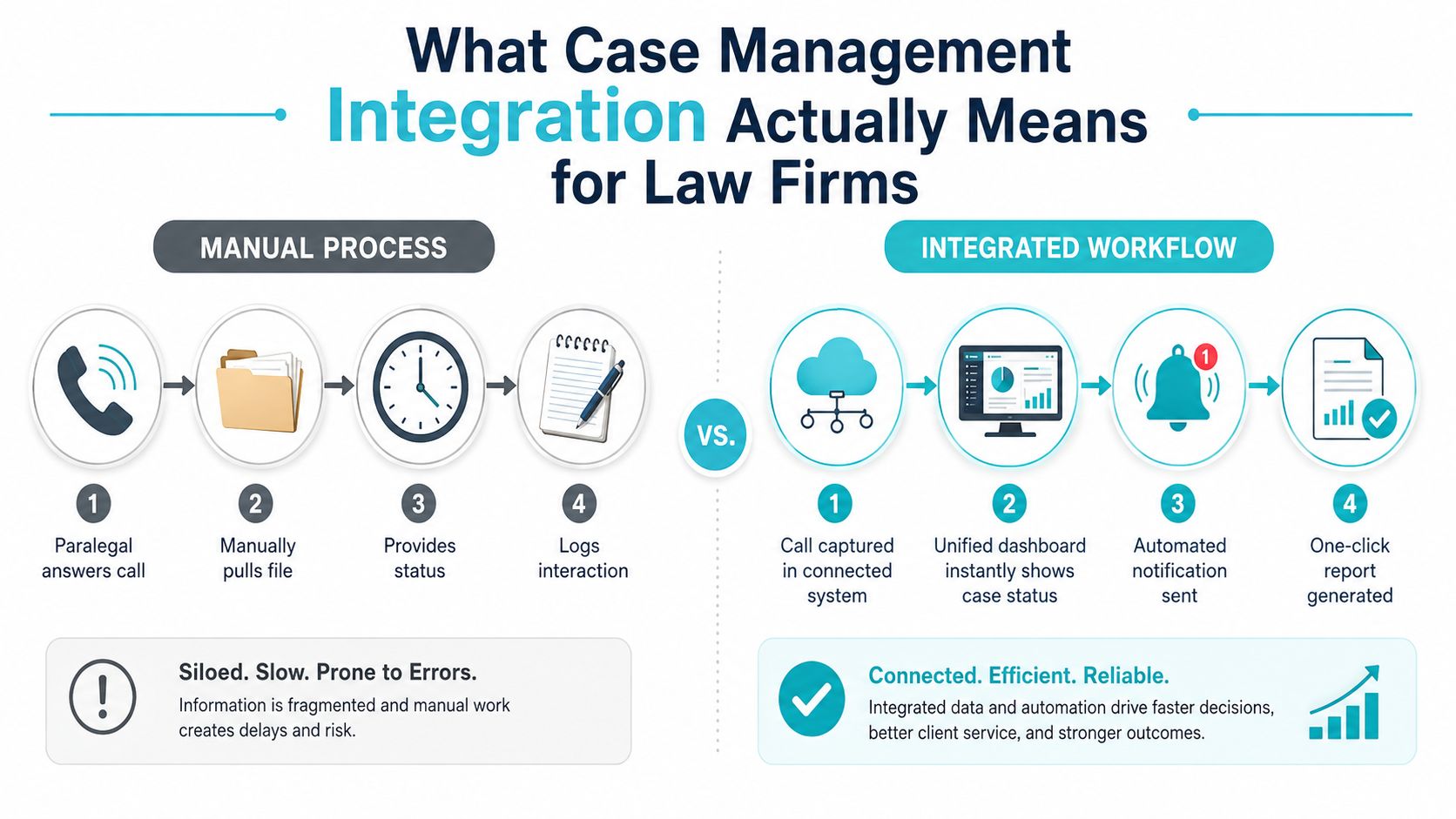
A client calls for a case update while a paralegal is preparing discovery responses. The paralegal answers, searches for the matter, checks the latest notes, explains the status, then records the conversation so someone else can find it later. When the client sends a document by email afterward, the paralegal may need to download it, rename it, upload it, and confirm that it reached the correct file.
That routine feels small until it repeats across every active matter. A portal may already exist, yet staff still spend their day switching between the portal, the case system, email, calendars, billing tools, and document workflows. Case management integration matters because it closes those handoffs instead of merely adding another place for information to appear.
What Case Management Integration Means for Law Firms
Case management integration connects the client portal directly to the firm's case system, so client actions flow into matter records without staff copying information by hand. A client can sign in, review available status information, send a message, or upload a file. The relevant activity should then reach the correct matter, with staff able to see what happened and what requires attention. CasePulse's explanation of integrated case management describes this connected workflow.
The operational definition
Integration is a bidirectional connection between the firm's core case management system and the tools used for client access, communication, document exchange, scheduling, billing, and related work. Matter information can move out to the portal, while client messages, submitted forms, and uploaded files return to the correct matter record.
The practical standard is whether the connection closes the workflow. A portal may display a status while staff still re-enter contacts, copy deadlines, download documents, rename files, or reconcile conflicting records. Those manual steps leave the firm with extra work and create opportunities for missed updates. An integrated design maintains a single source of truth and synchronizes the relevant data through APIs, webhooks, or purpose-built connections, as outlined in Wolters Kluwer's integration guidance.
Practical rule: If a client action still creates a manual intake, filing, or logging task for staff, the workflow is connected, but it is not fully integrated.
The market's adoption pattern reinforces the difference between portal access and a closed operational loop. A 2026 survey of 214 law firms found that 31% of Am Law 200 firms reported a client portal with real-time matter status visible to clients, compared with 24% for Am Law 101–200 firms, 11% for firms with 201–500 attorneys, and 6% for firms under 200 attorneys (The Legal Stack). The figures show why a portal's presence says little about whether intake, status updates, and document routing reach the case system automatically.
For legal operations teams, test one client journey from intake through status updates and document exchange. Record each handoff, duplicate entry, and system change. That map exposes whether the firm has an integrated workflow or several tools operating beside one another. Teams examining related automation can also review AI for law firms, particularly where classification or communication tasks intersect with existing matter workflows.
Measurable Benefits of Connecting Your Systems
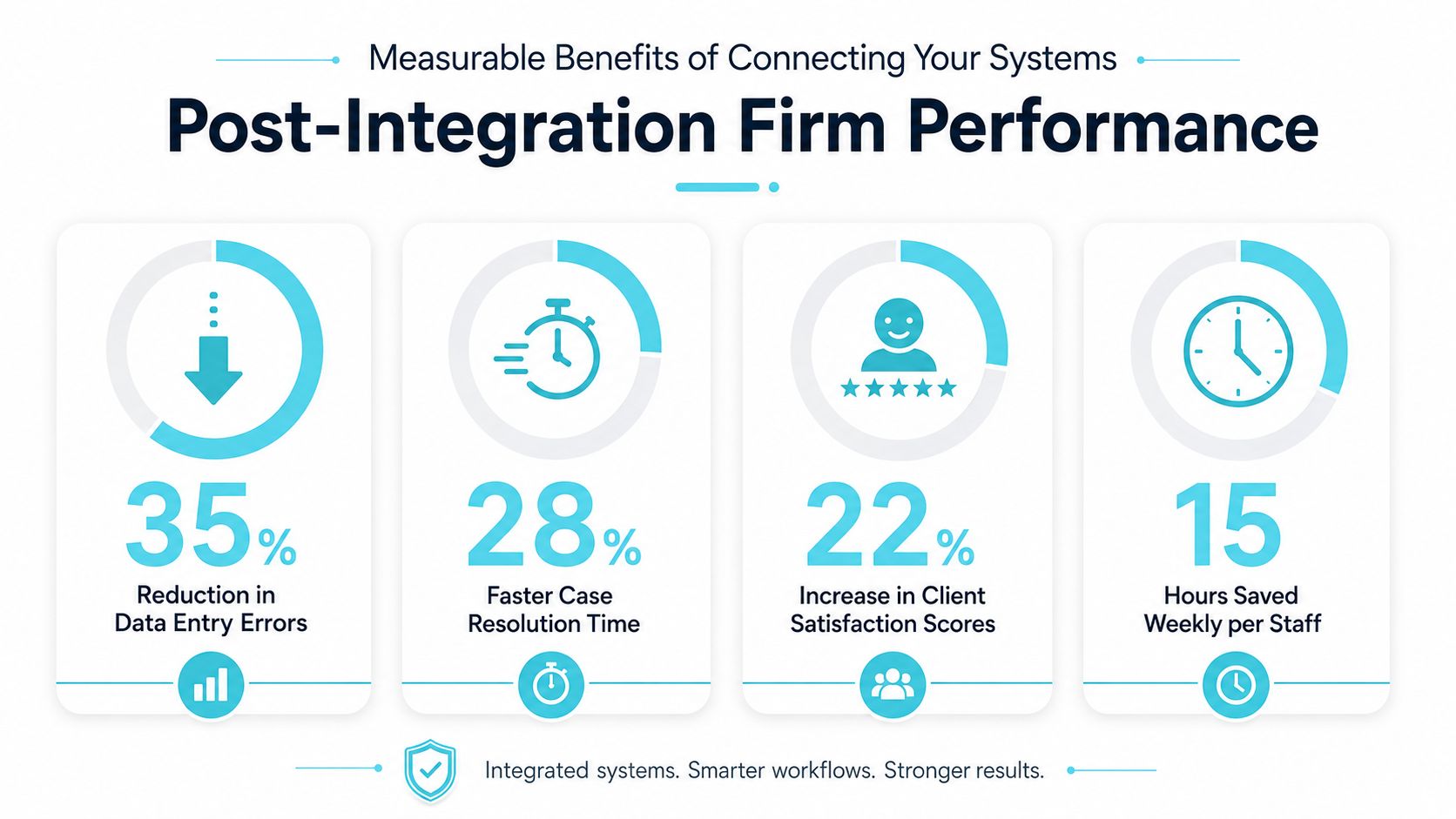
Integration creates value when it removes work that people currently repeat. A synchronized matter record can carry contacts, deadlines, document metadata, and status changes across the firm's operational stack, reducing the need for staff to retype the same information or reconcile separate records. Wolters Kluwer describes this event-driven approach as a way to keep applications aligned through real-time synchronization and triggers.
The strongest business case usually combines staff efficiency, data quality, and client access. A paralegal who works inside the primary case system shouldn't have to open another application to check whether a client uploaded a form. A managing partner shouldn't need separate reports to determine whether a matter status changed in the portal but not in the case file.
What the benchmarks actually show
A reported case study involving unified external property data and legal filings found that case preparation became about 80% faster on average, with information gathered and routed directly into the case management platform (PropTech Vision). The reported result came from consolidating information into one workflow, not from adding another dashboard for staff to monitor.
That distinction matters. Integration doesn't automatically make a firm faster. The improvement comes from removing manual collection, normalizing fields, and routing information where the next person needs it. Syncly's synchronization overview describes how automated matter data, document metadata, and calendar synchronization can reduce reconciliation work and support conflict detection and version control.
Client activation is another measurable variable. A widely cited 2025 legal-industry benchmark reported that 70% of legal consumers prefer digital communication with attorneys, while 37% of law firms offer a secure client portal for document exchange (US Tech Automations). The same source reported 70% to 85% client activation within the first week for firms using structured onboarding and invitation workflows, compared with 30% to 40% without onboarding automation.
The implication is straightforward. A portal that clients rarely activate won't reduce calls, regardless of how polished the interface looks. Firms should measure activation, message routing, document completion, status-update volume, and staff time spent changing systems. The metrics that matter for law firms provide a useful framework for turning those operational observations into a repeatable review process.
For teams designing the underlying architecture, a resource on unified data platform architecture and benefits can help clarify why consistent fields and shared records matter before automation rules are added.
Integration Patterns and How They Differ
Law firms generally encounter three integration patterns: API-based connections, middleware, and native plugins. They can all move information between systems, but they differ in how much control, customization, and maintenance the firm assumes.
An API connection allows one system to communicate directly with another. It's a strong fit when the case platform and external tool expose reliable endpoints for matter data, contacts, status changes, documents, and events. Webhooks can trigger a downstream action when a matter status changes or a new document arrives, making this pattern suitable for event-driven workflows.
Middleware sits between applications. It can translate field names, normalize formats, apply routing rules, and help manage conflicts when several tools update related records. That flexibility is useful for larger firms with varied systems, but it introduces another layer that someone must monitor, document, secure, and maintain.
Native plugins are purpose-built connections embedded into a specific platform. A plugin for Needles, Neos, LawBase, or Litify may reduce configuration effort because the connection is designed around that platform's data model. The trade-off is narrower portability. A firm changing platforms may need a different connector or a new implementation.
| Pattern | Setup Complexity | Real-Time Sync | Maintenance Burden | Best For |
|---|---|---|---|---|
| API-based connection | Moderate to high, depending on available endpoints and field mapping | Strong when events and webhooks are supported | Moderate, with monitoring required | Firms needing flexible system-to-system workflows |
| Middleware | High, because it adds routing and normalization logic | Strong when configured for event-driven processing | High, due to another governed layer | Firms connecting multiple tools with inconsistent fields |
| Native plugin | Usually lower for supported platforms | Varies by vendor and platform capability | Lower when the vendor maintains the connector | Firms seeking a focused connection to Needles, Neos, LawBase, or Litify |
A useful technical primer on API integration for customer support can help operations leaders ask better questions about endpoints, authentication, event handling, and failure recovery.
The right choice depends on the workflow, not the label. Ask what happens when a sync fails, whether updates move in both directions, how conflicts are handled, and who owns maintenance. A direct API may be ideal for one critical client-status workflow, while middleware may be justified when the firm must coordinate several systems with different data structures.
Security and Compliance Requirements for Legal Integrations
Legal integrations carry client messages, uploaded records, matter statuses, forms, and other information that requires controlled handling. A portal can appear connected while staff still move files manually, miss status changes, or route documents to the wrong matter. Security depends on protecting the full exchange, not just the connection between applications.
Start with access and data boundaries
Define who can see each matter, what clients can view, and which staff roles may create, edit, route, or download information. Apply permissions at the matter level rather than granting broad application access. A document copied into the wrong record creates a confidentiality problem even when the transfer itself was encrypted.
Encryption should protect communications and document transfers in transit and at rest. Set retention and deletion rules for portals that store files or messages outside the core case platform. Vendor review should cover authentication, role management, incident response, subcontractors, and the firm's ability to retrieve audit records.
Audit every meaningful exchange
Bidirectional synchronization needs a trace. The firm should be able to identify what changed, when it changed, which system initiated the change, and whether the receiving system accepted or rejected it. That history lets staff investigate stale data without guessing and gives managers a record for internal review.
Security principle: A successful connection requires trustworthiness, not just functionality. The firm must be able to explain where the data went and who could access it.
Conflict detection matters alongside encryption. If a client uploads a revised document while a staff member updates the same matter, the system needs a controlled process for identifying the conflict and preserving version history. Silent overwrites create operational and evidentiary risk.
Several integrations also create governance work. Assign each connection an owner and documented purpose. Record permissions, monitor failures, schedule access reviews, and define the response when a transfer stops. Firms assessing their broader posture can use this cybersecurity guidance for law firms to organize that review.
Before approving a vendor, request a workflow-level demonstration rather than accepting a generic security presentation. Ask the vendor to show a permission change, failed sync, duplicate record, revoked user, and audit-log search. These tests expose whether the integration closes the loop on intake, status updates, and document routing, or leaves paralegals toggling between systems when daily work becomes messy.
Rolling Out Integration at Firms Using Needles, Neos, LawBase, and Litify
A rollout succeeds when the firm changes one painful workflow at a time. For firms using Needles, Neos, LawBase, or Litify, the first task isn't configuring every possible connection. It's identifying where staff repeatedly copy information, answer avoidable status calls, or chase missing forms.
Build the rollout around the matter journey
Start with a system audit and workflow map. Trace intake, client invitations, status updates, messages, document uploads, forms, reminders, and escalation points. Mark which system owns each field and what should happen when information changes.
The configuration phase should then focus on field mapping and event behavior. Decide which matter statuses can appear to clients, which uploads should route into a matter, and which messages require staff review. Firms should test both directions, not just the outbound path from the case system to the portal.
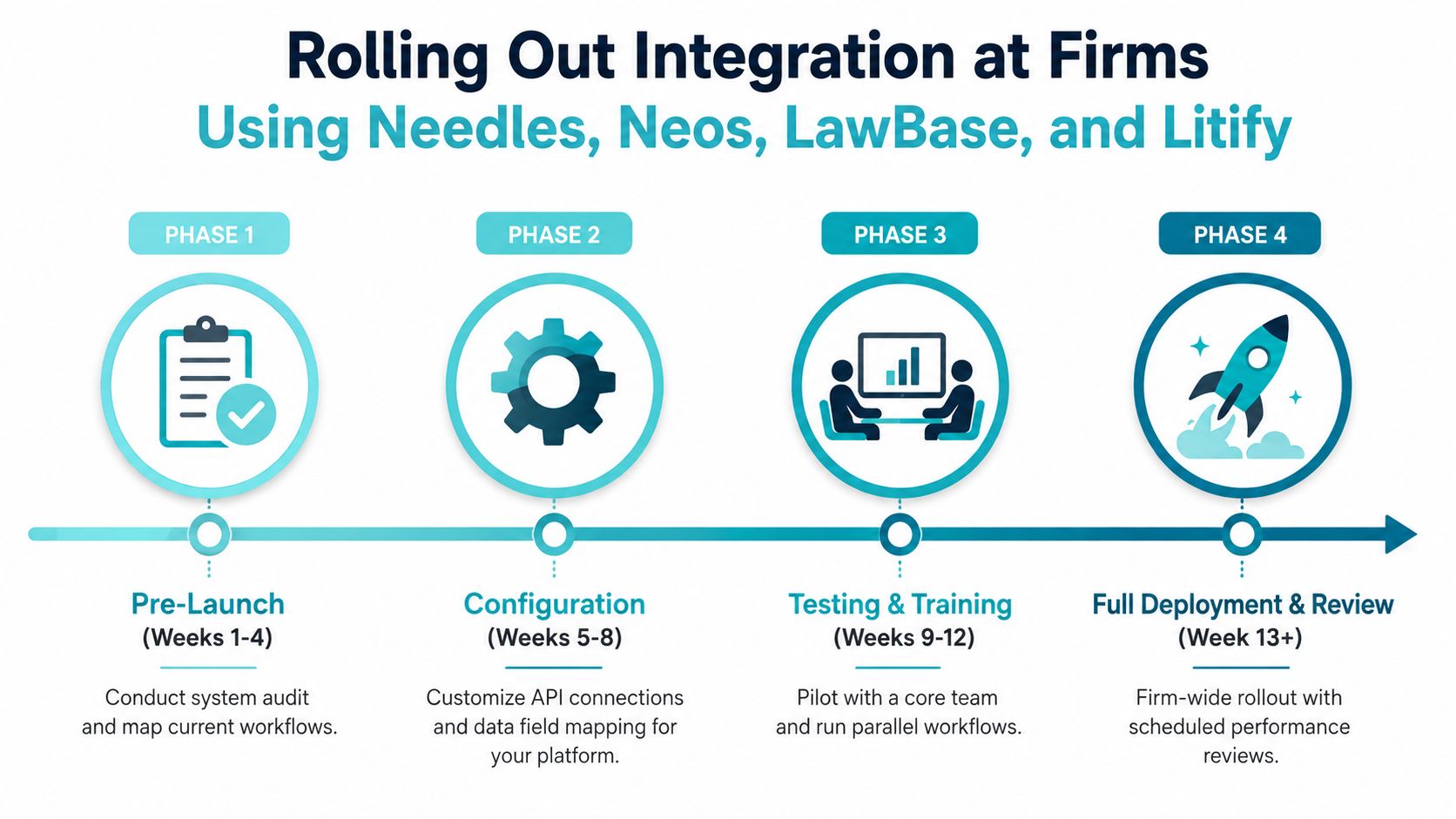
A practical rollout sequence looks like this:
- Pre-launch: Audit records, map workflows, identify duplicate entry, and choose a pilot group.
- Configuration: Map fields, set permissions, define event triggers, and connect the selected platform.
- Testing and training: Run representative matters through intake, messaging, status changes, and file exchange. Train staff to work from the primary case environment.
- Deployment and review: Expand access, monitor failed syncs and client activation, then review the workflow with staff who perform it daily.
Treat onboarding as part of the integration
Client activation determines whether the portal changes workload. The 2025 benchmark cited earlier reported 70% to 85% activation within the first week with structured onboarding and invitation workflows, versus 30% to 40% without onboarding automation (US Tech Automations). The invitation should arrive at the right point in the client journey, explain what the client can do, and make the first action obvious.
Pilot with a core team before firm-wide deployment. Watch whether paralegals revert to email because routed messages are unclear, whether clients can find status information, and whether uploaded files land in the expected matter. For firms evaluating a platform-specific workflow, the Needles integrations overview is a relevant starting point.
CasePulse offers a secure client portal that integrates with Needles, Neos, LawBase, and Litify, allowing clients to check case status, message the team, share files, and complete fillable forms while staff work within their existing workflow. It can also automate routine follow-ups and reminders, which makes it relevant when the implementation goal is to close the loop rather than add another inbox.
Why More Integrations Is Not Always Better
Staff who cannot trust synced data create shadow spreadsheets and revert to manual email handling, even with several integrations running. Each connection adds a dependency, field map, permission model, monitoring task, and possible failure point. The hidden cost appears when a portal receives information but does not close the loop. Paralegals then toggle between systems, confirm updates manually, and repair routing that was supposed to save time.
Watch for these signs:
- Stale information: The portal shows an old status, prompting clients to call for confirmation.
- Failed routing: Uploaded files or messages enter a queue that staff must inspect manually.
- Duplicate records: Systems hold competing contact or matter details.
- Unclear ownership: No one is assigned to investigate a failed synchronization.
- Workflow avoidance: Paralegals bypass the connection because manual handling feels safer.
Set the target around minimum friction across priority workflows. Keep an integration when it removes a real handoff, preserves data quality, and gives one person clear ownership. Consolidate or retire it when it duplicates another connection, needs frequent repair, or produces information staff do not use.
A portal that lacks a connection to the practice management system creates double work. Firms should prioritize native connections to the practice management platform, billing and accounting systems, document workflows, calendar applications, and e-signature tools, as advised by My Legal Academy's client portal guide.
Connect systems around the same client journey and test the entire handoff. Messaging still creates rework if staff must re-enter every message. Document routing remains risky when matter permissions do not carry through. Calendar synchronization can create duplicate deadlines and add review work.
Before adding a tool, ask: Which manual step disappears for which person? If the answer is vague, place the integration on the backlog. A live connection should reduce a defined handoff, make ownership visible, and leave staff with fewer systems to check each morning.
Evaluating Your Current Integration Maturity
Start your maturity assessment by observing how information moves through client journeys, then compare that against your software inventory. Follow intake, status updates, document exchange, forms, reminders, and follow-up. Count the points where staff re-enter information, switch applications, or confirm whether a handoff completed.
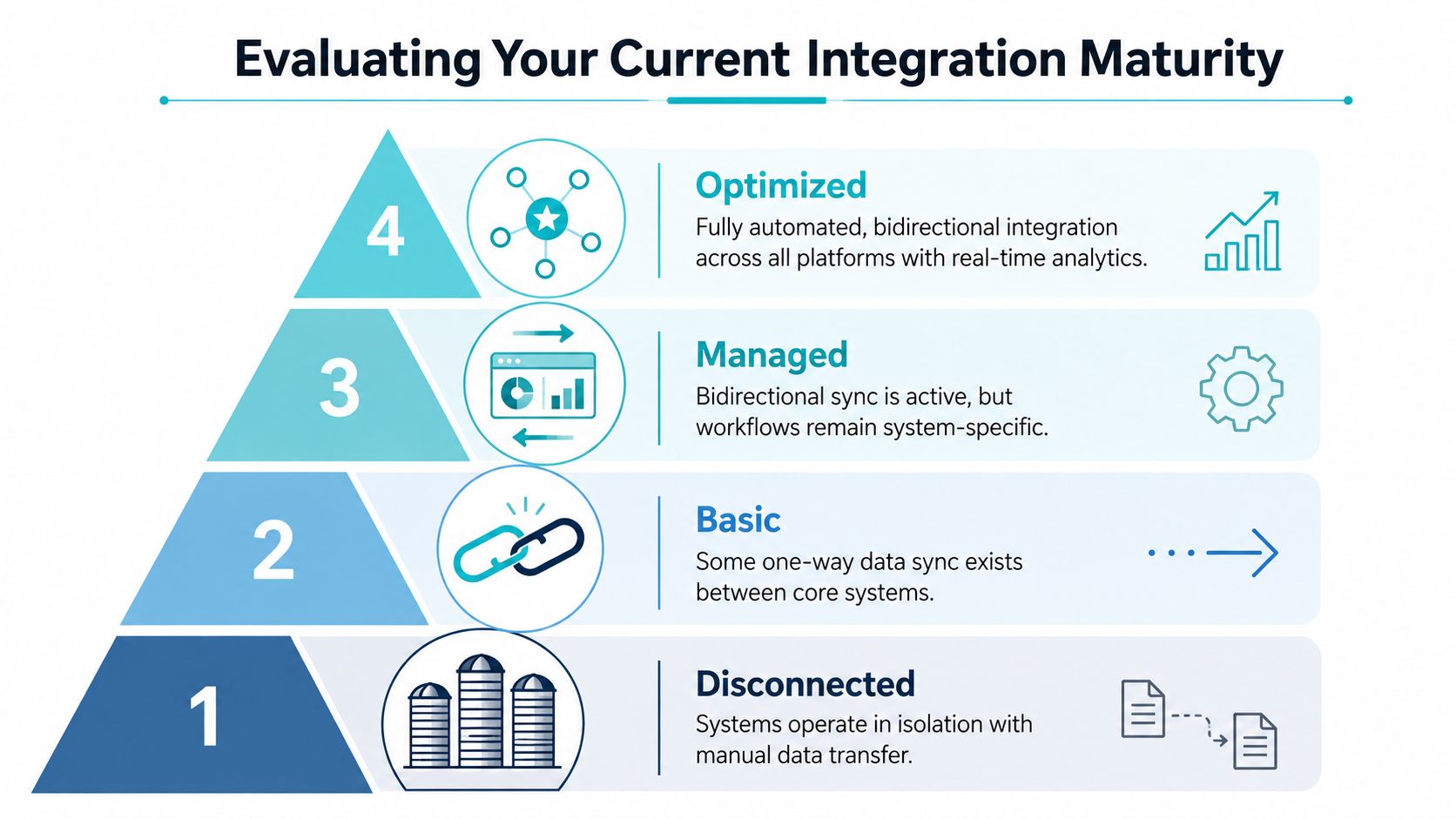
Use four levels to locate the firm:
- Disconnected: Systems operate in isolation, and staff transfer information manually.
- Basic: One-way synchronization exists, but client actions still create separate work.
- Managed: Bidirectional sync works for selected workflows, although staff still operate in system-specific ways.
- Optimized: Intake, status access, document exchange, messaging, and reminders operate as a connected workflow with reliable monitoring.
The assessment questions that matter
Ask whether an uploaded file reaches the correct matter without manual downloading. Check whether a status change appears through the approved client channel. Review whether staff can read portal messages from their normal work environment and whether failed events create an actionable alert.
Examine activation by workflow type, not as a single firmwide score. A portal may perform well for intake while producing weak follow-through on status updates or document requests. Compare client activation with status-call volume, time spent switching systems, and the share of interactions handled through integrated channels instead of phone and email. The objective is to find the bottleneck creating avoidable work.
A disconnected firm should begin with one high-volume workflow and assign ownership. A basic firm should add the missing return path so client activity reaches the matter record. A managed firm should consolidate fragile connections and standardize governance. An optimized firm should test whether each client journey remains closed-loop when new tools or workflows are introduced.
Decision test: If the client sees one experience but staff manage three separate records, the firm has not finished integrating the journey.
Review the assessment with a paralegal, a case manager, and the person responsible for technology governance. Each role exposes different failure points. Choose one measurable operational problem, assign an owner, test the workflow with real scenarios, and review the result before expanding the connection.
If status calls, duplicate uploads, or disconnected client messages continue consuming staff time, visit CasePulse to review how its secure portal connects client access with workflows for Needles, Neos, LawBase, and Litify. Map one client journey first, then assess whether it can become a reliable two-way workflow without adding another inbox.