
 CasePulse
A Monday morning at a busy personal injury firm rarely starts with legal analysis. It starts with ringing phones, unsigned retainer forms buried in email attachments, clients asking whether records arrived, and paralegals retyping information that someone already entered elsewhere. By midmorning, case managers may have answered the same status question several times while attorneys wait for documents needed to move a matter forward.
That pattern isn't a staffing problem alone. It's a client portal design problem, and more specifically, an integration problem. A portal becomes valuable when it gives clients a clear way to submit information, find matter updates, exchange files, and message the right team without creating another disconnected inbox for staff.
The history of patient portals illustrates the distinction between availability and adoption. A 2021 systematic review summary notes that about 90% of healthcare organizations offered portal access by 2018, while patient use was the most commonly studied metric, appearing in 90% of the studies reviewed, or 78 of 87. The lesson applies to law firms: launching access is only the beginning. Clients must understand why to use the portal, reach it easily, and complete meaningful tasks once they're there.
Why Law Firm Client Portals Have Become Operational Infrastructure
A personal injury firm can lose hours to routine interactions that look small in isolation. One client needs to upload medical records. Another wants confirmation that a signed form was received. A third calls because a voicemail wasn't returned and asks whether the demand package has been sent. Each request may be reasonable, but the combined interruption makes the team reactive.
The three pressure points
Intake creates avoidable repetition when staff copy information from emails, attachments, and handwritten forms into the matter record. Document exchange becomes difficult to track when files arrive through several channels, with no consistent indication of what is missing or who reviewed it. Status communication consumes additional time when clients have no reliable place to check the next stage of their matter.
A secure portal addresses these interactions structurally. Clients can complete firm-defined forms, upload requested files, read updates, and send messages connected to their matter. Staff can direct routine requests into a consistent workflow instead of reconstructing context from separate conversations.
Operational rule: A portal should remove work from the process, not merely move the same work into another dashboard.
The strongest argument for treating a portal as infrastructure is its relationship to the system of record. Independent legal technology guidance emphasizes that communication, document exchange, and status updates should connect to existing case management workflows rather than create another inbox (CasePulse guidance on case management integration). That connection determines whether a portal changes staff behavior or becomes one more place to check.
Availability isn't the outcome
A portal that technically exists but requires clients to search through old messages, repeat information, or call staff for clarification hasn't solved the underlying problem. In major regulated and high-touch industries, online access is increasingly a baseline expectation, but repeat use is the differentiator. For a law firm, practical measures include repeat logins, completed tasks, fewer routine email requests, and faster handling of common questions.
The shift from optional feature to operational infrastructure happens when the firm redesigns its habits around the portal. Intake staff invite clients through it, paralegals send updates there, and attorneys know where the latest client-submitted information belongs. Without that discipline, even a polished interface will sit beside the workflow instead of becoming part of it.
What a Legal Client Portal Actually Does
A legal client portal works best as a shared, secure workspace for one matter. The client sees the documents, messages, forms, and updates the firm has made available. The firm controls what each person can access and connects the activity to the matter record.
That shared-workspace model is different from a public website or a generic file-sharing location. A public website explains the firm. A generic file location may store documents without explaining what the client should do next. A well-designed portal combines controlled access, matter-specific communication, document exchange, and guided tasks.
For a broader look at how teams structure secure online workspaces, this web portal design and development resource provides useful context on portal planning beyond the legal sector. Legal teams should then apply stricter requirements around confidentiality, roles, matter boundaries, and auditability.
The client experience should feel consolidated
A client shouldn't need to remember which staff member handles medical records, which email address accepts signed forms, or which phone extension answers a status question. The portal should present the relevant path in one place.
A typical matter workspace may include:
- Secure intake forms: Clients provide information through structured forms, and the firm can use the responses within its case workflow instead of retyping every field.
- Document exchange: Clients upload records and review files in the context of the matter, with clear instructions about what the firm needs.
- Matter messaging: Two-way messages stay associated with the correct client and matter rather than disappearing into an email thread.
- Signature requests: The firm sends documents for electronic completion and can show the client which action remains outstanding.
- Calendar access: Clients can find relevant dates for events such as depositions or hearings without relying on a separate reminder conversation.
- Billing visibility: Where configured for the firm's process, clients can view invoice or trust account information in the same workspace.
The value isn't the feature count. It's the reduction in decisions a client must make. The CasePulse explanation of a client portal frames that experience around secure access, communication, files, and forms from a connected client workspace. That is the right starting point for design: identify the routine client actions, then make each one obvious.
UX Principles That Match How Legal Clients Behave
Legal clients often use a portal under pressure. A person may be checking a document from a phone during a work break, completing intake while managing an injury, or trying to understand a status update without legal training. Every unnecessary tap, unclear label, and unexplained status creates a reason to stop.
Client portal design should therefore begin with behavior, not visual decoration. General UX design principles are useful, but legal workflows add a specific constraint: the user may be anxious, unfamiliar with the process, and reluctant to make a mistake.
Put the next action in front of the client
Progressive disclosure works better than presenting the entire case history at once. A client who needs to upload an insurance letter shouldn't have to scan every event, message, and document before finding the request.
Use plain labels such as “Upload medical records,” “Review retainer,” “Message your case team,” and “See upcoming dates.” Avoid labels that assume the client understands internal legal terminology. The portal should also show who to contact, with persistent access to the assigned attorney or paralegal when a question can't be handled through self-service.
A useful status pattern is concrete and sequential:
- Received
- Under review
- Response sent
- Action needed
These labels tell the client what happened and what may happen next. They also give staff a consistent vocabulary for updates.
Design for the device clients actually use
A desktop-first layout can make a portal feel difficult even when its underlying workflow is sensible. Mobile responsiveness should support readable text, large touch targets, straightforward file uploads, and forms that preserve progress when a client needs to pause.
Accessible design matters for more than compliance. Clear contrast, keyboard support, descriptive labels, logical focus order, and readable error messages help clients who use assistive technology, have limited dexterity, or are completing a form while distracted. WCAG expectations provide a practical benchmark, but the operational test is simpler: can a real client finish the task without calling the office?
Design test: Give a client one task on a phone and observe where they hesitate. Don't explain the interface while testing. The hesitation is the finding.
A portal shouldn't make clients learn the firm's internal structure. It should translate that structure into a small number of recognizable actions, save their work, confirm receipt, and make the next step visible.
Security Architecture for Sensitive Legal Work
Security begins by separating two controls that firms sometimes treat as one. Authentication verifies who the user is. Authorization determines what that user may access or do. A successful login doesn't give someone permission to view every matter, download every file, or act for every client.
Server-side enforcement should check the tenant, matter, resource, and requested action on every read and write path. Testing should include pages, application routes, exports, search, files, and webhooks, including attempts to alter identifiers or move across matter boundaries. A portal can look secure in normal use while exposing records through an overlooked export or file endpoint.
Use stronger checks where the risk is higher
Routine status viewing shouldn't feel like a security obstacle course. Sensitive actions deserve more friction, including downloading medical records, approving payments, changing account settings, or accessing settlement information.
A practical pattern starts with password policies and can support SSO through OIDC or SAML where appropriate. The firm can then require MFA or reauthentication for higher-risk events, such as a first login from a new device or a sensitive download. The right balance preserves usability for ordinary tasks while adding meaningful protection around valuable actions, as described in step-up security guidance for client portals.
Transport protection, encryption at rest, short session controls, and secure recovery processes belong in the technical review. Audit trails should record who viewed, uploaded, changed, or downloaded information and when. Role-based access should distinguish clients, staff, attorneys, co-counsel, experts, and other third parties according to the matter and task.
Legal confidentiality duties make these controls operational requirements, not decorative assurances. Firms handling medical information in personal injury matters should also assess applicable health privacy obligations, contractual responsibilities, and state bar expectations for secure communication. Retention and deletion policies need documented ownership, especially when a portal contains information that must remain available for the matter but shouldn't remain accessible indefinitely.
The following checklist captures the controls and rollout questions that deserve review together.
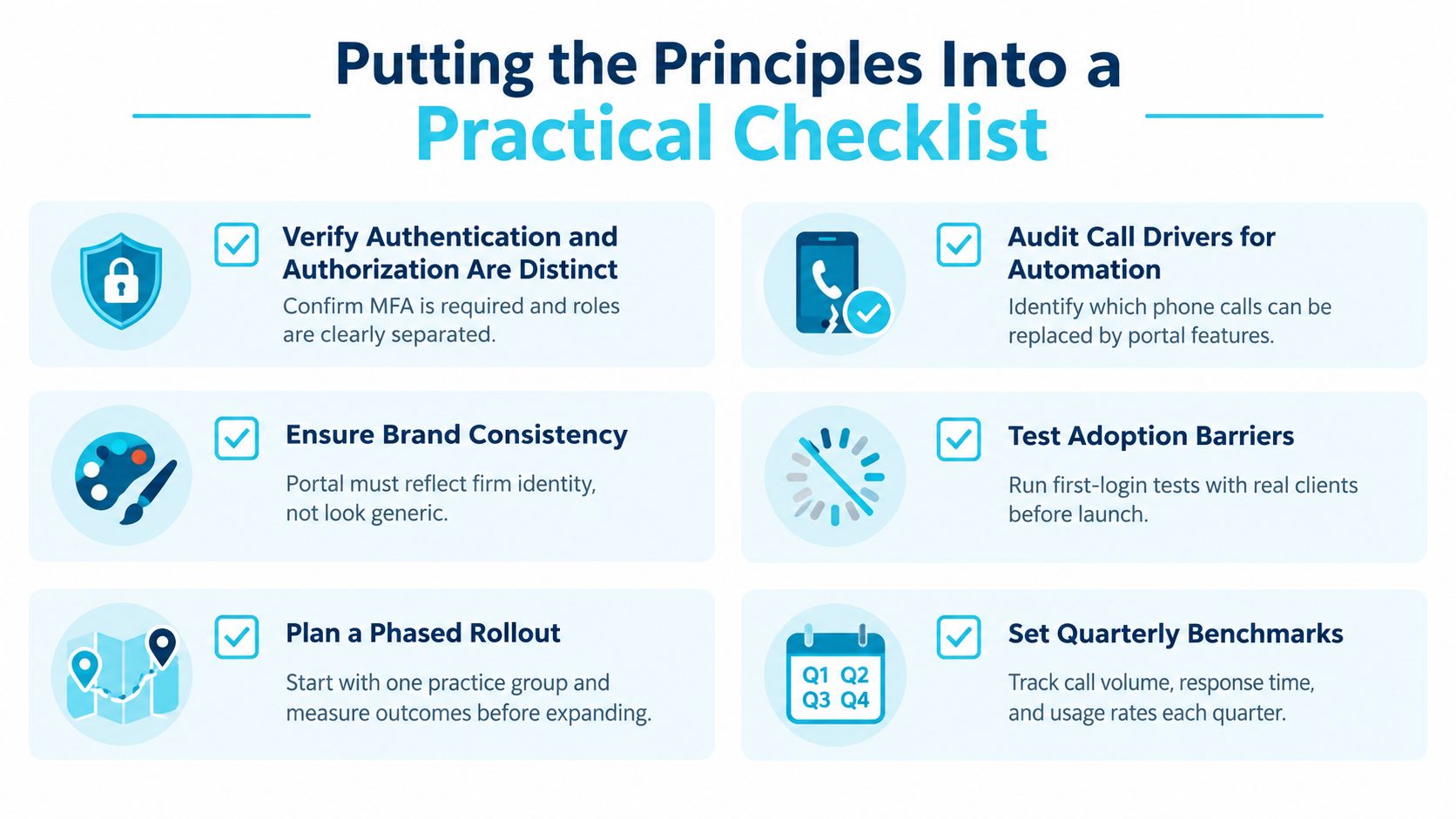
For a practical security review, firms can also use CasePulse information security best practices as a starting point for documenting access, authentication, and information-handling decisions.
Integration With Case Management Systems
A portal creates extra work when staff must copy its activity into the matter system by hand. Paralegals rarely sustain that process across a full caseload. A client message, uploaded record, or completed form should reach the correct matter without requiring repeated downloads, renaming, and reattachment.
The integration should fit the staff workflow already in use. CasePulse supports connections with widely used legal case management systems. The relevant question is not whether a portal displays an integration logo. It is whether useful client activity reaches the record where the team already works. For a detailed breakdown of how portal activity maps into the matter record, see the CasePulse case management integration guide.
Distinguish connected workflows from loose connectors
A connected workflow can synchronize contact details, attach uploaded documents to the correct matter, place messages in the matter timeline, and create tasks when a client completes a form. A loose connector may send only a notification, leaving staff to move the underlying work manually.
Use this framework during evaluation. The workflow categories describe the environments under review, not a promise that every available connection has the same depth.
| Workflow category | Typical integration type | What may sync automatically | Staff workflow impact |
|---|---|---|---|
| Matter-connected workflow, legacy on-prem systems | Matter-connected workflow | Client details, portal activity, files, and form events where configured | Keeps requests associated with the existing matter record |
| Matter-connected workflow, cloud practice management | Matter-connected workflow | Contact information, documents, messages, and task triggers where configured | Reduces duplicate entry during intake and follow-up |
| Workflow integration, custom-configured systems | Configured workflow integration | Matter-linked client activity and document events where configured | Preserves the relevant record structure while limiting manual transfers |
| Matter and process integration, Salesforce-based practice platforms | Matter and process integration | Client information, messages, files, and completed forms where configured | Supports structured handoffs without a separate portal inbox |
A broader case management overview from Magnitude Marketing can help teams define the system of record before assessing portal connections.
Test the handoff, not just the connection
Run realistic scenarios before launch. Create a new intake, upload a medical record, send a message, complete a form, and update contact information. Confirm where each event appears, which users can view it, whether the correct matter receives it, and what happens when a client abandons a task halfway through.
Test exceptions as carefully as successful submissions. Check duplicate contacts, incomplete forms, incorrectly attached files, and changes made by staff after a client submits information. These cases reveal whether the integration supports actual personal injury workflows or only performs well in a demonstration.
The strongest design makes portal activity feel like ordinary case work. If staff must monitor a separate dashboard, the portal may improve the client experience while increasing internal friction. That trade-off can weaken adoption because staff are less likely to reinforce portal use consistently.
Branding, Onboarding, and the Adoption Gap
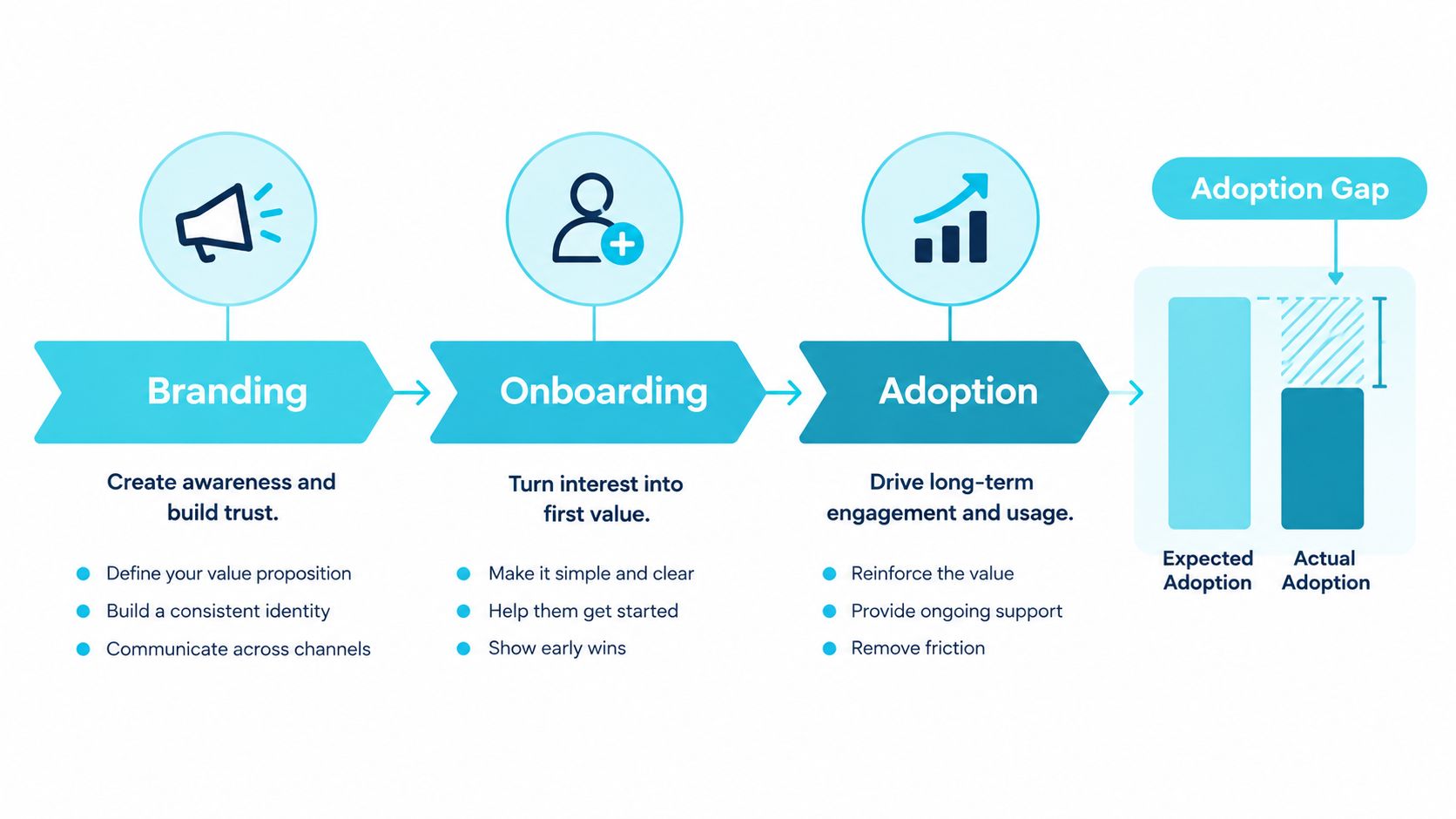
A portal can be available and still remain unused. Clients may ignore it because the invitation looks generic, the first screen doesn't explain the matter, or the firm asks them to repeat information already submitted by email. Availability gets a client to the doorway. Context gets the client through it.
The first login should answer three questions quickly: Is this really my firm? Why am I here? What should I do now? The firm's name, logo, colors, and visual identity help establish legitimacy, but branding shouldn't imply capabilities or timelines the firm can't deliver.
Make the first task specific
A welcome message that says “Welcome to your portal” is less useful than one that says the client has a new personal injury intake to complete, identifies the next required action, and explains how the response will be used. The first task should be narrow enough to finish without a tutorial.
Intake forms work best when they replace scattered requests rather than duplicate them. If the firm asks for the same address, incident details, and contact information through email and then again in the portal, the client experiences the portal as extra work. Saved progress and visible completion indicators reduce abandonment on longer forms because clients can see what remains.
Client trust is reinforced by small confirmations. Tell people when a file arrived, when a form was submitted, and whether the firm needs anything else.
Onboarding should also match the communication channel clients already notice. Passwordless entry, branded subdomains, and multi-channel notifications can reduce the burden of first use, but convenience must be balanced against matter sensitivity, device ownership, and jurisdictional expectations. A low-risk information request may tolerate a simpler entry path than a settlement approval or medical-record download.
Roll out where staff can reinforce the habit
A firmwide launch often creates too many new instructions at once. A phased rollout tied to one case type, such as new personal injury intakes or active litigation matters, gives staff a manageable script and gives clients a clear reason to return.
Track where clients stop, which invitations produce questions, and which requests still arrive by phone. Then refine the sequence before expanding. The objective isn't to make every feature available on day one. It's to make the first useful interaction easy enough that the portal becomes part of the matter routine.
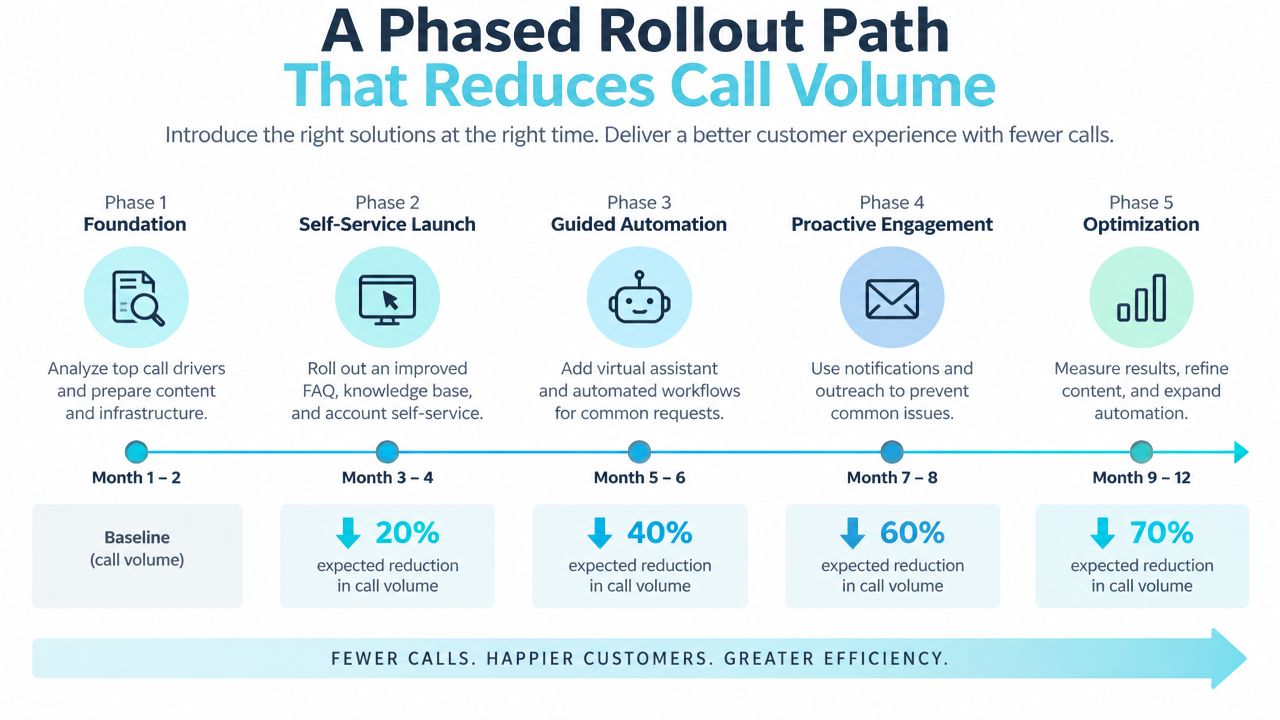
A Phased Rollout Path That Reduces Call Volume
A rollout should follow the client journey and the firm's capacity to support behavior change. Starting with every available feature creates confusion, makes training harder, and gives the firm no clear explanation when adoption is weak.
Start with the highest-frequency request
Phase one, intake: Begin with the forms, document requests, and status confirmations that generate the most repetitive work for intake staff. Measure completed forms, missing information, and the number of clarification calls per intake coordinator.
Phase two, document collection: Add structured uploads and review instructions for records, photographs, correspondence, and other matter materials. Measure how often staff must ask for the same file again and how quickly the team can identify missing items.
Phase three, ongoing communication: Use matter-linked messaging and stage-based updates to replace voicemail tag. Track median response time, the volume of routine status calls, and whether clients can find the latest update without contacting staff.
Phase four, client tasks: Introduce reminders and tasks tied to real milestones. A task should have an owner, a clear due point, and a visible completion state. Measure completion and abandonment rather than merely counting invitations.
Phase five, sensitive transactions: Add billing visibility, signing workflows, and other higher-risk actions after the firm has tested authentication, authorization, and support procedures. Apply step-up verification where the action warrants it.
Turn each phase into a learning loop
A practical rollout has three owners. Operations defines the target workflow. The case team reinforces it in client conversations. Someone responsible for reporting reviews usage, abandoned tasks, call reasons, and response times.
The CasePulse legal client portal rollout guidance reflects this low-friction approach, beginning with communication, document sharing, and frequently used forms before adding reminders, stage-based updates, and milestone tasks. The sequence matters because each phase reveals a different adoption barrier.
Don't use login frequency as the only measure. A client may log in repeatedly because the portal is confusing, while another may complete everything in one visit. Pair usage data with task completion, support calls, duplicate submissions, and staff handling time. Those measures show whether the portal is reducing friction or just shifting it.
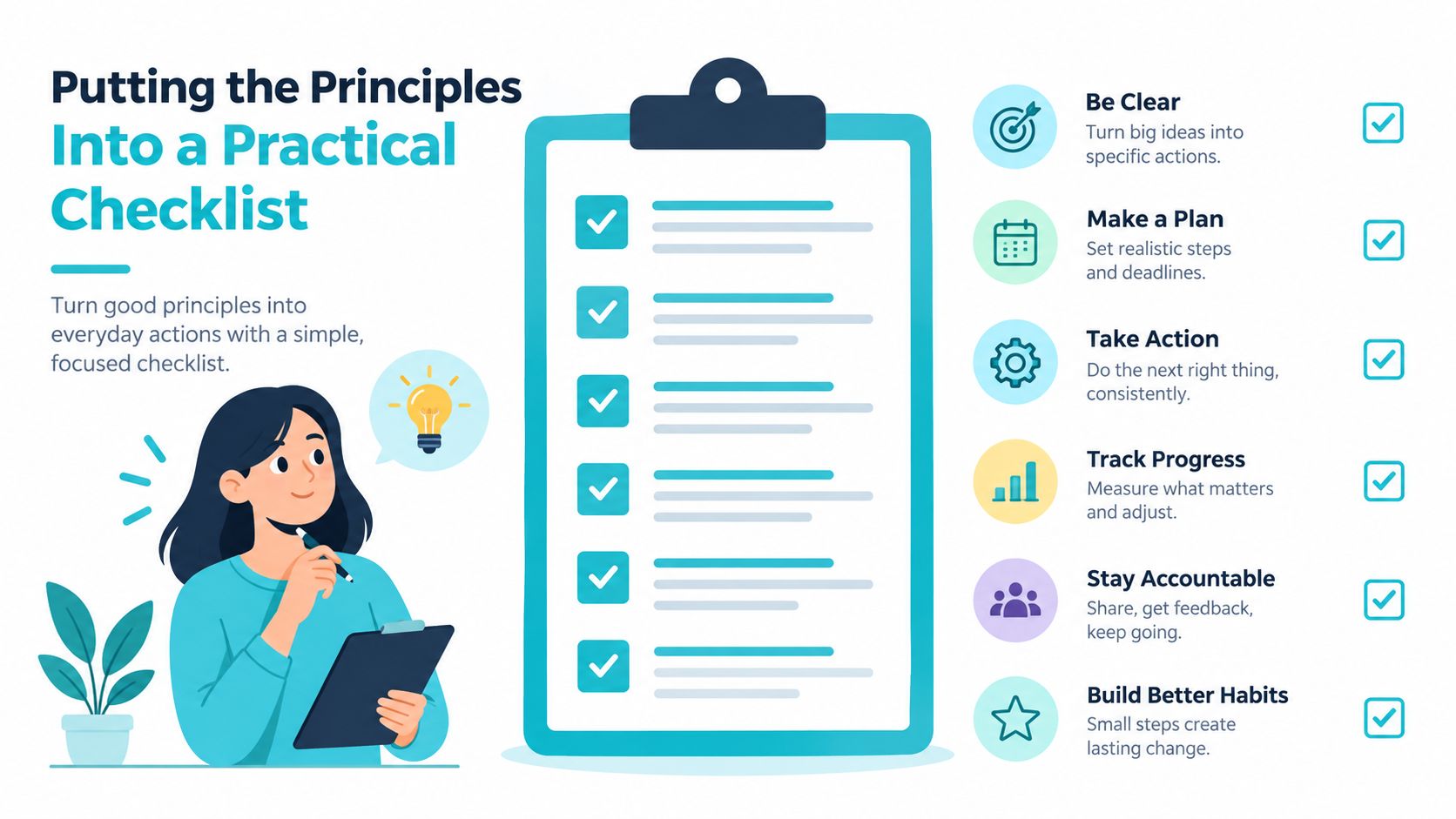
Putting the Principles Into a Practical Checklist
A managing partner or legal operations lead can use a simple scoring approach to evaluate an existing portal, compare implementation options, or scope a redesign. Score each question according to the firm's current state, then prioritize the gaps that affect client completion and staff effort most directly.
Client-facing experience
- Phone completion: Can a client complete the important intake and upload tasks from a phone without assistance?
- Next action: Does each screen show what the client should do now, rather than exposing an undifferentiated case archive?
- Status clarity: Do labels such as received, under review, and response sent explain progress without legal jargon?
- Accessibility: Can clients with different abilities use forms, read instructions, and understand errors?
Security and control
- Separate controls: Does the design distinguish authentication from authorization and enforce matter access on the server?
- Sensitive actions: Does the portal require stronger verification before high-risk downloads, approvals, or account changes?
- Accountability: Can the firm review who accessed, changed, uploaded, or downloaded information?
- Retention: Does someone own the policy for access duration, preservation, and deletion?
Integration depth
- No duplicate entry: Do client details, files, messages, and completed forms reach the correct matter without manual copying?
- Staff location: Can attorneys and paralegals act from their existing case workflow instead of monitoring another inbox?
- Failure handling: Does the process identify a failed sync, incomplete upload, or misrouted matter quickly?
Branding and onboarding
- Firm identity: Does the portal look and sound like the firm without making unsupported promises?
- First task: Does the invitation name the matter context and give the client one clear next step?
- Progress visibility: Can a client pause a longer form and understand what remains?
- Entry method: Is the login approach appropriate for the sensitivity of the matter and the client's likely device?
Rollout discipline
- Pilot boundary: Can the firm start with one practice group or matter type?
- Operational metric: Is each phase tied to a measure such as call volume, response time, task completion, or repeat use?
- Feedback owner: Who reviews client hesitation, staff workarounds, and failed handoffs?
- Expansion decision: What evidence will show that the firm is ready to add the next workflow?
The right portal isn't the one with the longest feature list. It's the one that clients can open, understand, and use, while staff can manage the resulting activity inside the matter workflow. CasePulse provides law firms with a branded client portal for case updates, secure messaging, file sharing, and fillable forms connected to supported case management systems. Visit CasePulse to evaluate how its client portal design can support a lower-friction rollout for your firm.