
 CasePulse
 Cybersecurity for law firms is not just an IT problem. It is about putting the right digital safeguards in place to protect your clients' most sensitive information and your firm's private data. This goes to the heart of your ethical duty to maintain client confidentiality and the trust you have worked so hard to build.
In a law firm, that means protecting everything from case strategies and financial records to the intimate personal details of your clients.
Why Cybercriminals See Law Firms as Easy Targets

Too many law firms operate under a dangerous illusion. They believe they are too small or specialized to be on a cybercriminal's radar. The reality is quite the opposite. Hackers do not see a small business. They see a concentrated hub of incredibly valuable, easily monetized information.
Think of your firm's servers and cloud accounts not as digital filing cabinets, but as a vault. Inside that vault are the "crown jewels", data that criminals can sell, exploit, or hold for a steep ransom.
The Treasure Trove of Data You Protect
The information your firm manages every single day is a goldmine on the black market. You are not just holding credit card numbers like a retailer. You have a far wider, and much more sensitive, collection of data that makes you a one stop shop for criminals.
So, what makes this data so irresistible?
- Personally Identifiable Information (PII): Social Security numbers, birth dates, driver's licenses, and home addresses are all standard parts of a client file.
- Financial Records: You routinely handle bank account details, wire transfer instructions, settlement figures, and confidential corporate financial statements.
- Protected Health Information (PHI): If you are a personal injury or med mal firm, your case files are packed with sensitive medical histories and treatment records.
- Intellectual Property and Trade Secrets: Corporate clients entrust you with their patents, proprietary business strategies, and secret M&A deal information.
Because of this, a single successful breach at a law firm can be far more profitable for an attacker than hitting dozens of other types of businesses. It is the perfect target for identity theft, financial fraud, and corporate espionage.
Common Tactics Used Against Law Firms
Criminals targeting law practices often lean on a few proven methods that exploit human error, not necessarily complex technical flaws. They know that busy attorneys and paralegals are focused on clients and deadlines, which can leave the door wide open.
The legal industry is under relentless attack, facing an average of 1,055 cyber attacks per week, a 13% increase from the previous year. For plaintiff personal injury firms using common case management systems, this means sensitive client data on accident details, medical records, and settlements is prime bait for hackers. You can dig into the full research about these law firm cyberattack statistics to really grasp the scale of the threat.
A successful cyber attack is more than a technical failure. It is a direct threat to your firm's reputation, client trust, and financial stability, potentially leading to ethical violations and malpractice claims.
The three attack methods we see most often are:
- Phishing Scams: Attackers send cleverly disguised emails pretending to be a client, opposing counsel, or even a senior partner. The goal is to trick someone into clicking a malicious link or opening an attachment that steals login credentials or installs malware.
- Ransomware: This is a particularly nasty form of malware that encrypts all of your firm’s files, making them completely inaccessible. The criminals then demand a hefty ransom payment, usually in cryptocurrency, to give you the decryption key.
- Business Email Compromise (BEC): A far more sophisticated attack. Criminals gain access to an attorney’s email account and just watch. They silently monitor communications to understand case details and firm operations, then impersonate the attorney at the perfect moment to redirect a client's wire transfer or settlement funds into their own accounts.
Meeting Your Ethical Duty to Protect Client Data
Failing to get cybersecurity right is more than just a business risk. It cuts to the very core of your professional and ethical obligations. For a law firm, a data breach is not just a technical glitch. It is a fundamental failure to uphold the duties of competence and confidentiality that are the bedrock of the attorney client relationship.
The American Bar Association (ABA) has made it crystal clear. Your responsibilities as a lawyer now extend far beyond the courtroom. They dig deep into how you manage and protect the digital information your clients entrust to you every single day.
The Modern Definition of Lawyer Competence
ABA Model Rule 1.1 demands that lawyers provide competent representation. This is not new, but what is new is a critical comment clarifying that this duty includes keeping up with "the benefits and risks associated with relevant technology." This is not a friendly suggestion. It is the baseline for practicing law today.
What does that mean in practical terms? Understanding the basics of cybersecurity is no longer optional for your firm.
Ignorance of how client data is stored, transmitted, and protected is no longer a valid excuse. Regulators now see technological competence as a core part of legal competence, and they will hold you to that standard during an ethics investigation after a breach.
For example, failing to use multi factor authentication, neglecting to encrypt sensitive emails, or not having a solid data backup plan could all be seen as a direct failure to meet this standard. It is the digital equivalent of leaving a client’s physical case file sitting on a park bench.
Upholding the Sanctity of Client Confidentiality
Building on that foundation, ABA Model Rule 1.6 gets to the heart of it all: the sacrosanct duty of confidentiality. The rule explicitly states that a lawyer must make "reasonable efforts" to prevent the inadvertent or unauthorized disclosure of client information.
So, what exactly are "reasonable efforts"? It is not a fixed target. The standard scales with the sensitivity of the data and the current threat landscape. Given that law firms routinely handle some of the most sensitive information imaginable, from trade secrets to personal medical details, that bar is set incredibly high. These efforts must include both technical safeguards and firm wide policies.
You can learn more about how dedicated tools help meet this duty in our guide on secure file sharing with clients.
Navigating State and Federal Breach Laws
On top of your ethical duties, a complex web of state and federal laws adds another layer of responsibility. Nearly every state has its own data breach notification law, which mandates that you notify affected clients, and sometimes state regulators, if their personal information is compromised.
Depending on your practice area, you may also be subject to tough federal regulations. If you handle medical records, you have to comply with HIPAA. If it is financial data, you could fall under the Gramm Leach Bliley Act (GLBA). Violating these rules can lead to staggering financial penalties and government investigations, piling disaster on top of the initial data breach.
In this environment, strong cybersecurity is not just good practice. It is non negotiable.
2. Implementing Foundational Security Controls in Your Firm
Knowing your ethical duties is one thing. Putting them into practice is another. The good news is that building a strong defense does not require a degree in computer science. It starts with a few foundational controls that shut down the most common ways attackers get in.
Think of these as the deadbolts, security cameras, and reinforced doors for your digital office. By putting them in place, you make it dramatically harder for a criminal to breach your walls. Let’s walk through the absolute must haves.
Secure Your Digital Front Door With MFA
If you do only one thing, do this. Implement Multi-Factor Authentication (MFA). MFA is what stops a stolen password from becoming a full blown catastrophe. It acts as a crucial second check to verify a user's identity.
Imagine your office door has two different locks requiring two different keys. A password is the first key. Even if a thief steals a copy, they still cannot get inside without the second one. MFA is that second key.
This second "key" is usually something only the legitimate user has:
- A code from an authenticator app on their smartphone.
- A physical security key they plug into their computer.
- A fingerprint or facial scan.
By requiring this extra step for logging into email, your case management system, and other critical accounts, you essentially neutralize the threat of stolen passwords. It is a massive leap forward in security.
Make Data Unreadable With Encryption
Once someone is inside your network (whether authorized or not), you still need to protect the data itself. That is the job of data encryption. Think of it as writing a confidential client memo in a secret code that only you and the recipient can decipher.
If an unauthorized person gets their hands on it, all they see is a jumbled mess of characters. That is exactly how encryption works for your digital files. It scrambles the information so it is completely unreadable without the specific decryption key.
A data breach is bad. A breach of encrypted data is a manageable incident rather than a firm-ending disaster. If a laptop with an encrypted hard drive is stolen from a partner's car, the client data on it remains confidential and secure.
This protection needs to cover two states. Data in transit (like an email on its way to a client) and data at rest (files sitting on your servers, laptops, and backup drives) must both be encrypted.
Control Access to Sensitive Information
Not everyone in your firm needs access to every single client file, financial record, or HR document. This is where access controls come in. The core idea is simple. Give people access only to the information they absolutely need to do their jobs. It is a concept known as the principle of least privilege.
You already do this in the physical world. The keys to the trust account records are not handed out to every intern. Access controls apply that same logic to your digital files.
By setting permissions, you can ensure that:
- An attorney in the family law practice can’t access discovery documents for a corporate litigation matter.
- A paralegal can view case files but cannot delete or modify them without approval.
- An administrative assistant can access billing software but not sensitive client strategy memos.
This strategy drastically limits your exposure. If an employee’s account is ever compromised, the attacker is confined to a small, contained set of data instead of having the keys to the entire kingdom. A thoughtful approach to cybersecurity for law firms always starts with strict, logical access rules.
Here's a quick summary of these essential security pillars:
Essential Cybersecurity Controls for Law Firms
These foundational measures form the bedrock of a secure law practice, directly addressing ethical obligations to protect client information from unauthorized access and disclosure.
| Security Control | What It Does | Why It Is Essential for a Law Firm |
|---|---|---|
| Multi-Factor Authentication (MFA) | Requires a second form of verification (like a phone code) in addition to a password to log in. | Prevents unauthorized access even if passwords are stolen, protecting email and client management systems. |
| Data Encryption | Scrambles data, making it unreadable to anyone without the proper decryption key. | Safeguards confidential client information on lost or stolen laptops, servers, and backup drives. |
| Access Controls | Limits user access to only the specific data and systems required for their job responsibilities. | Minimizes the potential damage from a compromised account by containing the breach to a limited area. |
Putting these three controls in place is the most effective way to build a robust defense that protects your clients, your reputation, and your firm’s future.
Turning Your Staff Into a Human Firewall

All the technical defenses in the world, MFA, encryption, firewalls, are critical. But they do not cover your single biggest vulnerability, which also happens to be your greatest potential asset: your people.
Cybercriminals are smart. They know the easiest path into a secure network is not through brute force attacks on your servers. It is by tricking a busy attorney or paralegal into clicking a link and opening the digital door for them. This reality puts your team on the true front line of your firm's cyber defense.
Every single person on your staff, from the managing partner down to the newest intern, makes dozens of small security decisions every single day. One careless click on a phishing email can instantly bypass millions of dollars in security software. This is why building a strong security culture is a non negotiable part of cyber security for law firms.
The goal is to shift everyone’s mindset from seeing security as “the IT department’s problem” to viewing it as a shared professional responsibility. When your team is trained, vigilant, and empowered, they become a powerful "human firewall," capable of spotting and stopping threats before they ever touch your systems.
Building a Security-First Culture
A security first culture is not built with a one off training session during onboarding. It is an ongoing commitment. The tactics used by attackers are constantly evolving, and your team’s awareness has to keep up.
This is where well designed security awareness training programs come in. They are the single best tool for turning your staff into that effective human firewall. But this training cannot be generic. It needs to be practical, engaging, and directly tied to the real world threats your law firm is up against.
A well-trained employee is more valuable than any piece of security software. They can spot the subtle red flags in a sophisticated phishing attempt that automated filters might miss, turning a potential disaster into a non-event.
Your training needs to be built around real world scenarios, not abstract policies. Show your team exactly what a convincing spear phishing email looks like. Walk them through the dangers of logging into the firm’s network from a coffee shop's public Wi Fi. And drill them on the protocol for verifying any unusual or urgent requests for wire transfers or sensitive client data.
Key Areas for Staff Training
To forge an effective human firewall, you need to concentrate your training on the most common ways criminals target law firms. These topics should not be a one and done deal. They should be a regular part of your firm's internal communications.
Your core training curriculum should always include:
- Phishing and Social Engineering: This is, without a doubt, the #1 threat. Teach staff how to meticulously scrutinize emails for red flags like mismatched sender addresses, odd grammar, a manufactured sense of urgency, and unexpected attachments. For a deeper dive, see our guide on best practices for email for lawyers.
- Strong Password Hygiene: Go beyond just telling people to use complex passwords. Explain why it is crucial to use a unique password for every single service. Then, make it easy for them by providing and training them on a firm approved password manager.
- Secure Remote Work Practices: With hybrid and remote work now standard, training on how to secure home Wi Fi networks and understanding the immense risks of using public Wi Fi for client work is absolutely essential.
- Data Handling and Disposal: Everyone at the firm must know the correct procedures for handling, storing, and securely disposing of sensitive client information, whether it is a digital file or a printed document.
By weaving these practices into your firm’s daily rhythm, security stops being a checklist item and starts becoming a shared cultural value. That proactive stance is what separates a resilient firm from an easy target.
Managing Risks from Vendors and Client Portals
No law firm is an island. You rely on a whole network of third party vendors for everything from document management and IT support to accounting software and cloud storage. Each of these relationships, as necessary as they are, is a potential doorway for an attacker.
Your firm's security is only as strong as your weakest link. When you hand over data or grant system access to a vendor, you are also inheriting their security flaws. A breach at one of your service providers can become a breach at your firm in the blink of an eye, exposing confidential client information and torpedoing your reputation. This is a massive blind spot for many firms.
This shared risk means you cannot just sign a service agreement and cross your fingers. Actively managing your vendors is a non negotiable part of modern cybersecurity.
Conducting Thorough Due Diligence
Before you bring any new software or service provider into your firm's ecosystem, you have to do your homework. Think of it like deposing a key witness. You need to ask tough, probing questions to get the real story on their security.
Do not be shy about digging deep and demanding clear answers. Your vetting process should involve asking for concrete proof of their security practices.
- Security Certifications: Have they gone through the rigor of a SOC 2 or ISO 27001 audit? These certifications are independent proof that they have solid security controls in place.
- Data Encryption: How is your data protected? You need to know it is encrypted both when it is sitting on their servers (at rest) and when it is moving back and forth (in transit).
- Access Controls: Who on their team can see your firm's data? What policies govern that access?
- Incident Response: What happens if they get hit with a data breach? You need to know their plan, including how and when they will notify you.
If a vendor gets cagey or hesitates to provide this information, treat it as a giant red flag. A true partner will be transparent and ready to show you they are serious about protecting your data.
The Hidden Dangers of Insecure Client Portals
One of the biggest vendor related risks often comes from a tool meant to make life easier: the client portal. While designed to streamline communication, an insecure or poorly designed portal can create a gaping hole in your defenses, giving attackers a direct line to your most sensitive case files.
Many generic portals simply are not built for the unique security and confidentiality needs of a law firm. They often lack true end to end encryption, have flimsy access controls, or fail to integrate cleanly with your core case management system. This often forces your staff to juggle yet another inbox and manually shuffle files around, which is a recipe for human error and data leaks.
A client portal should be a secure extension of your firm, not an insecure attachment. If the platform itself is vulnerable, it doesn't matter how strong the rest of your defenses are. Attackers will always target the easiest point of entry.
This is precisely why a purpose built solution is so critical. A platform like CasePulse, for instance, creates a secure, encrypted channel for all client communication and document sharing. Because it integrates directly with your existing case management system, it keeps everything protected within a single, trusted workflow. This eliminates the risks that come with using standalone, generic portals. If you want to dive deeper into this, check out our guide on finding the best client portal software for your practice.
Strengthening Your Vendor Contracts
Your service agreements are more than just legal paperwork. They are powerful security tools. These contracts must spell out your security expectations in black and white, giving you legal recourse if a vendor fails to meet them.
Work with your counsel to add specific security clauses to every vendor contract. These provisions should legally bind your vendors to:
- Maintain specific security controls (like encryption and multi factor authentication).
- Comply with all relevant data privacy regulations.
- Notify you immediately if a data breach affects your firm's data.
- Cooperate fully with any subsequent investigation.
- Carry adequate cyber liability insurance.
By embedding these requirements into your contracts, you build a legal framework that holds your partners accountable for protecting the client data you have entrusted to them.
Your Actionable Cybersecurity Implementation Checklist
I get it. Building a cybersecurity defense from the ground up can feel overwhelming. The trick is to stop thinking of it as one massive project and start seeing it as a series of manageable, concrete steps.
This checklist is your roadmap. We will walk through it logically, starting with the highest impact basics and moving toward building a truly resilient, long term security culture. This is not about a one and done fix. It is about making security a core part of how your firm operates.
Phase 1: The First 30 Days – Foundational Security
Your first month is all about triage, locking down the essentials. These initial steps give you the biggest bang for your buck, shutting the door on the most common and damaging attacks we see every day.
Conduct a Risk Assessment: You cannot protect what you do not know you have. Start by mapping out your firm's "crown jewels", sensitive client files, financial records, PII, and figuring out where it all lives. Then, identify the most likely ways that data could be compromised. Is it a weak password? An untrained employee? A shady software vendor?
Deploy Multi-Factor Authentication (MFA) Firm-Wide: If you do only one thing on this list, make it this. MFA should be mandatory for everything: email, case management software, cloud storage, you name it. It is the single most effective barrier against an attacker who has stolen a password.
Establish a Password Management Policy: The days of sticky notes and reused passwords have to end. Require strong, unique passwords for every single service. The only way to make this happen without driving your team crazy is to provide a firm approved password manager.
Phase 2: Days 30-90 – Strengthening Your Defenses
With the basics handled, the next couple of months are about adding layers and formalizing your approach. This is where you shift from putting out fires to building a real fortress.
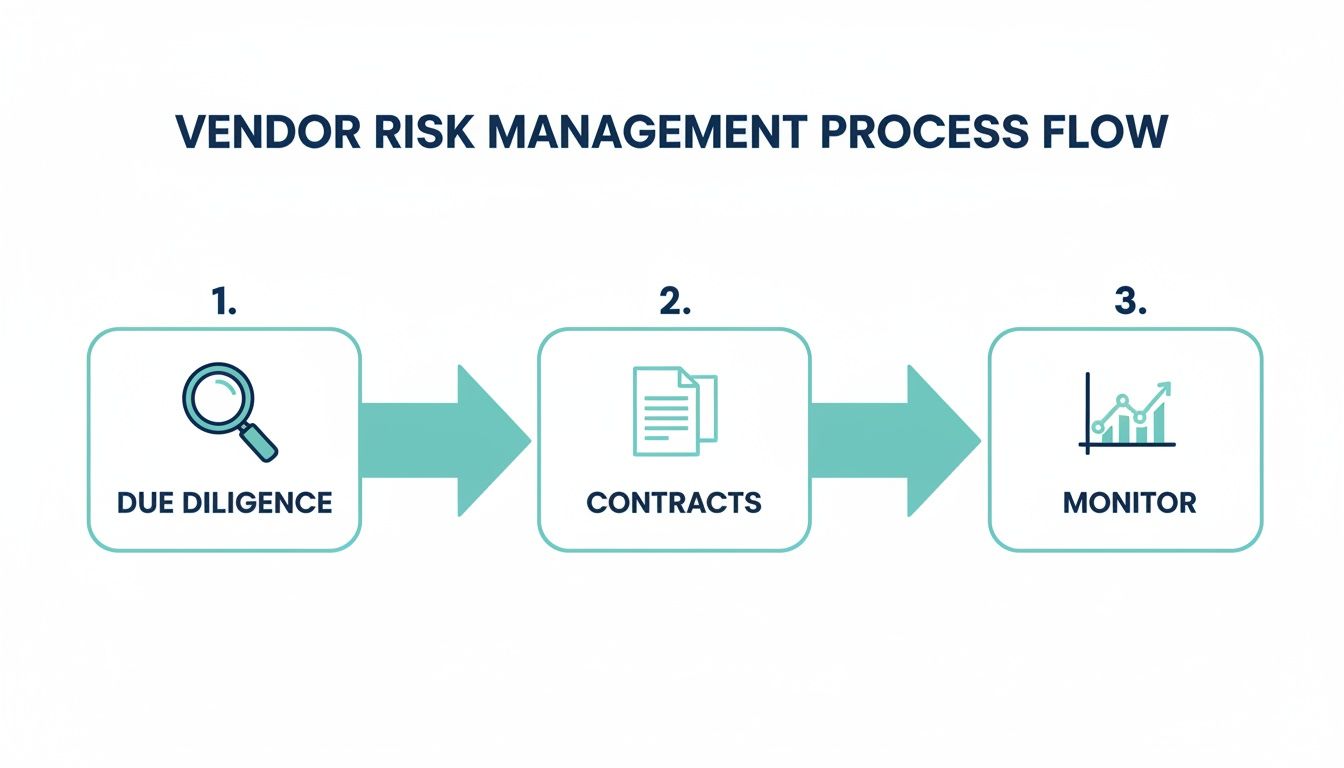
Managing vendor risk is a continuous cycle, not a one time check you perform when you sign a contract. It demands ongoing attention.
Develop an Incident Response Plan: When a breach happens, and you should plan for when, not if, what is the first call you make? Who is in charge? Your plan needs to spell out, step by step, how to contain the threat, who to notify, and how you will communicate with clients and regulators.
Implement Staff Security Training: Roll out a formal security awareness program. Do not just check a box with a boring annual video. Training needs to be practical and ongoing, focusing on real world threats like spotting phishing emails and avoiding social engineering traps.
Review and Harden Vendor Security: Take a hard look at every third party vendor with access to your firm’s data. Are they just saying they are secure, or can they prove it with certifications? Get specific security requirements written into your contracts.
Phase 3: Day 90 and Beyond – Building Long-Term Resilience
Good cybersecurity is not a destination. It is a process of constant improvement. Once your core defenses are in place, the goal is to weave security into the very fabric of your firm's culture.
Schedule Regular Security Audits: You need a fresh set of eyes. Hire an independent expert to conduct periodic penetration tests and vulnerability assessments. They will find the weak spots you have missed before a real attacker does.
Review Your Cyber Insurance Policy: Pull out your policy and read the fine print. Does it actually cover the most likely risks your firm faces today? Your policy is a critical financial backstop. For a detailed guide on what to look for, use this Cyber Insurance Coverage Checklist.
Establish a Security Governance Committee: Form a small, dedicated group, it could be a partner, your IT lead, and an office administrator, to meet regularly. Their job is to review security performance, stay on top of new threats, and guide the firm’s strategy moving forward.
By following this roadmap, you will systematically build a security program that does more than just meet your ethical obligations. It becomes a powerful signal to clients that you take the protection of their information as seriously as you take their case.
Frequently Asked Questions
When law firms decide to get serious about cybersecurity, a lot of practical questions pop up right away. Here are some straightforward answers to the things we hear most often from partners and firm administrators.
How Much Should We Spend on Cybersecurity?
There is no magic number here. Your firm’s size, the kind of data you handle, and your specific risks all play a role. It is better to stop thinking of cybersecurity as a cost and start treating it as a fundamental business investment, just like you do with your malpractice insurance.
A smart place to start is budgeting for the essentials: things like multi factor authentication, a solid backup system, and a password manager for the entire firm. From there, you will want to set aside funds for regular security training for everyone on your team.
Is Our Small Firm Really a Target?
Without a doubt. In fact, cybercriminals often see smaller firms as the low hanging fruit. They gamble that you have fewer defenses than a big corporation, but they know you are sitting on a treasure trove of valuable information, from M&A details to sensitive client litigation strategies.
A small firm with a rich collection of client data is often more profitable for an attacker than a large company with fewer valuable assets per employee. Your size does not grant you immunity; in some ways, it makes you a more attractive target.
Can We Just Outsource Everything to an IT Provider?
Partnering with a managed service provider (MSP) is a great move, but you cannot just hand over the keys and walk away. The ethical and legal buck still stops with you when it comes to protecting client data. Your job is to thoroughly vet any IT partner, make sure your contract spells out specific security duties, and have a clear understanding of the protections they are implementing on your behalf.
Think of it this way: your provider manages the technology, but you manage the risk. A good MSP acts as a true partner, but the ultimate duty of care always rests with the firm's leadership.
What Is the Single Most Important First Step?
If you do only one thing, do this: roll out multi-factor authentication (MFA) on every single system you use, starting with email. The overwhelming majority of data breaches begin with a stolen password. MFA is a simple, powerful tool that stops attackers cold, even if they get their hands on a legitimate password.
It delivers the biggest security upgrade for the least amount of effort and cost. It is a no brainer.
Ready to secure your client communications and improve firm efficiency? CasePulse offers a purpose-built client portal that integrates directly with your existing case management system, providing a secure, encrypted environment for messaging and file sharing. Learn more about CasePulse.