
 CasePulse
 If your estate planning team still builds matters by email, Word templates, paper notes, and reminder flags in Outlook, you already know the pattern. Intake comes in fragments. Staff retype names, addresses, fiduciary roles, and asset details into multiple documents. Clients call for updates because they can't see what's happening. Signed copies end up in one folder, drafts in another, and key follow ups live inside someone's inbox.
That setup works until volume rises, a staff member leaves, or a matter becomes more complex than expected. Then the friction shows up everywhere. Drafting slows down. Review takes longer than it should. Status checks interrupt the day. Profit on flat fee work gets squeezed by administrative labor no one can bill for.
The firms that are getting ahead aren't necessarily buying the most specialized drafting engine on the market. They're building a cleaner operating system for the practice. That means choosing estate planning software for lawyers that fits the way the firm already works, especially the systems attorneys and staff rely on every day.
Modernizing Your Practice with Estate Planning Software
A common scene in estate planning looks like this. The attorney has a will draft open on one screen, a prior intake PDF on another, and a yellow pad with handwritten corrections beside the keyboard. The paralegal is chasing down account statements, checking whether a power of attorney was returned, and fielding two voicemail requests for status updates. No one is doing bad work. The system is just asking too many people to remember too many things manually.

That's why software adoption in estate planning is no longer a side issue. According to a 2025 ABA cloud adoption summary for estate planning firms, 73% of law firms now use cloud based legal tools. For managing partners, the practical takeaway is simple. Remote access, secure collaboration, and real time document workflows are now baseline expectations, not experimental upgrades.
What modernization actually fixes
The point isn't to replace legal judgment. It's to remove the repetitive steps that waste attorney and staff time.
- Scattered matter data: Client facts shouldn't live in intake forms, email threads, and draft documents separately.
- Manual follow up: A team shouldn't have to create every reminder from scratch.
- Version confusion: Signed instruments, revision drafts, and correspondence need one reliable home.
- Client visibility gaps: When clients can't see next steps, they call. Staff then become status update routers.
A firm that modernizes well usually starts by identifying where work stalls, not by shopping for software features in the abstract. That broader shift looks a lot like the operational thinking behind digital transformation for small business, where the goal is to redesign workflow around fewer handoffs and cleaner systems.
Practical rule: If your estate planning process depends on staff remembering the next step more than the system prompting it, your workflow is still too manual.
Why this matters for profitability
Estate planning often includes flat fee work, recurring document types, and multiple stakeholders. That combination rewards consistency. A practice that handles intake, drafting, review, communication, and signing inside a coordinated system can protect margins without cutting service quality.
What doesn't work is adding another disconnected tool just because it has strong drafting templates. If software speeds up one phase but creates duplicate entry, another login, or another inbox to monitor, the firm hasn't modernized. It has just moved the friction around.
Beyond Document Drafting What Software Really Does
Many lawyers still evaluate estate planning software as if it were a faster word processor. That's too narrow. Good estate planning software for lawyers acts more like a digital assembly line for the matter.
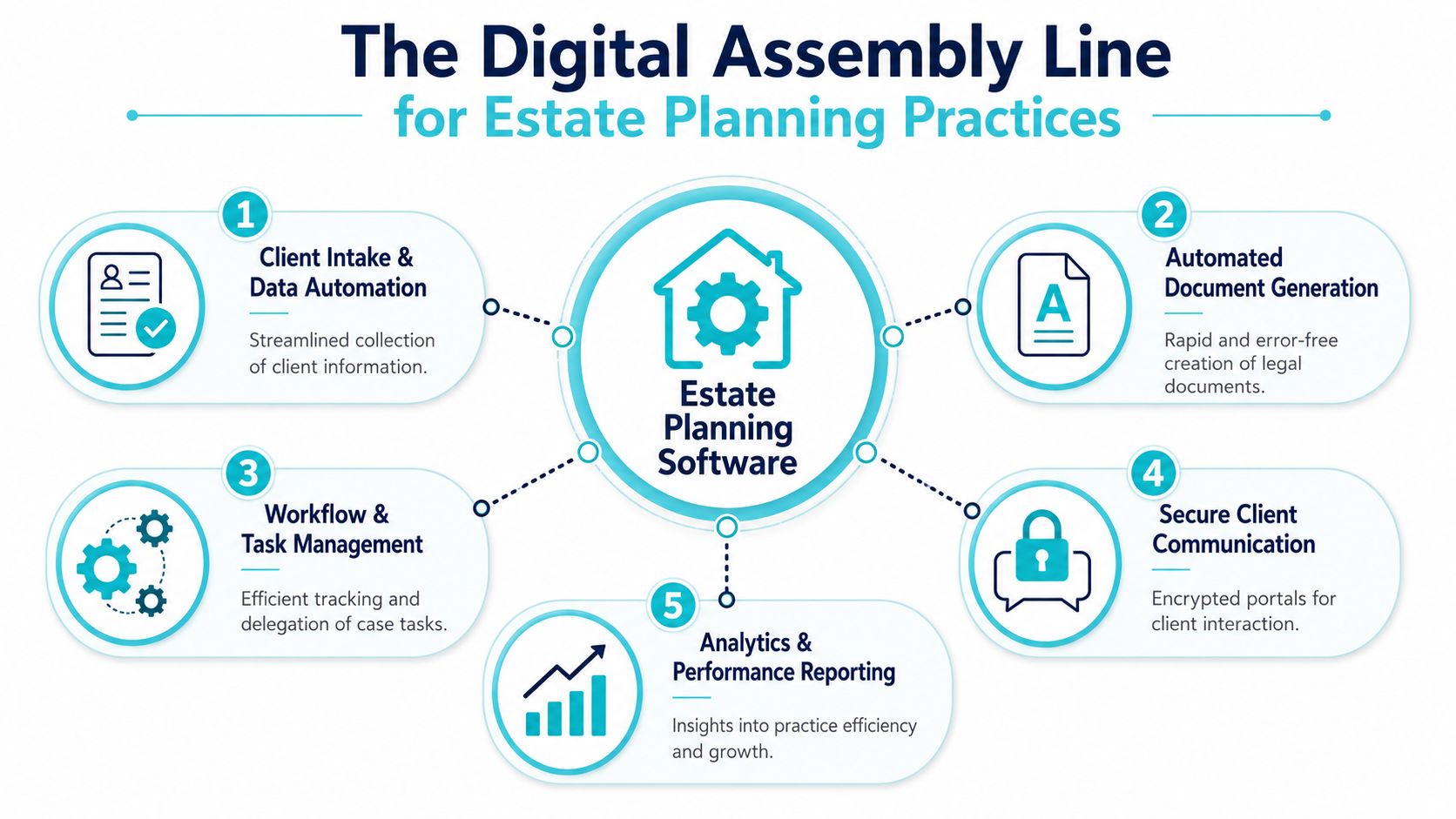
A client starts at intake. Their family details, beneficiary information, fiduciary roles, and asset information enter the system once. That data then moves into drafting, internal review, client communication, file collection, signing, and storage. Instead of a chain of disconnected tasks, the software creates one continuous path.
Think in terms of a single source of truth
When firms struggle with estate planning operations, the root problem usually isn't drafting quality. It's data fragmentation. The same client information gets entered multiple times in multiple places, often by different people.
A stronger setup treats the matter record as the firm's source of truth. Intake data, document versions, communications, tasks, and signed files stay linked to the same matter. That gives attorneys cleaner review. It gives staff fewer opportunities to miss a step. It also makes it easier to answer a basic question quickly: what's done, what's waiting, and who owns the next action?
The workflow is the product
Software's full potential shows up between the obvious steps.
Consider what happens in a manual practice:
- A client submits some information.
- Staff request missing items by email.
- Drafting starts before all data is complete.
- Revisions trigger new follow ups.
- Signing packets get assembled late.
- Someone manually logs what came back.
That process creates drag because every handoff relies on memory and personal organization.
A better system supports:
- Structured intake: Clients provide information in a guided format rather than an unstructured email.
- Matter linked files: Drafts, signed instruments, and supporting records stay attached to the file.
- Task sequencing: The next step appears when the prior step is completed.
- Communication continuity: Messages and updates stay tied to the matter rather than scattered across inboxes.
Estate planning software is most useful when it organizes the work around the matter, not around the preferences of whichever staff member happens to touch it that day.
What it should not become
Some firms buy software hoping for a magic drafting shortcut and then ignore intake, review routing, and client communication. That usually fails. The software gets blamed, but the actual issue is that the firm bought a drafting component when it needed an operating workflow.
The managing partner's job isn't to ask, “Can this generate a trust?” The better question is, “Can this move a matter cleanly from first contact to signed set without extra administrative drag?”
Core Features That Drive Daily Efficiency
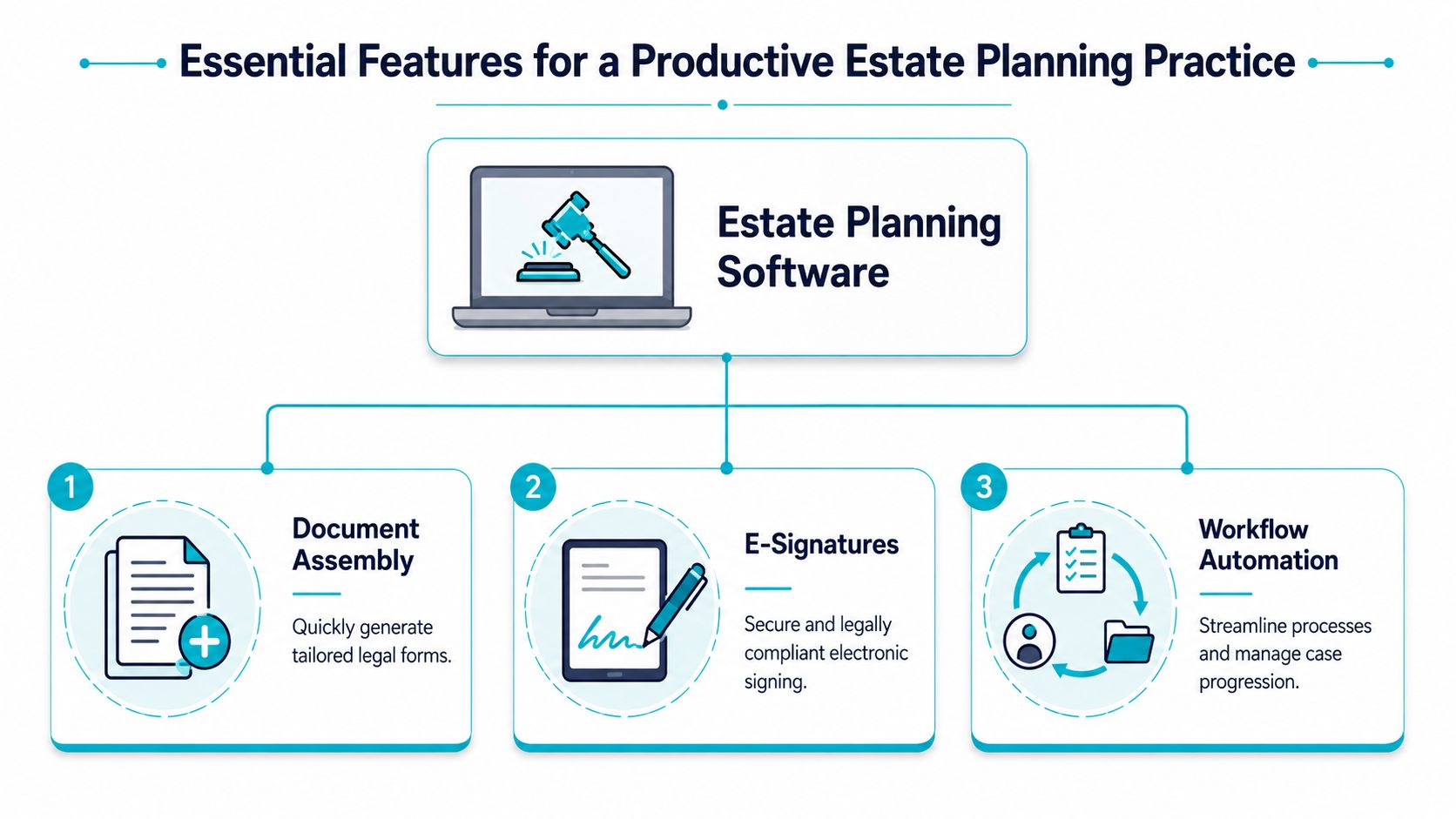
The foundational features aren't flashy. They're the ones your team touches every day, often dozens of times across multiple matters. In estate planning, three functions drive most of the practical gain: document assembly, e signatures, and workflow automation.
Document assembly removes the worst kind of repetitive work
The biggest efficiency gains come from single entry data capture paired with dynamic document assembly. As explained in MyCase's estate planning software overview, client information can populate wills, trusts, and forms from one source, reducing drafting time and lowering the risk of manual error.
That matters because estate planning is document heavy by nature. A simple name correction may need to carry across a will, trust, power of attorney, health care directive, cover letter, and internal checklist. If staff must rekey the same change across every item, mistakes become predictable.
For firms evaluating legal document automation, the practical question isn't just whether templates exist. It's whether the system can keep recurring fields synchronized across the matter.
E signatures cut waiting, not legal analysis
E signature tools don't replace the legal and ethical judgment required in estate planning. They do remove avoidable friction in the final mile.
Used well, they help with:
- Signature coordination: Clients can complete signing steps without the back and forth of printing, scanning, and emailing.
- Faster packet completion: The firm can move completed documents into the file more cleanly.
- Reduced staff chasing: Fewer reminders are needed for clients who stalled on logistics.
The trade off is straightforward. E signatures work best when the underlying workflow is already organized. If the packet is wrong, a digital signature only speeds up the wrong packet.
The technology doesn't fix bad drafting discipline. It makes disciplined drafting easier to deliver consistently.
Workflow automation protects consistency
Most estate planning bottlenecks aren't legal problems. They're process gaps. A matter waits because no one created the review task, no one set the reminder for missing information, or no one logged that the client packet was ready to send.
Workflow automation addresses that by creating structured sequences around repeatable work. A strong setup can trigger tasks after intake completion, assign follow ups, and keep deadlines visible without relying on manual note taking.
Here's what tends to work well:
| Feature area | What good looks like | What tends to fail |
|---|---|---|
| Document assembly | One source of client data feeding multiple documents | Separate templates with separate edits |
| E signatures | Built into matter completion and file return steps | Standalone signing with no workflow tie in |
| Task automation | Repeatable checklists tied to matter stage | Ad hoc reminders in personal calendars |
The point of these features isn't speed for its own sake. It's dependable execution.
Advanced Tools for Superior Client Communication
The firms that stand out in estate planning don't just draft accurately. They communicate clearly, consistently, and in a way that doesn't bury staff under routine updates. That's where advanced tools start to matter.
A secure client portal is often the dividing line between a modern client experience and a reactive one. Without it, clients call to ask whether documents were received, whether a draft is ready, or what they still need to provide. Those calls seem harmless until they consume the workday in small interruptions.
Why secure portals have moved into the essentials category
Neutral guidance on virtual estate planning has moved beyond basic drafting and now treats workflow orchestration as a central evaluation standard. In Clio's discussion of virtual estate planning tools, advanced software is evaluated on automated tasks, secure portals, and e signatures. It also notes that when clients can self serve for status updates and forms, routine inbound calls decrease, improving staff throughput.
That's not a marketing point. It's an operational one.
A portal can give clients a place to:
- Check status updates without calling the office
- Upload requested files securely
- Complete forms tied to the matter
- Review next steps in one consistent place
For firms exploring client portals for law firms, the true standard should be whether the portal reduces interruption while preserving a clear communication record.
Communication quality affects workflow quality
Estate planning often includes spouses, adult children, fiduciaries, financial advisors, and sometimes probate related participants. That means communication isn't just frequent. It's multi party and easy to lose track of.
When communication lives in phone notes and scattered emails, the team loses context. Staff then spend time reconstructing the history of the matter before they can answer even a simple question.
A portal based workflow changes that. It creates one documented channel for updates, requests, and file exchange. That helps attorneys supervise matters more effectively and helps support staff step into conversations without guessing what happened last.
Clients usually don't complain about the legal work first. They complain when they don't know what's happening.
The trade off firms should understand
Advanced communication tools only help if the team commits to using them consistently. If staff keep giving updates by email, requesting documents by text, and storing notes elsewhere, the portal becomes another place to check instead of the main communication channel.
The best implementation rule is simple. Choose one primary path for client interaction and train the team to use it. That's what turns a portal from a convenience into a system.
Choosing the Right Software for Your Law Firm
Most software selections go wrong before the demo ends. The firm gets impressed by drafting logic, intake design, or a polished interface, but no one asks the harder operational question: how well will this fit the systems we already depend on?
That question matters more now because legal technology adoption is moving quickly while lawyer time is still constrained. As summarized in Holistiplan's trust and estate planning software article, 54% of lawyers were using AI in their firms, up from 19% in 2023, yet many lawyers still spend only 18% of their time on billable work. The lesson for managing partners is clear. New software should reduce workflow friction, not add another disconnected layer.
Start with integration, not feature volume
If your firm already runs on Needles, Neos, LawBase, Litify, Clio, or another practice management platform, estate planning software has to work with that stack. Otherwise, staff end up doing duplicate entry, checking multiple systems, and manually reconciling matter status.
A good evaluation framework starts with these questions:
| Criterion | What to Ask | Why It Matters |
|---|---|---|
| Integration fit | Does it connect to our existing practice management and document workflows? | Prevents duplicate entry and disconnected matter records |
| Workflow support | Can it handle intake, drafting, review, communication, and signing in a coordinated way? | Reduces handoff failures |
| Client experience | How do clients complete forms, upload files, and receive updates? | Affects call volume and matter momentum |
| Security controls | How are documents, messages, and file sharing handled? | Protects confidential information |
| Implementation burden | How much process redesign and staff training will this require? | Determines adoption success |
| Vendor support | Who helps after the sale, and how responsive are they? | Problems always surface during rollout |
What often gets missed in vendor reviews
Security isn't just about encryption language on a website. It includes practical usability for the people on both sides of the portal. Client facing tools should be easy to use, readable, and accessible. Firms reviewing portals and intake systems should also consider standards around web accessibility for legal teams, especially if clients will use these tools to complete forms or review status information.
Another missed issue is reporting. Managing partners need enough visibility to tell whether the software improves workflow or instead changes where work gets stuck. That doesn't require complicated analytics. It requires clear matter status, task ownership, and communication tracking.
A sound buying decision usually looks boring
The best software choice often won't be the one with the longest feature list. It will be the one your attorneys and staff can use inside the existing operating model.
Watch for these warning signs during evaluation:
- Feature sprawl: The vendor shows many tools, but none clearly connect to your actual workflow.
- Weak matter continuity: Intake, documents, and communication feel like separate modules rather than one process.
- High switching cost: Staff would need to abandon reliable systems without a clear payoff.
- Vague onboarding: No one can explain how the rollout will work in practice.
A managing partner should leave the demo knowing exactly how a matter will move through the system.
Understanding the True Cost and ROI of Your Investment
Software cost is rarely the primary objection. The true objection is uncertainty. Partners want to know whether the firm is buying efficiency or just taking on another subscription, another implementation project, and another training burden.
Total cost includes more than the invoice
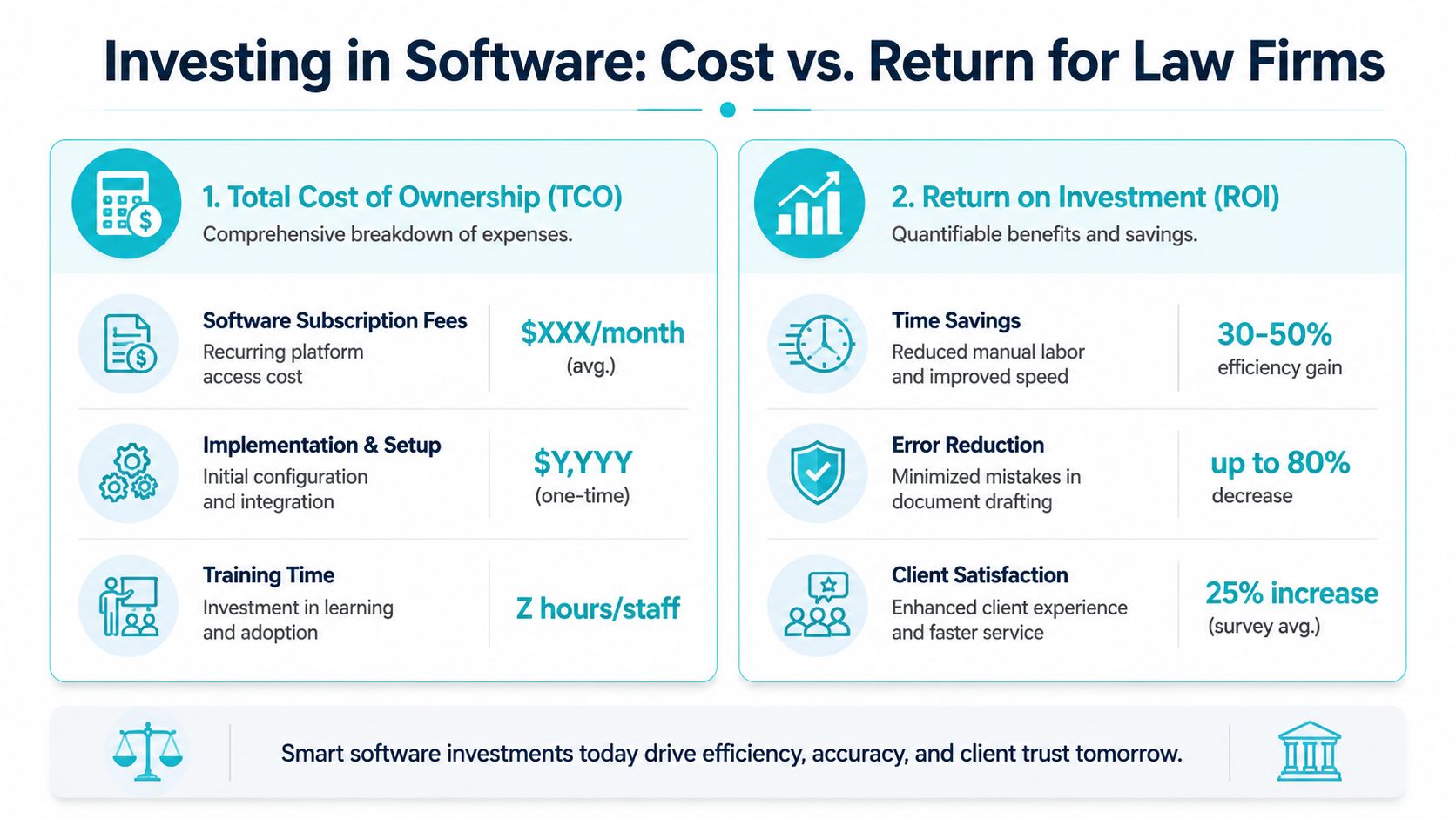
When you evaluate estate planning software for lawyers, look at total cost of ownership in three buckets.
- Software fees: The recurring platform expense is only the starting point.
- Implementation effort: Someone has to map workflows, set up templates, and make decisions about intake, tasks, and file handling.
- Training time: Staff need enough repetition to use the system correctly under real work pressure.
What doesn't help is trying to force an ROI calculation from invented percentages. A better approach is to track specific operational changes after rollout. Are staff retyping less? Are fewer client updates coming by phone? Are draft packets moving through review with fewer avoidable corrections?
ROI shows up as capacity and control
Some returns are easy to see. A matter moves faster because intake is cleaner. A paralegal spends less time chasing forms. An attorney reviews fewer inconsistent drafts. Other returns are more strategic. The practice becomes better at handling routine estate planning work without letting administrative overhead swallow the fee.
That matters because the underserved market is large. The ACTEC Foundation notes in its discussion of wills for the underserved that only 6% of households with estate planning needs used an attorney or law firm in a 2024 survey. For firms willing to streamline simpler matters, efficiency tools can make everyday family planning work more operationally realistic.
A useful ROI test is this. Does the software let your firm serve a broader range of matters with the same team, while keeping quality and communication under control?
The wrong way to think about cost
If partners focus only on subscription price, they'll undervalue the hours lost to fragmented systems. The more honest comparison is between the software expense and the hidden cost of manual administration, avoidable follow up, and work that can't scale because too much of it depends on memory.
Your Roadmap to Successful Implementation
Successful rollout starts before vendor selection. Audit one estate planning matter from first contact to signed set and list every handoff, every manual reminder, every duplicate entry point, and every place client communication falls outside the main system. That map will tell you what the software needs to solve.
A practical rollout sequence
Use a simple sequence and keep it grounded in actual work.
- Audit the current process. Identify where intake stalls, where drafting errors recur, and where staff spend time answering routine status questions.
- Define success clearly. Decide what must improve first, such as cleaner intake, better workflow control, or fewer communication interruptions.
- Shortlist vendors against your stack. Eliminate any option that creates duplicate records or requires staff to live in multiple systems.
- Run realistic demos. Ask each vendor to walk through one actual estate planning matter, not a polished generic presentation.
- Pilot before broad rollout. Start with a narrow set of matter types and a small internal team.
- Train to the workflow. Don't train on features in isolation. Train on how the firm will complete intake, draft, review, communicate, and close a matter in the new environment.
Keep implementation expectations realistic
Most firms underestimate process work and overestimate how much software alone will fix. If you want a grounded view of migration planning, integration effort, and the real costs of cloud modernization, it helps to review modernization guidance before signing a contract.
The firms that implement well usually make one smart choice early. They decide that every new tool must reduce operational drag inside the broader practice, not just add a faster drafting step. That's what turns software into an asset instead of another admin burden.
If your firm wants a secure client portal that works with the case management systems your team already uses, CasePulse is built for that job. It helps law firms reduce inbound status calls, automate follow ups, collect forms and files securely, and give clients a branded place to check updates without forcing staff into another disconnected workflow.