
 CasePulse
 Every personal injury firm has a version of the same problem. A client gets asked for financial information, then sends a half completed PDF, a few phone screenshots of pay stubs, and a handwritten list of monthly bills by email. A paralegal opens each attachment, tries to decipher what belongs where, then sends another follow up asking for the missing pieces.
That process feels routine because it happens so often. It's also expensive in staff time, weak on security, and harder on clients than most firms realize. When financial statement forms arrive in fragments, the legal team spends more time reconstructing the record than using it to support damages.
For PI firms, this isn't just an intake annoyance. Financial data often feeds wage loss analysis, settlement positioning, mediation prep, and trial preparation. If the collection process is sloppy, the case file usually reflects it.
Why Collecting Financials from Clients Is Broken
The breakdown usually starts with the form itself.
Many firms still use a Word document, a flat PDF, or a scanned packet that was originally built for in office signing. It asks for the right general categories, but it doesn't guide the client well. The client skips fields, writes in the margins, or sends supporting documents separately. Staff then has to interpret what the client meant and whether the answer belongs in income, expenses, debt, or household support.
Manual collection creates hidden legal ops work
A managing partner might see this as paralegal follow up. In practice, it becomes a chain of avoidable tasks:
- Chasing missing answers: Staff sends reminder emails, leaves voicemails, and asks the same questions again in a different format.
- Rekeying data: Someone copies information from attachments into the case file or another internal worksheet.
- Cleaning up inconsistencies: Monthly amounts show up next to annual amounts. Gross income gets mixed with net income. Old liabilities remain on the form because no one confirmed whether the debt is still active.
- Hunting for signatures: The completed form sits in limbo until the client signs, dates, and returns it.
None of that work strengthens the case. It only repairs a broken collection process.
A better approach is to build the collection flow around secure digital forms, automated follow up, and direct movement of data into the matter record. Firms that want to reduce this kind of staff drag should look seriously at workflow automation for law firms, because the underlying issue is rarely the form alone. It's the workflow wrapped around it.
Practical rule: If staff has to ask the client for the same financial detail more than once, the process is the problem, not the client.
Clients experience the friction first
Clients don't separate administrative friction from legal service. If they struggle to open, complete, return, and sign financial statement forms, they read that as a communication problem. They may not complain directly. They just become slower to respond, less confident in the process, and more likely to call the office for reassurance.
That's a bottom line issue. More calls, more follow up, more internal handling, and weaker first pass data all raise the cost of managing the file.
The Four Key Financial Statement Forms Explained
Personal injury firms collect many documents that sound similar but answer very different questions. If the intake team, paralegals, and attorneys do not distinguish between them, they ask for the wrong records, over-collect, or miss facts that matter to damages.
The four standard financial statements are the balance sheet, income statement, cash flow statement, and statement of shareholders' equity. The SEC's financial statements guide also explains how standardized reporting forms such as Form 10-K and Form 10-Q are used in public company reporting. In practice, private business records are less standardized, which is exactly why firms need a clear internal workflow for requesting, reviewing, and digitizing them.
For PI work, these are not accounting labels. They are evidence categories. Each one helps the firm capture a different part of the client's pre-injury and post-injury financial position, and that matters when data is moving through a client portal into case management.
Core Financial Statements at a Glance
| Statement Type | What It Shows | Best Use in a PI File |
|---|---|---|
| Balance Sheet | Assets, liabilities, and equity at one point in time | Establishing what the client or business owned and owed on a specific date |
| Income Statement | Revenue and expenses over a period | Documenting earnings history and changes in business or personal income |
| Cash Flow Statement | Cash moving in and out over a period | Showing whether money was actually available, not just reported on paper |
| Statement of Shareholders' Equity | Changes in ownership equity over a period | Adding context when the client owns part or all of a business |
What each form is useful for in practice
Balance sheet
The balance sheet answers a date-specific question. What did the client or the client's business own, and what did they owe, on that day?
That matters more than many firms expect. If a self-employed plaintiff says the injury forced asset sales, increased borrowing, or reduced business stability, the balance sheet helps anchor that claim to a point in time. It is often the cleanest form to request when the goal is to compare financial position before the incident with financial position after it.
Income statement
The income statement shows performance over a period. For PI matters, it is often the first form attorneys ask for because it helps frame lost income, reduced revenue, and expense changes in an organized way.
It also has limits. An income statement can show strong revenue while hiding collection problems, deferred payments, or irregular owner draws. That is why firms should not stop here, especially in cases involving contractors, small business owners, or closely held companies.
Cash flow statement
Cash flow is where many business-owner cases become clearer. Reported income does not always match available cash.
A client may still show revenue on paper while struggling to pay payroll, rent, vendors, or loan obligations because timing changed after the injury. If the firm uses a digital intake process, this is one of the forms worth tagging separately in the portal and matter record. It often explains distress that a profit and loss statement does not show.
Statement of shareholders' equity
This form appears less often in consumer PI matters, but it should not be ignored when the client has an ownership interest in a business. It tracks changes in the owner's stake over time, including retained earnings, distributions, and capital contributions.
That can help the firm sort out a common problem in owner-operated businesses. Was the client's loss tied to wages, distributions, reduced business value, or some combination of the three? Without that distinction, damages analysis gets muddy fast.
The practical value of these forms is simple. Each one supports a different damages question, and a good digital workflow should route each document into the right place the first time.
Why Personal Injury Firms Request Financial Statements
PI firms don't ask for financial information to fill a file. They ask for it because damages arguments become stronger when the client's financial condition is documented in an organized way.
A wage loss claim built on scattered pay stubs and a rough client estimate is harder to defend than one built on structured records. The same is true when the client is self employed, supports dependents, or carried significant financial obligations before the injury.

Economic damages need a baseline
A personal injury case often turns on before and after comparisons. To make that comparison credible, the firm needs a baseline.
That means collecting information about employment, earnings, recurring expenses, debt load, and major assets in a way that can be reviewed consistently. The stronger the baseline, the easier it is to spot what changed after the incident.
A few common uses include:
- Lost wages: Past earning records help establish what the client was earning before time away from work.
- Reduced earning capacity: If the injury changed the client's ability to work, financial records help anchor that story in documented history.
- Household disruption: Regular expenses and dependent obligations can help show the practical effect of reduced income.
- Business owner impact: For self employed clients, records can help separate personal withdrawals, business income, and cash flow strain.
The personal financial statement matters because it standardizes the picture
In many PI files, the most useful intake tool isn't a full corporate reporting package. It's a personal financial statement.
That form works because it follows a clear structure. A personal financial statement is built like a balance sheet, where assets minus liabilities equal net worth, and the SBA's Form 413 uses that structure to assess repayment ability and creditworthiness in lending contexts through a standardized review of a person's financial position, as shown in the SBA Form 413 guidance.
For a law firm, that same structure helps in a different setting. It gives the legal team a consistent way to capture what the client owns, what the client owes, and where the pressure points sit.
What firms often miss
Some firms gather income documents but ignore liabilities and recurring expenses. Others collect a personal financial statement but never connect it to damages analysis. Both approaches leave value on the table.
A better file usually includes both narrative and structure:
- Narrative from the client about how the injury affected work and household finances
- Structured fields that let staff compare clients across matters and spot gaps quickly
- Supporting documents such as wage records, account statements, or tax materials where appropriate
When the form is well designed, staff can see what's missing at a glance. When it's poorly designed, they only notice gaps after the demand package is already in motion.
Creating Secure Fillable Financial Statement Forms
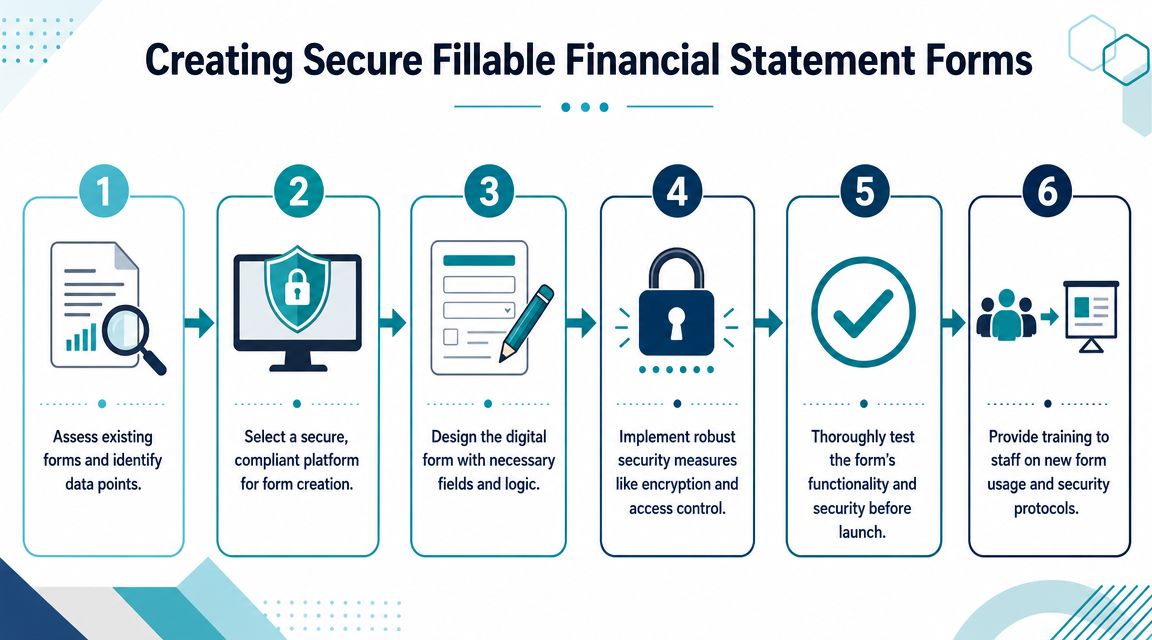
Once a firm accepts that paper and email are the weak points, the next step isn't just converting a PDF into a web form. The primary goal is to create financial statement forms that are easy for clients to complete, secure enough for sensitive data, and connected to the systems staff already uses.
That requires a workflow decision, not just a design decision.
Start with the intake path, not the template
A fillable form only helps if the client can receive it, understand it, complete it on any device, and return it without extra friction. Firms often focus on field layout and forget the delivery path.
Modern reporting workflows are moving toward digital submission and software assisted review, with cloud based reporting tools, structured data tagging, and AI review for inconsistencies becoming part of the process, as discussed in DFIN's overview of financial statement types and digital reporting. Law firms don't need to mimic public company reporting, but they should take the lesson seriously. Collection should be digital, structured, and reviewable.
That means your form process should answer these questions:
- How does the client access the form securely
- Can the client save progress and return later
- Can the client upload supporting records in the same workflow
- Does the completed form land in the case record without duplicate entry
- Can staff send reminders without manual chasing
What works in a PI environment
In practice, a secure client portal is usually the cleanest option because it combines access, form completion, file sharing, and status visibility in one place. That's very different from sending a PDF attachment and hoping the client returns it in usable form.
One practical example is CasePulse, which gives law firms a secure client portal tied to systems such as Needles, Neos, LawBase, and Litify. Clients can complete fillable forms, share files, message the team, and work from any device while staff stays inside the existing case management workflow. For firms evaluating options, the key issue isn't branding or polish. It's whether the platform reduces reentry and follow up.
If your current process still relies on attachments or open email threads, it's worth reviewing how secure file sharing for law firm clients should work in a portal based workflow.
Security choices affect adoption
Clients will use the path that feels simplest. Staff will use the path that feels fastest. If the secure path is clunky, everyone drifts back to email.
That's why firms should evaluate form workflows with both legal ops and client behavior in mind:
- Access control matters: Sensitive financial details shouldn't travel through unsecured attachments when a controlled portal can handle the exchange.
- One workflow beats multiple handoffs: If the client gets the request, uploads records, signs, and submits in one session, completion rates tend to improve qualitatively because there are fewer break points.
- Reminders should be automated: Manual reminder chains waste staff attention that should go to case progress.
- Integration matters more than templates: A beautiful form that still requires rekeying into the case management system doesn't solve the fundamental cost problem.
A good outside reference on the security side is CloudOrbis's guide for accounting professionals, which is useful because accounting teams deal with many of the same document sensitivity issues law firms face when collecting tax records, statements, and supporting financial files.
Operational test: If the client submits a financial form at night from a phone, the case team should see usable data in the matter record the next morning without rebuilding it by hand.
What does not work
Some common mistakes show up again and again.
Flat PDFs with no logic
These forms force every client through the same sequence, even when half the fields don't apply. That leads to confusion, skipped answers, and unnecessary follow up.
Email based collection
Even when staff uses password protected attachments or separate upload links, email based instructions create scattered threads. The risk isn't only security. It's fragmentation.
Separate systems for forms and files
If the client completes a form in one tool, uploads documents somewhere else, and signs through a third workflow, completion drops because each extra step creates another point of abandonment.
A Checklist for Your Client Financial Forms
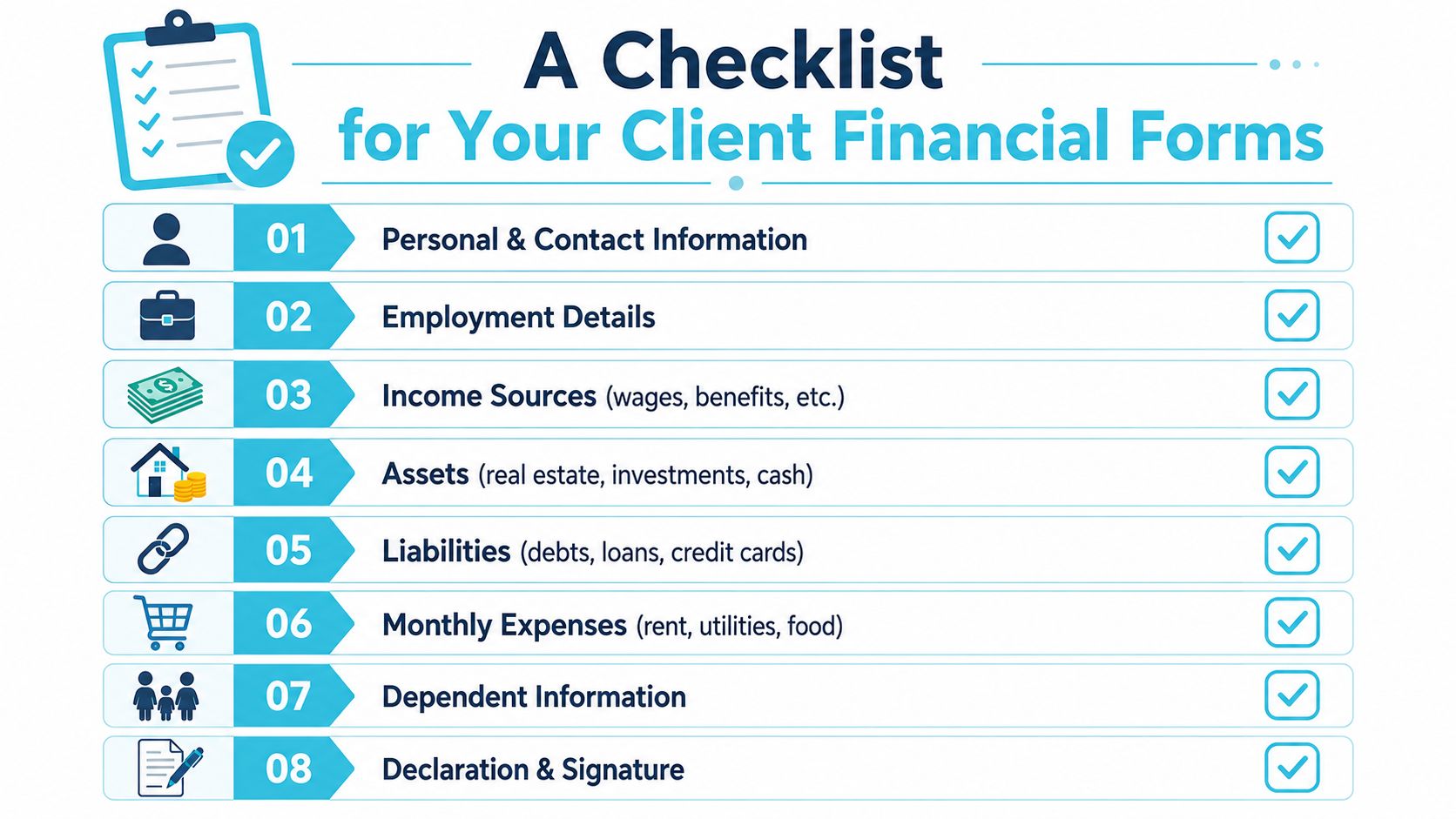
Most PI firms don't need a generic accounting form. They need a client facing financial intake form that supports damages work and can be completed without staff interpretation.
That form should ask only for information the legal team can use. It should also explain requests in plain language so clients don't freeze when they see financial terminology.
Core fields worth including
Personal and household details
Start with the basics that frame the client's financial responsibilities.
- Full identity details: Legal name, address, contact information, and household composition help confirm who is providing the information.
- Dependent information: Dependents can be relevant when reduced income affects a broader household, not just the named client.
- Marital or household support context: This helps staff understand shared expenses and whether income is pooled.
Employment and income history
This section should be specific enough to support lost income analysis without turning the form into a tax return.
- Current and recent employment details: Employer name, role, pay structure, and typical schedule create a clearer before injury snapshot.
- Other income sources: Benefits, contract work, or business distributions may matter if wages alone don't tell the whole story.
- Periods of missed work: This gives the file a timeline staff can compare against medical restrictions and treatment history.
Expense, asset, and liability categories
A strong form doesn't stop at earnings. It captures the financial obligations that make reduced income legally meaningful.
- Monthly living expenses: Rent or mortgage, utilities, food, transportation, insurance, and similar recurring costs show what the client had to carry while income changed.
- Major assets: Real estate, savings, investments, and vehicles help define the client's broader financial position.
- Outstanding liabilities: Loans, credit card debt, medical debt, and other obligations show the debt burden and strain points.
Firms should borrow thinking from regulated industries. A useful overview of how structured controls support reliable data handling appears in fintech compliance solutions. The details differ from legal practice, but the lesson holds. If sensitive financial data enters the system, the collection method should be disciplined and auditable.
Closing elements firms should not skip
The final section of the form often gets rushed, but it matters.
- Declaration language: The client should confirm that the information is complete to the best of their knowledge.
- Date field: Staff needs to know when the financial snapshot was provided.
- Signature capability: If the form requires acknowledgement or verification, build the signature step into the same workflow. Firms reviewing portal based execution should understand electronic signature legality for law firm workflows before finalizing the process.
Ask only for data your team knows how to use. Every extra field creates friction, and every vague field creates cleanup work.
Modernize Your Firm's Financial Data Collection
A firm doesn't modernize financial statement forms by making them look cleaner. It modernizes them by changing how information moves from client to case file.
The useful shift is straightforward. Replace scattered email attachments with secure submission. Replace static PDFs with fillable digital forms. Replace manual reminder chains with automated follow up. Replace duplicate entry with direct integration into the system your staff already uses.
The strategic gain is bigger than admin savings
This change helps at several levels at once:
- Staff efficiency improves: Paralegals spend less time chasing, decoding, and retyping.
- Case files get cleaner: Structured intake makes financial information easier to review and compare.
- Client experience improves: Clients can complete requests from their phone or laptop without juggling forms and attachments.
- Security posture gets stronger: Sensitive financial details stay inside a controlled workflow rather than spreading across inboxes.
If your firm is also dealing with older internal document repositories, it's worth reading Ollo's SharePoint migration guide. It's not written for PI firms specifically, but it's useful for thinking through how financial documents should move when you're trying to leave fragmented storage behind.
Managing partners usually ask whether this is an operations tweak or a business decision. It's a business decision. Better collection supports faster staff handling, a more organized damages record, and a smoother client relationship through the life of the matter.
If your firm is still collecting financial statement forms through PDFs and email, it's worth taking a close look at CasePulse. It gives law firms a secure client portal for forms, files, messages, and status updates while keeping staff inside existing case management workflows.