
 CasePulse
Monday morning at a plaintiff firm usually starts the same way. A paralegal is digging through email for an intake form, a partner wants a status update on a closed matter, and someone new on the team is asking where the latest medical record lives. The firm isn't short on files, it's short on a system that tells people where a document goes, who can touch it, and when it stops being active.
That's why how to organize client files is really a workflow question, not a storage question. A good setup starts with one place of truth for each matter, a folder shape people can predict without guessing, and intake rules that keep documents from spreading across desktops, inboxes, and personal drives. Microsoft's file guidance leans hard on centralizing and standardizing digital records, using template folders, posting filing guidelines, and regularly deleting or archiving old files so the system stays usable over time, not just tidy for a week Microsoft's digital file organization guidance.
The Monday Morning File Hunt
The mess usually shows up in small, annoying ways. A client calls with a simple question, and staff need three places to answer it. Email has the attachment, the desktop has a copy, and the shared drive has something that looks right until you open it and realize it's last month's version.
The real cost is retrieval, not storage
In a busy personal injury firm, the broken part isn't usually capacity. It's the time people lose deciding whether a file belongs in “Intake,” “Correspondence,” “Medical,” or some one-off folder a previous assistant invented during a rush. That's why the best systems don't ask staff to think harder. They make the right move obvious.
Practical rule: if someone has to ask where a document goes more than once, the structure is too loose.
A workable client file system gives every matter a single home, then keeps the shape shallow enough that a new hire can use it on day one. The better systems treat filing as part of the job, not a clean-up task after the day is over. That matches the operational logic in legal file management guidance, which pushes one live matter file, version control, and regular hygiene rather than loose piles of documents in inboxes and local drives law firm file management checklist.
What a healthy system looks like in practice
The pattern that holds up is simple. Client files come in through one intake path, land in one matter record, and stay there until they're archived. If the team is still asking paralegals to rename files by memory or rebuild the same folder tree for every new case, the firm is paying for inconsistency with time.
A better setup also makes onboarding easier. New hires don't need a long explanation if the folder names, file names, and upload path all behave the same way across matters. They can read the structure and work it.
That's the true test. If a system only works when the person who created it is in the building, it's not a system yet.
Designing a Folder Structure That Scales
A folder tree should mirror the work, not the org chart. That is where most structures go wrong. Someone builds a maze of folders around departments, specialties, or personal preference, and the paralegal who only needs to file a settlement packet is left guessing where it belongs.
Keep the hierarchy shallow and predictable
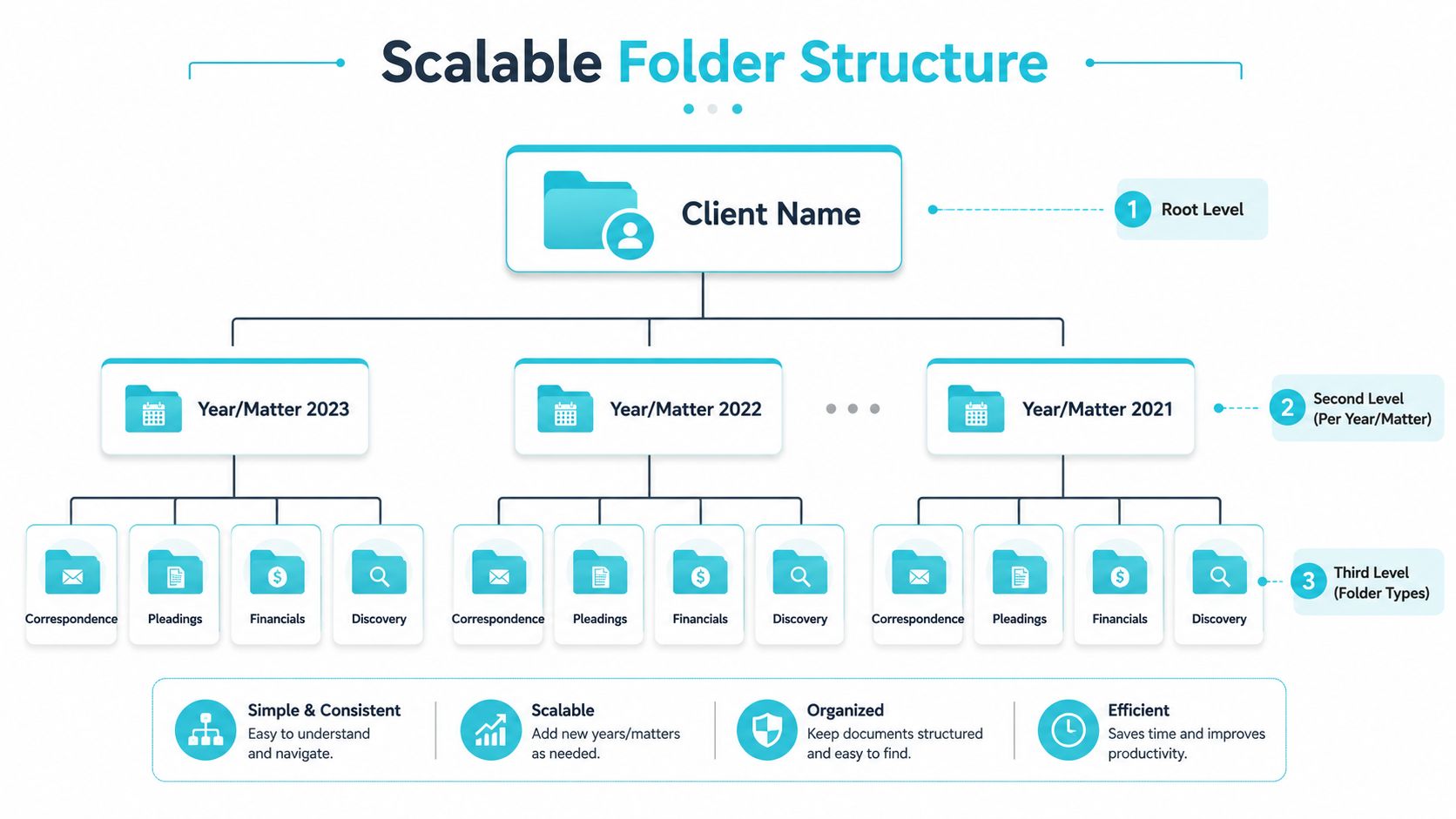
A technically sound structure usually starts with Client Name > Year/Matter > Document Category > Subcategory, or a close variation of that shape, and stays 2 to 3 levels deep so navigation does not turn into a scavenger hunt structured client file hierarchy. That depth matters because shallow trees are easier to search, easier to teach, and easier to keep consistent across remote teams.
A good working example looks like this:
- Client Name
- 2026 or Matter Name
- Intake
- Correspondence
- Pleadings
- Medical
- Settlement
- 2026 or Matter Name
The point is not the exact folder names. The point is making sure every matter uses the same shape, whether it is a slip and fall or a motor vehicle case. If the team can open one file and recognize the pattern, the folder tree is doing its job. That kind of consistency also makes it easier to line up the folder structure with the matter record and intake steps inside the case management system, which is usually where the filing logic breaks down first. The guide from F1Group on SharePoint is useful here because it shows how shared document spaces stay usable when the structure stays simple. If your firm is standardizing the rest of the workflow too, the internal reference on document management best practices fits the same approach.
Use descriptive names, not clever codes
Some firms still lean on numeric indexing systems. That sounds tidy until staff have to remember what the numbers mean, and then the structure becomes a memory test. A more durable approach is to organize by client name first, then year, matter, or document type, with clear filenames that include the client and date so documents can be found quickly.
The true cost is retrieval, not storage. When a lawyer, paralegal, or intake coordinator has to stop and decode a folder label, the system is already losing time. Clear templates and standardized names are easier to enforce in shared drives, case management platforms, and client portals than any scheme that depends on someone remembering a private code.
A folder structure should be boring. If people notice the structure more than the work, it is probably too clever.
Active and closed matters should also be separated cleanly. That does not mean copying everything into two places. It means keeping live files in the working space and moving closed matters into archive so the active area stays readable. The file tree should support what happens in the case management record, the upload queue, and the archive step, not force staff to improvise every time a matter changes status. The firm saves time every day when the structure is obvious enough that nobody has to guess where the next document belongs.
Naming Conventions and Intake Rules That Prevent Drift
Folders only do half the work. The other half is how files arrive. If everyone saves attachments differently, your neat folder tree turns into a junk drawer by Friday.
Pick one naming pattern and make it the default
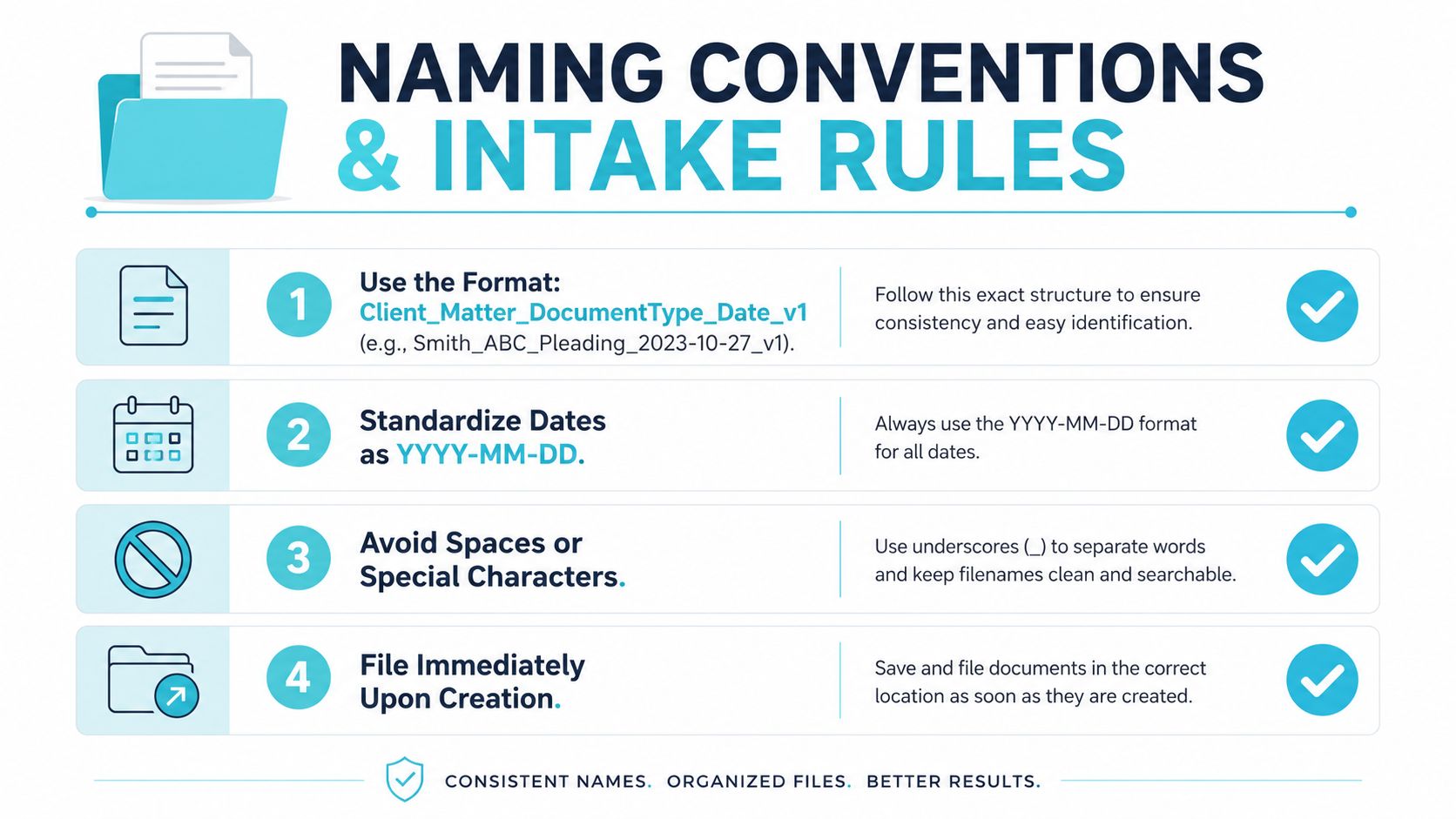
The safest naming pattern is the one staff can apply without debate. A widely used version is Client_Project_DocumentType_Date_v1, or a close cousin such as Date-Client-Document Type-Detail when chronological sorting matters most inside a folder. Date-based names also help version control because they make older drafts easier to spot without opening every file. Several professional-services guides now recommend patterns in that style, and they all point to the same practical benefit, files sort themselves more cleanly.
The biggest rule is consistency. A firm doesn't need ten naming rules. It needs one that people can remember.
Make intake boring on purpose
The main failure mode is inconsistent intake and naming, so the most effective fix is to standardize one upload path and make it the easiest path to use. Content Snare's client-file guidance puts the emphasis on a repeatable intake flow, reducing manual filing decisions, and keeping documents from being scattered across email, desktop, and ad hoc folders standardized intake flow guidance. That matches what works inside firms too.
The intake rules should be simple:
- One upload path. Every client-uploaded file should land in the matter file the same way.
- No desktop storage. Local copies become shadow systems fast.
- No personal inbox filing. If the attachment matters, it belongs in the file record.
- Working files stay separate from deliverables and archive. That keeps the live matter readable.
Version control needs the same discipline. A filename like v_final_v2_AB is a sign the team has already lost the thread. If the firm uses one repeatable naming pattern and stores the working copy in the matter system, the staff spends less time hunting for the latest draft and more time moving the matter forward.
For firms that want a structured way to tie intake to a portal, the internal reference on secure client data is useful because the intake question isn't just where files go, it's where they land safely.
Access, Security, and Version Control on Real Matters
Once the structure exists, the next failure mode is people getting into the wrong folders. That's where permission design matters. A file system that's easy to browse but hard to control doesn't hold up in a multi-staff firm.
Permissions should follow roles, not habit
The cleanest approach is least privilege by role. Attorneys don't need the same access as intake staff, and intake staff don't need broad access to every settlement figure or medical record. A strong file map gives people enough access to do their jobs without opening the whole matter to everyone secure client file guidance.
That idea lines up with how legal training sources describe modern file management. Sensitive documents should stay in the matter system, with version history and backups available, rather than bouncing around local hard drives. The goal is traceability. If someone overwrites a file or uploads the wrong draft, the firm should be able to see what changed and when.
A practical permission map usually looks like this:
- Attorney. Full matter access, including sensitive records and deliverables.
- Paralegal. Working access to matter folders needed for daily processing.
- Intake. Limited access for new-file setup and document collection.
- Admin. Access to routing, templates, and routine filing, not every sensitive item.
Keep the paperless record complete
A good paperless file record should capture the date of the event, the communication method, the people present, the substance of what was discussed or decided, and the follow-up action. The same source says that when a material event happens, correspondence should go in the file, notes should be written for in-person or phone events, and a confirming letter should be sent to the client client file recordkeeping booklet. That matters because a document file is only useful if it preserves what happened.
For confidentiality and messaging hygiene, a secure client communication overview like Voicedial.ai on data privacy is worth a look as a practical reminder that permissions and messaging habits are part of the same risk picture. The same logic applies inside the firm and at the portal edge.
The deeper point is simple. Version history, access control, and backups aren't separate features. They're the guardrails that keep the file system usable when real people make real mistakes.
Retention, Archiving, and When to Close a Matter
A lot of firms never delete anything, and the result is predictable. Every search gets slower, every migration gets harder, and every old matter keeps hanging around in the active workspace long after it's useful. The fix is a retention rhythm, not a heroic cleanup.
Use a schedule, not mood, to close files
Mature file management treats retention as a routine. One client-data guide recommends checking contact information every quarter to remove duplicates, delete inactive contacts, and enrich records after each interaction client-data cleanup guidance. Another operational rule says clients should be archived after 90 days of no activity, which is a clear example of how many firms now define inactivity with a fixed threshold instead of vague judgment.
That doesn't mean every firm should copy those exact cutoffs. It does mean the firm needs a written trigger for when a matter stops being active and becomes archival. Without that trigger, closed matters keep acting like live matters.
A simple cadence keeps the system from rotting
| Matter status | Review frequency | Primary action | Owner |
|---|---|---|---|
| Active | Weekly | Check completeness, new uploads, and missing correspondence | Paralegal or file captain |
| Pending | Monthly | Confirm no new activity, move stale items toward closeout | Attorney or case manager |
| Archived | Quarterly | Review retention, remove duplicates, verify retrieval path | Operations or records lead |
The table is intentionally plain. That's the point. File hygiene works when everyone knows who owns the review and how often it happens.
Closeout should be specific
A retention policy doesn't have to be long, but it does have to answer three questions. Who decides a matter is closed. Where archived material lives. How long open and closed records stay in the system. If those answers aren't written down, the cleanup cycle will drift until someone gets frustrated and starts deleting things by instinct.
For client-facing confidentiality and communication discipline during closeout, the guide for secure client communication is a useful companion read because retention and confidentiality are tied together in day-to-day practice. A matter that goes cold matters less than a firm being able to say exactly where it is and who can retrieve it.
Wiring the Workflow Into Your Case Management System
A client file system only holds up if it lives where the matter work already happens. In practice, that means the case management platform carries the live record, and file handling follows the matter instead of running beside it.
One system should act as the source of truth
For firms using Needles, Neos, LawBase, and Litify, the practical move is to make the case management platform the live matter record and route every file action back through it. That keeps intake, notes, shared documents, and task history tied to the same place instead of spreading across disconnected folders and inboxes.
The portal layer changes client behavior too. Instead of sending attachments into email threads that no one wants to sort later, clients can check status, share files, and complete forms through the client-facing side while staff stay inside the matter workflow. That reduces cleanup work for paralegals and keeps the record easier to trust.
Portal actions should match file actions
A useful portal does more than collect documents. It ties intake, status updates, secure messaging, and fillable forms to the matter record so the file stays organized as the case changes. If a client uploads a record, staff should know exactly where it lands. If a form gets completed, it should map back to the same matter. If a reminder goes out, it should sit in the same thread as the rest of the communication.
The portal is the intake door, and the case management system is the file cabinet. If the front end is simple, the back end stays cleaner because staff are not reconciling separate versions of the same work.
For a practical look at how shared workflows fit into existing systems, the internal guide on integrated case management software fits this section well. The main discipline is keeping folder templates and matter fields consistent so the portal, the live record, and the document path do not drift apart over time.
Rolling Out the New System Without Killing Productivity
The hardest part isn't designing the system. It's getting people to use it without slowing the firm down for a month. The firms that succeed don't try to migrate everything at once. They stage it.
Start with new matters, then work backward
The cleanest rollout sequence is simple. Begin with new matters, backfill recently closed files next, and leave legacy archives for last. That order protects day-to-day productivity because staff only learn one workflow for current work, instead of juggling two systems while trying to keep cases moving.
A good rollout also needs a visible file captain for each matter. That person owns the live file, checks for missing uploads, and keeps the naming pattern consistent. The title sounds small, but the accountability matters more than the label.
Practical rule: if two people think the other person is filing the document, the document won't get filed.
Train people on actions, not theory
People don't need a binder. They need three or four concrete moves they can repeat. Save the file into the matter record. Use the naming pattern. Move closed matters out of the active workspace. Keep client uploads in the portal path instead of email.
The migration traps are easy to spot. Double folders appear when old and new systems run at the same time. Personal cloud drives keep hoarding files. Paper backups linger because nobody wants to be the person who throws them away. Each of those habits feels safe for a week, then they create duplication.
Measure whether the system is actually working
You don't need a dashboard full of vanity numbers. You need to know whether staff can find documents faster, whether attachments stop getting missed, and whether intake is smoother. If those things improve, the file system is doing real work.
For firms that want a portal layer built around the same workflow, CasePulse gives plaintiff firms a secure client portal tied to the systems they already use. It supports the file organization work by keeping client uploads, messages, and forms attached to the matter instead of scattered across inboxes and desktops.
If your firm is still juggling email attachments, desktop copies, and a folder tree nobody trusts, it's time to tighten the workflow. Visit CasePulse to see how a secure client portal can keep intake, messaging, files, and forms tied to the matter record your team already uses.