
 CasePulse
 At its core, integrated case management software connects your primary legal case management system with all the other tools your firm relies on, like a client portal or messaging app. The entire point is to create a single, reliable source of truth for every single case. This eliminates the endless, time wasting cycle of switching between different programs and manually copying the same data over and over again.
What Is Integrated Case Management Software
Think of your law firm's technology stack like a mechanic's toolbox. In a firm without integration, that toolbox is a complete disaster. Every time a paralegal or attorney needs something, they have to dig through piles of separate, disconnected tools, wasting precious minutes just to find the right file or message. A tool from one system does not talk to another, and your team spends more time searching and switching than actually moving cases forward. That is the daily reality when your case management platform, client communication app, and document storage all operate in their own little silos.
Now, imagine a perfectly organized workbench where every tool is exactly where it should be and everything just works together. Integrated case management software creates that kind of seamless, connected environment for your firm. It is the bridge that lets your main case management system communicate effortlessly with all your other essential applications.

Unifying Your Core Systems
In the real world, integration means your primary system, whether it is Needles, Neos, LawBase, or Litify, can share data directly with other specialized tools. It is a two way street. Information flows automatically between platforms, creating a truly unified workflow. When a client sends a message through a secure portal, for example, that message shows up right inside their case file in your main system. No copying and pasting required.
This approach breaks down the biggest bottlenecks that plague modern law firms. Your team no longer has to:
- Manually re enter data: Information from a new client intake can automatically populate the correct fields in their case file.
- Constantly switch between programs: Staff can manage client communications and see case updates without ever leaving their primary case management software.
- Worry about conflicting information: With a single source of truth, everyone on the team sees the same up to date information, which dramatically reduces errors and confusion.
Enhancing Your Current Workflow
True integration is not about ripping out and replacing the systems your team already knows how to use. It is about making those trusted systems more powerful. A solution like CasePulse, for instance, is built to plug directly into your existing software, acting as an enhancement, not a disruption.
The goal is to bring powerful new capabilities, like a modern client portal and automated messaging, directly into the workflow your team already uses every day. This avoids the friction and steep learning curve that comes with forcing everyone to adopt entirely new, standalone platforms.
By adding a purpose built integration layer, you protect the investment you have already made in your primary case management system while adding critical new functionality. It is a strategy that lets your firm modernize client communication and boost internal efficiency without forcing your staff to start from scratch. You are building on your solid foundation, not tearing it down.
The Core Features That Drive Firm Productivity
The real worth of integrated case management software is not some long list of technical specs. It is about how specific features solve the daily headaches that bog down a law firm. It is all about turning technology into real, measurable productivity. Instead of forcing your team to juggle a bunch of disconnected tools, a truly integrated system brings powerful new abilities right into the software they already live in every day.
These features are built to work in concert, creating a seamless experience that cuts down on administrative busywork and frees up your team to focus on high value legal work. Let’s break down the core functions that make the biggest difference for a plaintiff personal injury firm.
Secure Client Portals That Build Trust
A secure client portal is so much more than a digital filing cabinet. Think about it from the client's perspective. Going through a personal injury case is incredibly stressful, and the constant uncertainty only adds to their anxiety. A portal gives them a sense of control by offering 24/7, on demand access to their case status and key documents.
This direct line of sight dramatically cuts down on the "just checking in" phone calls and emails that can swallow a paralegal's entire day. When clients can get answers on their own schedule, your staff is free to concentrate on actually moving cases forward. It flips client communication from a reactive, time draining chore into a proactive, efficient process.
Workflow Automation for Paralegals
Workflow automation is the engine that really drives efficiency. It takes all those repetitive, manual tasks off your team's plate. Just think of the hours spent chasing down clients for information or sending one off reminders to complete intake forms. An integrated system like CasePulse can automate these routine communications for you.
You can set up workflows to:
- Automatically send reminders to clients who have not finished their initial intake packet.
- Schedule follow up messages asking for updated medical records or other documents.
- Confirm that you have received files or forms without anyone having to lift a finger.
By automating these steps, you empower your paralegals to shift their focus from administrative follow up to the substantive legal tasks that actually require their expertise. It is a safety net that ensures nothing falls through the cracks while giving your most valuable team members their time back.
Secure Messaging and File Sharing
Let’s be honest. Email was never built for the sensitive nature of legal communication. It is a security risk and creates messy, scattered conversation threads that are a nightmare to track down and save to a case file. Secure messaging pulls these critical client conversations out of the chaos of the inbox and into a protected, central hub.
Every single message, document, and image shared is automatically logged and saved directly to the correct case file in your primary management system. This creates a complete, chronological record of all client interactions without any manual data entry.
This kind of feature is foundational to running a modern law firm. The global case management software market has seen huge expansion for a reason. It was valued at around USD 8.26 billion and is projected to shoot past USD 24.09 billion by 2034. This growth underscores the urgent need for secure, integrated solutions that both protect client data and make firms run better.
To really get a handle on how these integrated tools boost productivity, it is helpful to see how they touch the different stages of the litigation process, starting with the all important intake phase.
The table below shows how these features directly connect to tangible benefits for your firm.
How Integrated Features Translate to Firm Benefits
| Feature | What It Does | Benefit For Your Firm |
|---|---|---|
| Secure Client Portal | Provides clients with 24/7 access to case documents, status updates, and key dates. | Reduces inbound calls/emails, improves client satisfaction, and builds trust through transparency. |
| Workflow Automation | Automates repetitive tasks like follow-up reminders, document requests, and status notifications. | Frees up paralegal time for higher-value work, prevents tasks from slipping through the cracks, and ensures consistency. |
| Secure Messaging | Centralizes all client communication and file sharing within a secure, case-specific environment. | Eliminates email clutter, enhances data security, and creates a complete, auditable communication record. |
| Customizable Forms | Allows you to create and send digital, mobile-friendly forms for intake, medical releases, etc. | Speeds up the intake process, reduces manual data entry errors, and improves the client experience from day one. |
Ultimately, each feature is designed not just to add a new capability, but to remove a point of friction in your firm's daily operations.
Customizable Forms and Simplified Intake
The client intake process sets the tone for the entire relationship. A clunky, confusing experience can create frustration right out of the gate and lead to incomplete or inaccurate information. Customizable forms and a simplified digital intake process fix this crucial first step for both your clients and your staff.
With an integrated tool, you can create easy to use digital forms that clients can fill out on any device, wherever they are. As soon as they hit "submit," that data can automatically populate the client's file in your case management system. This completely eliminates redundant data entry and kills the risk of transcription errors, ensuring you capture everything you need, correctly, from the very beginning. If you are looking for more on this topic, check out our guide on finding the right CRM for lawyers.
How Integration Works with Your Existing System
For most law firms, the thought of bringing in new software sparks immediate dread. You picture the chaos of disruption, the steep learning curve, and the groans from your team about having to master yet another program. That is a completely valid fear.
But true integrated software is not about ripping and replacing. It is designed to sidestep those exact headaches by connecting directly with the systems your firm already lives in, whether that is Needles, Neos, LawBase, or Litify, and making them better.
This connection is not magic. It is all about technology, specifically something called an API, or Application Programming Interface.
The Power of an API
The best way to think of an API is as a universal translator for software. Your firm’s case management system speaks one language, and a client communication tool like CasePulse speaks another. The API is the interpreter sitting between them, allowing them to pass information back and forth instantly and securely.
It essentially builds a bridge that lets data flow in real time.
This is what allows for a purpose built, low friction approach. CasePulse uses this "translator" to plug directly into your firm's database. This means all the powerful new features, like secure client messaging, document portals, and automated forms, become available right inside the environment your staff already knows.
The infographic below shows how these different functions click together to really move the needle on your firm's productivity.
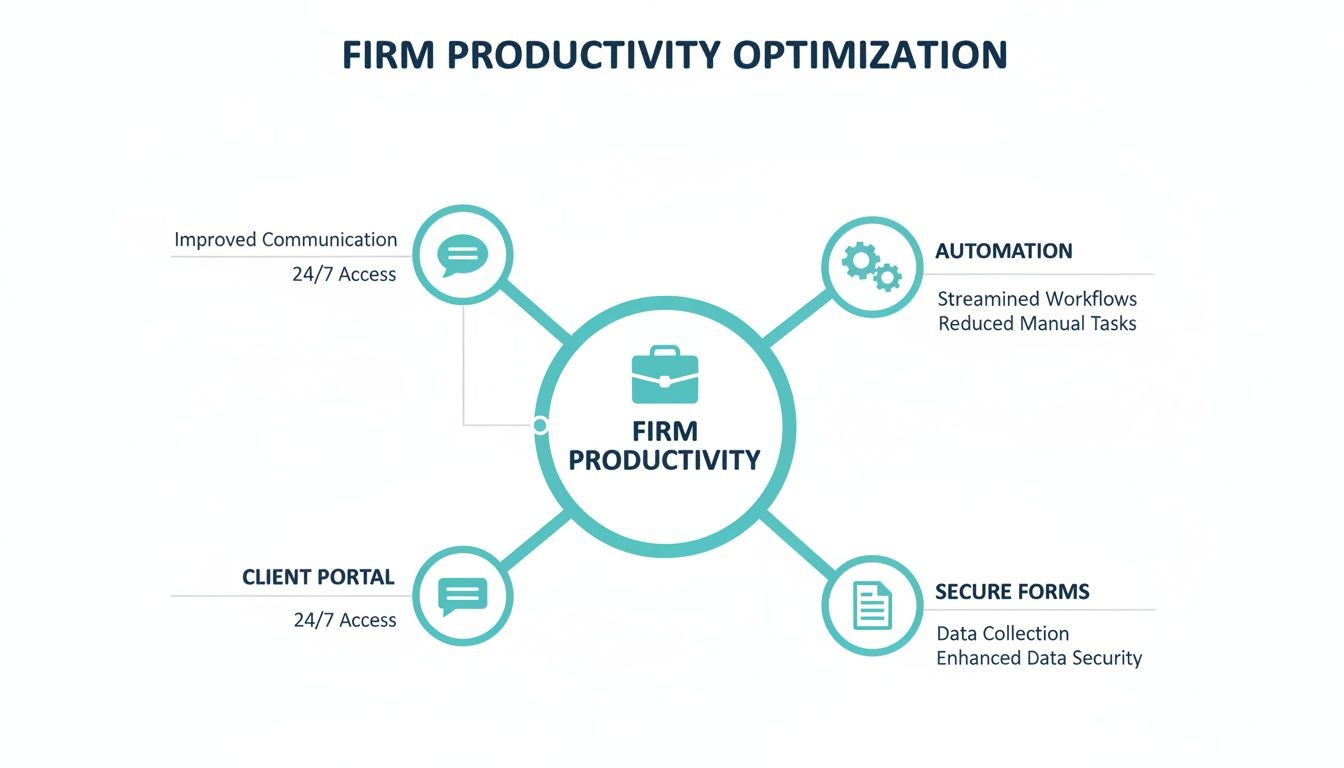
As you can see, connecting client portals, automation, and secure forms into a central hub creates a much more efficient and streamlined operation.
Keeping Your Team in Their Workflow
Here’s the most important part. Your team never has to leave their familiar software. There is no separate program to open, no new login to remember, and no extra inbox to monitor.
Imagine a paralegal working in a case file in Needles. They can send a client a secure message or assign them an intake form without ever clicking out of that screen.
When the client replies or fills out the form, that new information, the message, the document, the data, is automatically saved right back into that same case file in Needles.
The action and the client's response appear directly in the case file. This creates a single, complete, and chronological record of all communications without requiring any manual copy and pasting from your team.
This seamless flow of information is what makes integrated case management software so effective. It is all about eliminating administrative busywork, not creating more of it. For firms looking to connect multiple platforms, specialized CRM integration services can be invaluable in making sure all the data flows correctly.
Because this approach works within your existing systems, adoption is surprisingly fast and painless. It is an upgrade to your team's current workflow, not a disruption. You can explore our specific integrations to see exactly how we connect with different platforms.
By building on the foundation you already have, you add powerful new capabilities without the friction that usually comes with new tech. This is how modern firms boost efficiency and elevate client service at the same time.
Finding the Right Integrated Solution for Your Firm
Choosing new software for your firm is a huge decision, and frankly, it should be. The right platform can be a game changer, boosting your team's efficiency and improving client satisfaction. But the wrong one? It becomes a source of daily frustration, a money pit, and a drag on productivity. To navigate this, you need a solid game plan for evaluating your options.
This is about more than just ticking boxes on a feature list. It is about finding a true partner for your firm, a system that fits how you already work, solves your real world problems, and is ready to grow alongside you. A thoughtful evaluation process will help you see past the sales pitches and focus on what will genuinely make a difference for your staff and clients.
Does It Actually Integrate With Your Case Management System?
Let's start with the absolute deal breaker. If a so called "integrated" solution does not connect perfectly with your primary case management system, whether that is Needles, Neos, LawBase, or Litify, then it is not a solution at all. It is just another piece of software creating more work.
The whole point is to make your existing system better. Before you look at anything else, you have to confirm the software offers a deep, two way integration. This means data flows effortlessly in both directions. When a client uploads a document through a portal, it should appear in the case file instantly. When your team updates a case status, the client should see it right away. Anything less is a compromise you cannot afford.
How Seriously Do They Take Security and Compliance?
As a law firm, you are the guardian of your clients' most sensitive information. That is why security is not just a feature. It is an ethical and legal mandate. Any new software you bring into your firm has to be put under a microscope.
Dig into the provider's security practices. You should be asking tough questions and looking for:
- Rock Solid Encryption: Is all data encrypted, both when it is being sent and when it is stored?
- Secure Hosting: Where is the data physically (or virtually) stored? Is the environment compliant with industry standards?
- Granular Access Controls: Can you precisely control who sees what? This applies to your internal team just as much as it does to your clients.
A data breach can do irreparable harm to your firm's reputation and bottom line. Think of robust security as the foundation. Without it, nothing else matters.
Will Your Team and Clients Actually Use It?
The most feature packed software on the planet is worthless if your team hates using it. A system that is intuitive and easy to navigate is invaluable because it means people will adopt it quickly, and you will start seeing the benefits almost immediately.
The best integrated software should feel like a natural part of your workflow, not some clunky add on that your team has to wrestle with every day. The easier it is for your people and your clients to use, the more powerful it becomes.
This goes for your clients, too. If their portal is confusing or hard to access, they simply will not use it. You want a clean, simple interface that works flawlessly on a phone, a tablet, or a desktop. High adoption from both your staff and your clients is the clearest sign that you have made the right choice.
Can It Scale With You (Without Punishing You)?
Your firm is going to evolve, and your software needs to be able to keep up. When you are evaluating options, look at how the platform handles growth. But do not just stop at the technology. Scrutinize the pricing model. Too many firms get stuck in rigid, long term contracts that become a financial anchor as their needs shift.
A more modern and flexible approach, like the month to month, unlimited use model offered by CasePulse, puts you in control. This structure lets you scale up or down without getting hit with penalties, tying your costs directly to your firm's current reality. That kind of financial agility is a massive advantage in today's market.
What Happens When You Need Help?
When something goes wrong, and eventually, it will, the quality of customer support suddenly becomes the most important thing in the world. A slow or unhelpful support team can grind your operations to a halt. As you talk to vendors, ask them directly about their support. Is the team in the U.S.? What is a realistic response time?
Knowing you have a responsive, U.S. based team of experts on standby is a huge relief. It means that when you are in a pinch, you will be talking to someone who understands your problem and can solve it quickly. This kind of partnership is what separates a mere software vendor from a true technology partner and is key to getting the most out of your investment in integrated case management software.
Implementing Your New Software for Firm-Wide Adoption
Picking the right integrated case management software is just the start. The real challenge? Getting your team to actually use it. Even the most powerful technology gathers dust if it does not get adopted, so a thoughtful rollout plan is what separates a smart investment from another pricey subscription.
You need a practical playbook for managing this transition. By following a few key steps, you can get your people on board, build momentum, and make sure the new system delivers value from day one.

Designate an Internal Champion
Every successful tech rollout has a champion. This does not have to be your most senior partner. It just needs to be someone enthusiastic, respected, and willing to be the go to person for questions. Their job is to lead the initial training and keep the energy positive.
Think of them as the bridge between the software vendor and your staff. They translate technical features into real world benefits your team will care about. A little genuine excitement from a trusted colleague goes a long way.
Start with a Pilot Group
Do not go big bang. Before you push the software out to everyone, test the waters with a small pilot group. Grab a few tech savvy paralegals or attorneys who are generally open to new ideas and let them have at it.
This small scale test run is incredibly valuable. Your pilot group will:
- Find the best ways to apply the software to your firm’s unique workflows.
- Iron out any kinks or process hiccups in a low pressure setting.
- Create a set of best practices you can share with everyone else during the full launch.
This lets you refine your approach and build a solid foundation, which makes the firm wide rollout much, much smoother.
Develop Clear Communication Protocols
Uncertainty is the enemy of adoption. Your team needs to know exactly what to use and when to use it. That means setting up simple, clear communication rules right from the start.
For example, you might create a simple rule: "Use the client portal for non urgent status updates; call the client for sensitive news or strategy discussions." Clear guidelines remove the guesswork and help build new habits.
These protocols create consistency and show everyone how the new integrated case management software slots into their day to day work. The aim is to make the new way the easiest and most obvious choice. For a closer look at optimizing these processes, you can learn more about improving your firm's legal operations management.
Provide Hands-On Training
Watching a webinar is not training. People learn by doing. Your training sessions have to be hands on and focused on the real tasks your team performs every single day. This is where a partnership with a provider like CasePulse shines, as our team provides direct, practical support to get you started.
Walk your team through their common workflows, step by step, showing them precisely how the new software makes those tasks faster and less of a headache. When they experience the "aha!" moment for themselves, they will be sold.
Showcase Early Wins
Finally, you need to build momentum by celebrating the small victories. Did a client send an email raving about the new portal? Share it with the whole firm. Did a paralegal save an hour on medical summaries thanks to an automated form? Make sure everyone hears about it.
These early wins are powerful social proof. They show hesitant team members that the change is worth it and motivate them to get on board.
Frequently Asked Questions About Integrated Software
Making a big tech decision always comes with a lot of questions. That is a good thing. For law firms thinking about bringing in integrated case management software, we have found that the same few concerns pop up time and time again. Getting straight answers to these is the only way to feel confident about moving forward.
Let's walk through the three most common questions we hear from firms just like yours. Our goal here is to be completely transparent and address the real world practicalities of adding a new tool to your daily operations.
How Secure Is Our Client Data in an Integrated Portal?
This is, without a doubt, the first and most critical question. And it should be. Your firm is the guardian of incredibly sensitive client information, and protecting it is everything. The reality is that a well designed client portal pulls communication out of insecure email chains and into a secure, controlled environment built for legal work.
Real security is not just one thing. It is a series of layers working together. It starts with powerful data encryption for information both in transit (as it travels between your office and the client) and at rest (while it is being stored). Think of it as putting every message, document, and form submission into a digital safe that can not be cracked.
Security also comes down to control. You need to be able to dictate exactly who sees what. With strict access controls, you ensure only authorized staff and the right client can access a specific case file. That combination of airtight encryption and granular permissions is what makes a platform truly trustworthy.
Bottom line, a purpose built client portal is worlds more secure than relying on standard email. It gives you a protected, auditable space for every client interaction, shielding you from the kinds of cyber threats that target vulnerable inboxes every day.
How Long Does It Take to Get Started?
For any busy law firm, time is the most valuable resource. The last thing you need is a six month software rollout that grinds your practice to a halt. This is where a low friction tool like CasePulse really shines. Because it is designed to plug directly into the case management software your team already knows and uses, getting it set up is surprisingly fast.
You are not ripping out your core system or forcing everyone to learn a brand new platform from the ground up. You are simply adding a powerful new communication layer onto your existing foundation.
This approach means you can be up and running much faster than you would think. In fact, most firms start inviting clients to their new portal in about a week. Our hands on support team guides the whole process, making sure it is a smooth transition that does not disrupt your firm’s momentum.
Will Our Clients Actually Use a Client Portal?
This is the million dollar question, right? Because the most amazing technology is worthless if nobody uses it. The secret to getting clients on board is an intuitive, mobile friendly design. People manage their entire lives from their smartphones, and they expect interacting with their lawyer to be just as easy.
When a client portal is simple to access and navigate, it quickly becomes the path of least resistance for them to get updates or send you a document. No more phone tag. No more waiting anxiously for an email reply to a quick question. This instant connection to their case provides genuine peace of mind and builds a tremendous amount of trust.
Here is what really drives client adoption:
- Mobile First Design: It has to work perfectly on a phone. No exceptions.
- Simple Navigation: Clients need to find what they are looking for in a click or two. If it is confusing, they will give up.
- Obvious Value: When clients see that the portal saves them time and puts them in control, they will use it. It is that simple.
Get these things right, and clients do not just adopt the portal, they embrace it. It makes their lives easier, which boosts their overall satisfaction and frees your staff from the constant barrage of "just checking in" calls.
Ready to see how a purpose-built client portal can transform your firm's efficiency and client service? CasePulse integrates seamlessly with your existing case management system to automate communication and streamline your workflow. Get started with CasePulse today.