
 CasePulse
You can tell a claims process is broken long before anyone says it out loud. The phone keeps ringing with the same question, the adjuster is waiting on a document, the paralegal is copying status notes into three different places, and the client still doesn't know whether anything has changed. In a plaintiff personal injury firm, that churn sits on top of everything else, so a missing update feels like a missed promise.
That pressure is not small or isolated. The U.S. health-care claims data ecosystem includes millions of doctor appointments, bills, and insurance records, and the National Library of Medicine notes that claims databases work because of that large sample size. In another market signal, Premier's 2023 survey found claims adjudication cost U.S. providers more than $25.7 billion, up 23% from $19.7 billion the prior year, which is a useful reminder that claims work is infrastructure, not clerical noise. For firms trying to reduce follow-up calls and keep files moving, this is why a good resource on data quality incidents in insurance is worth bookmarking before any software review starts.
Why Insurance Claim Systems Matter for Law Firms
A busy PI office usually doesn't fail because staff don't care. It fails because the work arrives in fragments, one medical bill in one inbox, one adjuster note in another, one voicemail asking for an update, and a client who's understandably frustrated that nobody can tell them what happened at 3:14 p.m. yesterday. A strong insurance claim system matters because it turns those fragments into a single operational record that people can work from.
The insurance side of the house is built for volume. In homeowners insurance, property damage including theft accounted for 97.3% of claims in 2023, and about one in 18 insured homes had a claim overall. Triple-I also reports about one in 36 insured homes had a wind- or hail-related property damage claim, about one in 67 had a water-damage or freezing claim, and about one in 430 had a fire-and-lightning claim, which shows how claims systems have to handle frequent, standardized events as well as rarer losses. Those ratios matter to law firms because the client experience often mirrors the same pressure, lots of routine status checks, occasional complex exceptions, and constant need for clean intake.
What that looks like in a plaintiff firm
The practical problem is not just adjudication. It's the fact that legal teams spend too much time translating insurer status into plain language for clients who only want to know whether the claim is moving. The internal burden gets heavier when claim intake, evidence, and communication live in separate tools, because every answer becomes a scavenger hunt.
Practical rule: if staff are answering the same claim-status question more than once, the system is already doing too little for communication.
There's also a trust issue. Which means the system has to support not only routing and document capture, but also clear updates and a path for human escalation when the claim is messy, disputed, or stalled. That's why claims infrastructure is a front-line business issue for law firms, not an operations side project.
What an Insurance Claim System Really Is
An insurance claim system is the operational record that tracks a claim from intake through resolution. In practice, it receives the loss, routes it through checkpoints, and preserves visibility at each step so staff are not guessing where the file stands.
That flow matters because claims do not move as one continuous task. A claim usually passes through First Notice of Loss, investigation, adjudication, reserve setting, settlement approval, and payment disbursement, and each stage works better when it is tracked on its own. Systems built around asynchronous queues also separate submission from background processing, which helps keep notifications, status updates, and other downstream work from clogging the front end when volume rises.
A clean boundary between claims and generic case management
Generic case management organizes legal work. A claims system tracks the loss itself, including status changes, evidence, and the payment logic a carrier uses to decide what happens next. That distinction matters for plaintiff firms, because the firm may need to monitor a claim closely without owning every internal insurer step.
The cleanest way to explain the split is straightforward. A claims system is the operational record of the insurance event, while legal case tools organize the firm's work around that event. For a broader comparison of firm-side workflow tools, the guide to PI case management tools is useful context, and it helps separate what belongs in the firm's legal stack from what belongs in the insurer-facing workflow.
Why event-driven design matters
The better systems do not force every action through a single rigid path. They use idempotent APIs for submission and status changes, a message queue for downstream work, and one source of truth for claim state so adjusters, policy systems, and communication channels stay aligned. That design keeps intake separate from decisioning and payment logic.
In practice, the system behaves more like a routing center than a static database. One task can still be waiting while the claim moves forward, and staff can check status without re-entering the same details in multiple places. For law firms, that same structure is why a client portal such as CasePulse can complement the insurer's claim system, it gives the firm a clearer way to share updates, collect documents, and reduce the repetitive status calls that drain staff time.
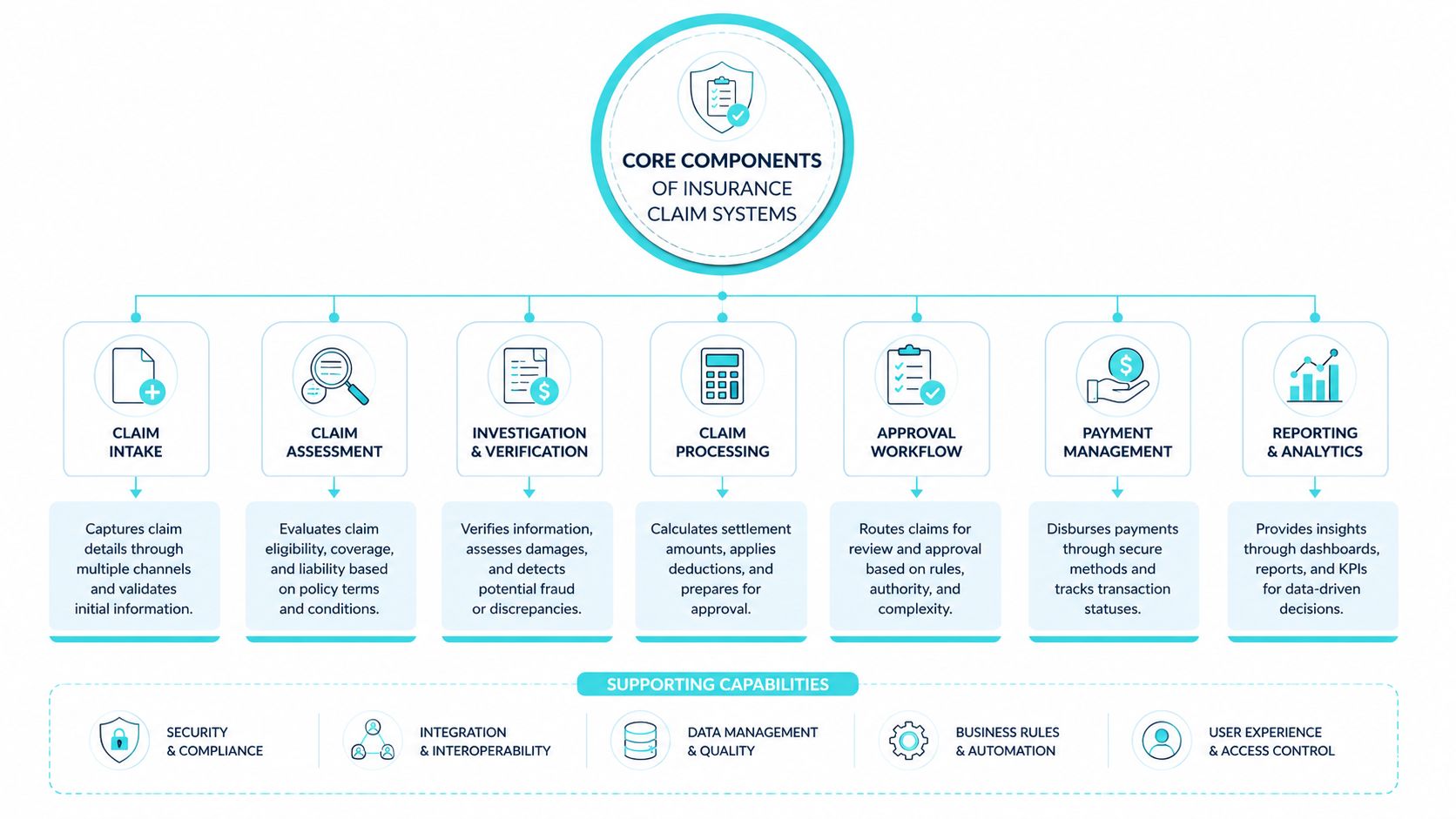
Core Components of Insurance Claim Systems
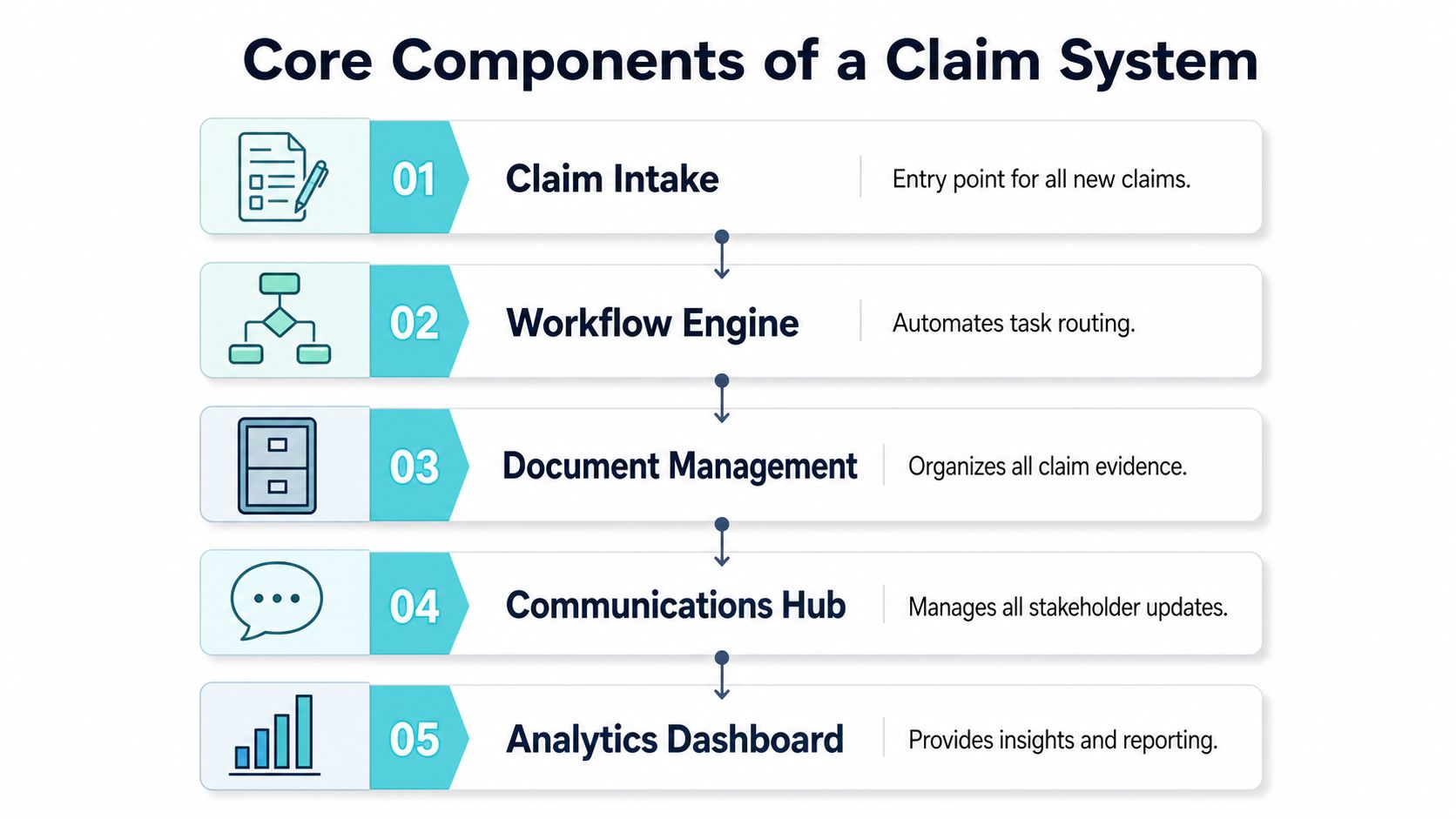
A claims platform works best when the moving parts fit together. Intake captures the loss, the workflow engine routes the work, documents support the file, communications keep people informed, and analytics show where the process is slowing down. If one part is weak, staff usually make up the gap with manual work, and that is where delays and inconsistency start.
Intake and workflow
Intake should capture the claim once, with enough validation that staff are not chasing missing basics later. In a claims architecture, that intake feeds a workflow engine that moves work through FNOL, investigation, adjudication, and payment-related steps without forcing a human to carry every task by hand. For a useful external comparison on process design, workflow automation and browse FaxZen's document management guide show the same discipline around intake, routing, and document handling that mature claims operations rely on.
The workflow layer is where modular design pays off. A well-built system should support asynchronous task handling, status tracking, and stakeholder updates, because those controls keep intake, decisioning, and payout from collapsing into one fragile queue. In plaintiff PI firms, that matters because the legal team often needs visibility into insurer movement without turning the firm's own portal into a duplicate claims system. A client portal like CasePulse can sit alongside the insurer workflow, collect updates, and reduce the repetitive status calls that drain staff time.
Claims work slows down when every exception blocks the file. It runs better when exceptions are isolated and the normal path keeps moving.
Documents, communication, and analytics
Document handling matters because claims data rarely arrives clean. High-performing platforms ingest structured claim records plus photos, adjuster notes, and other unstructured evidence, then normalize them into layered stores for routing and analytics. Databricks describes that approach with Auto Loader into Delta Lake and a medallion model, which shows why raw files alone are not enough for dependable claim decisions.
Communications should not be treated as an add-on. A claim system needs visible status updates and a channel structure that supports both self-service and human escalation. That is what keeps the claims file from becoming a black box, because a client who can see what happened next is far less likely to call for the same explanation again.
Analytics closes the loop. Once the data is standardized, teams can run dashboards and AI-assisted triage on curated records instead of raw operational files, which improves routing, fraud-pattern detection, and business-rule enforcement. For a law firm, that means management can see where clients are waiting, where documents are missing, and where staff time is getting eaten by avoidable follow-up.
Law Firm Benefits and KPIs from Claim Systems
The value of a claims platform shows up in operations before it shows up in the demo. If staff stop retyping the same facts, if clients stop calling for every tiny status change, and if supervisors can see bottlenecks without asking three people for an update, the system is doing real work. The point is to measure that improvement with a small set of KPIs instead of relying on impressions.
| KPI | Why It Matters |
|---|---|
| Time to first client update | Shows whether the firm is giving claimants early visibility instead of letting anxiety build |
| Status call volume | Reveals whether self-service and proactive communication are reducing avoidable inbound calls |
| Document completeness at intake | Tells you whether the file starts with enough information to avoid rework later |
| Claim handoff delays | Highlights where tasks stall between intake, review, and follow-up |
| Data consistency across tools | Confirms whether the same claim facts stay aligned across the firm's systems |
| Exception rate | Shows how often the team needs human review instead of standard routing |
| Dashboard freshness | Indicates whether leaders are working from current information or stale reports |
The analytics payoff is real when the data pipeline is unified. Databricks describes claims architectures that ingest structured records and unstructured evidence into governed layers, which allows real-time dashboards and AI-assisted triage on curated datasets. For a law firm, the operational version of that idea is simple, the firm can act on the same canonical claim record instead of juggling different versions of the truth.
How to baseline the numbers
Start with one month of current-state data. Count how often clients call for status, how often staff have to search for missing documents, and how many times a file gets reassigned because the next step wasn't obvious. Then compare that baseline after the system is live.
Practical rule: don't judge a claims system on feature count. Judge it on whether your team can answer client questions with less digging.
The best KPI set is the one the managing partner will review. If the dashboard tells a clear story about client communication, file readiness, and staff time, the platform can justify itself without hype.
Integrating and Securing Insurance Claim Systems
A claims platform only helps if it sits inside the firm's existing workflow rather than around it. That means the integration question comes first, because staff will not adopt a tool that makes them leave Needles, Neos, LawBase, or Litify every time they need to check a file. The practical target is a system that complements the case platform, not one that tries to replace it.
The Rutgers claims process material is a good reminder that the workflow also has legal duties attached to it. It says insurers must promptly, fairly, and objectively process, investigate, evaluate, and resolve claims, and after initiation they must provide policyholders with information about the claim process and rights, plus a copy of the claim file on request. That standard matters for design because the system has to make disclosure, access, and status information easy to produce instead of hiding it in someone's inbox.
Integration patterns that actually work
The cleanest pattern is usually sync by event, not manual export. A claim update should flow into the case record, while core case details should be available to the claims workflow without duplicate entry. That reduces rekeying, which is where a lot of avoidable error creeps in.
Security has to be treated as part of the workflow, not a separate checklist. For a deeper operational view on the controls that matter, the internal cybersecurity for law firms resource is a useful reference point. The main issue is access discipline, who can view, edit, and export claim-related data, and how the system records those actions.
Questions to ask before signing
- Can it integrate without forcing a rip-and-replace? If the answer is no, adoption will be slow and expensive.
- Can staff stay in their current case tool? If not, the platform will create a second work queue.
- Can it show a complete claim history on demand? That matters for both client communication and internal accountability.
- Can it support role-based access and auditability? If it cannot, security risk rises fast.
- Can it preserve the source of truth across systems? If not, your team will waste time reconciling mismatched records.
The best implementations make compliance and access control invisible to the user while keeping them obvious to administrators. That combination is what keeps the firm efficient without making it sloppy.
How CasePulse Enhances Claim System Workflows
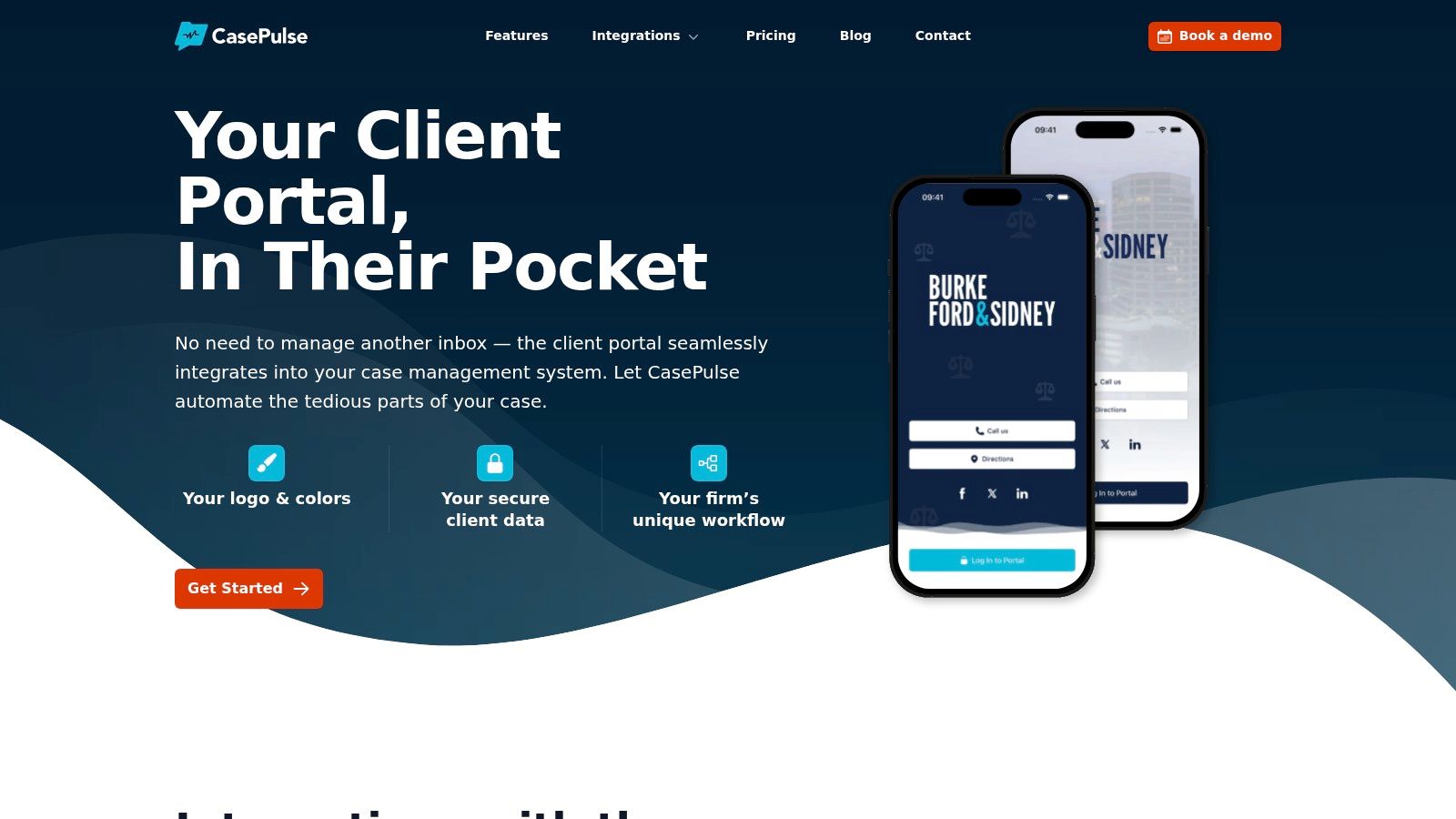
A client portal doesn't replace an insurance claim system. It makes the system usable for the people who keep calling, emailing, and asking for the same answer in different ways. That matters in PI work because the client usually doesn't care which internal queue the file is in, they care whether they can see progress without waiting on staff.
Consider a common file. The firm opens the matter in its case platform, the claim status changes after a carrier response, and the client wants to know whether the next step has happened. Instead of handing that request to a paralegal, a portal can expose status, collect a message, and let the client upload a needed form from any device while staff stay in the existing workflow.
The communication challenge is real. Industry commentary repeatedly points out that claims systems need to support different communication channels and a hybrid model, not digital-only assumptions, because claimants still need visible updates and human escalation for complex issues. That aligns with what law firms see every day, not every client wants another generic email, but almost every client wants clarity.
What the portal changes operationally
The biggest shift is not flashy. It's fewer status calls, fewer scattered messages, and fewer staff interruptions for routine tasks that can be handled through self-service. When the portal is tied to the same file the team already works in, it gives clients a window into progress without forcing the firm to manage another inbox.
It also improves the quality of the interaction. A client who can submit a form, ask a question, or check status on their own schedule is less likely to feel left out of the process. That's a better communication model than endless phone tag, and it supports the same basic claim-system goal, keep the record current and the claimant informed.
Vendor Selection and Implementation Checklist
The easiest vendor mistake is buying for features and discovering later that staff still have to work around the tool. Start with integration depth, because if the platform cannot connect cleanly to your current case system, everything else becomes harder to sustain. Then look at communication workflow, security, support quality, and how quickly the firm can pilot the tool with real clients.
A practical checklist helps keep the evaluation honest. The internal law firm client management software resource is useful here because it frames the client-facing layer as part of the firm's operating system, not a separate gadget.
What to require from a vendor
- Integration with current case tools: Ask how the system works with Needles, Neos, LawBase, or Litify without forcing the team into a second workspace.
- Client self-service that stays simple: The portal should let clients check status, message the team, share files, and complete forms without training.
- Hands-on onboarding support: Ask who helps map the workflow and whether a US-based team will be available during launch.
- A short pilot path: The firm should be able to invite a small group of clients first, then expand once the process is stable.
- Clear contract terms: Avoid long lock-ins that make it hard to adjust if the implementation doesn't fit the firm's actual workflow.
- Audit-friendly messaging and file handling: Make sure the system keeps the communication record tied to the matter.
A one-week pilot is a smart test when the vendor has low-friction setup support. It forces the firm to see whether the portal reduces calls and whether clients understand how to use it without a lot of handholding. If staff still spend their day translating the tool, the tool is not ready.
The best decision criterion is simple, does the platform make the client experience clearer while leaving staff inside the systems they already trust? If the answer is yes, the firm is likely looking at a real workflow improvement instead of another disconnected app.
If your firm wants a cleaner client communication layer around insurance claims, CasePulse is built for exactly that kind of workflow. It gives clients 24/7 status access, messaging, file sharing, and forms while your team keeps working inside your existing case management system. Visit CasePulse to see how a portal can simplify claims communication without creating another inbox.