
 CasePulse
 A paralegal opens the inbox at 8:07 a.m. There are messages from a client asking whether the demand package went out, a provider asking for another authorization, opposing counsel sending a large attachment, and three internal forwards with subject lines that all start with “RE:” and say almost nothing useful. By 10:30, that same paralegal is still chasing one missing PDF and answering calls from clients who only want a status update.
That workflow is common in plaintiff firms and other busy practices. It's also where security problems start. Files move through email because it's familiar. Staff download attachments locally because it's faster in the moment. Someone shares a folder through a consumer tool because a deadline is close. None of that feels dramatic while it's happening. It just feels like work.
The problem is that email based file exchange creates two failures at once. It wastes staff time, and it weakens control over client information. Secure file sharing for law firms isn't just a security purchase. It's an operational fix. The firms that get this right stop treating file exchange as a side task and build it into the system their staff already use all day.
Your Firm's File Sharing Is Broken Here Is How to Fix It
The breakdown usually starts with good intentions. A case manager emails a medical records request to a client because that's the fastest way to reach them. The client replies from a phone, forgets an attachment, then sends photos of paperwork in a second email. Later, another staff member asks whether the signed form ever came in, but the answer is buried in a thread no one can find quickly.
Meanwhile, the phones keep ringing.
Clients call because they don't know whether anything is happening. Staff call providers because they can't tell which version of a document is final. Lawyers forward attachments internally because they don't trust that everyone has the latest copy. The firm ends up managing documents across inboxes, desktops, and generic file links. That's not a system. It's a patchwork.
What broken looks like in practice
A file sharing process is broken when staff have to do any of the following just to move one document:
- Search multiple inboxes: One person has the client's upload, another has the latest signed copy, and nobody is sure which email matters.
- Answer routine status calls manually: Clients call because they have no consistent place to check updates or send requested items.
- Recreate context from scratch: A team member opening a message chain has to piece together what happened, when it happened, and who has the file now.
- Use tools outside the main workflow: Staff leave their case system, log into another app, then try to keep both systems aligned by memory.
Practical rule: If your team has to manage a second inbox to share files securely, adoption will slip and shortcuts will come back.
The fix is not “buy the most secure tool and hope people use it.” The fix is to put secure sharing where the work already happens. That means choosing a system that protects files, records activity, and lets staff send, receive, and track documents without leaving their case workflow. Security matters. But in day to day operations, efficiency is what determines whether security gets followed.
Understanding the Legal and Security Mandates
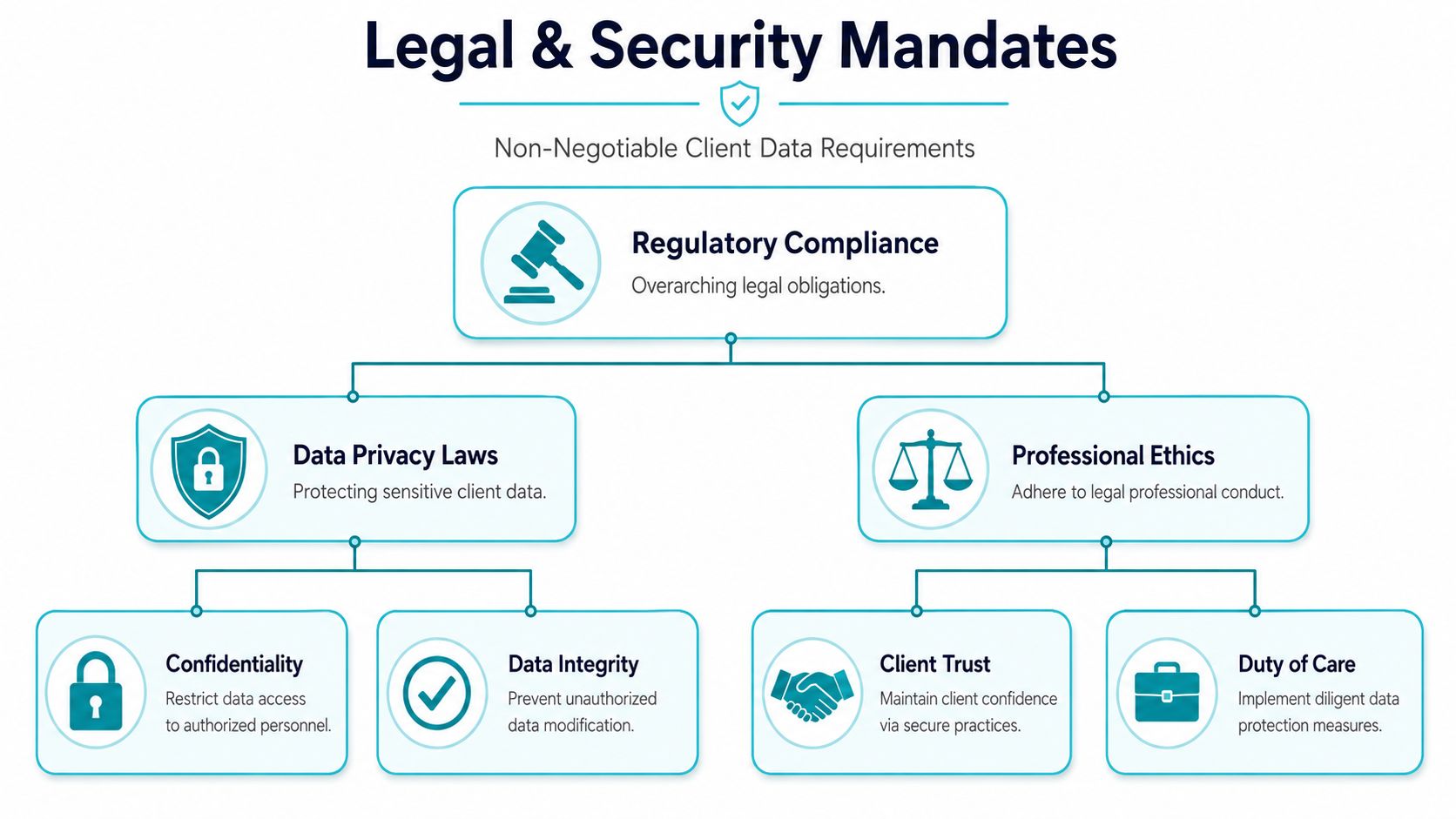
Law firms don't get to treat file sharing as a convenience feature. Client files carry confidentiality obligations, and digital handling has to support those obligations the same way locked file rooms once did. The difference is that digital mistakes happen faster, spread wider, and are harder to reverse.
One fact should reset the conversation. Over 90% of legal organizations reported at least one data breach in the past five years, often tied to insecure methods like email, according to Thomson Reuters on secure file sharing risks for law firms. That's why baseline protections are non negotiable, not optional upgrades.
What the technical requirements actually mean
The two encryption standards firms should expect are AES-256 for data at rest and TLS for data in transit. The easiest way to explain the difference is this:
- AES-256 at rest: Think of files stored inside a locked safe when they're sitting on the platform.
- TLS in transit: Think of those files traveling inside an armored vehicle while moving between users and the system.
If a vendor can't clearly explain both, keep looking.
The same source also points out that SOC 2 Type II and ISO 27001 matter because they show the vendor's controls have been independently audited. Support for GDPR and HIPAA also matters when your client base includes healthcare related records or international data issues. These aren't abstract badges. They help you separate a polished sales demo from a platform that can support real legal obligations.
Control matters after the file is sent
A secure system has to preserve control after sharing. That's where granular access controls come in. Law firms need settings such as view only, no print, or no download per user. Without that level of control, a document is effectively outside the firm's hands the moment it leaves the sender.
You also need a clear record of who handled what. Chain of custody isn't just trial language. It affects day to day document management, especially when firms need to show how a file was shared, accessed, or restricted over time. For a broader look at operational safeguards around legal data, law firm cybersecurity controls are worth reviewing alongside your file sharing standards.
Confidentiality can be lost through ordinary habits. Most breaches don't start with dramatic hacking. They start with routine shortcuts.
Security policy is bigger than cloud sharing
Firms often focus on software and overlook the rest of the data lifecycle. If your office replaces laptops, printers, phones, or storage devices, disposal practices matter too. The same confidentiality logic that applies to file sharing should apply to retired hardware, which is why many firms also spend time vetting IT disposal vendors for law firms before decommissioning old equipment.
What works is simple in principle. Pick tools with audited security controls, strong encryption, precise permissions, and records of user activity. What doesn't work is assuming your current mix of email attachments and generic links will somehow satisfy legal, ethical, and client expectations because “everyone uses them.”
Comparing Common File Sharing Solutions for Law Firms
Most firms don't choose one method on purpose. They accumulate methods. Email for clients. Shared links for experts. A folder platform for internal files. Maybe SFTP for one vendor. That mix usually reflects history, not strategy.
The easiest way to evaluate secure file sharing for law firms is to compare each option against the same questions. Does it protect confidentiality? Can clients use it without friction? Does it save staff time or create more admin work? Can the firm prove what happened to a file after sharing?
The methods firms use most
Email attachments remain the default in many offices because they're familiar. They're also the hardest to control once a file leaves your system. Someone forwards it, downloads it, stores it locally, or replies with a different version. Now the firm has less visibility and more confusion.
Consumer cloud tools improve convenience, but they often fall short where law firms need precision. A personal Dropbox style workflow may be easy to start, but that doesn't make it a sound process for handling sensitive client records, especially when the team needs consistent controls and reliable activity history.
Dedicated encrypted email and SFTP can strengthen transmission security. The trade off is usability. Clients may struggle with setup, passwords, or retrieval steps. Staff often treat these tools as one more place to check. That matters because a secure process people avoid is not a durable process.
By contrast, firms are moving toward portal based sharing for ongoing matters. According to this overview of secure client portals and legal data rooms, branded secure portals give clients an always available place to exchange files and create robust audit trails that record who sent what to whom and when. That's why they fit long running litigation, M&A, and other document heavy matters much better than scattered attachments.
Comparison of Law Firm File Sharing Methods
| Method | Security Level | Client Experience | Firm Efficiency | Best For |
|---|---|---|---|---|
| Email attachments | Low control after sending | Familiar, but chaotic over time | Poor for tracking and version control | Quick one off exchanges with low sensitivity, though still risky |
| Consumer cloud storage | Better than email in some cases, but often weak on legal controls | Usually easy if the client already knows the tool | Mixed, depends on discipline and setup | Informal sharing where legal auditability is not central |
| Encrypted email or SFTP | Stronger transmission security | Often clunky for non technical users | Moderate to low because staff manage another process | Limited high sensitivity exchanges |
| Secure client portal | Built for controlled sharing and monitoring | Centralized and consistent | Strong, especially for repeated exchanges | Ongoing client matters and collaboration |
Trade offs that matter in real firms
The issue isn't whether a method can move a file. Almost anything can do that. The issue is whether it supports repeatable work without forcing staff to improvise. Email fails because it decentralizes information. SFTP often fails because clients don't want to use it. Consumer tools fail because ease of access can come at the expense of legal grade controls.
One more consideration is system fit. If you're evaluating adjacent tools and document workflows, firms often also review broader software stacks at the same time. This roundup of software options law firms compare is useful context, but the key question remains narrower here. Can your chosen sharing method protect documents and reduce staff effort at the same time?
The best sharing method is the one your staff will use consistently under deadline pressure, not the one that looks strongest in a vendor checklist.
Must Have Security Features to Protect Your Firm
Once a firm moves past email and generic links, the next mistake is buying based on branding alone. Secure file sharing for law firms should be judged feature by feature. If the controls are weak, the label on the platform doesn't matter.

The short list that actually matters
Start with multi-factor authentication, link expiration, and audit logs. According to guidance on secure sharing for lawyers, firms using MFA and audit logging have 60% fewer successful unauthorized access attempts. That number tracks with what practitioners see in the field. Password only access leaves too much room for reused credentials and account takeover.
Then look at file level controls. Law firms need the ability to set permissions by user and by matter. If you can't restrict viewing, printing, or downloading where needed, you're relying on the recipient's restraint instead of the system's controls.
What each feature prevents
- MFA: Stops stolen passwords from being enough on their own. If an employee credential is exposed, the second factor blocks a large share of opportunistic attacks.
- Link expiration: Prevents old shares from staying live long after the matter changed. This is especially important when temporary access should end automatically.
- Audit logs: Create an immutable record of access, download, and modification activity. That helps with internal investigations and external proof.
- Granular permissions: Limit what each recipient can do with a file. Not every user should have the same rights.
- Encryption in storage and transfer: Protects documents both while stored and while moving through the system.
A practical example helps. If opposing counsel claims they never received a discovery set, a strong audit log can show whether the file was delivered, opened, downloaded, or left untouched. That doesn't solve every dispute, but it gives the firm a documented timeline instead of guesswork.
Questions to ask vendors before you sign
Ask direct questions and listen for direct answers:
- Can permissions be set at the user level? Not just by folder, and not just all or nothing.
- Do share links expire automatically? Manual cleanup gets missed.
- What exactly appears in the audit log? Access only, or also downloads and changes?
- Is MFA available for staff and outside users? Client facing gaps matter.
- How hard is it to revoke access immediately? Fast revocation matters in active cases.
If your broader security stack includes Microsoft tools, it also helps to understand where platform security and productivity licensing overlap. This overview of Microsoft 365 E5 business value can help firms think through that relationship without treating file sharing as a standalone island.
Buy for enforceable controls, not for promised behavior. People forget. Systems shouldn't.
The Power of Integrated Client Portals
Security conversations often stop too early. They focus on encryption, MFA, and audit trails, then ignore the operational reality inside the firm. That's where many implementations fail. If staff have to leave their case system, check another portal manually, and monitor a separate inbox, they'll drift back to email under pressure.
That workflow gap matters more than many firms realize. Clio's discussion of secure file sharing for law firms highlights that 68% of PI firms still use email for client updates, leading to a 40% increase in inbound call volume, and that portals integrated with systems like Needles or Neos can reduce administrative overhead by up to 35% through automated follow ups. Those numbers point to the underlying issue. Security only sticks when it reduces friction instead of adding it.
Why the second inbox kills adoption
In many firms, the secure portal itself isn't the problem. The problem is that staff have to manage it separately from the case management system where they already live. That creates duplicate work:
- Staff check email and the portal separately
- Messages need to be copied into case notes
- Document requests get tracked outside the matter record
- Follow ups depend on memory or manual reminders
That model doesn't scale well in PI, mass tort, employment, or any practice with high client communication volume. It also creates blind spots because activity lives in multiple places.
Integration changes behavior
When the portal is tied directly to the case management workflow, file sharing stops being a detached administrative task. It becomes part of normal case handling. Staff can request records, receive uploads, send updates, and keep the matter current without changing systems.
That's the operational win. The security win follows from it. People use the secure path because it's the easiest path.
A strong integrated portal should support:
- Client access to files and updates in one place
- Messaging tied to the matter record
- Forms and follow ups without side systems
- A workflow that keeps staff inside Needles, Neos, Litify, LawBase, or similar platforms
For firms evaluating this approach, secure portal options are easiest to judge by one standard: do they remove work from staff, or just relocate it? If you want to see what that category looks like in practice, review secure client portal software for law firms with that question in mind.
If the secure workflow takes more effort than email, email will come back.
Implementing a Secure File Sharing System
A bad rollout can sink a good platform. The firms that succeed don't start with features. They start with process, ownership, and adoption.
Step 1 through Step 3
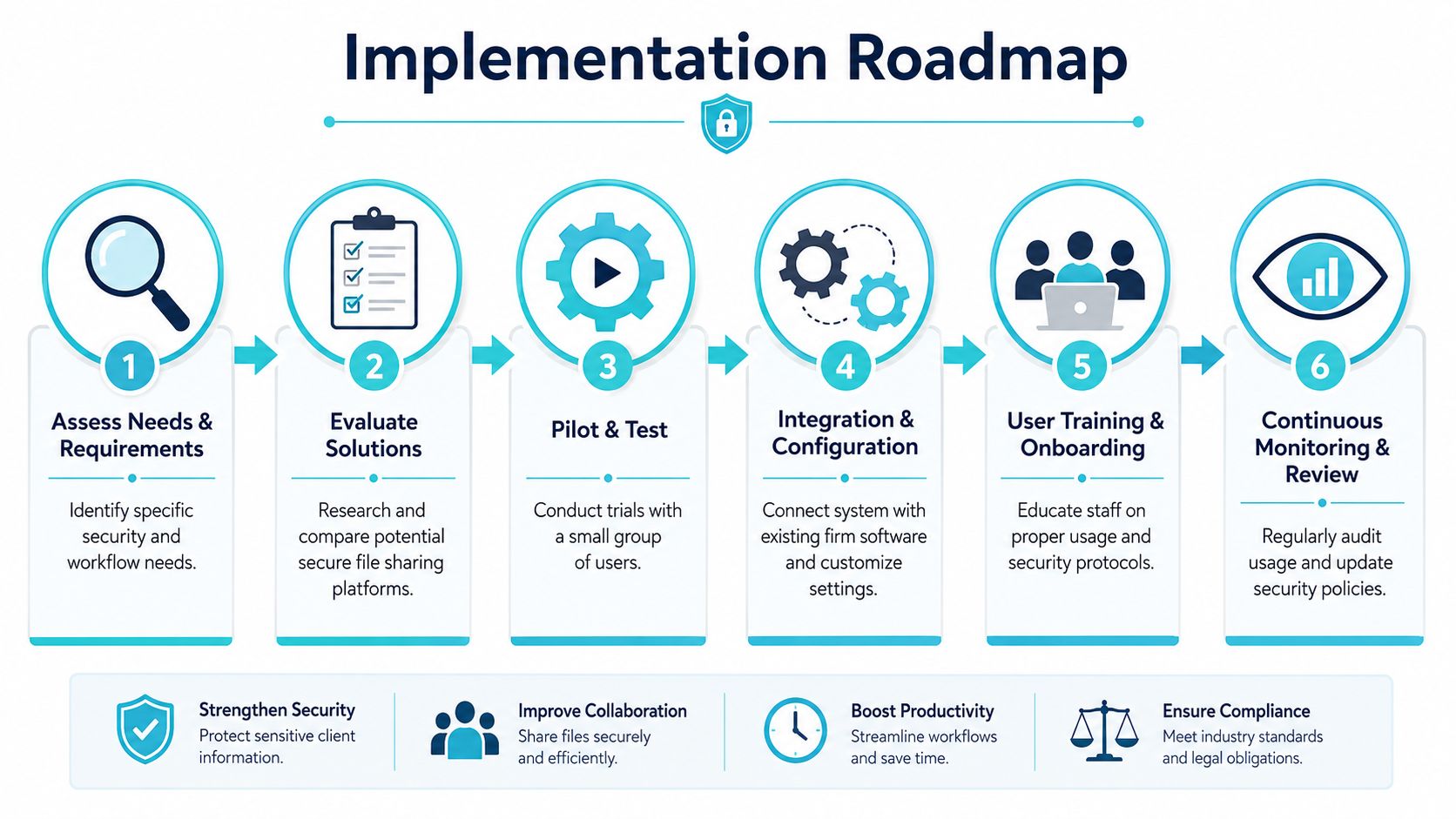
Set a firm policy first. Decide when staff may use email, when they must use the secure system, who can create external shares, and how permissions should be assigned. Without a policy, people improvise.
Evaluate vendors against your real workflow. Don't just ask whether the platform is secure. Ask whether staff can use it without creating duplicate work. Put common tasks on the test list, such as requesting records, sending discovery, collecting signed forms, and sharing updates with clients.
Pilot with one team before firm wide rollout. Choose a practice group with enough volume to expose problems quickly. Watch where users hesitate. If staff still fall back to email during the pilot, the issue is usually workflow design, not attitude.
Step 4 through Step 6
Configure permissions and integrations carefully. User roles, share settings, and matter level access should match how your firm operates. Keep access tight by default. Open up only where there's a clear reason.
Train staff on the why, not just the clicks. They need to understand how the system protects client information and saves time. Training that focuses only on button sequences won't hold when real workload pressure hits.
Onboard clients with a simple script. Tell them where to log in, what they can do there, and why the firm wants files sent that way instead of by email. Keep the instructions short. If the first experience feels cumbersome, clients will revert to old habits.
A practical rollout checklist
- Name an owner: One person should be responsible for adoption, issue tracking, and follow through.
- Measure exceptions: Track where staff still use email or ad hoc links, then fix the cause.
- Use templates: Standardize messages that invite clients, request uploads, and explain the new process.
- Review activity regularly: Audit logs should be checked, not just stored.
The firms that get results treat implementation as an operations project, not just an IT task. That mindset changes everything. It keeps security tied to the daily work of serving clients, moving cases forward, and reducing the noise that keeps staff stuck in reactive mode.
CasePulse helps law firms replace email driven file exchange with a secure client portal that works inside the case management systems teams already use. If your firm wants to reduce call volume, automate routine follow ups, and stop forcing staff to manage another inbox, take a look at CasePulse.