
 CasePulse
 Most firms looking for software for legal operations aren't starting from a blank slate. They already have a case management system. They already have staff habits, intake procedures, document workflows, and a steady stream of client calls asking the same questions.
That's usually the actual problem.
A managing partner may think the firm needs a bigger platform, more AI, or a full systems overhaul. In practice, the bigger drag on profitability is often simpler. Staff spend too much time answering status questions, chasing forms, re-sending links, and moving information between tools that don't fit together cleanly. Clients feel that friction too. They wait for updates, wonder whether anyone saw their documents, and call because calling feels faster than the digital options they've been given.
The strongest software decisions usually come from fixing that daily friction first. In many firms, the right move isn't ripping out the existing system. It's adding the missing layer that improves communication, self service, and workflow continuity without forcing lawyers and staff to relearn how the office runs.
The Modern Legal Client Communication Challenge
The phone starts ringing at 9 a.m. A client wants a case update. Another needs a document link resent. Someone else wants to know whether their forms were received. None of these calls are unusual, and that's the problem. They are routine, repetitive, and expensive in staff time.
Most broad conversations about software for legal teams focus on research platforms, document tools, or full practice management suites. Those categories matter, but they often miss the operational choke point sitting in front of the firm every day. For many firms, the highest value tool is the one that improves client facing communication and self service, especially when the firm already has a case management platform in place.
Why communication turns into overhead
Independent guidance on remote legal service delivery treats practical tools such as chat, file sharing, video, and accessible web based access as core service capabilities, not extras, and it also notes that two thirds of people who need legal help cannot access it in one estimate from the same guidance (remote legal service delivery guidance). That matters inside a law firm because access problems don't just exist at the system level. They show up in small, daily moments when a client can't get basic information easily.
When firms don't offer simple digital access, clients default to the phone. Staff then become the human bridge for every minor interaction.
That has a direct operational cost:
- Status requests pile up because clients have no easy place to check what happened last.
- Documents stall matters when clients must print, scan, email, or physically drop off paperwork.
- Administrative staff become traffic controllers instead of focusing on work that moves a file forward.
- Lawyers get interrupted for issues that should be handled through a structured client workflow.
Practical rule: If clients have to call to learn what they could have checked securely on their own, your software stack is creating labor.
What most firms actually need
The overlooked opportunity isn't another giant platform. It's a tool that closes the communication gap without pulling staff out of the system they already use.
That usually means a few things working together:
- Secure messaging so clients stop using scattered email chains
- File sharing that doesn't depend on ad hoc attachments
- Web based access that works from any device
- Structured forms and reminders that reduce chasing and follow up
The best software for legal work isn't always the broadest product. Often it's the product that removes the most repeatable friction from the firm's day.
Navigating the Legal Software Landscape
Legal software got here through a long shift from basic record keeping to connected workflows. Industry guidance now describes case management software as the operational core that unifies documents, communication, tasks, and billing, while other tools are increasingly built to connect to that core rather than replace it (overview of common law firm software categories).
That's the framework I'd use in a buyer meeting. Think of your case management system as the workbench in the shop. Everything else should either sit on that bench cleanly or plug into it without slowing your team down.

The core categories that matter
Here's the plain English version of the situation.
| Category | What it does in practice |
|---|---|
| Practice management | Organizes matters, contacts, tasks, calendars, notes, and often billing |
| Document management | Stores, shares, and controls access to documents |
| Legal research | Helps attorneys find law, authorities, and related materials |
| E discovery | Handles collection and review of electronic evidence |
| Client communication | Supports status visibility, messaging, form collection, and file exchange |
A firm evaluating legal case management software options should first decide which category is the true bottleneck. Many firms assume the answer is practice management because that's the biggest system in the office. Often the actual bottleneck is client communication layered on top of practice management.
Why rip and replace usually disappoints
Partners often get sold on the idea that one big system will solve everything. In reality, replacing the central platform is one of the highest friction technology projects a law firm can take on. It affects intake, training, billing habits, reporting, staff confidence, and attorney compliance all at once.
That doesn't mean firms should never replace a platform. It means they should only do it when the current system is structurally failing the business.
In many firms, the better path looks more like this:
- Keep the existing case management system if staff already rely on it daily.
- Identify the gap causing the most wasted time.
- Add a focused tool that solves that gap while fitting into the existing workflow.
- Measure workflow relief, not just feature availability.
A stable workbench with the right attachments usually beats rebuilding the whole shop while clients are still active.
How to think about category fit
If your lawyers can't find information, your issue may be document management or search.
If your intake process is inconsistent, forms and workflow tools may matter more.
If your paralegals spend half their day sending updates, explaining next steps, and tracking missing items, the high value category is probably client communication software integrated with the case system you already have.
That's where many firms find the fastest operational return, not because communication is glamorous, but because it touches every active matter.
Essential Features for a Modern Client Experience
The legal software market has moved toward automation and continuous client service workflows, which reflects demand for tools that can handle large volumes of matters and communications more efficiently (legal analytics and automation market overview). That trend matters even if your firm isn't shopping for analytics. It tells you what clients and staff now expect from day to day legal operations.
A modern client experience doesn't require dozens of features. It requires the right client facing ones.

Transparency that cuts down on status calls
Clients don't just want updates. They want access.
When a client can log in and review case status, recent activity, shared files, and pending tasks on their own schedule, the firm reduces one of the most common forms of avoidable contact. That's why a portal matters. Not because it looks modern, but because it changes how information gets delivered.
A useful starting point is reviewing client portal software for law firms through an operations lens rather than a feature checklist. Ask whether the portal gives clients answers without creating another inbox for staff.
Communication that stays in one lane
Email is easy until it isn't. Messages get buried, forwarded, or sent to the wrong thread. Clients send attachments with unclear labels. Staff then copy information into the case system manually.
Secure messaging and structured file sharing solve a less visible problem. They keep communication tied to the matter.
That improves client experience because the client knows where to go. It improves staff efficiency because they aren't reconstructing conversations from scattered channels.
A few capabilities matter more than long feature lists:
- Secure message threads tied to the matter
- Document sharing without relying on loose attachments
- Mobile friendly access so clients can respond from wherever they are
- Clear task prompts that tell clients what to do next
Automation that removes first pass admin work
Automation earns its keep when it removes repetitive staff effort, not when it creates a new set of rules nobody follows.
The most practical examples are simple:
- Reminder workflows for missing forms or documents
- Fillable digital forms that reduce intake back and forth
- Routine follow ups triggered without staff manually sending each message
One product in this category is CasePulse, which provides a secure client portal built to integrate with systems such as Needles, Neos, LawBase, and Litify so clients can check case status, message the team, share files, and complete forms while staff stay inside existing workflows.
Clients don't judge your software stack. They judge how easy it is to get information to you and get information back.
A related point gets missed in many software demos. Client communication tools and document review tools solve different problems. If part of your workflow also involves negotiating or revising agreements, it's worth looking at tools that ensure accurate redlines for legal teams so drafting work doesn't create another manual bottleneck.
What doesn't work
Three things usually fail in practice.
First, feature overload. Staff won't use a portal well if it tries to imitate a full practice management suite.
Second, client friction. If clients have to download software, create complicated credentials, or interact with a cluttered interface, adoption drops.
Third, workflow duplication. The minute staff must update both the case system and a separate communication tool manually, the promised efficiency starts disappearing.
The Strategic Power of Deep Integration
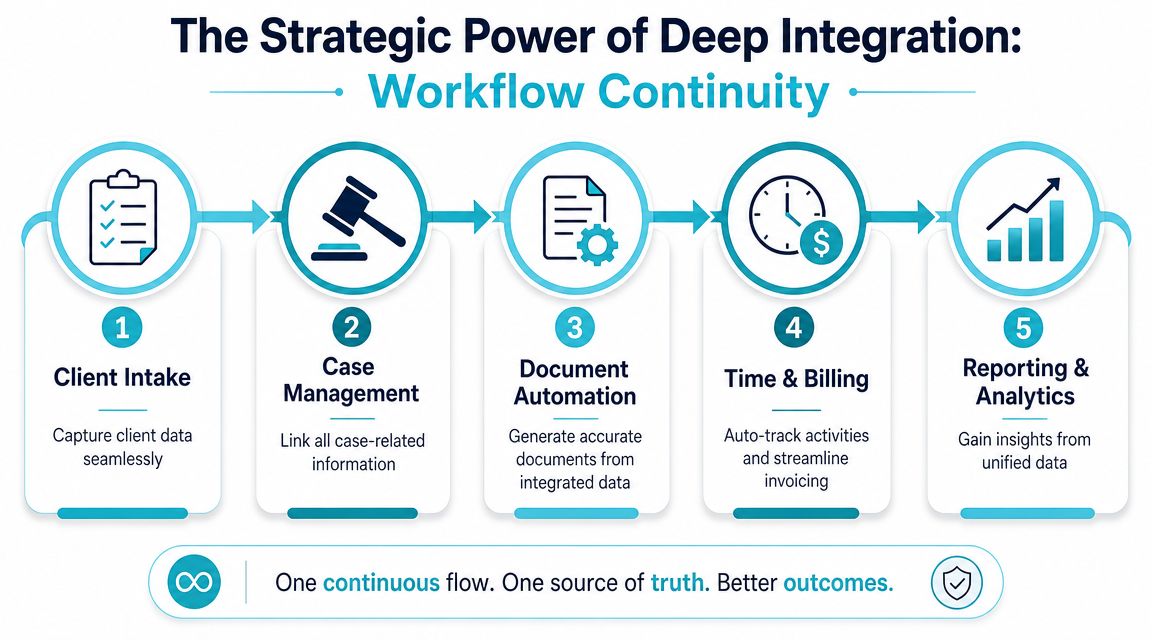
Integration gets talked about too loosely. A vendor says it integrates, and buyers hear “problem solved.” But there's a big difference between a system that can exchange data somewhere in the background and a system that preserves workflow continuity for the people doing the work.
Modern legal software increasingly depends on centralized data pipelines that unify workflows, litigation, and client records so teams aren't forced into manual consolidation across systems (legal point solutions and unified legal data). That's the definitive standard. Not whether two tools can technically connect, but whether the firm can operate without duplicate effort.
Connected is not the same as integrated
A connected product may sync a contact record or push a file on a schedule. That's better than nothing, but it often leaves staff toggling between windows, managing separate logins, and checking whether data transferred.
A fully integrated product changes the experience inside the office:
| Before | After |
|---|---|
| Staff switch between multiple systems | Staff work inside the primary case system |
| Data gets re entered or checked manually | Data stays tied to the existing matter record |
| Clients use one channel, staff use another | Communication appears inside the team's normal workflow |
| Reporting requires cleanup and reconciliation | Records are easier to track in one operational flow |
That's why firms shopping for software for legal operations should care about where the work happens, not just where the data ends up.
The workflow test I'd use in every demo
Ask the vendor to show the exact staff experience for a common task.
For example:
- A client uploads a document.
- A paralegal reviews it.
- The team sends a follow up request.
- The attorney wants to see the communication history.
- The matter record needs to stay complete.
If the demo requires opening multiple systems, checking two message areas, or copying notes back into the case file, the integration is shallow. If the work happens in one familiar environment, you're closer to real operational value.
The question isn't whether software can sync. The question is whether your staff can stay focused in one workflow from intake through follow up.
For firms reviewing communication adjacent systems, the same standard applies to phone workflows. A useful example is SnapDial's CRM VoIP solution, which helps illustrate how communication tools create more value when they sit inside the system where staff already manage relationships and matters rather than floating outside it.
Why this matters to managing partners
Deep integration affects more than convenience.
It shapes training time, adoption risk, reporting reliability, and whether your team uses the software six months after launch. It also changes whether adding a tool feels like modernization or disruption.
If you're evaluating CRM tools for lawyers, keep that lens. A feature rich product that fractures workflow can still cost the firm more than a narrower tool that fits tightly into how people already work.
Best Practices for Adoption and Implementation
A software rollout fails long before go live if the product asks the firm to change too much, too fast. Under security and governance pressure, the most important question is whether a tool can be adopted quickly, securely, and without changing how lawyers work. Practical guidance also points buyers toward concerns like encryption, browser based access, and whether clients must install software to use the service (guidance on legal software adoption and security concerns).
That gives you a sensible implementation standard. Low friction wins.

Start with one operational pain point
Don't launch software because the market says you should modernize. Launch it because one process is wasting time every week.
The cleanest first targets are usually:
- Client updates that consume staff phone time
- Document collection that drags because intake is inconsistent
- Routine reminders handled manually by paralegals
- Status visibility that clients can't access on their own
When the first use case is narrow and obvious, staff understand the reason for change.
Roll out in phases people can absorb
A realistic adoption plan looks more like controlled expansion than a dramatic switchover.
Phase one should focus on configuration, a pilot group, and a limited set of client interactions. Keep the workflow simple.
Phase two should expand to the broader team only after the pilot proves that staff can handle the process without extra admin burden.
Phase three should tighten standards, templates, and reporting based on what the team used, not what looked good in the original demo.
Here's the sequence I usually recommend:
- Map the current workflow before touching any software
- Choose one team or practice group for the pilot
- Train around real tasks, not generic feature tours
- Collect staff objections early
- Refine permissions, templates, and message triggers
- Expand only after the process feels normal
Keep security practical
Security reviews often drift into abstract checklists that don't reflect how clients and staff use the product.
A managing partner should press on practical points:
- Does the product rely on browser based access or require installation
- How is client communication protected
- Can clients use it across devices
- Will clients have to disclose extra personal contact details to use it
- What happens to staff workflow if permissions need to change
Those questions matter because secure software that nobody adopts still fails operationally.
Good legal tech disappears into the work. If staff talk more about the system than the matter, the rollout probably added friction.
Build momentum with visible wins
Nothing creates internal buy in faster than staff relief. If paralegals stop answering the same update calls all day, they'll support the tool. If lawyers can review client communication without asking someone to forward threads, they'll support the tool. If clients stop saying they don't know what's happening, partners will notice.
Quick wins aren't cosmetic. They're proof that the implementation matched the firm's actual work.
Your Law Firm's Software Evaluation Checklist
A software purchase goes sideways when the firm evaluates demos instead of workflows. Buyers get shown dashboards, AI labels, and long feature menus. What they need is a disciplined way to test whether the product reduces labor, protects client experience, and fits the current operation.
One useful parallel sits outside portals and practice management. If your firm is also reviewing dictation or meeting capture tools, it helps to explore HyperWhisper's transcription recommendations with the same lens. Don't ask only whether a tool produces text. Ask where that output goes, who reviews it, and whether it creates cleanup work elsewhere.
The questions that reveal fit
Use this checklist in every vendor meeting.
| Category | Question to Ask Vendor |
|---|---|
| Workflow fit | Will our staff have to leave our case management system to use this day to day? |
| Client experience | Can clients access it from a browser on any device, or do they need to install anything? |
| Communication | Are messages and file exchanges tied clearly to the matter? |
| Intake and forms | How are forms collected, reviewed, and tracked once a client submits them? |
| Adoption | What does onboarding look like for lawyers, paralegals, and administrative staff? |
| Training | Do you train around real workflows or just product features? |
| Security | How do you handle encryption, access control, and client data handling in practice? |
| Administration | Who on our team has to maintain templates, permissions, and user settings? |
| Reporting | Can we see client communication activity without exporting and reconciling data manually? |
| Pricing | Is pricing structured in a way that creates usage anxiety, or can the firm roll it out broadly? |
| Support | What happens when something breaks during intake or active case communication? |
| Implementation risk | What existing habits in our firm will this tool force us to change? |
What a strong answer sounds like
The best vendor answers are usually simple. They can show the workflow clearly. They can explain how clients access the system without extra friction. They can tell you what your staff will do differently on Monday morning.
Weak answers sound abstract. They lean on general promises about transformation and efficiency without showing where the work lives.
When evaluating software for legal teams, the central question is straightforward. Does this tool improve the firm while preserving the operating system the team already relies on? If the answer is yes, you may have a real fit. If the answer depends on retraining the whole office and rebuilding every routine, the firm is taking on more risk than it needs.
CasePulse fits the practical path many firms need. It gives law firms a secure client portal that integrates with systems like Needles, Neos, LawBase, and Litify so clients can check status, message the team, share files, and complete forms without forcing staff into a separate workflow. If your goal is to modernize communication without a disruptive rip and replace project, CasePulse is worth evaluating.