
 CasePulse
Monday morning at a plaintiff firm has a familiar rhythm. The phone starts ringing with the same questions, the intake team is juggling messages, and someone on staff is still pulling together status updates that a client expected to see hours ago. That friction is exactly where API connectivity starts to matter, because it gives two systems a reliable way to exchange information automatically instead of making people retype the same facts all day.
For law firms, the idea is simple even if the technology underneath it isn't. API connectivity is the ability for software systems to talk to each other, share data, and trigger actions without manual workarounds. In practice, that's how a client portal can show case activity from the firm's case management system, how reminders can go out without a paralegal chasing them, and how intake data can move into the right place with less delay. One 2024 industry estimate says more than 70% of organizations use API connectors to streamline operations, and the broader API economy is projected to grow at a 20% CAGR to $13.7 billion by 2027 (API connector statistics). For busy practice managers, the question isn't whether the technology is trendy, it's whether it lowers the daily noise. Law firms and technology
What API Connectivity Means for Law Firms
A plaintiff firm rarely feels its technology problems in one big event. It feels them in the repeated interruption, the “do you have an update?” call, the missing attachment, the message that lives in one system while the case details live in another. That's where API connectivity becomes practical, because it lets those systems exchange information automatically so staff don't have to act as the bridge.
The plain-language version
Think of API connectivity as the agreed language between two applications. One system asks for something, the other system responds in a format it understands, and the data moves without anyone copying and pasting it by hand. In a law firm setting, that can mean a portal showing the latest case status from Needles, Neos, LawBase, or Litify while staff keep working in their normal case environment.
That matters because clients don't care which system holds the data. They care that they can log in, see where things stand, and avoid waiting for someone to call them back about routine information. A well-connected portal closes the gap between where the firm tracks a case and where the client expects to interact with it.
Practical rule: If your team has to open three systems to answer one client question, the process is too manual.
The most useful way to think about what is API connectivity is not as a technical feature, but as a workflow shortcut with guardrails. It reduces duplicate entry, helps information stay consistent, and gives firms a cleaner way to present case data to clients. That's why it's become part of the default technology stack in many organizations, not just a niche developer tool.
For firms that want a broader operational frame, workflow automation in law firms connects directly to this idea. API connectivity is often the plumbing that makes that automation possible.
How API Connectivity Works Under the Hood
A good analogy is a universal adapter. Different devices may have different plugs, but the adapter translates between them so the power can flow safely and consistently. API connectivity plays a similar role in software, except the thing being translated is data, requests, and responses.
From request to response
An API, short for application programming interface, is a set of rules that lets one system ask another system for information or action. A client portal might request case status, document access, or a list of recent messages. The case management system responds in a structured way, and the portal displays it to the user. The important part is that the two systems don't need to be built the same way to work together.
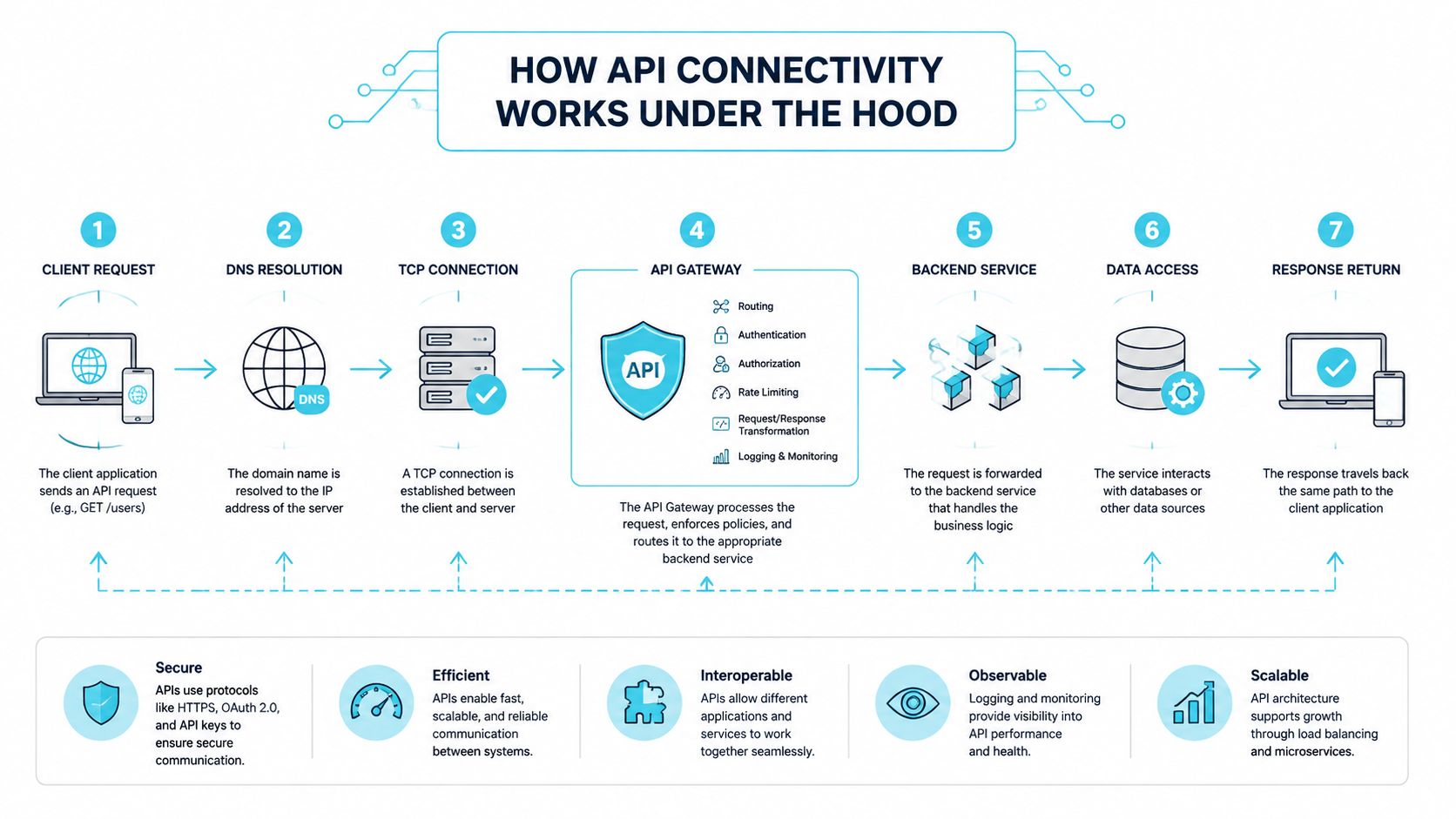
In cloud-native environments, API connectivity is more than having an endpoint available. It means using modular, reusable APIs to link applications and data across loosely coupled services, so the connectivity layer can support governance at scale instead of just managing one connection at a time. That's where firms run into trouble if they grow the number of systems without a plan. The risk shifts from one simple integration to many independently deployed interfaces, each with its own versioning and access rules.
Why the design details matter
Technical specifications are the part most non-technical leaders can safely insist on reviewing. A solid API spec should define request and response schemas, headers, parameters, and allowed values so systems can interoperate reliably without hard-coded assumptions. That's how you avoid the brittle setup where one change in one system breaks something else downstream.
The security lesson is just as important. In a law firm, connectivity can't be treated like a casual convenience layer. It needs centralized policy enforcement, identity controls, and version discipline, because the firm isn't just moving information, it's moving client data through multiple systems that must stay aligned. If you're comparing document exchange channels as part of the same broader architecture, a resource like HIPAA compliant fax API shows how API-based workflows can be designed around controlled transport and access.
Types of Connectivity and Security Foundations
Salesforce describes API led connectivity as a methodical way to connect data to applications through reusable and purposeful APIs, and it breaks that work into three roles. First, APIs access data from systems. Second, they compose data into processes. Third, they deliver an experience. That structure is useful because it keeps law firm leaders from thinking of integrations as one vague blob of technology.
Three roles, one workflow
In a plaintiff personal injury firm, pulling data is the part that retrieves case details from a system like Needles or LawBase without anyone opening the backend each time. Composing data into processes is what lets the firm build reminders, follow ups, or task handoffs around that information. Delivering an experience is the portal layer the client sees when they log in.
Those three roles should stay distinct in your head because they solve different problems. A firm might already have access to data, but still fail to turn that data into a useful workflow. Or it may have a polished portal that still forces staff to rekey updates behind the scenes. API led connectivity works best when those layers line up.
The portal is the front door. The API is the route that keeps the door connected to the case record behind it.
Security isn't optional in this setup
Authentication makes sure only authorized users can access the data. Encryption protects that data while it moves between systems. Those two basics sound simple, but they're the difference between a helpful connection and a risky one.
For law firms handling sensitive personal injury matters, these controls should be treated as a baseline rather than a nice extra. The broader expectation is similar to the discipline you'd want in a health or claims environment, even when a specific regulation doesn't apply directly to the firm. That's why security has to sit beneath every connectivity decision, not after it.
If your team wants to compare how connectivity fits into a broader security posture, cybersecurity for law firms is the right companion topic. The core takeaway is that API connectivity only helps if the firm can trust the path data takes.
Benefits of API Connectivity for Law Firms
The benefit that gets attention first is client convenience, but the operational gain is usually what convinces managing partners. When clients can check their own case status, the front desk and intake team spend less time answering repetitive calls. That frees staff for work that requires judgment, follow up, or legal context.
Where the value shows up day to day
Routine reminders can move automatically instead of being handed off as a manual task. Fillable forms can live in the portal instead of arriving by email as attachments that need to be tracked, opened, and reattached somewhere else. Clients get a cleaner experience, and the firm gets fewer small disruptions.
That's where the IBM view is useful. IBM says API-led connectivity is meant to replace complex point-to-point integration, improve collaboration, and increase agility through reusable APIs. The more practical reading is that the goal is to reduce dependency sprawl, not just connect tools. That point matters in law firms, because a patchwork of one-off connections often creates more maintenance than it removes.
What firm leaders should look for
A better connected workflow often changes the tone of client communication. Instead of callers asking where a case stands, they can check it themselves at any hour. Instead of staff repeating the same status update, they can focus on substantive client work.
- Fewer repeated status calls: Clients get a self-service view instead of waiting for office hours.
- Less manual chasing: Reminders and follow ups move through the system automatically.
- Cleaner intake flow: Forms and files travel through one connected path instead of scattered email threads.
- More consistent communication: The same case information appears across the systems people use.
The strongest law firm use case is usually the simplest one. If your client portal and case management system are talking to each other well, the firm spends less time translating between systems and more time moving matters forward. In that sense, API connectivity isn't only a technical upgrade, it's an operational one.

How CasePulse Integrates With Case Management Systems
CasePulse was built around a problem many plaintiff firms already know well, the disconnect between client communication and the case system staff use all day. It connects directly to Needles, Neos, LawBase, and Litify, so clients can check status, message the team, share files, and complete fillable forms without the firm forcing everyone into a separate workflow. Staff keep working where they already work, which is usually the point of the integration in the first place.
What the connection looks like in practice
A paralegal doesn't need to monitor a second inbox just to keep up with portal activity. The firm can keep the case record in its core system while the portal handles the client-facing interaction layer. That arrangement matters because it keeps the operational burden low for people who are already juggling calls, deadlines, and updates.
The portal also supports custom branding, so the client sees the firm's identity rather than a generic third-party look. That may sound cosmetic, but in practice it helps the portal feel like part of the firm's service, not an add-on clients are asked to tolerate. CasePulse also includes links to external tools and document workflows, which gives firms room to extend the connection beyond the core case system.
Why this matters for staffing
The biggest day-to-day gain is usually in routine follow ups. When those reminders and check-ins are automated, case managers spend less time chasing people for basic information and more time handling work that needs their attention. That's especially useful in plaintiff personal injury firms, where communication volume can spike without warning.
CasePulse was launched in 2017 after delivering custom portals to firms across the country, and its current integration pattern is designed to stay low friction. In practice, that means firms can begin inviting clients into the portal in about a week, without turning the rollout into a long internal project. For practice managers, that shorter path matters because it reduces the chance that a good idea gets stuck waiting for a perfect technology window that never opens.
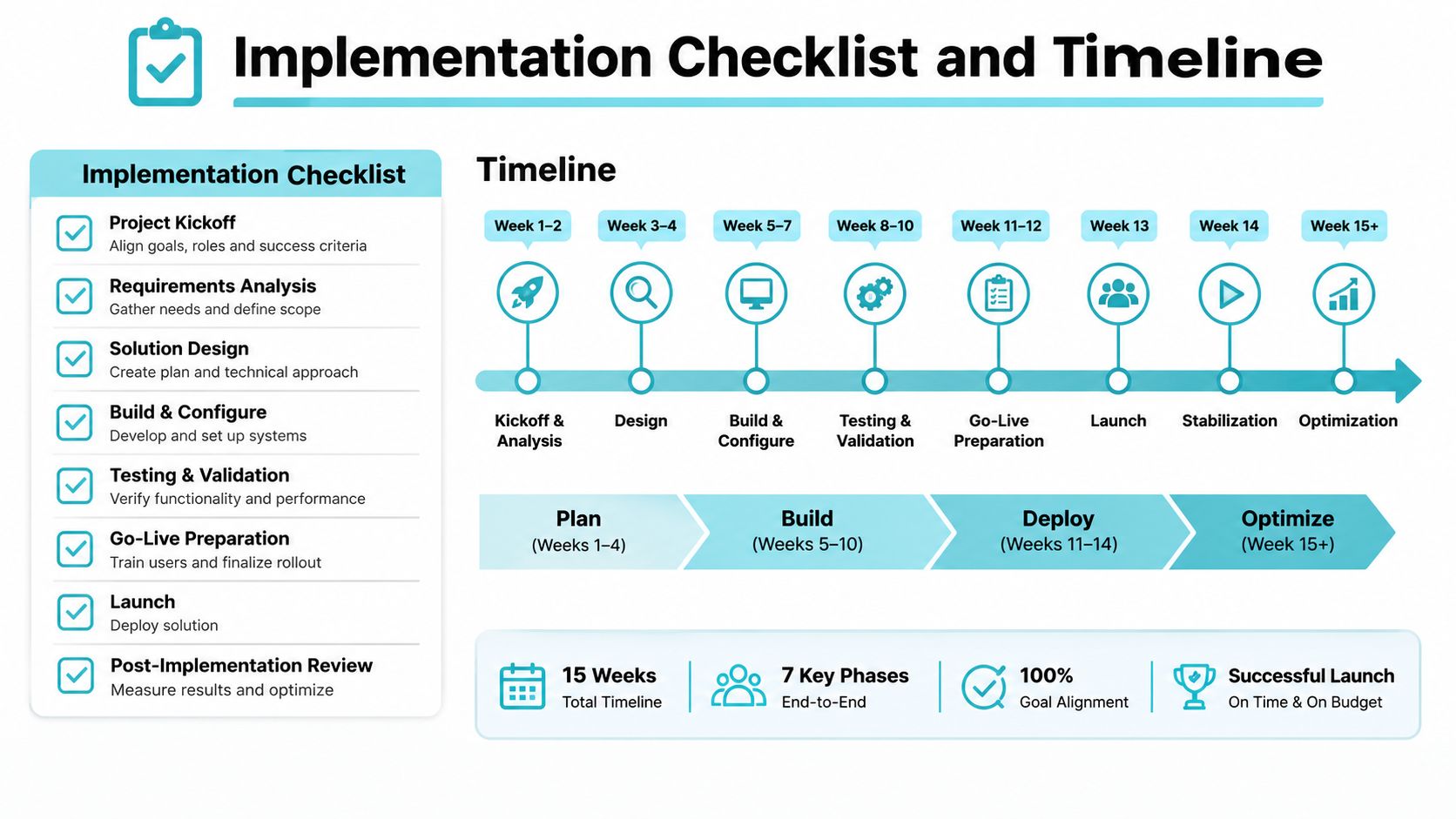
Implementation Checklist and Timeline
A connectivity project doesn't have to feel like a major systems overhaul. With a platform that's already designed for law firm workflows, the rollout usually starts with a configuration call, where the team maps the firm's case management system, the communication pattern, and the specific data that should move between systems. That early step keeps the setup tied to actual work instead of abstract preferences.
What to verify before launch
- Confirm system compatibility: Make sure the portal connects to the firm's case management platform, whether that's Needles, Neos, LawBase, or Litify.
- Identify the right fields: Decide which case details, messages, and forms should sync so the firm doesn't overbuild the connection.
- Prepare branding assets: Gather the logo, colors, and other items needed to make the portal reflect the firm.
- Build the initial invite list: Know which clients should be invited first so the rollout starts with a manageable group.
- Train the staff: Make sure the team knows how to use the portal alongside daily case handling.
Within a few days, the portal is typically configured, branded, and tested against the firm's case management system. By about a week, the firm can usually begin inviting clients to create accounts and start using it. That quick turn matters because it keeps momentum high and gives staff a real view of how the connection behaves in live use.
A good rollout doesn't ask staff to change everything. It asks them to keep working while the client side becomes easier.
CasePulse also provides hands-on support from a U.S.-based team, which is useful for firms that want implementation help from people who understand legal operations rather than general software onboarding. The pricing model scales by firm size and includes unlimited cases, messages, files, forms, and support on a month-to-month basis with no long-term contracts. That structure lets firms adopt the connection without locking themselves into a heavy commitment before they've seen it in practice.
Evaluating an API Integration Partner
The wrong connectivity partner can leave a firm with a shiny portal and a messy back end. The right one reduces friction without creating new maintenance headaches. That's why the evaluation should focus on how the integration behaves in daily firm life, not just on whether a demo looks polished.
Four questions worth asking
First, confirm that the provider already supports the case management system your firm uses. Prebuilt integrations are usually easier to deploy and less fragile than custom work, especially if your team needs to move quickly. That matters more than a clever sales pitch.
Second, look at the security posture. Authentication, encryption, and data handling policies should be clear enough for a practice manager or operations lead to understand without guessing. If the vendor can't explain those basics plainly, that's a warning sign.
Third, evaluate support. A U.S.-based team with law firm experience can shorten rollout confusion and reduce the back-and-forth that slows adoption. Many firms don't need more features, they need quicker answers when something needs adjustment.
Fourth, check the pricing model. Unlimited cases and messages are easier to plan around than usage-based charges that climb unpredictably as the firm grows. That predictability matters when the portal becomes part of regular client communication.
For a practical outside view on vendor selection, API integration services explained offers a useful way to think about what a partner should deliver. CasePulse fits the checklist above with direct integrations, month-to-month pricing, and support included, but the broader lesson is bigger than one product. The right partner should make the connection feel like a working part of the firm, not a separate system the team has to babysit.
Conclusion
API connectivity is no longer a side topic for firms that want to modernize client communication. It's the layer that lets a client portal, a case management system, and the people using both work together. For plaintiff personal injury firms, that usually means fewer status calls, cleaner follow ups, and a client experience that feels far more responsive than the old email and voicemail routine.
The main decision is strategic, not technical. Firms that build around interoperable systems reduce manual work and avoid piling new tools on top of old workarounds. CasePulse shows what that looks like in practice with direct connections to Needles, Neos, LawBase, and Litify, branded client portals, and a rollout that can get a firm inviting clients in about a week.
If your team is still answering the same case status questions over and over, it's probably time to look at the connection layer behind the scenes. The firms that get ahead here aren't chasing software for its own sake, they're building a cleaner way to serve clients and support staff at the same time.
If your firm wants a client portal that connects directly into Needles, Neos, LawBase, or Litify, CasePulse is built for that workflow. Visit CasePulse to see how API connectivity can reduce status-call overload, automate routine follow ups, and keep your team working inside the system you already use.