
 CasePulse
Monday morning at a plaintiff firm is usually the same kind of mess. The phones light up with status checks, paralegals dig through notes, and clients who signed last week still haven't sent the photos, forms, or records release you asked for. That's the moment a case management portal earns its keep, because it gives clients one controlled place to check status, message the team, and send files without forcing staff to live in another inbox.
The right way to think about it is simple. The portal sits on top of your existing case system, it does not replace it. Your staff stays in the system they already trust, while the portal handles client-facing communication in a way that's easier to control and easier to scale, which is the operational point that modern operations case system tips gets right. If you want a practical overview of the client-facing model itself, this guide to client portals for law firms is worth a look.
What a Case Management Portal Actually Changes at a Law Firm
A good portal changes the tone of the week before it changes the software stack. Instead of paralegals spending their mornings repeating the same case-status script, clients can check a dashboard, upload what they owe, and send a message that lands against the right matter. That shift matters because the bottleneck in a busy plaintiff shop isn't always legal work, it's all the tiny client touches that break concentration and eat time.
The Monday morning problem
A case manager shouldn't have to choose between returning calls and moving cases forward. If every intake follow-up lives in voicemail, text, and email threads, the team ends up reassembling the file every time someone asks where things stand. A case management portal changes that by giving the client a front door and giving the firm a controlled way to receive information.
That does not mean your case management system disappears. It means the portal becomes the client-facing layer while the firm's core system stays the record of truth for notes, deadlines, and internal workflow. If the firm already knows how to work in its own system, that discipline doesn't get thrown out. The portal just reduces the number of times someone has to act as the human bridge.
Practical rule: if a portal forces staff to check a second inbox all day, it's not really reducing work. It's just moving the clutter.
The buying decision gets clearer when you frame it that way. You're not buying another case system, you're buying a controlled surface for client interaction that keeps the internal record intact. That's the sentence a managing partner can use in a meeting without overselling the tool or confusing it with the stack already in place.
How a Case Management Portal Fits With Your Case System
The cleanest mental model is back office versus client window. The case system is where the firm stores the matter, the notes, the deadlines, and the internal view of work. The portal is where the client sees a curated slice of that work, sends messages, uploads files, and completes forms without ever touching the internal system directly.
Back office and front door
That separation is what makes the whole thing useful. A client doesn't need access to raw case notes, and a paralegal doesn't need to retype a text message into a matter record if the portal can push that interaction into the case file. In a firm that runs on a mature internal process, the portal should sit cleanly on top of the existing workflow rather than asking everyone to learn a second operating model.
The architecture behind that matters. Common case management designs separate the web front end, the API layer, the identity service, and the workflow core, which is exactly why a portal can expose status and messages without opening the whole case engine to clients. That layered design also supports secure client self-service because authentication, workflow, and content access can be controlled independently, instead of mixing everything into one public interface. For a law firm, that's the difference between a controlled client window and a glorified shared inbox, as explained in the vendor-neutral architecture pattern described in the case management reference architecture.
The other misconception is migration. A portal rollout doesn't have to mean moving all your historical data or retraining the entire office on day one. If the firm already has a case system, the portal should pull only what clients need to see and push only the client actions that belong in the matter record. That's the point of integration, not reinvention.
Core Features That Matter in a Law Firm Portal
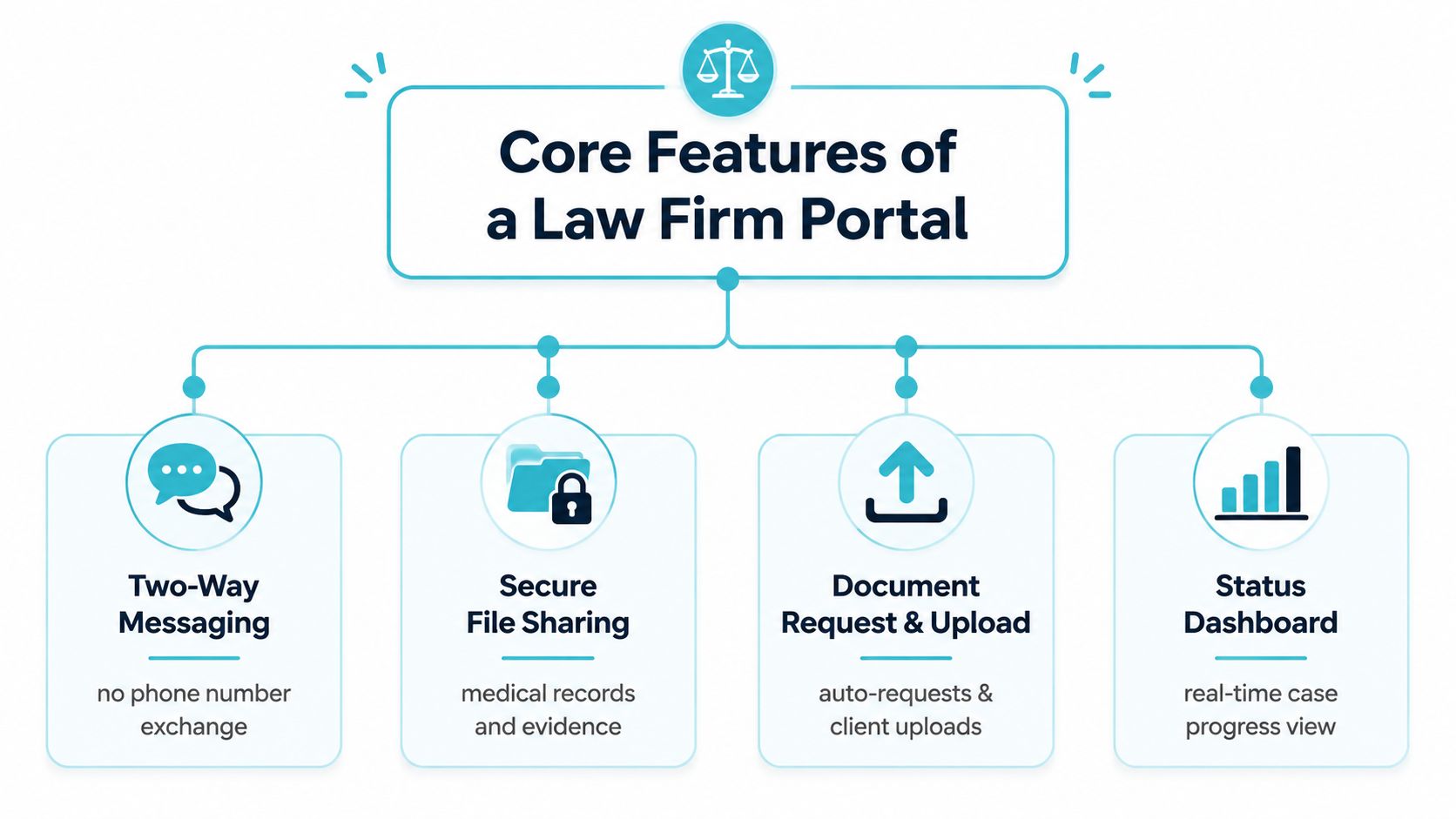
The feature list should stay narrow. If a vendor starts talking about every possible workflow under the sun, steer the conversation back to the daily pain points in a plaintiff practice. The portal has to help clients communicate, help staff collect what they need, and help everyone see where the case stands without a phone call.
Messaging, files, forms, and status
Two-way messaging is the starting point because it keeps client communication tied to the case. A client can ask where the adjuster request stands, and the staff response stays attached to the matter instead of disappearing into a text thread on somebody's phone. That gives the team context, and it keeps the communication history in one place.
Secure file sharing matters just as much. In a personal injury case, the file exchange isn't cosmetic, it's medical records, photos, billing statements, and supporting documents. The portal should let a client send those items without staff juggling email attachments or hunting for the latest version of a document.
Fillable forms are the intake and follow-up workhorse. If the firm needs a signed retainer, a records release, or updated contact details, the client should be able to complete the form in the portal and send it back as part of the case flow. That reduces the number of times staff has to manually chase missing information.
24/7 case status visibility is what kills the simplest calls. Clients don't always need a detailed legal explanation, they often just want to know whether their case is moving or waiting on something. A dashboard that shows real-time progress gives them that answer without pulling a paralegal off other work.
Automated reminders close the loop. If a document is missing or a follow-up is overdue, the portal should be able to prompt the client without someone manually writing the same reminder over and over. That's where the tool starts acting like workflow support instead of just a message box.
Bottom line: if the demo doesn't show messaging, file exchange, forms, status, and reminders tied to real case activity, keep walking.
For a deeper look at how firms think about connected workflow, integrated case management software is the right adjacent concept to study. The point isn't feature inflation, it's whether client activity lands where staff already work.
Integrations With Needles, Neos, LawBase, and Litify
Integration is the whole game for a firm that already has a case system. If the portal doesn't connect to the system your team already uses, then staff end up copying data back and forth and the “portal” becomes just another task. That's not modernization, that's duplication with a nicer interface.
What deep integration should feel like
With systems like Needles, Neos, LawBase, and Litify, the portal should let the firm keep its normal workflow while client updates flow into the case record. The staff experience should be boring in the best way possible, open the matter, see the client's message, review the upload, update the record, move on. The client experience should feel simple too, log in, see branded status, upload what's requested, and respond without learning the firm's internal software.
Deep integration means the portal pushes and pulls data with the case system. Lightweight integration means it may link out to external tools for e-signature or document workflows without fully embedding them. Both can have a place, but don't confuse a link-out with a real workflow connection. If the portal can't write back useful client activity into the matter record, the staff will pay for it later in rekeying and missed context.
Here's a simple way to pressure-test a vendor demo.
| Case System | Integration Pattern | Staff Experience | Client Experience |
|---|---|---|---|
| Needles | Direct case data sync | Staff stays in the current matter workflow | Client sees branded status and messaging |
| Neos | Direct case data sync | Intake and follow-up land in the existing record | Client uploads files and completes forms |
| LawBase | Workflow-connected integration | Internal team reviews client activity where it already works | Client interacts through one portal |
| Litify | Connected matter sync | Staff avoids duplicate entry | Client gets a consistent front-end experience |
Custom branding matters too. If the portal uses the firm logo, colors, and a domain that reflects the firm's identity, clients trust it faster and adoption is smoother. That isn't decoration, it's part of the operational design because clients are more likely to use a portal that looks like it belongs to the firm.
For a different adjacent workflow lens, AI tools for insurance agents shows how other client-service-heavy teams think about connected systems and handoffs. The lesson is the same, integration beats extra admin every time.
Security and Compliance Without the Fearmongering
The security question isn't whether a portal is perfect, because nothing is. The question is whether it controls access better than email, text, and scattered attachments do. On that score, a portal that lives inside the firm's perimeter is a straight upgrade, because access can be limited, actions can be logged, and the firm can end a client's access when the matter closes.
The questions a managing partner should ask
Start with access control. Who can see what, and how is that separated by matter, role, and client identity? Government case management standards emphasize controlled sharing, auditing, dynamic routing, and proper assignment of information, and those are the right mechanics to demand from a law firm portal too, because they map directly to secure sharing and workflow visibility rather than vague marketing language. The standards language also reinforces a practical point, access is not a vibe, it's a rule set.
Then ask about the audit trail. If a client uploads a file, changes a form, or receives a reminder, the firm should be able to see what happened and when. That record matters for internal accountability and for the firm's reputation if there's ever a dispute about who sent what. A portal is safer than loose email chains precisely because it ties the interaction to the matter record instead of scattering it across devices.
Data handling comes next. Messages and files should be stored and transmitted under the same controlled environment the firm uses for its casework, not left floating around in personal phones or unmanaged inboxes. That keeps client communication inside a process the firm can supervise. It also makes offboarding cleaner when a matter closes, because access can end with the case instead of lingering indefinitely.
A portal isn't a new risk surface if you configure it well. It's a control improvement over the status quo, which is exactly why it belongs in the conversation.
If you want a useful checklist for your vendor review, the cybersecurity for law firms resource is aligned with the questions that matter here. Keep the discussion practical. Ask who can log in, what gets logged, how access ends, and what the team sees when it needs to audit an interaction.
Timeline, Pricing Models, and What Affects Both
The rollout timeline should be measured in days for a simple adoption, not in endless quarters of planning. The fastest path is a controlled pilot with the firm's existing workflow, branded portal setup, and a small client invite list. Deeper customization, more complex forms, and more deliberate change management naturally stretch that out.
What drives the schedule
A quick launch usually works when the firm keeps the scope tight. The team decides which client actions belong in the portal, what gets mirrored into the matter record, and what stays internal. Once those decisions are made, the portal can be live fast enough to prove the concept without turning the project into a full systems program.
The pricing model should be just as straightforward. CasePulse says its pricing scales by firm size and includes unlimited cases, messages, files, forms, and support on a month-to-month basis with no long-term contracts. That kind of structure matters because the cost tracks the size of the firm rather than every incremental client interaction, which is how a portal should be priced if it's meant to reduce friction instead of penalizing usage.
A buyer should ask three things before signing anything:
- What's included at the base price? Make the vendor name the onboarding help, support, and branded setup without hiding essentials.
- What slows down launch? Ask where custom forms, workflow mapping, and staff training add time.
- What creates lock-in? If the contract pushes long terms, usage caps, or extra fees for ordinary activity, the economics get worse fast.
Case management portals are often defined by explicit technical requirements, and that's not a bad thing. Casepoint's eCASE requirements show how specific portal deployments can get about server and client compatibility, which is a reminder that “simple” still needs a working technical foundation. The planning mistake is assuming the portal will be easy just because the user interface looks light.
Real-World ROI for Plaintiff Personal Injury Firms
The ROI shows up in small moments first. A car accident client checks treatment status at night instead of calling at 4:45 p.m., and the office doesn't have to stop what it's doing to answer a routine question. A new intake uploads photos, a signed retainer, and the first round of documents before the first follow-up call, so the paralegal starts with real information instead of a blank thread.
What changes in the first months
The first change is usually fewer repetitive status calls. That doesn't just save time, it lets the staff focus on the matters that need actual judgment. The second change is cleaner intake, because the portal pushes the client to complete the basics before anyone has to chase them.
By the later stages, the firm should see more disciplined follow-up. A paralegal can work through portal messages in a batch instead of bouncing between voicemails, texts, and email attachments. That's not glamorous, but it's the operational difference between a day spent reacting and a day spent advancing files.
The value depends on workflow discipline, not the software by itself. If the team keeps answering in three channels, the portal won't save the day. If the firm commits to making portal activity the default path for client communication, then the gains compound in cleaner records, fewer missed deadlines, and faster case movement.
Measure this: message response time, document turnaround, and inbound call volume. If those don't improve, the firm isn't using the portal as a workflow layer, it's using it as decoration.
A managing partner should think about this in 30, 90, and 180 day terms. At 30 days, the firm should be testing client adoption and staff comfort. At 90 days, the team should be seeing whether the portal is reducing interruption and tightening intake. By 180 days, the question is whether the new communication path has become the default, because that's when ROI becomes believable inside the firm.
Choosing and Implementing a Portal Without Burning the Team
The shortest path to a bad rollout is trying to solve everything at once. Pick one practice group, one client cohort, and one reason to use the portal first. If the portal can't handle a focused pilot, it won't magically work at full scale.
A checklist a managing partner can use in one meeting
- Confirm the portal integrates with your actual case system. If the firm runs on Needles, Neos, LawBase, or Litify, the demo should reflect that.
- Confirm staff stay in their normal workflow. If the portal creates duplicate entry, the gain disappears.
- Confirm unlimited usage on the things that scale. Cases, messages, files, forms, and support should not become billing traps.
- Confirm month-to-month terms. A portal shouldn't require a long contract before you know whether adoption is real.
- Confirm US-based support with real onboarding help. Adoption depends on guidance, not just login credentials.
- Confirm the launch timeline is measured in days, not quarters. If setup drifts, the rollout is too heavy.
The implementation sequence should stay simple. Pilot with one practice group, invite a small group of clients, and watch what happens to call volume and message response time. Then expand only after the internal process is stable. That sequence forces the firm to treat the portal as an operational tool, not a branding exercise.
CasePulse is one option in this category, and it's built as a client portal that connects to a firm's case system, supports case status checks, messages, file sharing, fillable forms, and automated follow-ups, with branding and month-to-month pricing. If you're ready to see how that model fits your firm, visit CasePulse and judge it against your current intake and client communication workflow.