
 CasePulse
 If you're running a PI firm, the scene is familiar. Staff members are answering the same status questions all day, medical records arrive in different formats, signed forms get trapped in email threads, and someone is still trying to figure out which version of a document is the final one. At the same time, courts expect clean electronic submissions, clients expect quick updates, and your team can't afford another system that creates more work than it removes.
That pressure is why so many firms start looking at electronic filing systems. But the term gets used too loosely. In practice, law firms are usually talking about two separate systems that solve two very different problems. One handles filing with courts. The other handles the firm's internal flow of documents, updates, and client communication.
Confusing those two is where a lot of bad buying decisions begin.
What Are Electronic Filing Systems in a Law Firm
In a law firm, electronic filing systems aren't one product or one workflow. They describe the move away from paper based handling of documents and toward digital storage, retrieval, and transmission. That broad definition matters because a PI firm uses electronic systems in more than one place.
A basic starting point comes from Diligent's overview of electronic filing, which explains that electronic filing systems replace tangible hard copy paper documents with electronic files that can be stored on individual computers or in larger databases, allowing for the secure transmission of information between two parties almost instantaneously. That sounds simple, but in a litigation practice it plays out in two distinct lanes.
The court side
First, there's external court e filing. This is the filing process your firm uses to submit pleadings, motions, exhibits, and other required documents through court approved systems. It's procedural. It's mandatory. It's governed by court rules, deadlines, formatting requirements, and public record accuracy.
When lawyers talk about e filing because the court requires it, this is what they usually mean.
The firm side
Second, there's the internal electronic system your firm relies on to keep a case moving. That includes how your team stores files, organizes records, tracks correspondence, shares documents securely, and communicates with clients. This side of the house is where operational improvement happens.
A PI firm with a heavy caseload doesn't struggle only because paper exists. It struggles because information gets scattered. Intake notes live in one place, records requests in another, signed authorizations in someone's inbox, and client updates depend on whether a case manager has time to return a call.
Practical rule: If a system only helps you file with the court, it hasn't solved your internal workflow problem.
That distinction is worth getting clear on before you evaluate vendors. A court portal can be necessary and still do almost nothing for client service or staff efficiency. An internal system can transform daily work and still not replace the court's own filing process.
For firms sorting through the broader legal tech environment, Nutmeg Technologies' legal tech insights offer a useful overview of how different systems fit together inside modern practice operations.
A good mental model is this:
- Court e filing handles submissions to outside entities.
- Internal electronic systems handle the firm's own records, workflows, and communication.
- Client experience depends far more on the second category than most firms initially realize.
If you're evaluating how your firm currently stores and moves information, it also helps to review practical records management system examples for law firms so you can compare structure, not just features.
Court E-Filing Versus Internal Firm Systems
Most firms know they need both. Fewer firms draw a clean line between them.
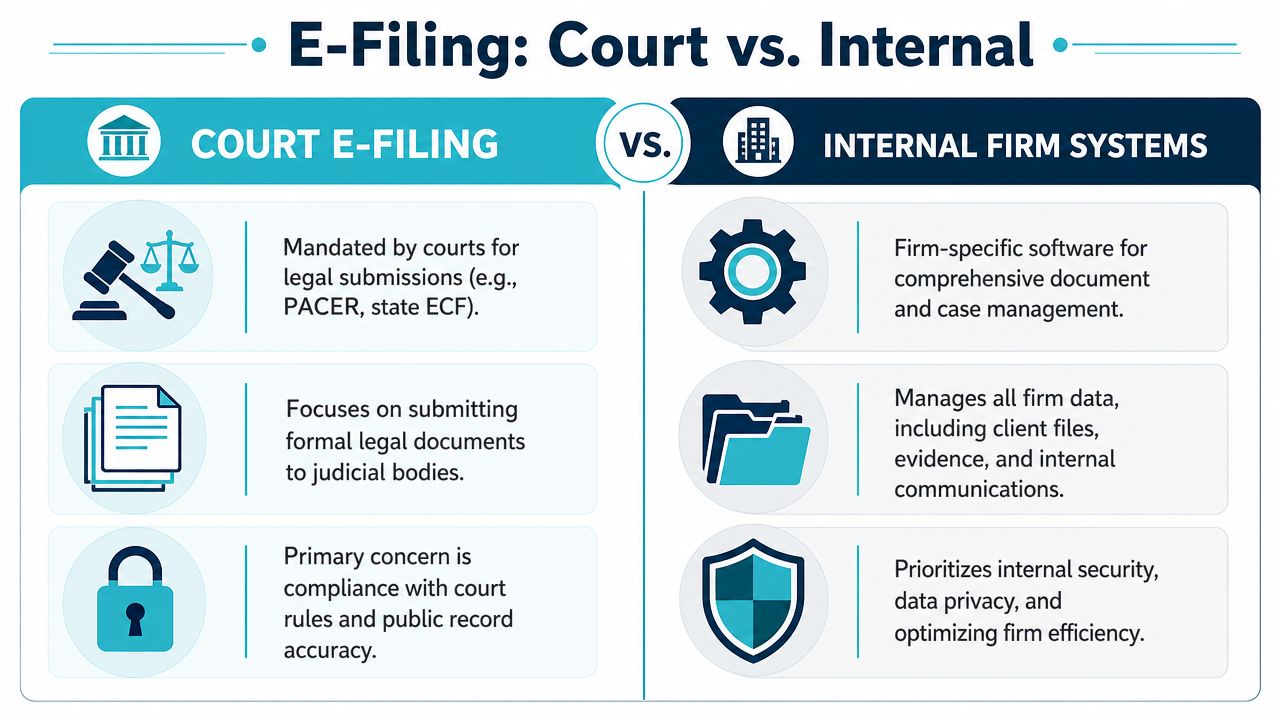
Court e filing is like a public mailbox. You prepare something according to someone else's rules, submit it to an outside destination, and receive confirmation that it went where it was supposed to go. Internal firm systems are more like your private working library. They control how your team finds, updates, shares, and protects information while a case is active.
What court e filing actually does
Court e filing systems exist to move formal documents into the judicial process. Their purpose is narrow by design. They enforce filing rules, deadlines, document categories, and procedural compliance. If you use PACER, a state ECF portal, or another court platform, you're operating inside that court's structure.
That's necessary, but it doesn't organize your pre suit medical records, your lien correspondence, your intake follow ups, or the stream of client questions that come in after every appointment and demand package update.
What internal firm systems actually do
Internal systems support the business of running cases. Business.com's explanation of computerized filing systems describes them as IT systems meant for business papers' archiving and controlling organizations' data, using a computer program to file documents in a systematic order that is easy to locate compared to traditional paper based practices. For a PI firm, that means the system should help staff locate the right file quickly, keep work organized, and reduce dependency on memory.
Here's the practical difference in side by side form:
| Area | Court e filing | Internal firm systems |
|---|---|---|
| Primary user | Courts and filing staff | Attorneys, paralegals, case managers, clients |
| Main purpose | Submit formal legal documents | Organize active case work and communication |
| Rules | Court controlled | Firm controlled |
| Success measure | Accepted filing | Faster workflows and better client handling |
| Client impact | Mostly indirect | Direct and daily |
A court portal can confirm that your motion was filed. It can't tell a worried client whether records were received, whether a form still needs a signature, or whether the demand is under review.
That's why firms often feel disappointed after "going digital." They digitized one external requirement, but they didn't improve the internal experience.
Where firms get tripped up
The most common mistake is assuming compliance equals efficiency. It doesn't. A firm can file electronically with every required court and still run its internal operation through email chains, desktop folders, shared drives, and manual follow ups.
Another mistake is building internal processes around how the court wants information, instead of how the firm works. Court filing is episodic. PI case handling is continuous. Your internal system has to support evidence gathering, records collection, document review, intake progression, and client communication between filings, not just at filing moments.
The firms that get this right treat these systems as related but separate. Court e filing is the lane for submission. Internal systems are the backbone for everything that happens before and after.
How Electronic Systems Drive PI Firm Efficiency
A PI practice doesn't need technology for technology's sake. It needs fewer repetitive tasks, fewer avoidable interruptions, and fewer status updates trapped in someone's voicemail queue. That's where internal electronic systems earn their keep.
The biggest gains usually don't come from one dramatic feature. They come from removing friction in small places that add up across hundreds or thousands of case touches.

Less duplicate work inside the file
One of the most practical improvements is controlling document sprawl. According to Document Logistix's guide to electronic file management, the efficiency of modern electronic file management is driven by embedded automation of version control and centralized metadata management, which eliminates document duplication. The same source notes that capabilities like automatic backups and secure file sharing can help firms achieve measurable cost efficiencies and reduce overhead.
For a PI team, that matters in very ordinary situations:
- A paralegal updates a demand draft and doesn't have to wonder whether someone else saved a different version locally.
- A case manager searches for a medical record and can find it by matter details or file metadata instead of digging through nested folders.
- Support staff shares documents securely without creating fresh copies across inboxes and desktops.
That kind of cleanup doesn't look glamorous in a demo. In daily operations, it saves attention.
Better client communication without more phone time
Clients in injury cases don't call because they enjoy calling. They call because they want reassurance, clarity, and proof that something is happening. If your system gives them a reliable place to check status, send a message, upload a document, or complete a form, staff members stop acting as human routers for routine updates.
That changes the rhythm of the day. Instead of answering "Any update on my case?" twenty times, a case manager can spend that time pushing a file forward.
A practical internal setup should support things like:
- 24 7 case visibility so clients can check progress without waiting for office hours.
- Secure file exchange for IDs, photos, medical paperwork, and signed forms.
- Automated reminders for missing items that would otherwise require repeated manual outreach.
- Mobile access because many clients are responding from a phone, not a desktop.
The best workflow improvement in a PI firm is often the one clients barely notice. They just stop needing to chase your office for basic information.
For firms thinking through adjacent process improvements, SendItFax's document automation guide is a useful companion read on reducing handoffs and repetitive document tasks.
Where morale improves
Efficiency isn't only about throughput. It also affects how work feels.
When staff members spend most of the day hunting for attachments, checking whether forms were returned, or repeating the same update by phone, they burn out faster. When the system handles routing, reminders, and organized access to current information, those same people can focus on higher value work like preparing files, resolving issues, and helping clients through harder moments in the case.
That shift usually shows up first in the tone of the office. Fewer frantic interruptions. Less inbox archaeology. More forward motion.
Ensuring Security and Seamless Workflow Integration
Security concerns are legitimate. So is the fear of buying a new system that forces everyone to work around it. Firms should be skeptical on both points. The answer isn't avoiding modernization. It's choosing systems built around secure data exchange and real integration.
What secure exchange actually means
A lot of vendors talk about security in broad language. Ask what happens to data as it moves between systems. That's where the answer gets concrete.
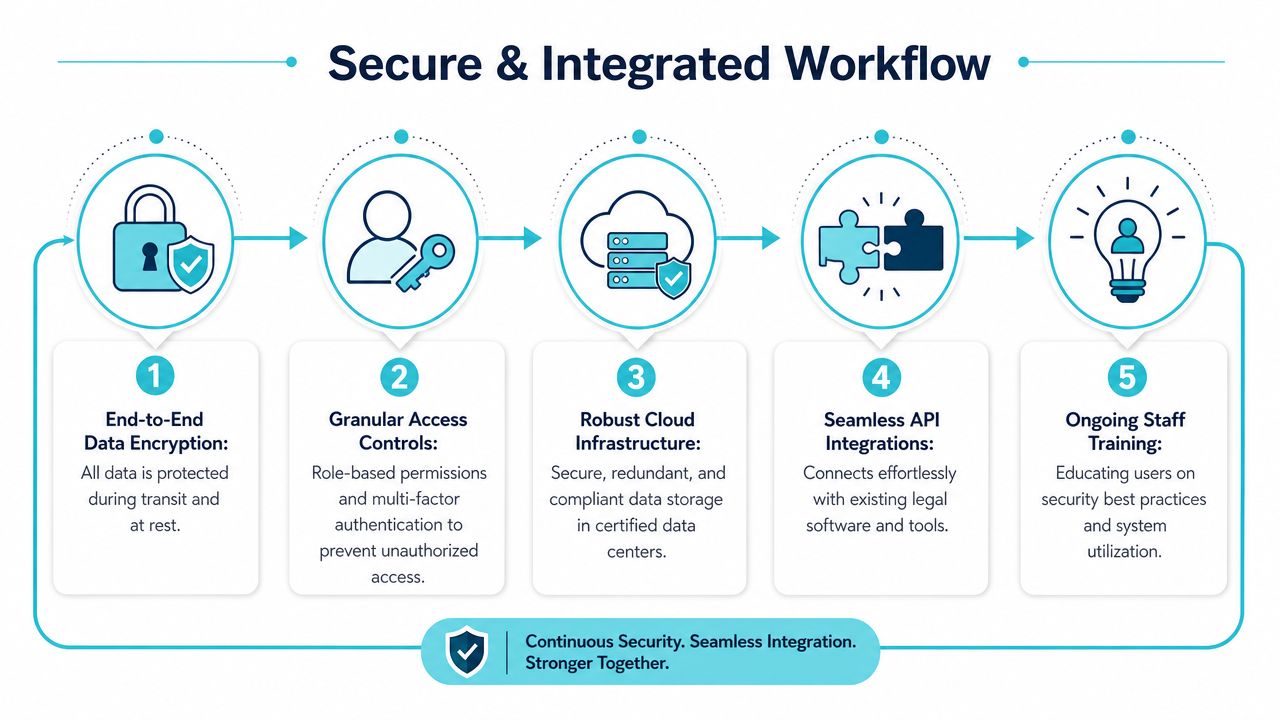
The Filing Fairness Project at Stanford notes that operational security is supported when data exchanges are established through APIs and transactions between service providers and managers are performed using HTTPS and SSL encryption, protecting sensitive legal data against interception. For firms, the takeaway is straightforward. Security isn't just about where a file sits. It's also about how that file travels.
If your team is exchanging medical records, signed forms, case correspondence, and client messages, that movement has to be protected, not improvised through ad hoc habits.
A practical security review should include questions like these:
- How is data transmitted between connected systems?
- Who can access what inside the firm?
- What happens when staff roles change or an employee leaves?
- How are client uploads handled and where do they land?
- What is the backup and recovery process if something goes wrong?
For a broader business perspective on protected exchange, secure file sharing for Indiana companies gives a grounded overview of the habits and safeguards that matter beyond legal marketing language.
Why integration matters more than extra features
A secure system that doesn't fit your workflow will still fail.
PI firms already have established habits inside systems like Needles, Neos, LawBase, or Litify. If a new platform requires staff to reenter information, check a second inbox all day, or manually move files from one place to another, adoption drops fast. People revert to whatever feels faster in the moment, even when it's messy.
That's why integration is not a bonus item. It's the difference between one working system and two competing systems.
Field test: If a tool makes paralegals leave their normal workflow every hour, they won't use it the way the vendor promised.
Good integration should do three things well:
- Keep staff in familiar environments so they don't have to manage duplicate processes.
- Pass information cleanly between systems so updates aren't trapped in silos.
- Reduce manual handoffs between intake, case management, and client communication.
If you're auditing your own risk exposure while evaluating these systems, it's worth reviewing cybersecurity guidance for law firms alongside your software checklist.
What doesn't work
Three patterns usually create problems:
- Standalone tools with weak connectors that require exports, uploads, or copy and paste work.
- Security claims without specifics about transmission, permissions, or operational controls.
- Feature heavy platforms that look impressive in a sales demo but force staff to create parallel workflows.
The safer choice is usually the simpler one. Strong security, clean integrations, and minimal disruption beat a long feature list every time.
How to Choose and Implement Your System
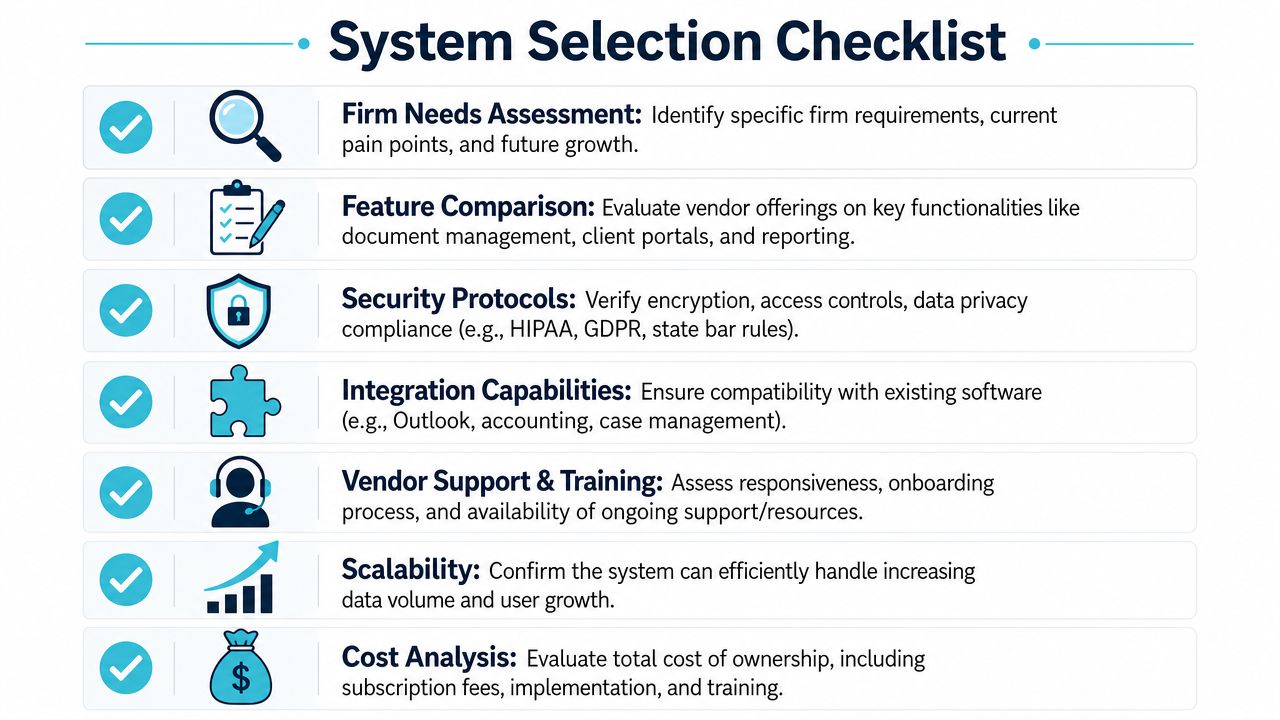
Choosing an electronic system for a PI firm isn't about finding the longest feature sheet. It's about asking better questions before you sign anything. The wrong system creates drag for years. The right one disappears into the work and makes the day run smoother.
Start with the operational pain
Don't begin with vendor branding. Begin with where your current process breaks down.
Maybe your intake team spends too much time chasing missing forms. Maybe case managers field constant update requests. Maybe signed documents arrive by email and then sit unfiled. Maybe staff members can't tell which messages the client has already seen.
Write down the actual pain points in plain language. That list becomes your filter.
A useful needs assessment usually includes:
- Client friction points such as status visibility, form completion, or file uploads.
- Staff bottlenecks such as repetitive follow ups or duplicate data entry.
- Integration requirements tied to the systems your firm already uses.
- Adoption constraints such as training time, rollout complexity, and support expectations.
Ask the vendor questions that expose workflow reality
Most demos are polished. Your questions shouldn't be.
Ask the vendor to show exactly how a client message appears to staff. Ask where an uploaded file lands. Ask what a reminder workflow looks like after setup. Ask what happens when a user permission changes. Ask how long initial rollout usually takes and who does the work.
Here's a practical evaluation table:
| Question | Why it matters |
|---|---|
| Does it integrate with our current case management platform? | If not, staff will build workarounds. |
| Can staff stay in their normal workflow? | Context switching kills adoption. |
| How is support handled? | Go live issues are operational, not theoretical. |
| Is pricing flexible? | Long contracts can trap firms in bad fits. |
| Is it easy for clients to use on a phone? | Many PI clients won't be using a desktop. |
Buy for the daily user, not the demo audience. If paralegals and clients struggle with it, the managing partner's approval won't save the rollout.
If you're comparing broader software categories while building your shortlist, this guide to software options for law firm document handling can help frame the market.
Roll out in phases, not all at once
Implementation goes better when firms avoid the big bang approach. Start with one office, one practice segment, or one case stage. Work out naming conventions, permissions, reminder timing, and client messaging before expanding.
A practical rollout sequence often looks like this:
- Configure the system around current workflows, not idealized future workflows.
- Train the staff who touch clients most often because they'll expose gaps quickly.
- Invite a limited group of active clients first and monitor where confusion appears.
- Adjust templates, reminders, and internal responsibilities based on actual use.
- Expand once staff trust the process and the handoffs are clean.
What usually goes wrong is predictable. Firms underestimate support needs, skip internal ownership, or pick a system that looks modern but adds another layer of inbox management. The implementation succeeds when the technology reduces work on day one, not after months of staff improvisation.
Measuring the Real Return on Your Investment
The return on an electronic system shows up in the workday before it shows up in a spreadsheet. You see it when staff stop chasing the same tasks manually, when clients stop calling for routine updates, and when the file moves forward without someone playing traffic cop between tools.
Consider two hypothetical PI firms.
The first firm buys a system because the demo looks polished. It doesn't integrate well with the team's existing workflow, so staff keeps using email, local folders, and side notes. Clients get partial access, but responses still depend on manual follow up from the office. After the initial push, the software becomes one more place to check. The firm is paying for a tool, but the old habits are still doing the essential work.
The second firm starts with narrower goals. It wants cleaner communication, fewer routine status calls, better file sharing, and less manual chasing of signatures and forms. It chooses a system that fits how staff already handles cases and rolls it out in stages. Clients start using the portal because it's easier than calling. Paralegals spend less time repeating updates and more time advancing files. The office feels calmer because fewer tasks are floating unassigned in inboxes.
That difference is the ROI.
What to watch after launch
Don't measure success only by logins or activation. Look at operational behavior.
- Are clients using the system instead of calling for routine updates
- Are staff members retrieving files and messages from one reliable place
- Are follow ups happening with less manual effort
- Are fewer tasks slipping because someone forgot to send a reminder
- Does the team trust the system enough to stop creating side processes
A strong return doesn't just lower friction. It gives your staff back time and gives clients a better sense of control.
The payoff that firms often miss
The financial return matters, but PI firms often overlook two other forms of value.
First, employee morale improves when the team can work from an organized flow instead of reacting all day. Second, client satisfaction improves when people feel informed without having to chase your office. Those clients are easier to retain, easier to communicate with, and more likely to remember the experience positively.
A good electronic system isn't just a filing upgrade. It's an operating upgrade.
CasePulse helps PI firms modernize client communication without forcing staff to leave the systems they already use. Its secure client portal integrates with platforms such as Needles, Neos, LawBase, and Litify so clients can check case status, message the firm, share files, and complete forms from any device while staff continue working in their existing workflow. If your goal is to reduce inbound calls, automate routine follow ups, and make adoption easier on both staff and clients, CasePulse is worth a closer look.