
 CasePulse
 Your team probably knows this drill too well. A paralegal sends a records request, leaves a voicemail, gets a fax back with missing pages, forwards an email asking for an update, then answers two client calls asking the same question: “Did the records come in yet?” By noon, nobody has moved the case forward. They've just managed the chase.
That isn't a small admin problem. It's a workflow design problem. When record retrieval lives in inboxes, spreadsheets, sticky notes, and a separate vendor portal, your firm pays for the same task more than once. Staff enter the same matter details again. Clients call because they can't see status. Attorneys wait on records that may already be in motion, but nobody has a clean view of where things stand.
The firms that get this under control usually make one shift. They stop treating retrieval as a side process and build it into the systems staff already use every day, especially the case management system and client portal. That's where efficient record retrieval stops being a slogan and starts becoming an operational advantage.
Why Your Current Record Retrieval Process Is Costing You
A lot of firms think the issue is provider delay. Sometimes it is. More often, the bigger problem sits inside the firm.
The request starts in one system. The authorization lives in another. Follow ups happen by phone and email. Status is tracked in somebody's notes. Then a client calls for an update, and the person answering has to check three places before they can say anything useful. That's expensive because it turns a straightforward process into repeated admin work.
The daily drag nobody budgets for
The top administrative bottlenecks for law firms include drowning in phone calls from clients seeking status updates and cases slowing to a crawl due to chasing down documents, which is why a purpose built client portal needs deep integration with systems like Needles or Litify and automated reminders to remove those exact pain points, as noted by CasePulse's review of client portal bottlenecks.
That bottleneck spreads. The paralegal loses focus. The case manager duplicates entries. The attorney doesn't know whether a delay came from the provider, the retrieval vendor, or an internal handoff. When this happens across a full docket, the firm burns hours on work that doesn't improve the case.
Practical rule: If your team has to answer status questions manually, the workflow is unfinished.
There's another cost that partners often miss. Staff spend time coordinating retrieval work instead of doing billable or case advancing work. If your goal is to protect attorney time and maximize lawyer billing, removing manual status chasing is one of the cleanest places to start.
What manual retrieval looks like in practice
Here's the pattern I see most often:
- Request details get retyped: Matter information gets copied from the case file into a separate request form or vendor portal.
- Follow ups depend on memory: Someone has to remember when to call back, resend an authorization, or escalate.
- Clients become the status trigger: The firm updates people only after they ask, which drives more calls.
- Records arrive without clean context: Staff still need to sort, rename, and match files to the right matter.
None of that is unavoidable. It's just what happens when retrieval sits outside the firm's main workflow.
Find the Bottlenecks in Your Current Workflow
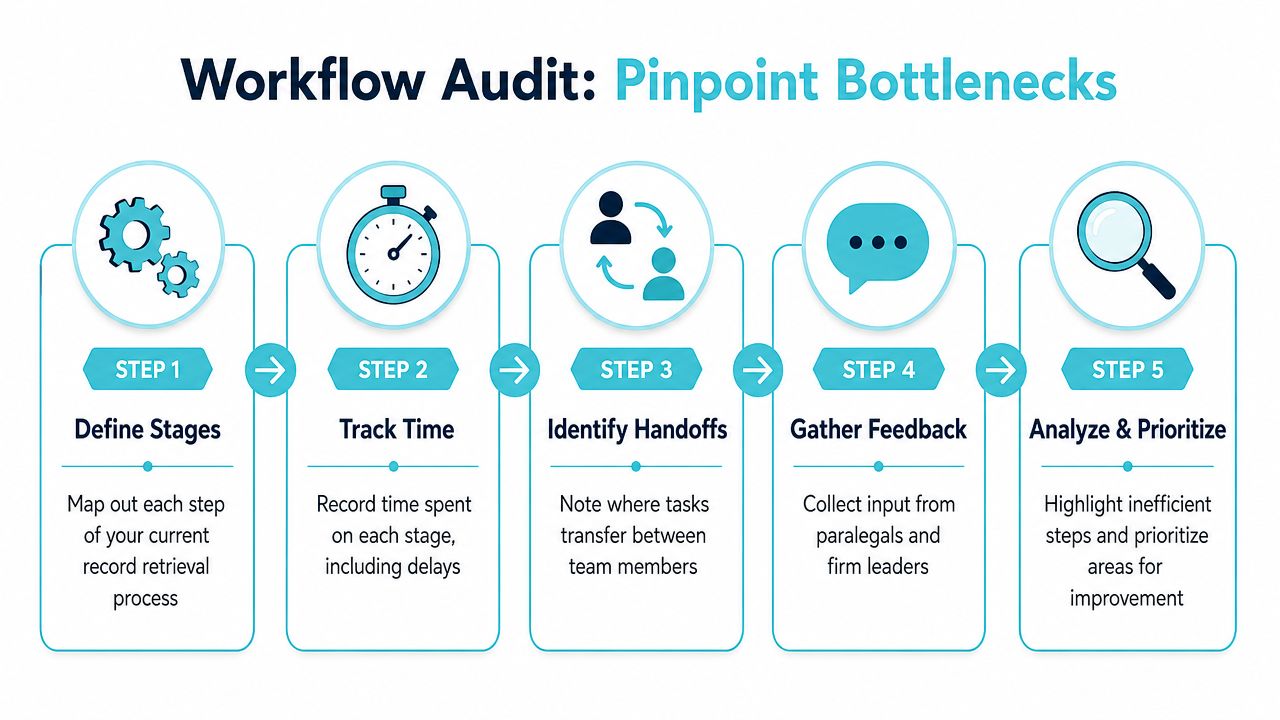
Before you buy anything or redesign anything, map the process you already have. Most firms skip this step because they assume the bottlenecks are obvious. They usually aren't. The visible delay is often a provider response time. The hidden delay is the handoff before and after the provider ever sees the request.
Start with the real process, not the policy
Don't map the ideal version your firm thinks it follows. Map what takes place on a live case.
Use one recent matter and trace every step from the moment someone decides records are needed to the moment those records are filed where the team can use them. Include every touchpoint, every handoff, and every waiting period.
A simple audit usually works best:
- List each stage in order. Intake, authorization, request submission, provider follow up, receipt, review, filing, client update.
- Note who owns the step. One person should be accountable even if several people touch it.
- Record where the work happens. Case management system, email, phone, fax, spreadsheet, retrieval vendor portal.
- Mark each handoff. Handoffs create delay because ownership gets fuzzy.
- Write down what triggers the next action. Calendar tickler, reminder, client call, attorney request, or somebody's memory.
Look for the hidden stalls
The most damaging bottlenecks usually don't look dramatic. They look normal because the team has gotten used to them.
Existing guidance often tells firms to eliminate unnecessary approval or communication loops outside security requirements, but it doesn't quantify the time lost. What matters operationally is that these loops are a hidden inefficiency and technology alone won't fix them if internal communication stays unstructured, as discussed in US Legal Support's review of retrieval workflow friction.
A slow provider is one problem. A request sitting in your own approval chain for two days is another, and firms often confuse the two.
Watch for these patterns:
- Approval bottlenecks: A request can't go out until someone reviews it, but there's no defined turnaround for that review.
- Format confusion: The team handles some records electronically and others through older channels without a standard rule for intake.
- Status trapped with one person: Only one paralegal knows what's happening because updates live in their inbox.
- Manual reconciliation: Records arrive, but someone still has to figure out which matter they belong to and whether the set is complete.
Turn the audit into a decision tool
Once the map is done, circle the stages that involve duplicate entry, repeated status checking, or unclear ownership. Those are the places where efficient record retrieval has the biggest impact.
A useful way to prioritize is by asking three questions:
| Audit question | Why it matters |
|---|---|
| Where does staff re-enter information? | Duplicate entry creates avoidable labor and more errors |
| Where does work wait for a person to notice it? | Memory based workflows break under volume |
| Where can the client not see status? | Lack of visibility drives calls and email traffic |
If you can't answer those questions from one screen today, your workflow is fragmented.
How to Automate Requests and Centralize Updates
Once you've identified the friction points, the next move is straightforward. Standardize the request, automate the follow up, and give everyone one place to check status.
That doesn't mean removing judgment. It means removing repetitive handling. Staff should spend time resolving exceptions, not rebuilding the same request packet over and over.
A modern workflow should look less like a chase and more like a queue. Requests move through defined stages. Reminders go out on schedule. Status changes are visible without someone composing a custom email each time.
Why automation changes turnaround
Automated systems matter because they remove manual errors and keep data quality consistent. In one documented benchmark, optimized operations achieved an average turnaround time of 15 days compared to the industry standard of 30 days through automated systems that improved consistency and reduced manual handling, according to Record Retrieval Solutions.
That kind of improvement doesn't come from one magic feature. It comes from tightening the full sequence:
- Standardized requests reduce missing information at the start.
- Automated reminders keep follow ups from relying on memory.
- Centralized status cuts the need for update emails and internal check ins.
- Consistent intake rules make received records easier to process.
What centralization should actually do
A central status hub should answer basic questions without forcing staff to investigate.
It should show whether the request was sent, whether additional authorization is needed, whether the provider responded, and whether the records have been received and reviewed. Clients don't need every operational detail. They need enough visibility to stop calling for routine updates. Staff need enough visibility to know what to do next.
If your team is evaluating process design, workflow automation for law firms is the right lens. The value isn't just faster task completion. It's that the system triggers the next action without waiting for a person to remember.
Centralized updates change behavior. When status is visible, clients ask fewer routine questions and staff stop acting as a switchboard.
What works and what doesn't
What works:
- Templates with required fields so requests go out complete.
- Reminder schedules tied to request status, not somebody's personal task list.
- A shared view of progress so the attorney, paralegal, and client aren't all relying on separate update chains.
What doesn't work:
- A generic inbox where every update still has to be read and manually relayed.
- A standalone retrieval tracker that forces staff to copy status back into the matter.
- A client portal that shows messages but not the actual stage of the retrieval process.
Automation helps most when it removes the need to re-state the same information in multiple places.
Integrating Retrieval into Your Case Management System
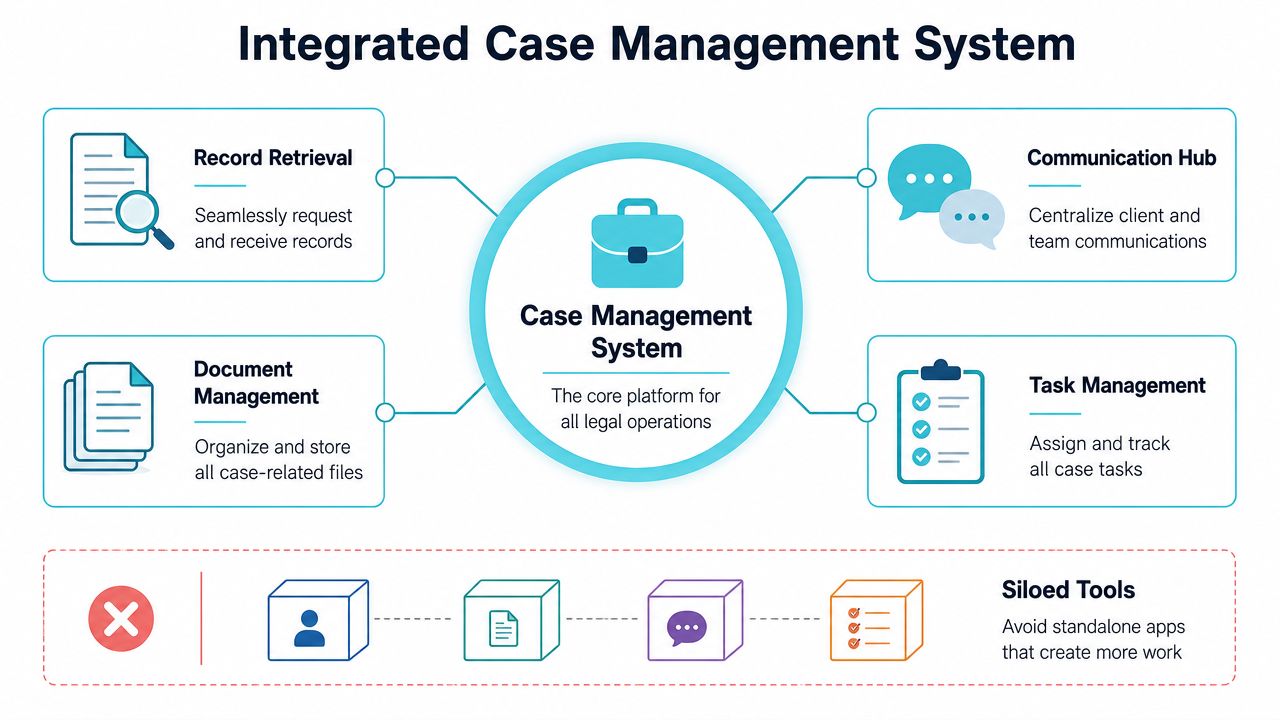
A lot of firms get close, then miss it. They digitize retrieval, but they don't integrate it. That leaves them with a cleaner silo instead of a better workflow.
A standalone tool can make one task easier, but if your staff still has to leave Needles, Neos, LawBase, or Litify to start a request, check status, and then manually update the matter, the firm hasn't eliminated cost. It has just moved it.
Integration is what removes duplicate work
For plaintiff PI firms, the client portal must map to the matter correctly within the case management system so client submitted information lands in the right place without manual cleanup. That directly removes duplicate entry and keeps staff inside their existing CMS workflow, as explained in CasePulse's overview of legal client portal software.
That mapping requirement sounds technical, but the operational result is simple. Staff don't have to clean up records, forms, or messages after the fact. The matter stays authoritative because updates land where they belong.
Here's the difference in plain terms:
| Approach | What the team experiences |
|---|---|
| Standalone retrieval tool | Staff jump between systems and manually sync status |
| Integrated retrieval workflow | Status, communications, and matter activity stay connected |
The systems your staff already use should stay central
Managing partners sometimes assume adding another app is harmless if the app solves a real problem. On paper, that sounds fine. In practice, every separate tool creates one more login, one more training burden, one more place where information can drift out of sync.
That's why I push firms to think in terms of operating environment, not feature list. If your team already works in Needles, Neos, LawBase, or Litify, retrieval should support that center of gravity rather than compete with it. A helpful reference point is this guide to legal practice management software, especially if your firm is reviewing the broader stack around case operations and communication.
What to ask in a demo
If a vendor says they integrate, ask them to show the workflow live. Not a slide. Not a roadmap.
Ask:
- Can a request start from the matter record?
- Does status update back into the matter automatically?
- Do client submitted forms or files map to the correct matter without cleanup?
- Can staff stay in the same workflow rather than monitor another dashboard?
If those answers are vague, the product is probably adjacent to your process, not embedded in it.
For firms comparing architectures, integrated case management software is the model to look for. The operational test is simple. If your team still needs a side spreadsheet after implementation, integration wasn't deep enough.
Upholding Compliance and Ensuring Record Accuracy
Speed gets attention. Accuracy decides whether the record is usable.
A fast retrieval process that produces the wrong record set, an incomplete chart, or a compromised transfer doesn't help the case. It creates risk. In plaintiff work, that risk isn't abstract. It affects demand prep, medical chronology, damages analysis, and credibility.
Fast and wrong is still wrong
One of the most overlooked issues in this space is the gap between speed and usable accuracy. That gap matters because records with disqualifying issues can be used “without realizing” it, which can invalidate a case and turn speed into a liability, as noted by American Retrieval's discussion of streamlined record retrieval.
That should change how firms evaluate retrieval workflows. Don't ask only, “How fast can we get records?” Ask, “How do we know the records are complete, correctly matched, and securely handled?”
“Usable” is the standard. If the record can't be trusted or can't be tied back cleanly to the matter, retrieval isn't finished.
Compliance has to be built into the workflow
HIPAA compliance is not optional. The retrieval process needs secure data transfer, controlled access, and an audit friendly chain for communications and files. The easiest way to fail here is to bolt security on after the workflow has already been designed.
Build your quality checks into operations:
- Verify patient and matter matching: Confirm the record belongs to the right client and matter before staff use it downstream.
- Check completeness on intake: Don't assume the received packet is complete just because it arrived quickly.
- Control access: Limit who can view or handle sensitive material.
- Use secure transfer channels: Convenience can't override confidentiality.
If your team wants a practical way to document intake and handling discipline, a simple download evidence documentation form can help structure internal verification. It isn't a substitute for legal judgment, but it reinforces process consistency.
Accuracy needs a review loop
The review loop should be short, but it should exist. Someone needs to confirm that the received records match the request, are legible enough to use, and don't have obvious gaps before they are treated as case ready.
Process design matters here too. A lot of firms improve speed, then accidentally weaken verification because nobody wants to “slow things down.” That's backwards. The right workflow shortens the admin chase and preserves the quality check.
For teams building that review step into a broader file handling process, document management best practices for law firms offers a useful framework for keeping intake, organization, and access controls disciplined.
How to Measure Success and Implement Your New Process
Once the workflow is designed, the rollout needs to be boring in the best sense of the word. Clear ownership. Clear metrics. Limited pilot. Fast feedback.
The mistake I see most often is trying to transform every office, every user, and every case type at once. PI firms do better when they pilot the new process with one practice group, one intake path, or one retrieval team. You want a controlled launch that exposes friction early.

Measure what staff can feel
The best metrics are the ones your team already experiences day to day. If people can feel the improvement, they'll adopt the process faster.
Track:
- Turnaround time by request type: Don't overcomplicate the first dashboard.
- Inbound status calls: If visibility improves, this should ease.
- Manual touchpoints per request: Count how often staff have to intervene.
- Exceptions requiring cleanup: These usually expose poor matter mapping or intake design.
If you need a second layer, review retrieval outcomes weekly during the pilot. Don't just ask whether records arrived. Ask whether they arrived in a way the team could immediately use.
Build the implementation in stages
A practical rollout usually follows this sequence:
- Define the workflow owner. One person needs authority to resolve process questions.
- Pilot with a limited case set. Pick a team that will give honest feedback.
- Train to the actual screens and steps. Generic training doesn't stick.
- Set escalation rules. Staff should know when to intervene manually.
- Review results and adjust. Tighten the workflow before broader rollout.
Field note: If your rollout plan depends on staff remembering a new side process, adoption will slip. The new process has to fit where they already work.
ROI of a Streamlined Retrieval Workflow
| Metric | Before (Manual Process) | After (Integrated System) |
|---|---|---|
| Request initiation | Matter details often re-entered manually | Matter information flows from the existing case workflow |
| Status visibility | Staff check email, notes, or call for updates | Team works from a centralized status view |
| Client updates | Clients call or email for routine status | Clients can self serve for routine progress checks |
| Follow ups | Reminder timing depends on individuals | Follow ups run from standardized automation |
| Record filing | Staff sort and reconcile incoming files manually | Intake follows a structured path tied to the matter |
| Accuracy review | Review happens inconsistently under deadline pressure | Review is built into the process before downstream use |
An efficient record retrieval rollout succeeds when it removes friction for both sides of the desk. Paralegals need fewer manual steps. Partners need cleaner visibility. Clients need fewer reasons to call. If you get those three outcomes, the process is doing its job.
CasePulse helps plaintiff firms bring client communication, updates, forms, and file sharing into a secure portal that connects directly to systems like Needles, Neos, LawBase, and Litify. If your firm wants record retrieval and client updates to live inside the workflow your staff already uses, explore CasePulse.